
Nissan Rogue (T33) 2021-Present Service Manual: Removal and Installation :: Brake Power Backup Unit
Exploded View
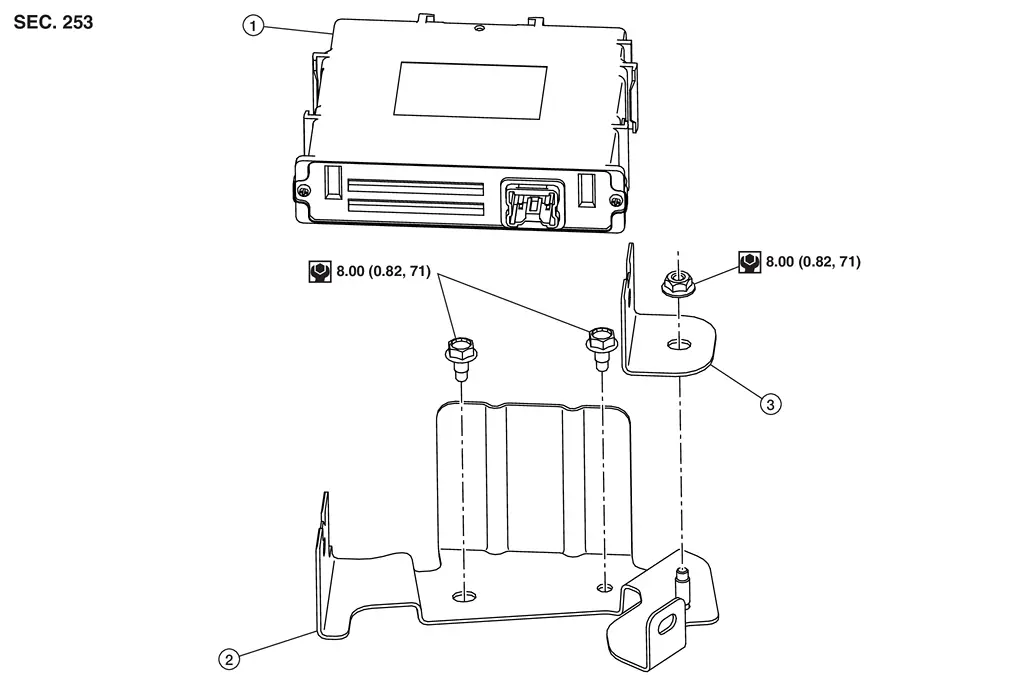
| 1 | Brake power backup unit | 2 | Bracket (lower) | 3 | Bracket (upper) |
Removal & Installation
REMOVAL
Power switch OFF and disconnect CONSULT from DDL2 diagnosis connector.
Check that room lamps are turned OFF after closing all doors including back door, and then wait for 3 minutes or more at out side of Nissan Ariya vehicle.
CAUTION:
Never touch the vehicle during waiting.
Remove the luggage side lower finisher (left). Refer to Removal and Installation.
Disconnect the harness connector from the brake power backup unit.
Remove the nut, the upper bracket, and the brake power backup unit. Refer to Exploded View.
CAUTION:
Never drop parts after removal.
Remove the upper bracket from the brake power backup unit.
Remove the bolts and the lower bracket.
INSTALLATION
Install the lower bracket with the bolts. Refer to Exploded View.
Align the letter (C) on the brake power backup unit (2) with the letter (C) on the upper bracket (3) positioned over the lower bracket (1).
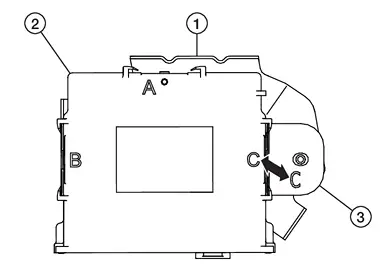
Install the upper bracket (2) to the brake power backup unit (1). Make sure to insert the protrusion (A) on the brake power backup unit to the lock hole (B) on the upper bracket.
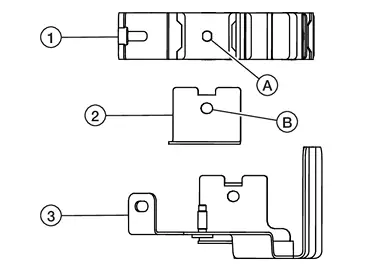
Install the upper bracket to the stud on the lower bracket (3).
Insert the protrusion (A) on the brake power backup unit (1) to the lock hole (B) on the lower bracket.
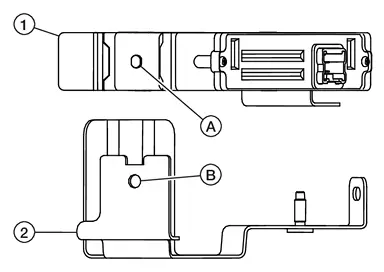
Install the nut to the stud on the lower bracket.
Connect the harness connector to the brake power backup unit.
Install the luggage side lower finisher (left). Refer to Removal and Installation.
Other materials:
Basic Inspection. Additional Service When Replacing Bcm
Description
CAUTION:
When replacing the BCM, always replace it with a new one. The
functions controlled by the BCM may not operate properly in case of
reuse of the BCM from another Nissan Ariya vehicle.
Before pairing of BCM and Intelligent Key unit, always write the BCM
configurati ...
Mac Key Writing
Description
When replacing around view monitor control unit, it is necessary to
write MAC key to around view monitor control unit. Write MAC key to
around view monitor control unit according to "MAC Key writing"
procedure of "CONSULT Operation Manual". Refer to Work Procedure.CAUTION:
During ...
Dtc/circuit Diagnosis. B2490-19 Front Seat Heater Lh
DTC Description
DTC DETECTION LOGIC DTC No.
CONSULT screen items
(Trouble diagnosis content) DTC detection condition
B2490-19
FRONT SEAT HEATER LH
(Front seat heater LH)
Diagnosis condition
Engine running
Signal (terminal)
—
Threshold
CPU in front seat heater LH ...