
Nissan Rogue (T33) 2021-Present Owner’s Manual & User Guide: Rear-facing child restraint installation using the seat belts
WARNING
The three-point seat belt with Automatic Locking Retractor (ALR) must be used when installing a child restraint. If the ALR mode is not used, the restraint may not be properly secured and could tip or become loose, causing injury to a child in a sudden stop or collision.
For additional information, refer to all Warnings and Cautions in the “Child safety� and “Child restraints� sections before installing a child restraint.
Do not use the lower anchors if the combined weight of the child and the child restraint exceeds 65 lbs (29.5 kg). If the combined weight is greater than 65 lbs (29.5 kg), use the vehicle seat belt (not the lower anchors) to install the child restraint. Always follow the child restraint manufacturer’s instructions.
Follow these steps to install a rear-facing child restraint using the seat belts in the rear seats of your Nissan Rogue:
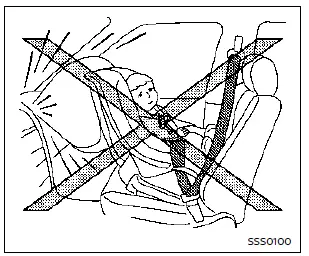
Rear-facing - step 1
1. Child restraints for infants must be used in the rear-facing direction and must never be installed in the front seat. Position the child restraint on the rear seat. Always follow the restraint manufacturer’s instructions.
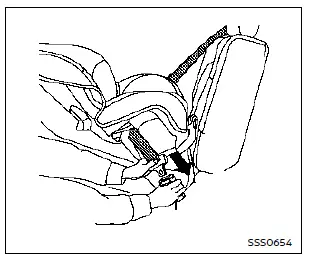
Rear-facing - step 2
2. Route the seat belt tongue through the child restraint and insert it into the buckle until you hear and feel it latch. Be sure to follow the child restraint manufacturer’s belt routing instructions.
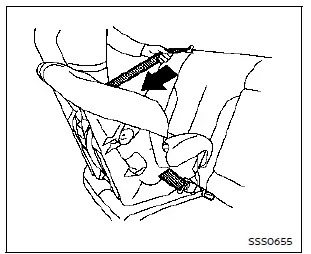
Rear-facing - step 3
3. Pull the shoulder belt until it is fully extended. At this point, the seat belt retractor switches to Automatic Locking Retractor (ALR) mode (child restraint mode). When the belt is fully retracted again, it returns to Emergency Locking Retractor (ELR) mode.

Rear-facing - step 4
4. Allow the seat belt to retract. Pull up on the shoulder belt to remove any remaining slack from the Nissan Rogue seat belt system.
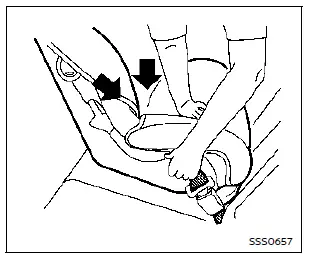
Rear-facing - step 5
5. Remove additional slack from the seat belt by pressing downward and rearward firmly in the center of the child restraint. This compresses the vehicle seat cushion and seatback of your Nissan Rogue while you pull up on the shoulder belt.

Rear-facing - step 6
6. After securing the child restraint, test the installation before placing the child in it. Hold the restraint near the seat belt path and push it from side to side.
The child restraint should not move more than 1 inch (25 mm) side to side. Tug it forward to ensure the Nissan Rogue seat belt holds it firmly. If the restraint is not secure, tighten the belt further or move the restraint to another seating position and test again. Some child restraints may not fit all vehicle types.
7. Check that the child restraint is properly secured before each use. If the seat belt is not locked, repeat steps 1 through 6.
Once the child restraint is removed and the Nissan Rogue seat belt is fully retracted, the ALR mode (child restraint mode) is deactivated.
Other materials:
Dtc/circuit Diagnosis. Rear Window Defogger Relay
Component Function Check
CHECK REAR WINDOW DEFOGGER RELAY CONTROL FUNCTION
CONSULT
Ignition switch ON.
Select “Rear defogger� in “Active test� mode of "BCM".
Touch “On�.
Check that the back door window glass is getting warmer.
NOTE:
When glass is hot, never start ...
Dtc/circuit Diagnosis. U2176-57 Can Comm Err (ccm/st Angle Sensor)
DTC Description
DTC DETECTION LOGIC DTC No.
CONSULT screen items
(Trouble diagnosis content) DTC Detection Condition
U2176-57
CAN comm err (CCM/ST angle sensor)
[Control area network communication error (chassis control module/steering angle sensor)]
Diagnosis condition
-
Sig ...
P11ae Vcr Shaft 2 Rotation Angle Sensor
DTC Description
DTC DETECTION LOGIC DTC
CONSULT screen terms
(Trouble diagnosis content)
DTC detection condition
P11AE
00
VCR shaft 2 rotation angle sensor
(Variable compression ratio shaft 2 rotation angle sensor)
Diagnosis condition
Ignition switch ON
Signal (termi ...