
Nissan Rogue (T33) 2021-Present Owner’s Manual & User Guide: Rear-facing child restraint installation using LATCH
For additional information, refer to all Warnings and Cautions in the “Child safety� and “Child restraints� sections before installing a child restraint.
Do not use the lower anchors if the combined weight of the child and the child restraint exceeds 65 lbs (29.5 kg). If the combined weight is greater than 65 lbs (29.5 kg), use the vehicle seat belt (not the lower anchors) to install the child restraint. Always follow the child restraint manufacturer’s installation instructions.
Follow these steps to install a rear-facing child restraint using the LATCH system in the Nissan Rogue:
1. Position the child restraint on the seat.
Always follow the child restraint manufacturer’s instructions.
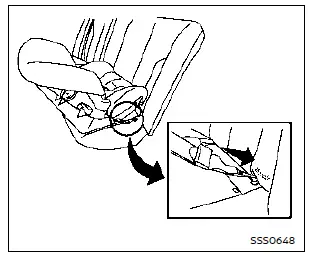
Rear-facing web-mounted - step 2
2. Secure the child restraint anchor attachments to the LATCH lower anchors. Check to make sure each LATCH attachment is fully and correctly engaged with the lower anchors.
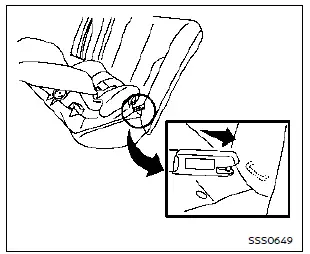
Rear-facing rigid-mounted - step 2
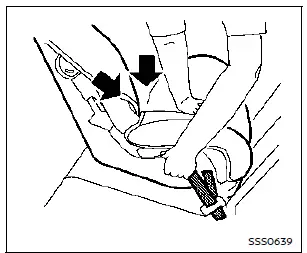
Rear-facing - step 3
3. For child restraints equipped with webbing-mounted attachments, remove any excess slack from the anchor attachments. Press firmly downward and rearward in the center of the child restraint to compress the Nissan Rogue seat cushion and seatback while tightening the webbing of the anchor attachments.
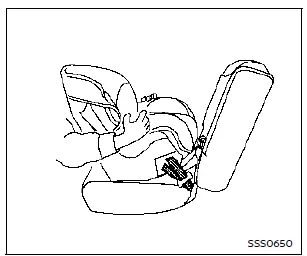
Rear-facing - step 4
4. After attaching the child restraint, test the installation before placing the child in it. Hold the restraint near the LATCH attachment path and push it from side to side. It should not move more than 1 in (25 mm) side to side. Pull it forward to ensure the LATCH attachments hold it firmly. If the restraint is not secure, tighten the LATCH attachments further, or move the restraint to another seating position and test again. You may need to try a different child restraint or install it using the vehicle seat belt (if allowed by the manufacturer).
Not all child restraints fit all vehicles.
5. Before each use, check that the child restraint remains secure. If it is loose, repeat steps 1 through 4.
Other materials:
Brake Hold Relay
Component Inspection
CHECK STOP LAMP RELAY
Apply battery voltage to stop lamp relay terminals 3 and 4, and then check for continuity under the following conditions.
STOP LAMP RELAY Condition Continuity
Terminals
1
2
When the battery voltage is applied
Yes
When the battery v ...
Side Radar (rear Right) (side Radar Rear Rh)
C1e80-44 Control Unit
DTC Description
DTC DETECTION LOGIC DTC No.
CONSULT screen terms
(Trouble diagnosis content) DTC detection condition
C1E80–44
Control unit
(Control unit)
Diagnosis condition
When ignition switch is ON.
Signal (terminal)
-
Threshold
If sid ...
Window washer fluid
Type A (if so equipped)
Type B (if so equipped)
For Type A systems on the Nissan Rogue, check the washer reservoir directly and refill with washer fluid when the level gets low.
For Type B systems, plug the center hole A of the cap/tube assembly with your finger and remove it from the re ...