
Nissan Rogue (T33) 2021-Present Owner’s Manual & User Guide: Forward-facing child restraint installation using LATCH
Basic information
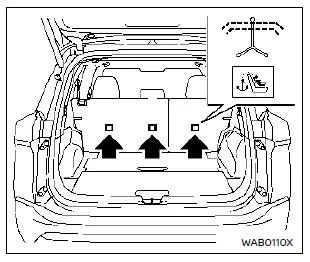
For proper installation of a forward-facing child restraint in your Nissan Rogue, carefully review all Warnings and Cautions in the “Child safety� and “Child restraints� sections before beginning.
Do not use the lower anchors if the combined weight of the child and restraint exceeds 65 lbs (29.5 kg). If the combined weight is higher than 65 lbs (29.5 kg), install the restraint using the Nissan Rogue seat belt instead of the LATCH anchors. Always follow the child restraint manufacturer’s installation instructions.
Follow these steps to install a forward-facing child restraint using the LATCH system:
1. Position the child restraint on the seat.
Always follow the instructions provided by the child restraint manufacturer.
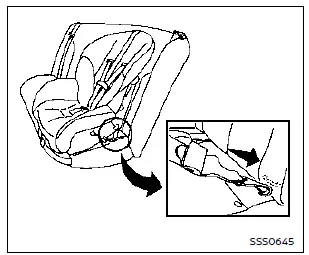
Forward-facing web-mounted - step 2
2. Secure the restraint’s LATCH attachments to the lower anchors. Check carefully to ensure the attachment is fully seated and locked onto the anchor points of your Nissan Rogue.
If equipped with a top tether strap, route the strap and attach it to the appropriate tether anchor. See “Installing top tether strap.� Do not install child restraints requiring a top tether in seating positions without a tether anchor.
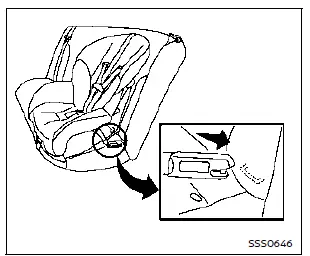
Forward-facing rigid-mounted - step 2
3. Ensure the back of the child restraint rests firmly against the vehicle seatback.
If needed, adjust or remove the head restraint/headrest to achieve proper fitment. If removed, store it securely and reinstall it once the child restraint is removed. See “Head restraints/headrests� for details.
If the seating position has a non-adjustable head restraint/headrest that interferes with correct installation, choose another seating position or a different restraint.
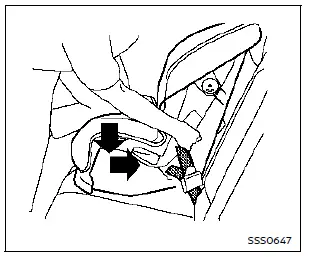
Forward-facing - step 4
4. If the restraint uses webbing-mounted attachments, remove extra slack by pressing downward and rearward firmly in the center of the restraint using your knee. This compresses the seat cushion and seatback of your Nissan Rogue for a tighter fit.
5. Tighten the top tether strap according to the manufacturer’s instructions.
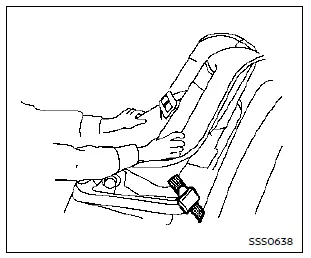
Forward-facing - step 6
6. Test the installation prior to placing the child in the restraint. Hold the child restraint near the LATCH attachment path and push it from side to side.
The restraint should not move more than 1 inch (25 mm) sideways. Pull it forward to ensure the LATCH anchors hold it securely. If it is loose, tighten the LATCH attachments or try another seating location. Some restraints may not fit all vehicles.
7. Confirm the restraint is properly secured before each use. If loose, repeat steps 1–6.
Other materials:
Doors
Basic information
WARNING
Always lock the Nissan Rogue doors while driving. Combined with seat belts, this reduces the risk of passengers being ejected in an accident and prevents children or others from unintentionally opening the doors, while also helping deter intruders.
Check surroundings for ...
Removal and Installation. Driver Knee Air Bag Module
Exploded View
Steering member
Driver knee air bag module
: Always replace after every disassembly.
: N·m (kg-m, in-lb)
Removal and Installation
WARNING:
Always observe the following items for preventing accidental activation.
Before servicing, pla ...
Symptom Diagnosis. Driver Side Power Window Does Not Operate
Diagnosis Procedure
CHECK POWER WINDOW MAIN SWITCH POWER SUPPLY AND GROUND CIRCUIT
Check power window main switch power supply and ground circuit.
Refer to Diagnosis Procedure.
Is the inspection result normal?
YES>>
GO TO 2.
NO>>
Repair or replace the malfunctioning parts.
CHE ...