
Nissan Rogue (T33) 2021-Present Owner’s Manual & User Guide: Intelligent Around View Monitor system limitations
Basic information
WARNING
Listed below are the system limitations for the Intelligent Around View Monitor. Failure to drive your Nissan Rogue in accordance with these limitations could result in serious injury or death.
- Do not use the Intelligent Around View Monitor with the outside mirrors in the stored position, and always confirm that the liftgate is securely closed when operating the vehicle using the Intelligent Around View Monitor.
- The distance that appears between objects on the Intelligent Around View Monitor and your Nissan Rogue is not always the actual distance.
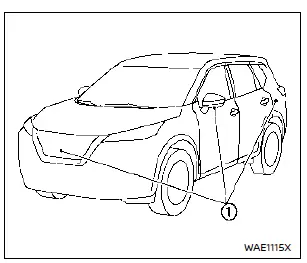
- The cameras are installed on the front grille, the outside mirrors and above the rear license plate.
Do not put anything on or near the cameras.
- When washing the vehicle with high-pressure water, be sure not to spray it around the cameras.
Otherwise, water may enter the camera units, causing water condensation on the lens, a malfunction, fire or an electric shock.
- Do not strike the cameras. They are precision components. Doing so could cause a malfunction or damage that may result in a fire or an electric shock.

There are areas around the Nissan Rogue where the system will not show objects and where it does not detect moving objects. In the front or rear view display, objects located below the bumper or lying flat on the ground may not be visible 1. In the bird's-eye view, tall objects near the seam 2 of the camera coverage areas may not appear clearly on the monitor.
The following conditions are normal operating limitations and do not indicate a system malfunction:
- There may be a brief delay when switching between views.
- When the temperature is extremely high or low, the screen may not show objects clearly around your Nissan Rogue.
- When strong light shines directly on the camera, objects may not appear clearly in the display.
- The screen may flicker when viewed under fluorescent light.
- The colors of objects on the Intelligent Around View Monitor may look different from the actual colors.
- Objects on the Intelligent Around View Monitor may not be sharp and their colors may differ in a dark environment.
- There may be differences in sharpness between each camera view of the bird's-eye view.
- Do not use wax on the camera lens.
Wipe off any wax with a clean cloth that has been dampened with a diluted mild cleaning agent, then wipe with a dry cloth.

Models without 3D view

Models with 3D view
System temporarily unavailable
When the "
 " icon is displayed on
the
screen, it indicates abnormal operating
conditions in the Intelligent Around View Monitor for your Nissan Rogue.
" icon is displayed on
the
screen, it indicates abnormal operating
conditions in the Intelligent Around View Monitor for your Nissan Rogue.
This will not prevent normal driving, but the system will not function correctly and should be checked.
It is recommended that you have your Nissan Rogue inspected by a NISSAN dealer.
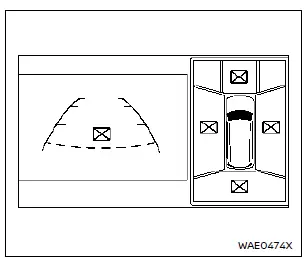
Models without 3D view

Models with 3D view
When the "
 " icon appears on the screen, the Intelligent Around View Monitor of your Nissan Rogue may be affected by temporary electronic interference from nearby devices. This does not affect normal driving, but the system should still be checked for proper operation. It is recommended to have your Nissan Rogue inspected by an authorized NISSAN dealer.
System maintenance
CAUTION
- Do not clean the camera with alcohol, benzine or thinner on your Nissan Rogue, as these chemicals can cause discoloration.
- Do not damage the camera, because the display quality of the Intelligent Around View Monitor may be negatively affected.
If dirt, rain or snow builds up on any of the Nissan Rogue cameras 1, the Intelligent Around View Monitor may not display surroundings clearly. Clean the camera by wiping it with a cloth dampened with a diluted mild cleaning agent, then wipe it again with a dry cloth to restore the best visibility.
Other materials:
Dtc/circuit Diagnosis. U2369-87 Can Comm Err (psd/mhb)
DTC Description
DESCRIPTIONCAN (Controller Area Network) is a serial
communication line for real time applications. It is an on-Nissan Ariya
vehicle multiplex communication line with high data communication speed
and excellent error detection ability. Modern Nissan Ariya vehicle is
equipped ...
System Description. Component Parts
Component Parts Location
With 8" Color Display
No. Component Function
1.
Rear sonar sensor RH inner
Refer to Sonar Sensor.
2.
Rear sonar sensor RH outer
3.
Sonar control unit
Refer to Sonar Control Unit.
4.
Around view monitor control unit
Receives the so ...
Flasher
CONSULT Function (BCM - FLASHER)
DATA MONITORNOTE:
The following table includes information (items)
inapplicable to this Nissan Ariya vehicle. For information (items)
applicable to this vehicle, refer to CONSULT display items.
Monitor item
[Unit] Description
Hazard switch
[Off/On]
...