
Nissan Rogue (T33) 2021-Present Owner’s Manual & User Guide: Moving Object Detection (MOD)
Basic information
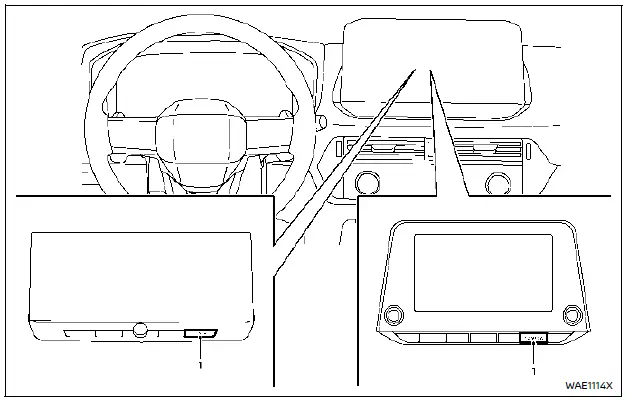
- CAMERA button
WARNING
- Failure to follow the warnings and instructions for proper use of the Moving Object Detection (MOD) system could result in serious injury or death.
- The MOD system is not a replacement for safe driving practices. Always check surroundings with mirrors and direct observation to ensure it is safe to maneuver your Nissan Rogue.
- The MOD system is disabled above 5 MPH (8 km/h) and reactivates at lower speeds.
- The MOD system does not detect stationary surrounding objects.
The MOD system alerts the driver to moving objects around the Nissan Rogue when maneuvering in areas such as garages, parking lots, or tight spaces.
The system detects motion by processing images from the vehicle’s cameras and highlights movement on the display.
MOD system operation (models without 3D view)
The MOD system activates automatically under the following conditions:
- Shift lever in R (Reverse).
- CAMERA button pressed to activate the Intelligent Around View Monitor.
- Vehicle speed drops below 5 MPH (8 km/h).
The MOD system operates in these situations when a camera view is shown:
- With the shift lever in P (Park) or N (Neutral) and the vehicle stopped, the system detects movement in the bird’s-eye view.
The MOD system will not work if a door is open. If the outside mirrors are folded, MOD performance may be reduced. - With the shift lever in D (Drive) and speed below 5 MPH (8 km/h), MOD detects movement in the front or front-wide view.
- With the shift lever in R (Reverse) and speed below 5 MPH (8 km/h), MOD detects movement in the rear or rear-wide view. The system will not operate if the liftgate is open.
The MOD system does not detect motion in the front-side or rear-side views (if equipped). No MOD icon will be shown in those views.
When the MOD system detects a moving object, a yellow frame appears on the corresponding area of the display and a single chime sounds. If movement continues, the yellow frame remains visible.
NOTE:
While the RCTA (Rear Cross Traffic Alert) chime is sounding, the MOD system will not chime.
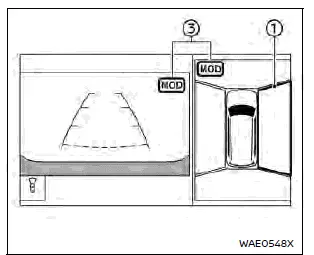
Front and bird's-eye views
Front and front-side views (example)
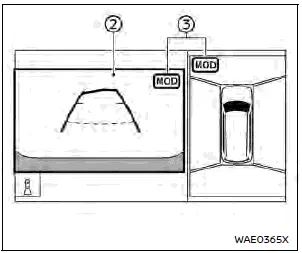
Rear and bird's-eye views
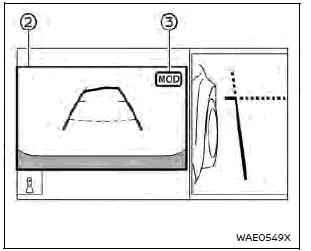
Rear and front-side views
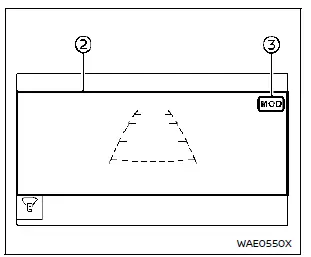
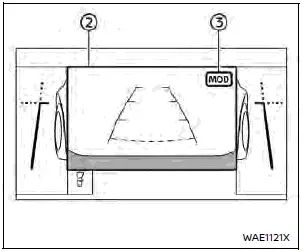
Front-wide view / rear-wide view
In bird’s-eye view, the yellow frame 1 highlights the area (front, rear, left, right) where moving objects are detected.
The yellow frame 2 appears in the front, rear, front-wide, and rear-wide views when movement is detected.
A green MOD icon 3 is shown in the view where the MOD system is active.
A gray MOD icon 3 appears in the view where the system is available but not active.
If the MOD system is turned OFF, the MOD icon 3 is hidden.
MOD system operation (models with 3D view)
The Moving Object Detection (MOD) system will activate automatically when any of the following conditions are met:
- Shift lever is placed in the R (Reverse) position.
- The CAMERA button is pressed to activate the Intelligent Around View Monitor.
- Vehicle speed decreases below 5 MPH (8 km/h).
The MOD system functions under these conditions when the camera view is displayed:
- With the shift lever in P (Park) or N (Neutral) and the vehicle stopped, the system detects movement in the bird’s-eye view.
The MOD system will not operate if any door is open. If the outside mirrors are folded, system accuracy may be reduced. - With the shift lever in D (Drive) and vehicle speed below 5 MPH (8 km/h), MOD detects movement in the front view, front-wide view, or Invisible Hood View (if equipped).
- With the shift lever in R (Reverse) and speed below 5 MPH (8 km/h), MOD detects movement in the rear view or rear-wide view. It will not operate if the liftgate is open.
The MOD system does not detect moving objects in the front-side view or the 3D view. No MOD icon is shown in these views.
When the MOD system detects movement around the vehicle, an orange frame appears on the corresponding camera view and a single chime sounds. If movement continues, the orange frame stays visible.
NOTE:
While the RCTA (Rear Cross Traffic Alert) chime is sounding, the MOD system will not chime.

Front and bird’s-eye views
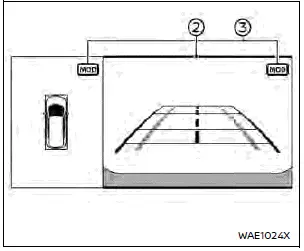
Rear and bird’s-eye views

Rear and front-side views

Front-wide view (example)

Rear-wide view
In the bird’s-eye view, the orange frame 1 appears on the camera image where movement is detected (front, rear, left, right).
The orange frame 2 appears in the front view, rear view, front-wide view, Invisible Hood View (if equipped) and rear-wide view.
A green MOD icon 3 indicates the system is active in that view.
A gray MOD icon 3 indicates the system is available but not actively detecting movement.
If MOD is turned OFF, no MOD icon is displayed.
Turning MOD on and off
The MOD system can be enabled or disabled through the vehicle information display menu.
MOD system limitations
WARNING
Failure to follow system limitations may result in serious injury or death.
- Do not use the MOD system while towing a trailer; it may not operate correctly.
- Loud ambient noise (radio volume, open windows, outside noise) may prevent hearing the MOD chime.
- System performance may be reduced under certain environmental conditions, including:
- Low contrast between moving objects and background.
- Flashing or blinking lights.
- Strong sunlight or intense headlight glare.
- Mirror folded or camera angle altered.
- Dirt, snow, or water droplets on the camera lens.
- Objects that move without changing apparent position in the display.
- The system may falsely detect water droplets, exhaust vapor, or shadows as movement.
- Detection accuracy may vary depending on the distance, speed, shape, or direction of moving objects.
- Damage to camera mounting points may cause misalignment and reduce MOD accuracy.
- Extremely high or low temperatures may reduce image clarity. This is not a system malfunction.
NOTE:
The green MOD icon will turn orange in the following situations:
- System malfunction.
- Component temperature is too high.
- The rear camera detects a blockage.
If the orange icon remains illuminated, have the system inspected. A NISSAN dealer is recommended.
System maintenance
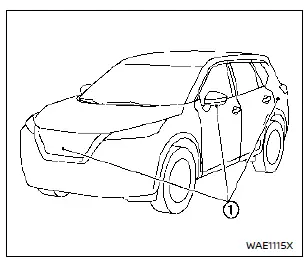
CAUTION
- Do not use alcohol, benzine, or thinner on the camera lenses. This may cause discoloration.
- Avoid damaging the cameras as this may affect screen visibility.
If dirt, rain, or snow accumulates on any of the cameras, the system may not detect motion correctly. Clean the lenses with a soft cloth dampened with mild cleaning solution, then wipe dry.
Other materials:
Dtc/circuit Diagnosis. B2c95-64 Combination Switch
DTC Description
DTC DETECTION LOGIC DTC No.
CONSULT screen items
(Trouble diagnosis content) DTC Detection Condition
B2C95-64
Combination switch
(Combination switch)
Diagnosis condition
Ignition switch OFF (auto ACC status)
Signal (terminal)
Combination switch signal
...
C1f36-55 Configuration
Without Propilot Assist 2.1
DTC Description
DTC DETECTION LOGIC DTC
CONSULT screen terms
(Trouble diagnosis content) DTC detection condition
C1F36
55
CONFIG UNFINISHED
(Configuration unfinished)
Diagnosis condition
When engine is running
When AEB system is ...
Basic information
The following are approximate capacities for your Nissan Rogue.
Actual refill capacities may vary slightly. When refilling, always follow the procedure described in the "8. Do-it-yourself" section to confirm the proper amount for your Nissan Rogue.
Fuel
Engine oil
Drain and refill
Genuine "NI ...