
Nissan Rogue (T33) 2021-Present Owner’s Manual & User Guide: System maintenance
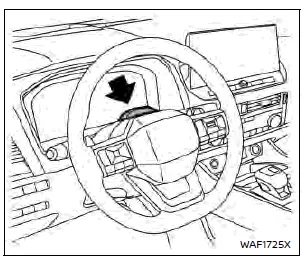
To ensure proper operation of the driver monitoring system on the Nissan Rogue, keep the camera and surrounding area clean. Use a soft, damp cloth—such as one designed for lens cleaning—wrung out thoroughly, and gently wipe the surface to remove dust or dirt.
License information (ProPILOT Assist 2.1)
Processing of 3D HD MAP data includes software and algorithms that utilize open-source software (OSS).
The license information is available on the following websites:
http://www.embedded-carmultimedia.jp/RTOS/License/oss/HDL_0101/
http://www.embedded-carmultimedia.jp/RTOS/License/oss/HDL_0102/
http://www.embedded-carmultimedia.jp/RTOS/License/lib/HDL_0121/
TERMS OF USE OF USHR INC. MATERIAL AND AGREEMENT TO END USER SUBLICENSE AGREEMENT
This vehicle contains software, data, intellectual property, and confidential information that are licensed from Ushr Inc. (the “Ushr Materials�) and incorporated into driver assistance systems used by the Nissan Rogue. Using the system constitutes agreement to the Terms of Use and the End User Sub-License Agreement available at www.ushrauto.com/legal.
If you do not agree to these terms, you must not use any function that relies on the Ushr Materials.
The license outlines important legal obligations, including compliance with usage permissions and restrictions, warranty disclaimers, liability limitations, intellectual property protections, and an agreement to resolve disputes through arbitration rather than jury trial.
Extracting, reproducing, transferring, or deriving any portion of the Ushr Materials without prior written consent from Ushr Inc. is strictly prohibited.
2022 Ushr Inc. All Rights Reserved.
“Ushr�, the Ushr logo, “Ushr Auto�, and www.ushrauto.com are trademarks of Ushr Inc.
OpenStreetMap contributors, www.openstreetmap.org/copyright.
Other materials:
P11ae Vcr Shaft 2 Rotation Angle Sensor
DTC Description
DTC DETECTION LOGIC DTC
CONSULT screen terms
(Trouble diagnosis content)
DTC detection condition
P11AE
00
VCR shaft 2 rotation angle sensor
(Variable compression ratio shaft 2 rotation angle sensor)
Diagnosis condition
Ignition switch ON
Signal (termi ...
Intercooler cooling system
Basic information
The intercooler cooling circuit of the Nissan Rogue is factory-filled with a 50/50 mixture of Genuine NISSAN Long Life Antifreeze/Coolant (blue) and water. This blend protects the system all year and includes corrosion inhibitors.
No extra additives are required for the intercool ...
C1f05-04 Front Camera Unit
DTC Description
DTC DETECTION LOGIC DTC
CONSULT screen terms
(Trouble diagnosis content) DTC detection condition
C1F05
04
Front camera unit
(Front camera unit)
Diagnosis condition
When engine is running
Signal (terminal)
—
Threshold
If front camera unit is mal ...