
Nissan Rogue (T33) 2021-Present Service Manual: Side Radar Front Rh
Reference Value
VALUES ON THE DIAGNOSIS TOOL
| Monitor item | Condition | Value/Status | |
|---|---|---|---|
| Horizontal alignment value | When the ignition switch ON and the side radar adjustment is completed | Displays the horizontal alignment value | |
TERMINAL LAYOUT
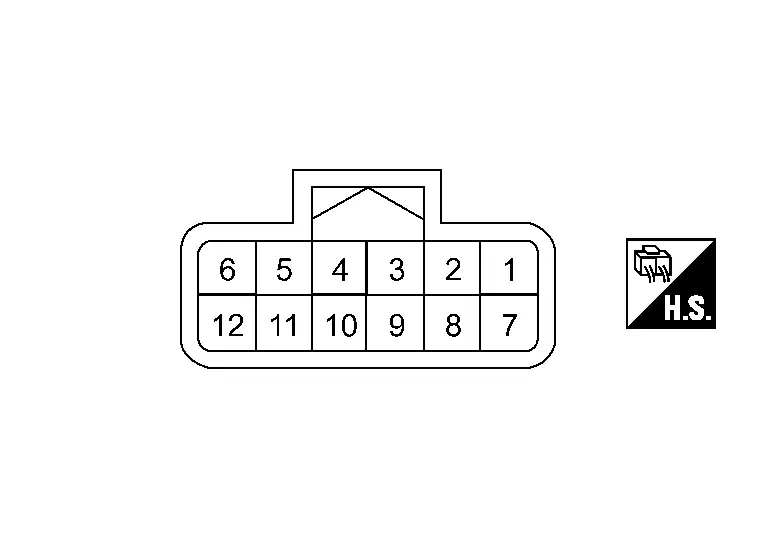
PHYSICAL VALUES
|
Terminal No. (Wire color) | Description | Condition | Value (Approx.) | ||
|---|---|---|---|---|---|
| + | – | Signal name | Input/Output | ||
|
1 (BR) |
— | CAN communication-H | — | — | — |
|
2 (V) |
CAN communication-L | — | — | — | |
|
7 (V) |
— | CAN communication-L | — | — | — |
|
8 (BR) |
— | CAN communication-H | — | — | — |
|
9 (LA/B) |
Ground | Switching signal | — | Ignition switch ON | 0 V |
|
10 (LA/B) |
Ground | Ground | — | Ignition switch ON | 0 V |
|
12 (LA/R) |
Ground | Ignition power supply | Input | Ignition switch ON | Battery voltage |
Fail-safe
Refer to Fail-safe (Side Radar).
DTC Inspection Priority Chart
If some DTCs are displayed at the same time, perform inspections one by one based on the following priority chart.
| Priority | Detected items (DTC) |
|---|---|
| 1 |
|
| 2 |
|
DTC Index
×:Applicable
| DTC |
Items (CONSULT screen terms) | Fail-safe | Reference | ||||||
|---|---|---|---|---|---|---|---|---|---|
| Nissan Ariya Vehicle speed & vehicle-to-vehicle control function | Lane keep function*1 | Lane keep function *2 | Lane change support function | Overtaking support function | Route driving support function | ||||
| C1EC0 | 44 | Control unit | × | × | × | × | × | × | Refer to DTC Description. |
| 45 | × | × | × | × | × | × | Refer to DTC Description. | ||
| 46 | × | × | × | × | × | × | Refer to DTC Description. | ||
| 47 | × | × | × | × | × | × | Refer to DTC Description. | ||
| 48 | × | × | × | × | × | × | Refer to DTC Description. | ||
| 49 | × | × | × | × | × | × | Refer to DTC Description. | ||
| 4B | × | × | × | × | × | × | Refer to DTC Description. | ||
| C1EC1 | 12 | Incorrect installation location | × | × | × | × | × | × | Refer to DTC Description. |
| C1ED0 | 54 | Side radar alignment | × | × | × | × | × | × | Refer to DTC Description. |
| C1ED2 | 16 | Side radar malfunction | × | × | × | × | × | × | Refer to DTC Description. |
| 17 | × | × | × | × | × | × | Refer to DTC Description. | ||
| C1ED3 | 55 | Configuration unfinished | × | × | × | × | × | × | Refer to DTC Description. |
| U2148 | 81 | CAN communication error (brake control unit) | × | × | × | × | × | × | Refer to DTC Description. |
| 82 | × | × | × | × | × | × | Refer to DTC Description. | ||
| 83 | × | × | × | × | × | × | Refer to DTC Description. | ||
| 87 | × | × | × | × | × | × | Refer to DTC Description. | ||
| U214F | 81 | CAN communication error (BCM) | × | × | × | × | × | × | Refer to DTC Description. |
| 82 | × | × | × | × | × | × | Refer to DTC Description. | ||
| 83 | × | × | × | × | × | × | Refer to DTC Description. | ||
| 87 | × | × | × | × | × | × | Refer to DTC Description. | ||
| U2156 | 81 | CAN communication error steering angle sensor | × | × | × | × | × | × | Refer to DTC Description. |
| 87 | × | × | × | × | × | × | Refer to DTC Description. | ||
| U215B | 81 | CAN communication error (IPDM E/R) | × | × | × | × | × | × | Refer to DTC Description. |
| 82 | × | × | × | × | × | × | Refer to DTC Description. | ||
| 83 | × | × | × | × | × | × | Refer to DTC Description. | ||
| 87 | × | × | × | × | × | × | Refer to DTC Description. | ||
| U2A09 | 88 | Communication Bus Off ITS5-FD | × | × | × | × | × | × | Refer to DTC Description. |
*1: ProPILOT Assist 2.1 display is green
*2: ProPILOT Assist 2.1 display is blue
Other materials:
Power Socket. Removal and Installation. Power Socket
Power Socket
Console Power Socket
Removal and Installation
REMOVALRemove switch panel. Refer to Removal and Installation.
Press the power socket fixing pawls from the back of the switch panel to remove the power socket.
: Pawl
INSTALLATIONNote the following, and install in the reve ...
Cvt: Ge0f14a. Symptom Diagnosis
Cvt Control System
Symptom Table
The diagnosis item number indicates the order of check. Start checking in the order from 1.
Perform diagnoses of symptom table 1 before symptom table 2.
Symptom Table 1 Diagnostic item Reference Symptom
Shift Shock Slips/Will Not Engage Other
...
Symptom Diagnosis. Easy Fill Tire Alert Does Not Activate
Description
The easy fill tire alert does not function while inflating a tire
when the CVT shift selector position is in P-range with the ignition
switch ON or with the engine started.NOTE:
After starting to inflate the tire, it takes a few seconds for the easy fill tire alert to function. ...