
Nissan Rogue (T33) 2021-Present Service Manual: Removal and Installation :: Intelligent Key Battery
Removal and Installation
-
Release the lock knob at the back of the Intelligent Key and remove the mechanical key.
-
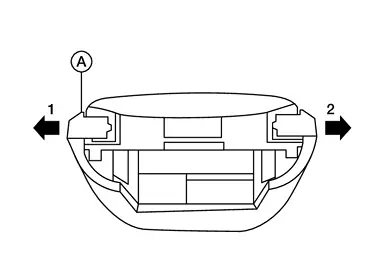
Using a suitable tool, release outer key bracket (A) in direction shown.
CAUTION:
-
Never touch the circuit board or battery terminal.
-
The Intelligant Key is water-resistant. However, if it does get wet, immediately wipe it dry.
-
-
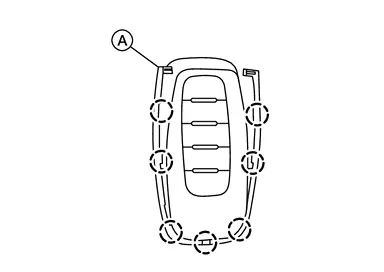
Using a suitable tool, release pawls then remove outer key bracket (A).
CAUTION:
-
Never touch the circuit board or battery terminal.
-
The Intelligant Key is water-resistant. However, if it does get wet, immediately wipe it dry.
-
-
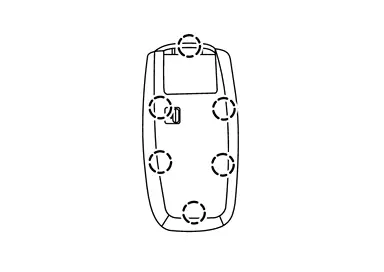
Using a suitable tool, release pawls, then separate upper part of Intelligent Key unit from lower part.
CAUTION:
-
Never touch the circuit board or battery terminal.
-
The Intelligant Key is water-resistant. However, if it does get wet, immediately wipe it dry.
-
-
Replace the battery with a new one.
Battery replacement :Coin-type lithium battery (CR2032) -
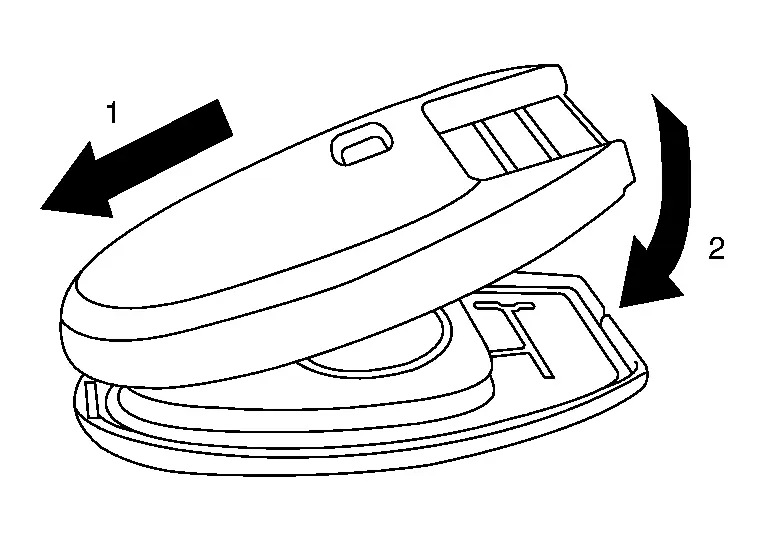
Align the tips of the upper and lower parts 1, and then push them together until it is securely closed 2.
CAUTION:
-
When replacing battery, keep dirt, grease, and other foreign materials off the electrode contact area.
-
After replacing the battery, check that all Intelligent Key functions work normally.
-
Other materials:
Removal and Installation. Rear Suspension Member
Exploded View
JAPAN PRODUCTION MODELS
Rear suspension member
Rear suspension member stay (right side)
Rear suspension member stay protector (right side)
Rear suspension member stay protector (left side)
Rear suspension member stay (left side)
Rebound stopper
: Ni ...
Basic Inspection. System Setting
Description
The settings of the automatic driving positioner system can be
changed, using information display in the combination meter and the set
switch. Always check the settings before and after replacing driver seat
control unit. For details, refer to Work Procedure.×: ApplicableSetting ...
Information Display (combination Meter)
Door Open Warning
DESIGN/PURPOSEInformation display warns the driver that each door is open or is not fully closed. Symbol Message
–
SYNCHRONIZATION WITH MASTER WARNING LAMPSynchronization is applied.Refer to Master Warning Lamp.SYSTEM DIAGRAMSIGNAL PATH
BCM transmits door switch ...