
Nissan Rogue (T33) 2021-Present Service Manual: Removal and Installation :: Back Door Opener Switch
Removal and Installation
REMOVAL
-
Remove back door inner finisher. Refer to Removal and Installation.
-
Disconnect back door opener switch connector.
-
Remove back door opener switch grommet
 using removal tool.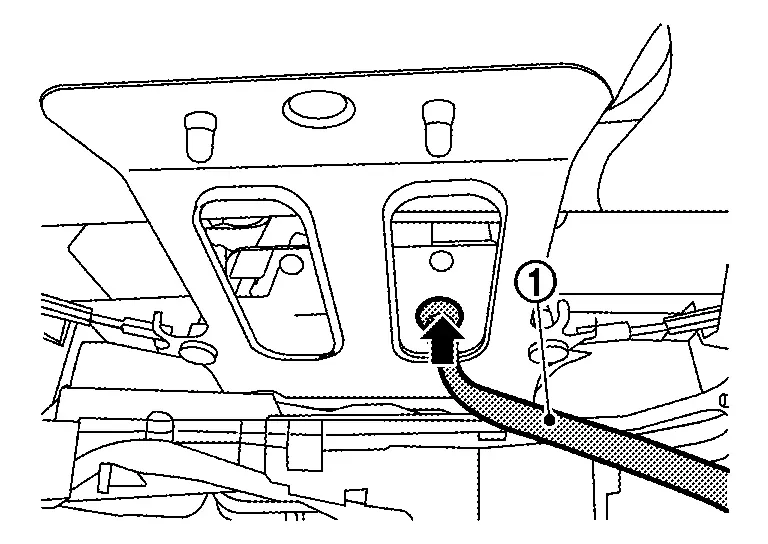
-
Remove back door opener switch fixing pawls using removal tool (A), and then remove back door opener switch
.CAUTION:
Apply protective tape on the part to protect it from damage.
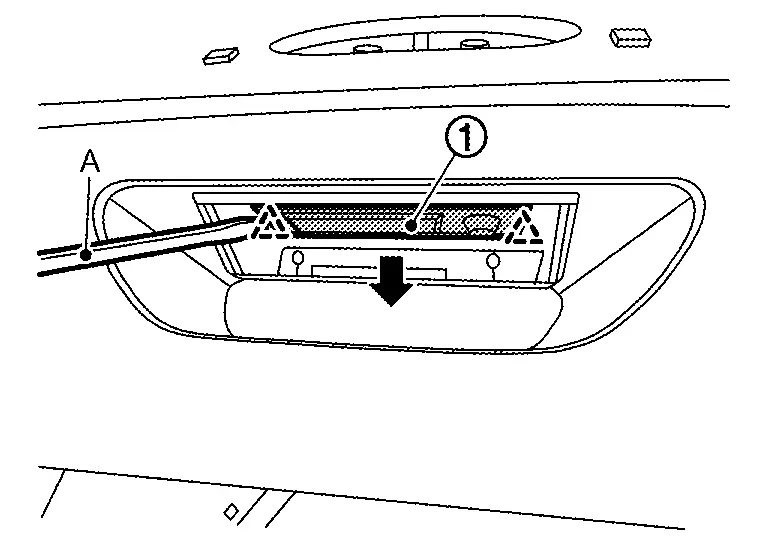

: Pawl
INSTALLATION
Installation is in the reverse order of removal.
Other materials:
Steering Switch Signal B Circuit
Component Function Check
CHECK COMBINATION METER INPUT SIGNAL
CONSULT
Ignition switch ON.
Select “Steering switch input� in “Data monitor� mode of “M&A�.
Check that the function operates normally according to the following conditions:
Condition Value
CONTRO ...
Système de freinage
Précautions relatives au freinage
Informations de base
Le système de freinage du Nissan Rogue est constitué de deux circuits hydrauliques distincts. En cas de dysfonctionnement affectant l’un de ces circuits, la capacité de freinage reste assurée sur les deux autres roues, ce qui permet de ...
P1536 Ascd System
DTC Description
DTC DETECTION LOGIC DTC
CONSULT screen terms
(Trouble diagnosis content)
DTC detection condition
P1536
00
Cruise control
(Cruise control)
Diagnosis condition
Ignition switch ON
Signal
CAN communication signal
Threshold
ECM cannot receive a ...