
Nissan Rogue (T33) 2021-Present Service Manual: Removal and Installation :: Front Door Lock
Exploded View
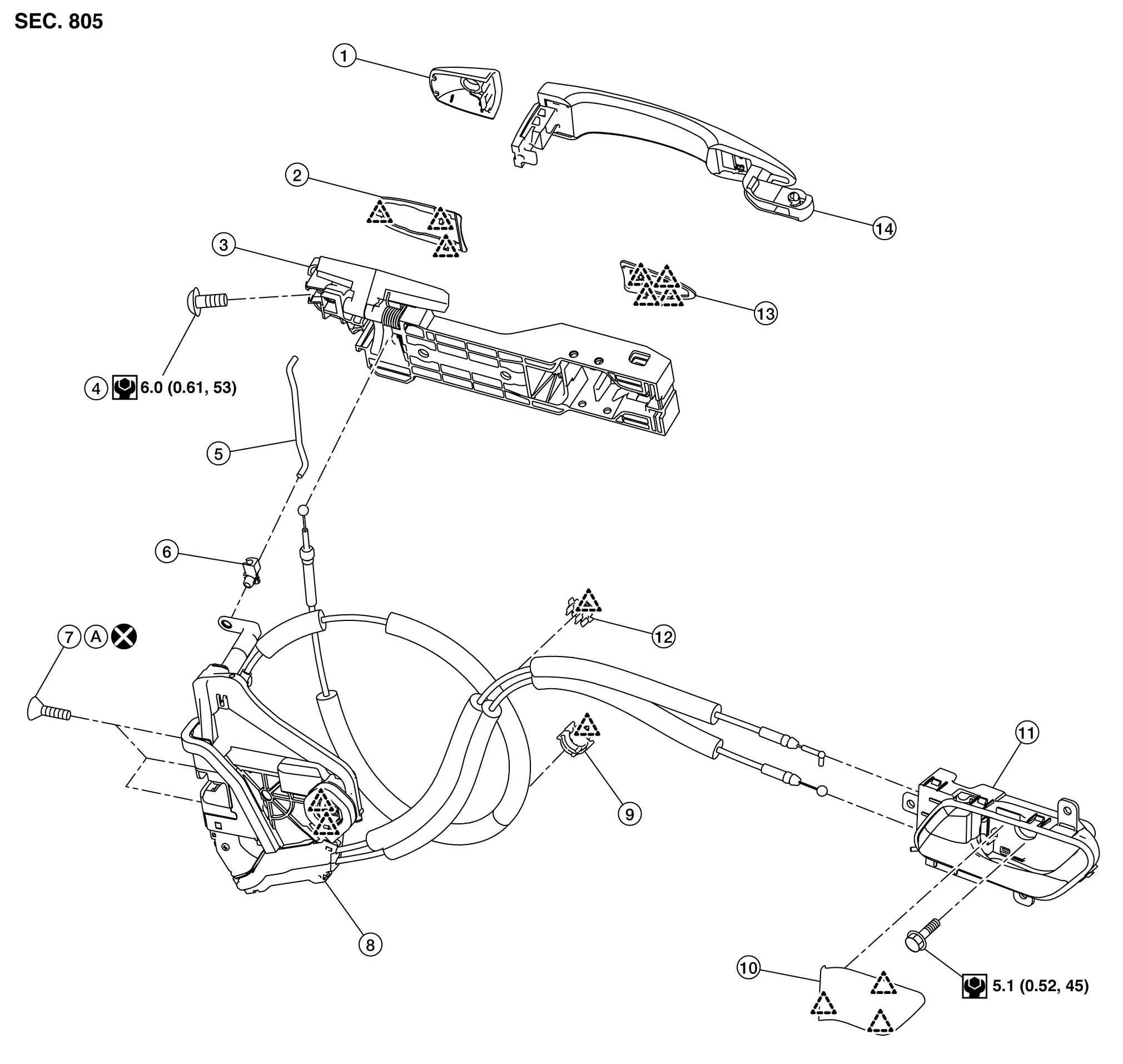
| 1. | Front door outside handle escutcheon | 2. | Rear gasket | 3. | Front door outside handle bracket |
| 4. | TORX bolt | 5. |
Key rod (If equipped) |
6. |
Key rod holder (If equipped) |
| 7. | TORX bolt | 8. | Front door lock assembly | 9. | Front door outside handle cable clip |
| 10. | Front door inside handle cap | 11. | Front door inside handle | 12. | Front door inside handle cable clip |
| 13. | Front gasket | 14. | Front door outside handle grip | A. | Comply with the installation procedure when tightening. Refer to Removal and Installation. |
 |
: Pawl | ||||
 |
: Always replace after every disassembly. | ||||
 |
: N·m (kg-m, in-lb) | ||||
Front Door Lock
Removal and Installation
REMOVAL
Remove front door outside handle bracket. Refer to Removal and Installation.
Remove front door glass run lower sash. Refer to Removal and Installation.
Disengage front door inside handle cable from front door inside handle cable clip.
Remove front door lock assembly mounting TORX bolts.
Disengage front door lock assembly fixing pawls, and then remove front door lock assembly.
INSTALLATION
Note the following items, and then install in the reverse order of removal.
CAUTION:
-
Never reuse front door lock assembly mounting TORX bolt. Always replace it with a new one when it is removed.
-
When installing, tighten mounting TORX bolts to specification according to numerical order 1→3 as shown in figure.
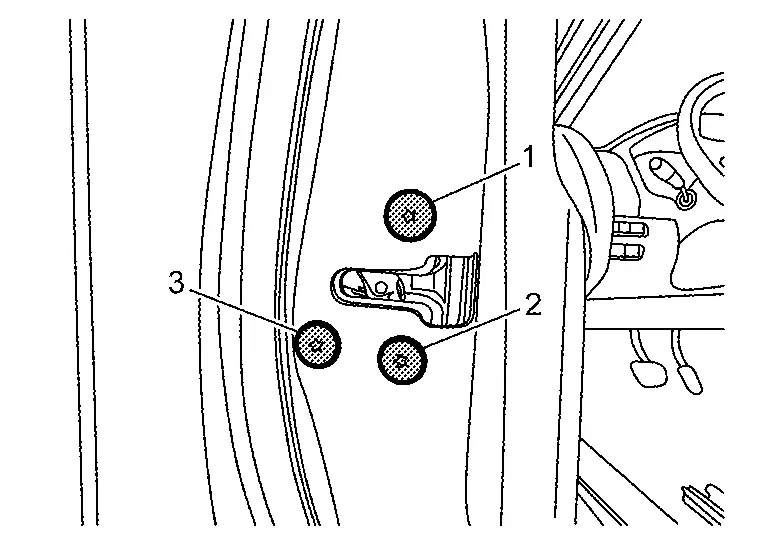
USA production models : 8 N·m (0.82 kg-m, 71 in-lb) Japan production models : 5.8 N·m (0.59 kg-m, 51 in-lb) -
When connecting front door inside handle cable to front door inside handle, check that front door inside handle cable is properly engaged with front door inside handle.
-
After installation, check front door lock. Refer to Inspection.
Inspection
After opening and closing the door, check that door is fixed to the vehicle body normally.
Check the lock/unlock operation of door lock.
Front Inside Handle
FRONT DOOR INSIDE HANDLE : Removal & Installation
REMOVAL
Remove front door finisher. Refer to Removal and Installation.
Disengage front door inside handle fixing pawls, and then remove front door inside handle.
INSTALLATION
Note the following items, and then install in the reverse order of removal.
CAUTION:
-
When connecting front door inside handle cable and front door lock knob cable to inside handle, check that front door inside handle cable and front door lock knob cable are properly engaged with front door inside handle.
-
After installation, check front door lock. Refer to Inspection.
Front Outside Handle
Removal and Installation
REMOVAL
Fully close front door glass.
Remove front door finisher. Refer to Removal and Installation.
Remove front door sealing screen. Refer to Removal and Installation.
Disengage front door outside handle harness connector  , and then disengage front door outside handle harness connector fixing clip
  (if equipped).
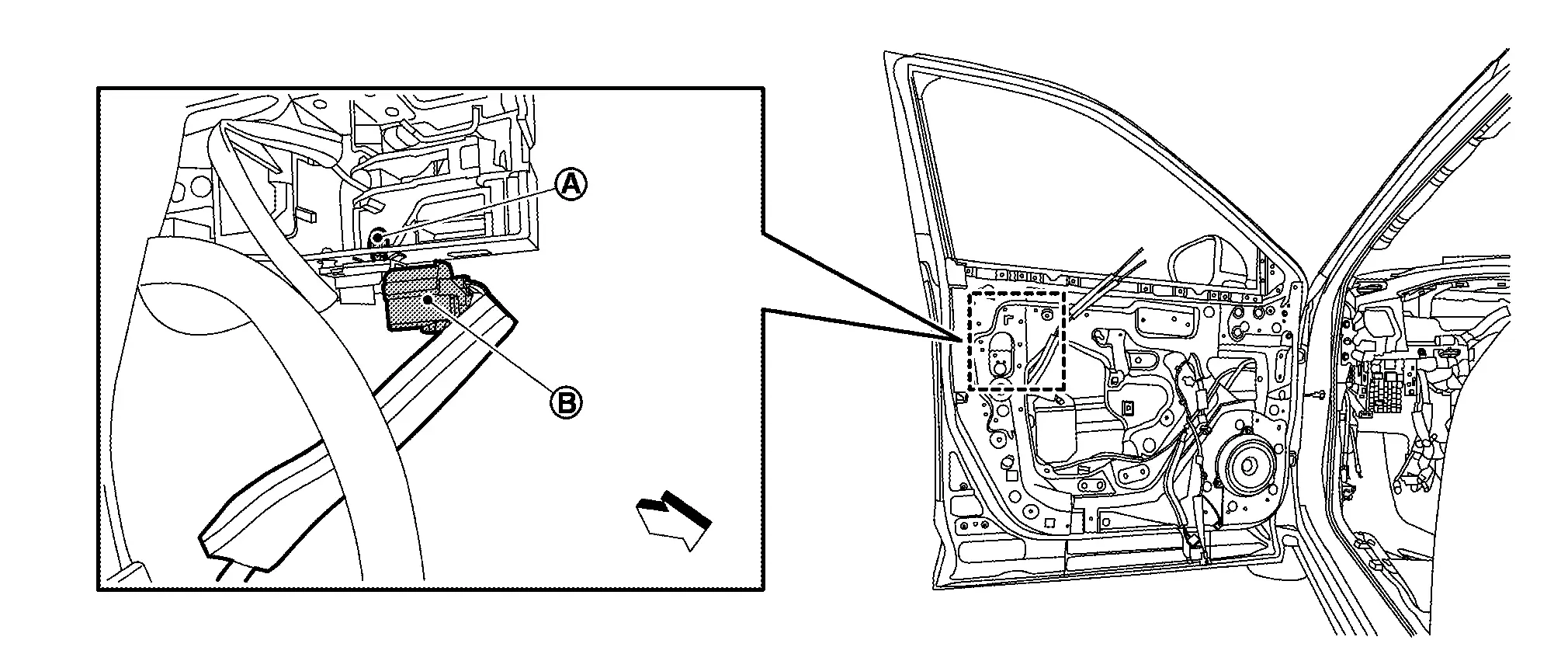
 |
: Nissan Ariya Vehicle front |
Remove key rod  from key rod holder
  according to the numerical order 1→2 indicated by arrows as shown in figure (if equipped).
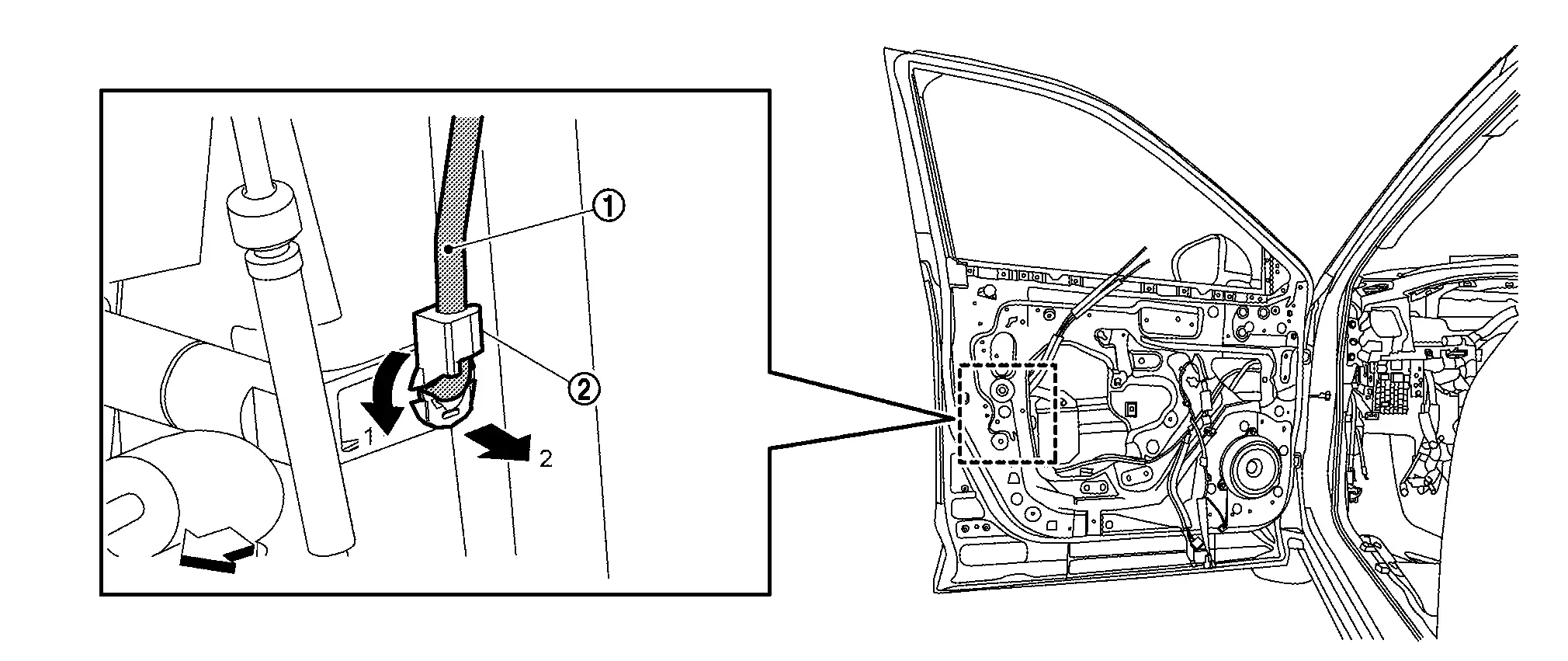
|
: Nissan Ariya Vehicle front |
Remove door side grommet , and then loosen TORX bolt from grommet hole.
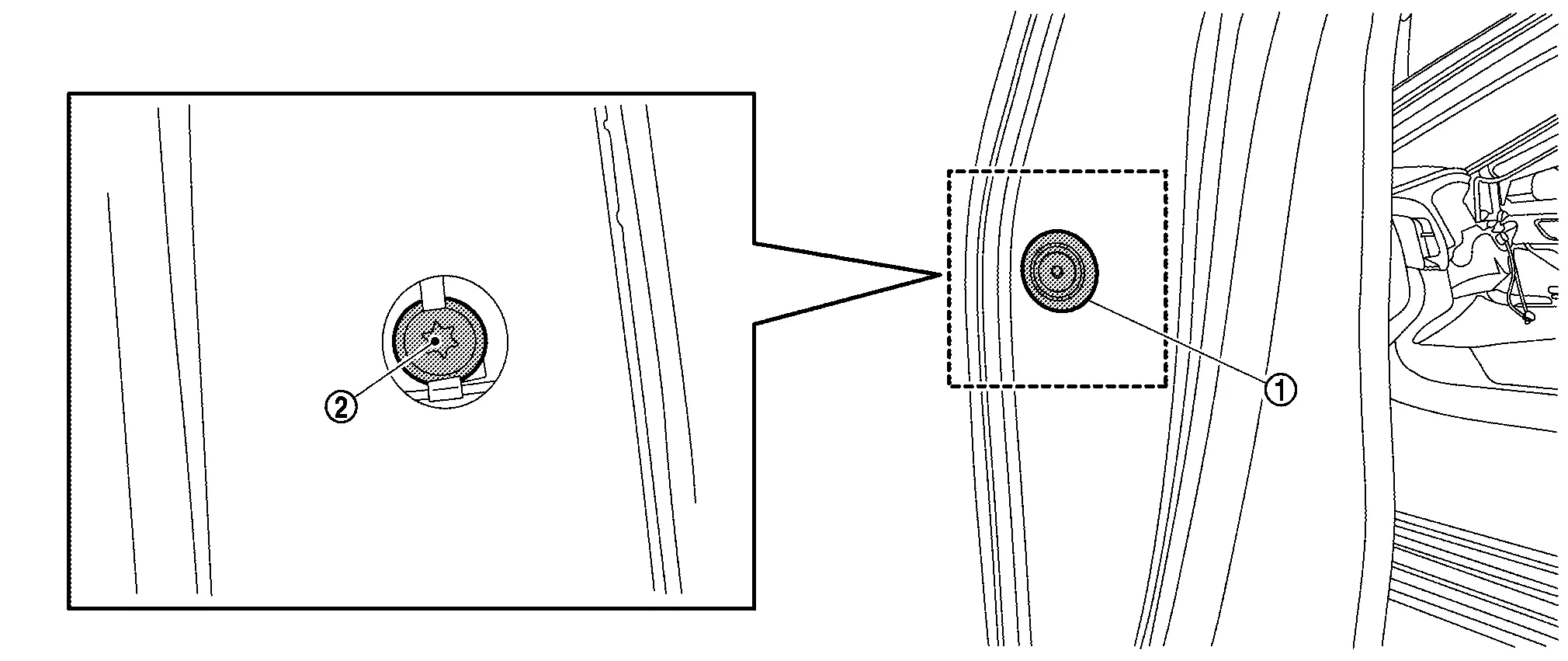
Remove front door outside handle escutcheon from front door panel.
Slide front door outside handle grip toward rear of Nissan Ariya vehicle and remove it according to the numerical order 1→2 indicated by arrows as shown in figure.
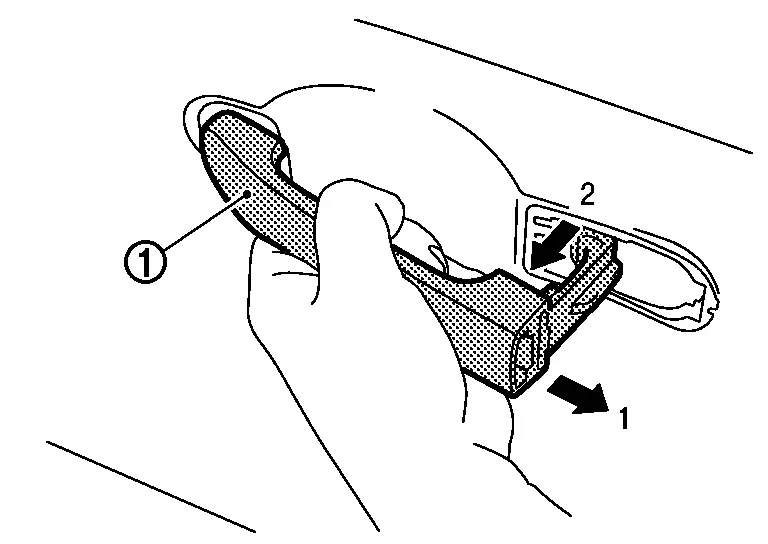
Disengage front gasket and rear gasket fixing pawls, and then remove front gasket and rear gasket.
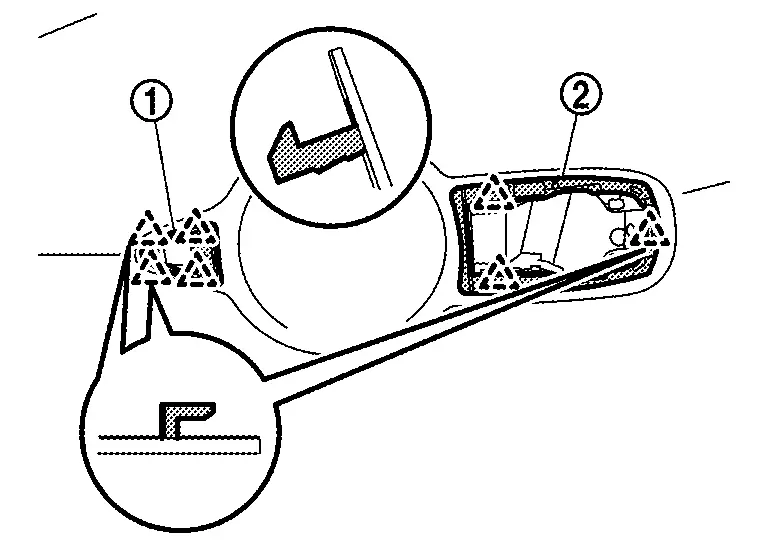
|
: Pawl |
Slide front door outside handle bracket toward rear of Nissan Ariya vehicle and remove it.
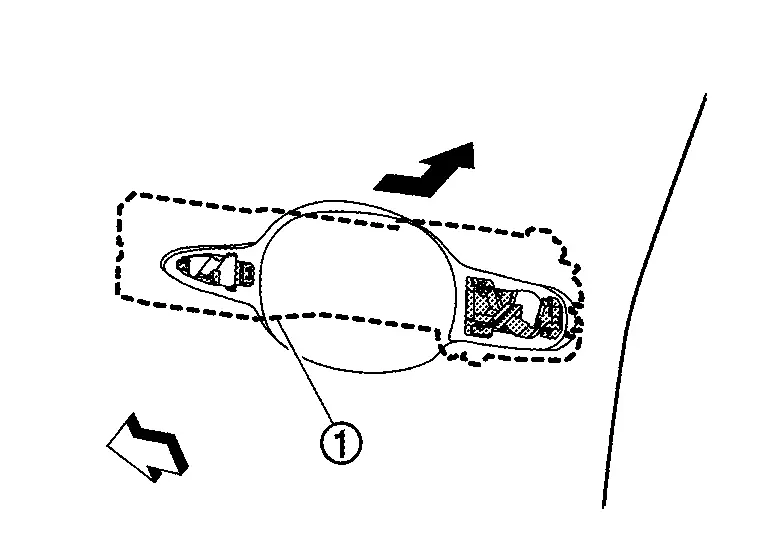
|
: Nissan Ariya Vehicle front |
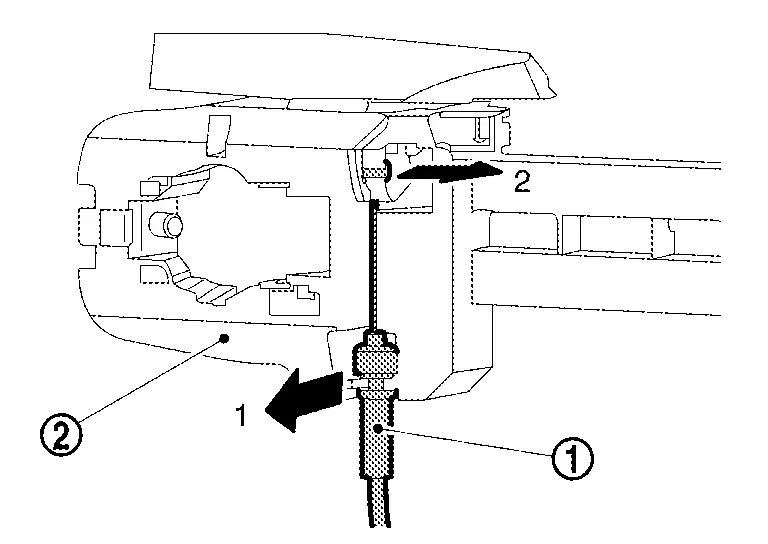
Disengage front door outside handle cable from front door outside handle cable clip.
Disconnect front door outside handle cable from front door outside handle bracket according to the numerical order 1→2 indicated by arrows as shown in figure.
INSTALLATION
Note the following items, and then install in the reverse order of removal.
CAUTION:
-
When connecting front door outside handle cable to front door outside handle bracket, check that front door outside handle cable is properly engaged with front door outside handle bracket.
-
When installing front door outside handle bracket, be careful that front door outside handle cable is routed normally.
-
When engage front door outside handle cable to front door outside handle cable clip
, make front door outside handle cable clip as shown in figure.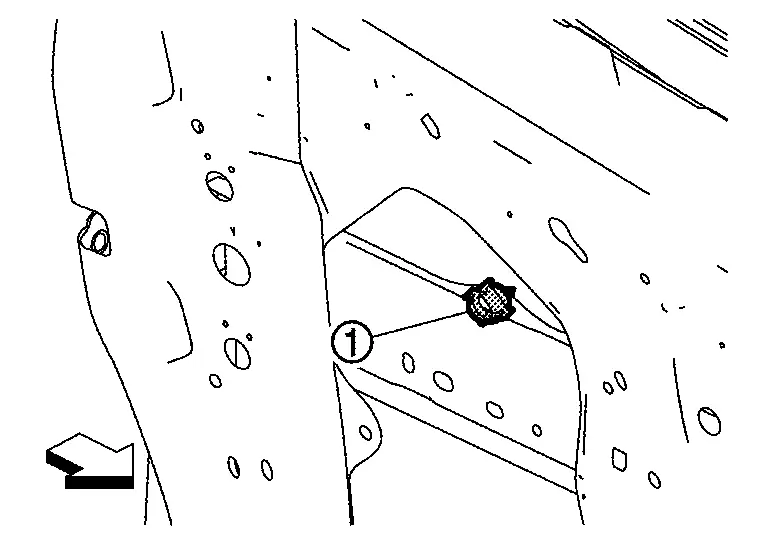
: Nissan Ariya Vehicle front -
When installing front door outside handle grip, be careful that front door outside handle grip harness and body side harness are routed normally (with request switch models).
-
When installing key rod, rotate key rod holder until a click is felt.
-
After installation, check door lock. Refer to Inspection.
Other materials:
Drive Mode Selector
Basic information
Drive Mode Selector: 2WD models
Drive Mode Selector: AWD models
Vehicle information display: 2WD models
Vehicle information display: AWD models
The Nissan Rogue offers multiple driving modes that can be selected using the Drive Mode Selector.
2WD models include SPORT, ST ...
Assistance au freinage
Assistance au freinage
Lorsque la force exercée sur la pédale de frein dépasse un certain seuil, le système d’assistance au freinage du Nissan Rogue s’active automatiquement.
Dans ce cas, la force de freinage appliquée devient supérieure à celle d’un système conventionnel, même ...
Ptc Heater
Component Function Check
CHECK PTC HEATER OPERATION
Start the engine.
Operate front blower motor.
Operate temperature control dial to full hot position.
Check for warm air at discharge air outlet.
NOTE:
Engine must be cold.
Battery must be charged.
Is the i ...