
Nissan Rogue (T33) 2021-Present Owner’s Manual & User Guide: Drive Mode Selector
Basic information
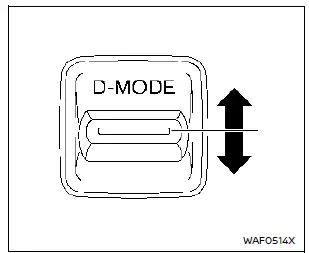
Drive Mode Selector: 2WD models
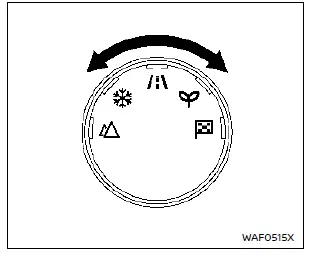
Drive Mode Selector: AWD models
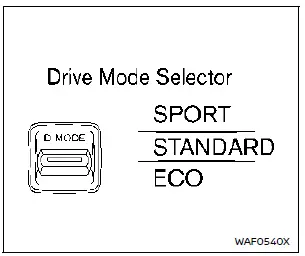
Vehicle information display: 2WD models
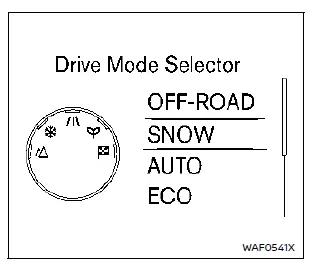
Vehicle information display: AWD models
The Nissan Rogue offers multiple driving modes that can be selected using the Drive Mode Selector.
2WD models include SPORT, STANDARD, and ECO modes. To switch between modes, push the selector up or down.
AWD models include OFF-ROAD, SNOW, AUTO, ECO, and SPORT modes. To change the mode, turn the Drive Mode Selector left or right.
NOTE:
After selecting a mode, the change may not activate immediately. This is not a malfunction.
The selected mode appears on the vehicle information display. A mode list also appears for selection and will close automatically after a few seconds.
The STANDARD/AUTO mode will be selected each time the Nissan Rogue ignition switch is placed in the ON position.
If the mode does not switch when the ignition is ON, have the system checked at a NISSAN dealer.
WARNING
- Do not stare at the Drive Mode Selector or display while driving; focus must remain on operating the Nissan Rogue safely.
- Avoid sudden acceleration, harsh steering, or abrupt braking, especially on slippery surfaces, to prevent tire slip or skidding.
OFF-ROAD mode (AWD models)
Enhances control when driving on uneven dirt roads, steep inclines, or sand.
CAUTION
Do not use OFF-ROAD mode on dry pavement as it may overload the powertrain, increase tire wear, and lower fuel economy.
Minor vibration or tight-corner braking sensations may occur. This is normal.
SNOW mode (AWD models)
Improves traction when starting or driving on snowy or icy surfaces.
CAUTION
Avoid using SNOW mode on dry, hard surfaces to prevent powertrain strain and increased tire wear.
Some vibration when cornering is normal.
STANDARD (2WD) / AUTO (AWD)
Ideal for everyday driving. This is the default mode whenever the Nissan Rogue ignition is turned ON.
ECO mode
Basic information
Optimizes engine and transmission behavior for improved fuel economy, offering smoother starts and steady cruising.
NOTE:
ECO mode does not guarantee better fuel economy in all conditions.
Operation
Select ECO mode using the Drive Mode Selector. The ECO indicator will illuminate.
When the accelerator pedal stays within the ECO driving range, the ECO indicator glows green. If pedal input exceeds the range, the indicator turns off.
The indicator will not illuminate when:
- The shift lever is in R (Reverse).
- Vehicle speed is below 2 MPH (3.2 km/h) or above 90 MPH (144 km/h).
- Cruise Control or Intelligent Cruise Control is active.
ECO Mode Customize
Additional ECO systems—Cruise Control, Idling Stop, and Air Conditioning—can be customized for greater fuel savings when ECO mode is active.
- Cruise Control: Reduces acceleration targets to improve cruising efficiency.
- Idling Stop: Extends stop time under certain conditions when using A/C.
- Air Conditioning: Limits A/C performance for better fuel efficiency.
NOTE:
When vehicle speed drops significantly (such as on an uphill road), returning to the previously set cruising speed may take longer in ECO mode.
Tire Pres ECO advice
This feature displays a tire pressure ECO reminder on the vehicle information display when low tire pressure is detected.
When active, the Nissan Rogue will show “Check Tire Pressures for Best Fuel Economy�. You can switch to the tire pressure view using the steering-wheel button.
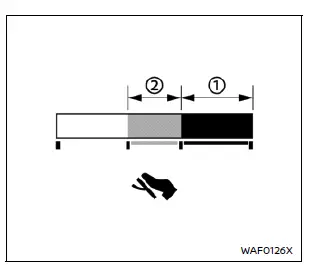
ECO Pedal Guide function
The ECO Pedal Guide display can be enabled in ECO mode to help achieve better fuel efficiency.
• Green bar = super economy driving • Light green bar = economy range • Outside green range = accelerator input beyond economy driving
The ECO Pedal Guide bar is not displayed when:
- The vehicle speed is less than approximately 2 MPH (4 km/h).
- The shift lever is in P (Park), N (Neutral), or R (Reverse).
SPORT mode
- Engine and transmission response is increased for more dynamic driving.
- Steering effort is moderately increased to enhance sporty feel.
NOTE: Using SPORT mode may reduce fuel economy.
Other materials:
P2480 Exhaust Gas Temperature Sensor
DTC Description
DTC DETECTION LOGIC DTC
CONSULT screen terms
(Trouble diagnosis content)
DTC detection condition
P2480
00
Exhaust gas temp sensor bank 1
(Exhaust Gas Temperature sensor Circuit/Open Bank 1 Sensor 5)
Diagnosis condition
Ignition switch ON
Signal
— ...
Configuration
Description
Vehicle specification needs to be written with CONSULT because it is
not written after replacing the ABS actuator and electric unit (control
unit).The configuration requires network connection. CONSULT
connects to network and then it downloads the configuration data from
the ser ...
Kr15ddt. Removal and Installation
Fuel Level Sensor Unit, Fuel Filter and Fuel Pump Assembly
Exploded View
REMOVAL2WD
Lock ring
Fuel level sensor unit, fuel filter and fuel pump assembly
O-ring
Fuel tank
: Nissan Ariya Vehicle front
: Always replace after every disas ...