
Nissan Rogue (T33) 2021-Present Owner’s Manual & User Guide: Head restraints/headrests
Basic information
WARNING
Head restraints/headrests work together with other vehicle safety systems to help reduce the risk of injury.
They may provide additional protection in certain rear-end collisions. For maximum effectiveness, adjustable head restraints/headrests must be positioned correctly as described in this section. Always check the adjustment after someone else has used the seat.
Do not attach objects to the head restraint/headrest stalks, and do not remove the head restraint/headrest. Do not use the seat without its head restraint/headrest installed. If it has been removed, reinstall and properly adjust it before allowing an occupant to ride in that seating position.
Failure to follow these guidelines reduces the effectiveness of the head restraint/headrest.
This could increase the risk of serious injury or death in a collision.
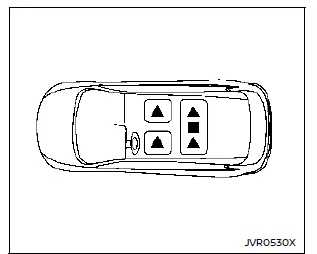
The illustration shows the seating positions equipped with head restraints/headrests.
 Indicates the seating position is equipped with a head restraint.
 Indicates the seating position is equipped with a headrest.
+ Indicates the seating position is not equipped with a head restraint or headrest.
- Your Nissan Rogue includes head restraints/headrests that may be integrated, adjustable, or non-adjustable.
- Adjustable head restraints/headrests feature multiple notches along the stalk, allowing them to lock into several height positions.
- Non-adjustable versions have a single locking notch that keeps them secured to the seat frame.
- Proper Adjustment:
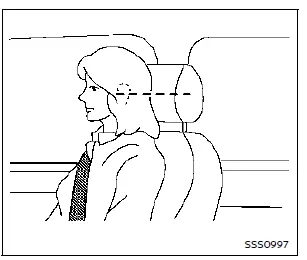
- For adjustable types, position the head restraint/headrest so that the center of your ear aligns closely with the center of the restraint.
- If your ear is still above the recommended height, raise the head restraint/headrest to its highest position.
- If the head restraint/headrest has been removed, make sure it is reinstalled and fully locked into place before using that seating position.
Adjustable head restraint/headrest components
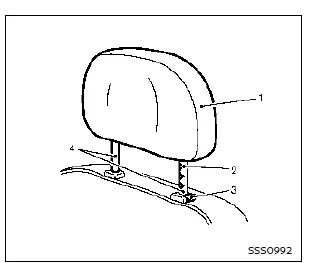
- Removable head restraint/headrest — the upper cushion that provides head support.
- Multiple notches — height adjustment points that lock into place.
- Lock knob — used to release the locking mechanism for removal or lowering.
- Stalks — support rods that fit into the seat frame.
Non-adjustable head restraint/headrest components
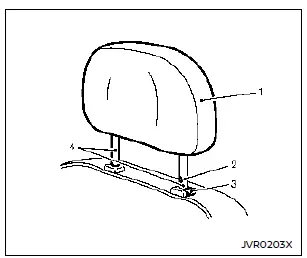
- Removable head restraint/headrest — fixed-height support cushion.
- Single notch — one locking point keeping the head restraint/headrest secured.
- Lock knob — releases the head restraint/headrest for removal.
- Stalks — support rods attaching it to the seat frame.
Remove
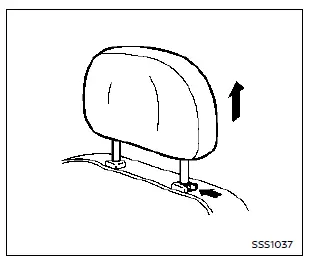
Use the following steps to remove the head restraint/headrest:
1. Pull the head restraint/headrest up to its highest position.
2. Press and hold the lock knob.
3. Lift and remove the head restraint/headrest from the seat.
4. Store it securely so it does not move freely inside the Nissan Rogue.
5. Reinstall and adjust the head restraint/headrest properly before someone uses that seating position.
Install
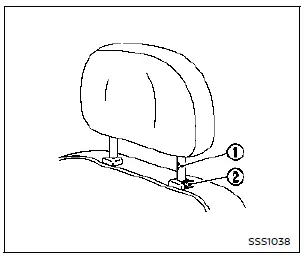
1. Align the head restraint/headrest stalks with the seat openings. Ensure correct orientation—the stalk with the adjustment notch 1 must go into the hole with the lock knob 2.
2. Press and hold the lock knob, then push the head restraint/headrest downward.
3. Adjust the head restraint/headrest to the proper height before using the seat.
Adjust
Basic information
For adjustable head restraint/headrest
Adjust the head restraint/headrest so its center aligns approximately with the center of your ears.
If your ear position is still above this level, raise the head restraint/headrest to the highest available notch.
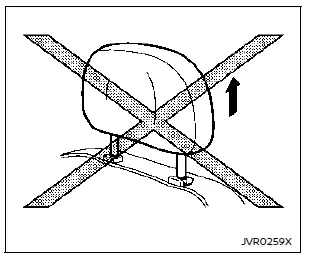
For non-adjustable head restraint/headrest
Ensure the head restraint/headrest is correctly positioned with the lock knob fully engaged in the notch before using the seat.
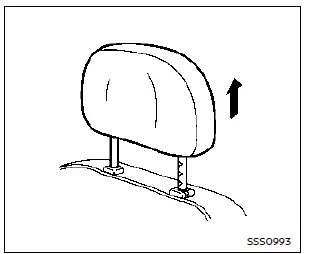
Raise
To raise the head restraint/headrest, pull it upward.
Confirm the lock knob engages properly in the notch before riding in that seat.
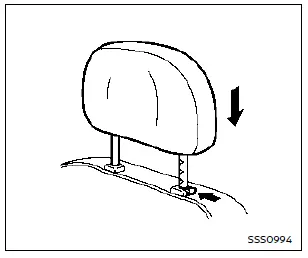
Lower
To lower the head restraint/headrest, press and hold the lock knob while pushing it downward.
Ensure the lock knob is engaged in the notch before using the seating position.
Other materials:
Intelligent Forward Collision Warning (I-FCW)
Basic information
WARNING
Failure to follow the warnings and instructions for proper use of the I-FCW system on the Nissan Rogue could result in serious injury or death.
The I-FCW system helps alert the driver before a potential collision but cannot prevent one. The driver must remain attentive, ...
P155f Generator Voltage
DTC Description
DTC DETECTION LOGIC DTC
CONSULT screen terms
(Trouble diagnosis content) DTC detection condition
P155F
00
GENERATOR VOLTAGE
(GENERATOR VOLTAGE)
Diagnosis condition
Ignition switch ON
Signal (terminal)
ECM power supply
Threshold
Battery voltage me ...
Precaution. Precautions
Precaution for Supplemental Restraint System (SRS) "AIR BAG" and "SEAT BELT PRE-TENSIONER"
The Supplemental Restraint System such as “AIR BAG� and “SEAT BELT
PRE-TENSIONER�, used along with a front seat belt, helps to reduce the
risk or severity of injury to the driver and front passeng ...