
Nissan Rogue (T33) 2021-Present Owner’s Manual & User Guide: Automatic brake hold
Basic information
The automatic brake hold function keeps the vehicle stopped without requiring the driver to hold the brake pedal. When the accelerator pedal is pressed, the system releases the brake automatically. This convenience feature improves comfort in stop-and-go traffic, especially in a Nissan Rogue.
To use the feature, the following conditions must be met:
- The driver's seat belt is fastened.
- The electronic parking brake is released.
- The vehicle is not in the P (Park) position.
- The vehicle is not on a steep hill.
WARNING
- The automatic brake hold function is not intended to hold the Nissan Rogue on steep or slippery surfaces.
- Warning messages may appear instructing the driver to use the brake pedal.
- If the system fails to keep the vehicle stationary, immediately apply the brake pedal.
- Deactivate the system before using a drive-through wash, towing, or carrying heavy cargo.
- Always apply the parking brake and shift to P (Park) when exiting the vehicle.
- If warning indicators appear or the system fails to activate, have the Nissan Rogue inspected by a NISSAN dealer.
- The system will not enable brake hold if relevant warning lights or chassis error messages are active.
- Slight noise may occur while maintaining brake force — this is normal.
- In some cases, the brake may remain applied even when the accelerator is pressed; press the brake pedal and turn off the system to cancel.
How to activate/deactivate the automatic brake hold function
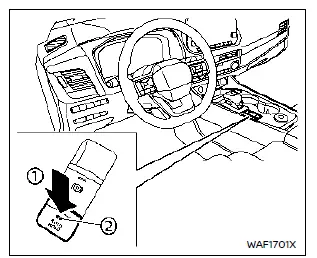
How to activate the automatic brake hold function
1. With the ignition switch in the ON position, push the automatic brake hold switch 1. The indicator light on the automatic brake hold switch 2 illuminates.
2. When the automatic brake hold function enters standby mode, the automatic brake hold indicator light (white) illuminates.
To use the automatic brake hold function in your Nissan Rogue, the following conditions must be met:
- The driver's seat belt is fastened.
- The electronic parking brake is released.
- The vehicle is not in the P (Park) position.
- The vehicle is not stopped on a steep incline.
NOTE:
The automatic brake hold function retains its last state even after the ignition is turned off, until the driver manually changes the setting.
How to deactivate the automatic brake hold function
While the automatic brake hold function is active, push the automatic brake hold switch to turn off the indicator light and deactivate the system. To deactivate brake hold while it is actively maintaining brake force, depress the brake pedal and push the switch.
WARNING
Firmly depress and hold the brake pedal when turning off automatic brake hold while brake force is applied. Once deactivated, the brake force will release, which may cause the Nissan Rogue to move unexpectedly.
Failure to secure the vehicle may result in injury or property damage.
How to use the automatic brake hold function
Basic information
For additional guidance on using brake hold in your Nissan Rogue, refer to the instructions in this section.
To maintain braking force automatically
With brake hold activated and the indicator (white) illuminated, depress the brake pedal to stop the vehicle. The automatic brake hold indicator (green) will illuminate once the system applies brake force automatically. The green indicator confirms that the brake is being held without pressing the pedal.
The green indicator will not illuminate if the brake is not pressed firmly enough to hold the Nissan Rogue or if the pedal is released too quickly.
Ensure the green indicator is ON before removing your foot from the brake pedal.
To start the vehicle from a standstill
With the vehicle not in P (Park) or N (Neutral), depress the accelerator pedal while brake force is maintained. Brake force will release automatically, the white indicator will illuminate, and brake hold returns to standby.
Parking
When parking with brake hold maintaining brake force, shifting to P (Park) will cause the electronic parking brake to engage automatically and release the brake hold function.
The brake hold indicator will turn off. The same occurs if the electronic parking brake is applied manually while brake hold is active.
NOTE:
- The electronic parking brake will automatically engage and brake hold will release under these conditions:
- Brake hold has been active for 3 minutes or more.
- The vehicle is in P (Park).
- The electronic parking brake is applied manually.
- The driver’s seat belt is unfastened.
- The driver’s door is opened.
- The ignition switch is turned OFF.
- A malfunction occurs in the automatic brake hold function.
- If the vehicle stops but brake hold does not activate, firmly depress the brake pedal until the green indicator illuminates.
- When stopping on a hill, press the brake pedal firmly until the green indicator illuminates to ensure proper brake hold operation.
Other materials:
Removal and Installation. Seat Memory Switch
Removal and Installation
REMOVALRemove front door finisher LH. Refer to Removal and Installation.
Disengage the fixing pawls using a remover tool (A) and then remove seat memory switch .
: Pawl
INSTALLATIONInstall in the reverse order of removal. ...
P2127 App Sensor
DTC Description
DTC DETECTION LOGIC DTC
CONSULT screen terms
(Trouble diagnosis content)
DTC detection condition
P2127
00
APP SEN 2/CIRC
(Throttle/Pedal position sensor/switch E circuit low)
Diagnosis condition
Engine running at idle
Signal (terminal)
Accelerator ...
Basic Inspection. Anti-Pinch Inspection
Description
If any of the following operations are performed, the initialization
is necessary for normal operation of anti-pinch function. Refer to Work
Procedure.
When front power window motor (driver side) replaced.
Power supply to the front power window motor (driver side) is not cut ...