
Nissan Rogue (T33) 2021-Present Service Manual: Removal and Installation :: Brake Pedal
Without Propilot Assist 2.1
Exploded View
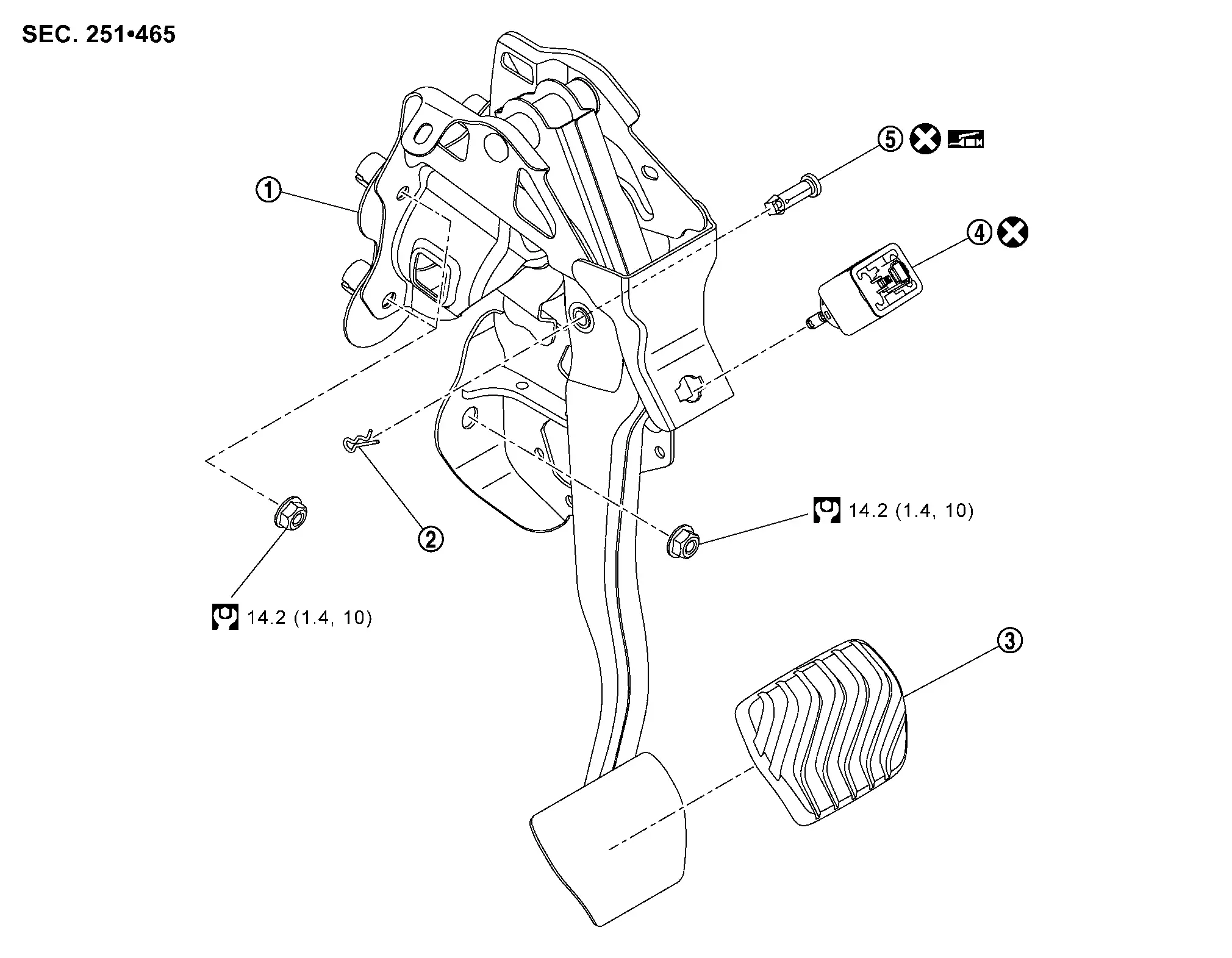
 |
Brake pedal assembly |  |
Snap pin |  |
Brake pedal pad |
 |
Stop lamp switch |  |
Clevis pin | ||
 |
: N·m (kg-m, ft-lb) | ||||
 |
: Apply multi-purpose grease. | ||||
 |
: Always replace after every disassembly. | ||||
Removal and Installation
REMOVAL
Remove instrument lower panel LH. Refer to Removal and Installation.
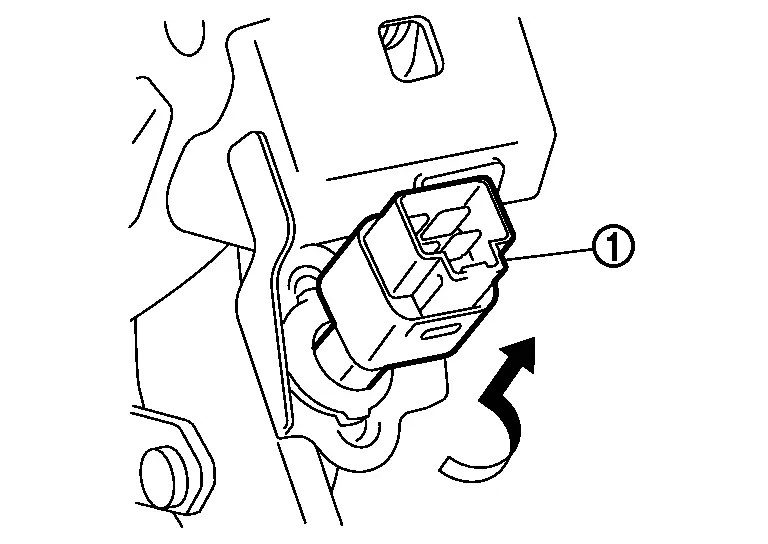
Disconnect the stop lamp switch harness connectors.
Rotate the stop lamp switch (1) counterclockwise to remove.
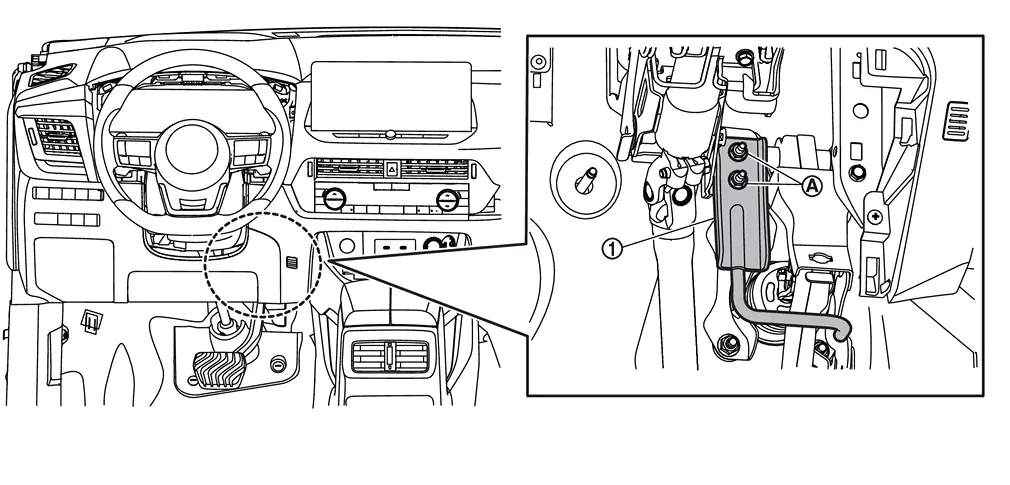
Disconnect the accelerator pedal harness connector.
Remove the accelerator pedal from the brake pedal assembly. Refer to Removal and Installation.
Remove nuts (A), and then remove bracket (1).
Remove snap pin (1) and clevis pin (2) from clevis of brake booster (3).
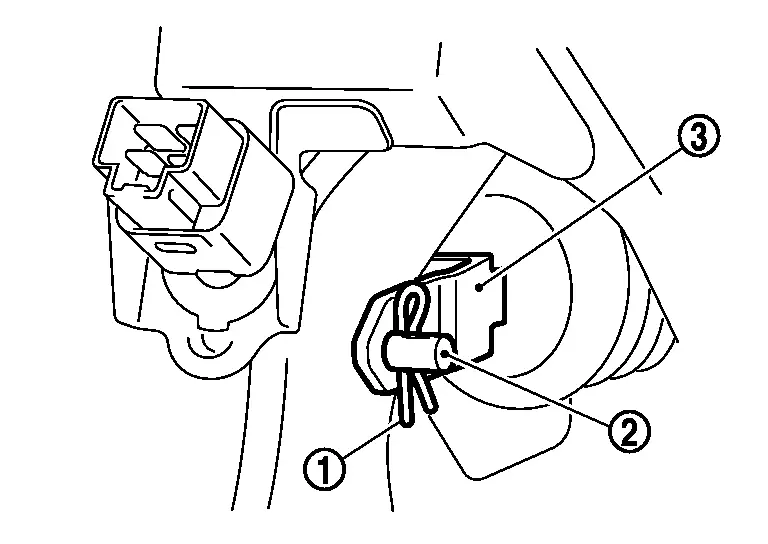
Remove harness clip from brake pedal.
Remove the brake pedal assembly.
CAUTION:
Hold the brake booster and master cylinder assembly so as not to drop out or contact them other parts.
Perform inspection after removal. Refer to Inspection and Adjustment.
INSTALLATION
Installation is in the reverse order of removal.
-
Never reuse the clevis pin.
-
Apply the multi-purpose grease to the clevis pin and the mating faces. (Not necessary if grease has been already applied)
 NOTE:
NOTE:
The clevis pin may be inserted in either direction.
-
Never impact brake pedal such as drop and interference with tools and parts.
-
Replace brake pedal when impacting brake pedal.
-
Perform adjustment after installation. Refer to Inspection and Adjustment.
Inspection and Adjustment
INSPECTION AFTER REMOVAL
Check for the following items and replace the brake pedal assembly if necessary.
-
Check rivet
 for deformation, crack, and damage.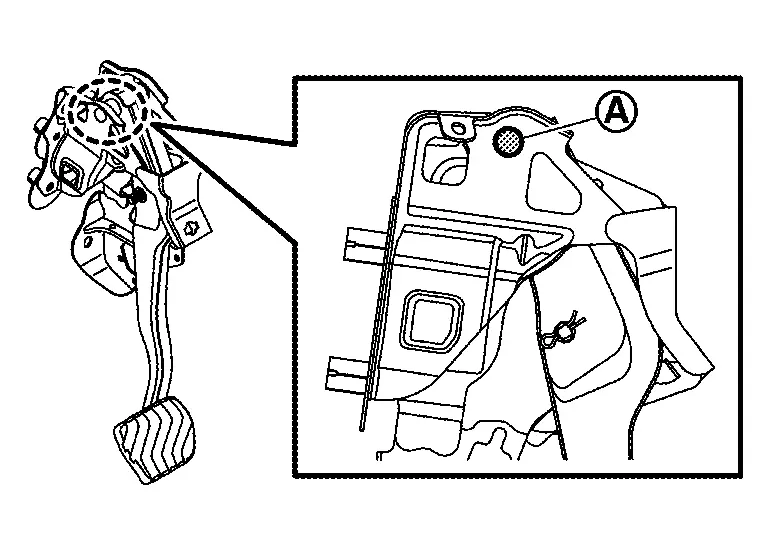
-
Check the brake pedal for bend, damage, and cracks on the welded parts.
ADJUSTMENT AFTER INSTALLATION
-
Adjust each item of brake pedal after installing the brake pedal assembly to the vehicle. Refer to Inspection and Adjustment.
-
Perform the release position learning of the accelerator pedal. Refer to Description.
With Propilot Assist 2.1
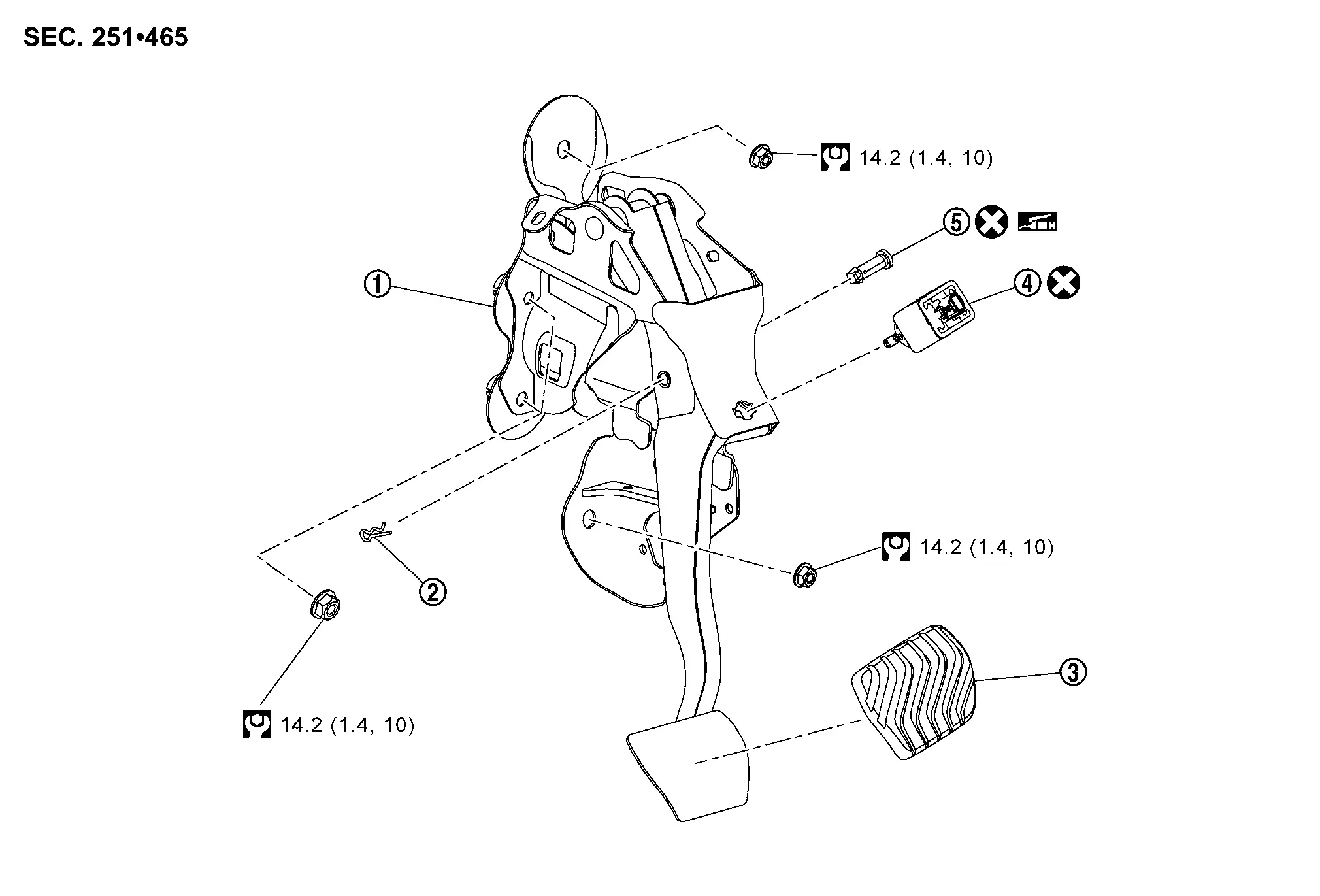
Exploded View
|
Brake pedal assembly | |
Snap pin | |
Brake pedal pad |
|
Stop lamp switch | |
Clevis pin | ||
|
: N·m (kg-m, ft-lb) | ||||
|
: Apply Nissan multi-purpose Special Grease. | ||||
|
: Always replace after every disassembly. | ||||
Removal and Installation
REMOVAL
Remove driver knee air bag module. Refer to Removal and Installation.
Disconnect the stop lamp switch harness connectors.
Rotate the stop lamp switch counterclockwise to remove.
Disconnect the accelerator pedal harness connector.
Separate the accelerator pedal from the brake pedal assembly. Refer to Removal and Installation.
Remove nuts , and then remove bracket  .
.
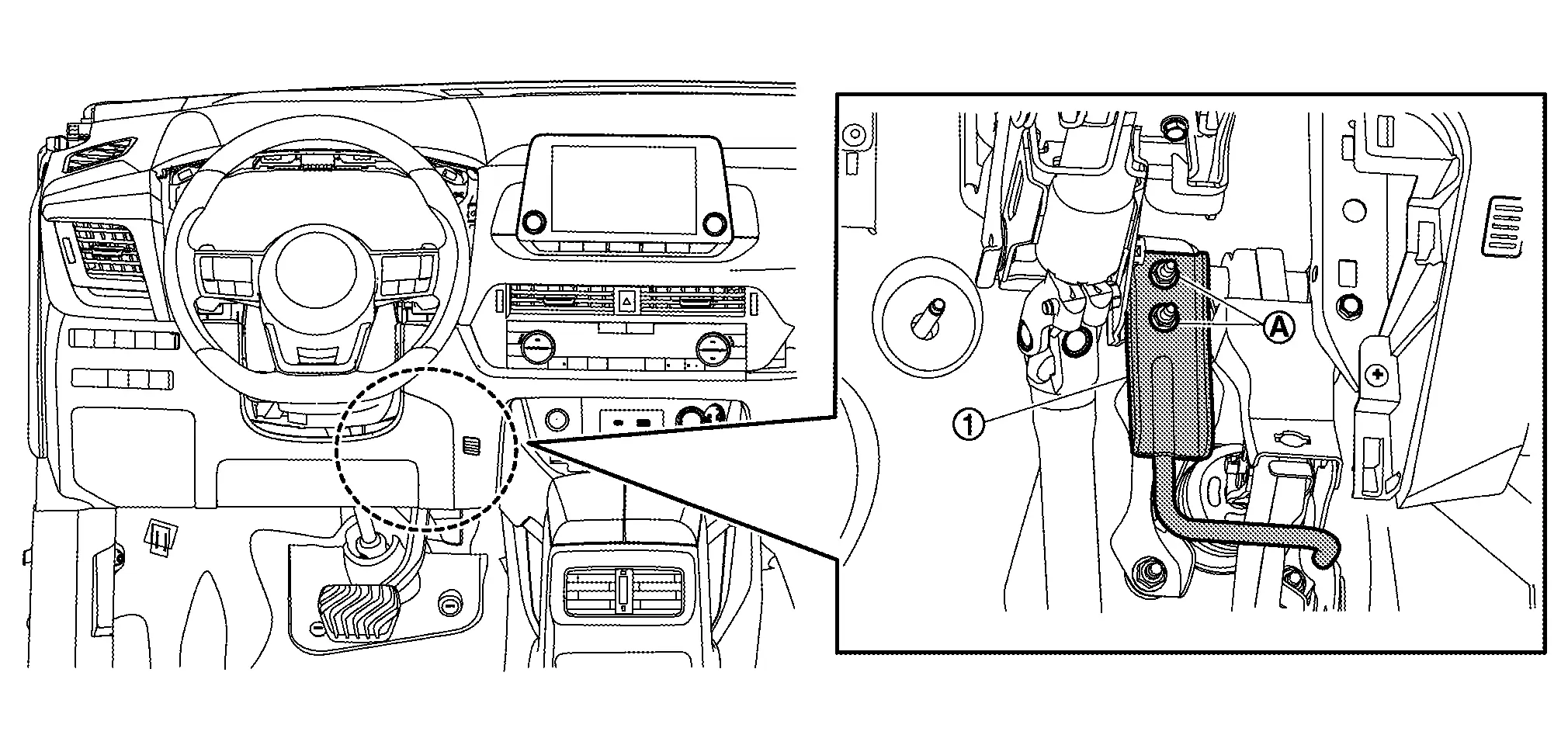
Remove snap pin and clevis pin from clevis of brake booster .
Remove harness clip from brake pedal.
Remove the brake pedal assembly.
CAUTION:
Hold the brake booster and master cylinder assembly so as not to drop out or contact them other parts.
Perform inspection after removal. Refer to Inspection and Adjustment.
INSTALLATION
Note the following, and install in the reverse order of removal:
-
Never reuse the clevis pin and snap pin.
-
Apply the multi-purpose grease to the clevis pin and the mating faces (Not necessary if grease has been already applied).
NOTE:
The clevis pin may be inserted in either direction.
-
Never impact brake pedal such as drop and interference with tools and parts.
-
Replace brake pedal when impacting brake pedal.
-
Perform adjustment after installation. Refer to Inspection and Adjustment.
Inspection and Adjustment
INSPECTION AFTER REMOVAL
Check for the following items and replace the brake pedal assembly if necessary:
-
Check rivet (A) for deformation, crack, and damage.
-
Check the brake pedal for bend, damage, and cracks on the welded parts.
ADJUSTMENT AFTER INSTALLATION
-
Adjust each item of brake pedal after installing the brake pedal assembly to the vehicle. Refer to Inspection and Adjustment.
-
Perform the release position learning of the accelerator pedal. Refer to Description.
Other materials:
Fonction de démarrage à distance du moteur du Nissan Rogue
Informations de base et réglementation
Exemple de configuration
Sur les modèles de Nissan Rogue compatibles, la touche de la clé intelligente permet d'initier le cycle moteur sans présence physique à bord. Si vous aviez réglé la climatisation ou le chauffage avant de quitter votre Niss ...
Pression des pneus
Système de contrôle de la pression des pneus (TPMS)
Le Nissan Rogue est équipé d’un système de contrôle de la pression des pneus (TPMS) qui surveille en permanence la pression de tous les pneus, à l’exception de la roue de secours. Lorsque le témoin d’avertissement de pression insuffi ...
Intelligent Key Interlock Function (without Navigation System)
System Description
SYSTEM DIAGRAMINPUT SIGNAL AND OUTPUT SIGNAL Component Function
BCM
Recognizes the following status and transmits it to driver seat control unit via CAN communication:
Ignition ON signal
Door lock status signal (with Intelligent Key, front door request switch op ...