
Nissan Rogue (T33) 2021-Present Owner’s Manual & User Guide: Rear Cross Traffic Alert (RCTA)
Basic information
WARNING
Failure to follow the warnings and instructions for proper use of the RCTA system on your Nissan Rogue could result in serious injury or death.
- The RCTA system is not a replacement for safe driving practices and is not designed to prevent contact with vehicles or objects. When backing out of a parking space, always check the side and rear mirrors and physically look in the direction the Nissan Rogue will move. Never rely solely on the RCTA system.
The Rear Cross Traffic Alert system on the Nissan Rogue is designed to assist when backing out of a parking space. When the vehicle is in reverse, the system monitors the area to the right and left of the rear of the vehicle and, if cross traffic is detected, it provides an alert to the driver.
RCTA system operation
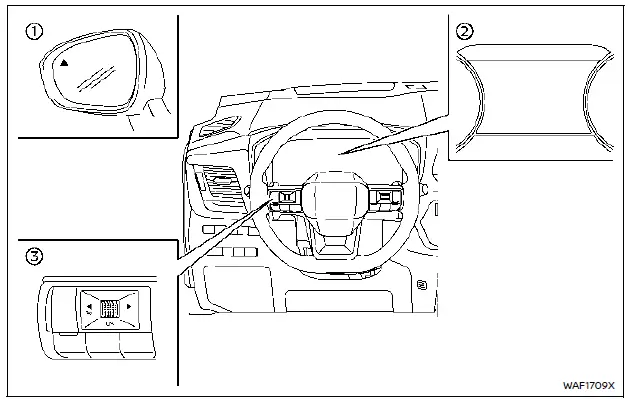
- Side indicator light
- Vehicle information display
- Steering-wheel-mounted controls (left side)
The RCTA system helps warn the driver of an approaching vehicle while the Nissan Rogue is backing out of a parking space.
When the shift lever is in the R (Reverse) position and vehicle speed is below approximately 5 MPH (8 km/h), the RCTA system becomes active.
If the radar sensors detect a vehicle approaching from either side, the system sounds a chime (once) and the side indicator light flashes on the side from which the other vehicle is coming.
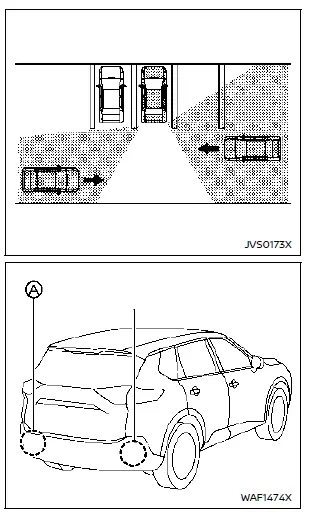
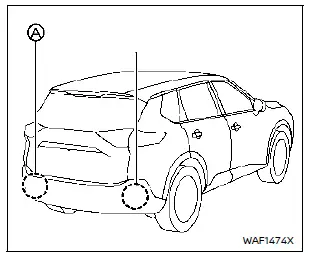
The RCTA system on the Nissan Rogue uses radar sensors A mounted on both sides near the rear bumper to monitor approaching traffic.
The radar sensors can detect an approaching vehicle from a distance of up to approximately 66 ft (20 m).
How to enable/disable the RCTA system
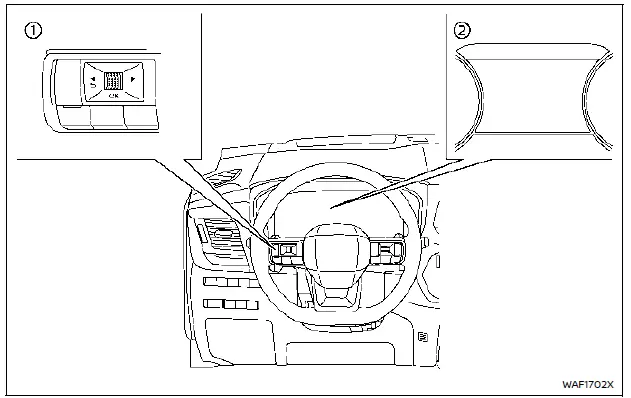
- Steering-wheel-mounted controls (left side)
- Vehicle information display
1. Push the
 button until "Settings" appears in the vehicle information display and then push the scroll dial.
Use the scroll dial to select "Driver Assistance". Then push the scroll dial.
2. Type A (if so equipped): Select "Parking Assist" and push the scroll dial. Then select "Rear Cross Traffic Alert" and push the scroll dial to turn the system ON or OFF.
Type B (if so equipped): Select "Rear Cross Traffic Alert" and push the scroll dial to turn the system ON or OFF.
NOTE:
The selected RCTA setting will be retained even if the Nissan Rogue engine is turned off and restarted.
RCTA system limitations
WARNING
Listed below are the system limitations for the RCTA system. Failure to operate the Nissan Rogue in accordance with these limitations could result in serious injury or death.
- Always check the surroundings and look behind you before reversing. The radar sensors detect approaching moving vehicles, but they cannot detect every object such as:
- Pedestrians, bicycles, motorcycles, animals or child-operated toy vehicles
- Vehicles passing at speeds greater than approximately 19 MPH (30 km/h)
- Vehicles passing at speeds lower than approximately 5 MPH (8 km/h)
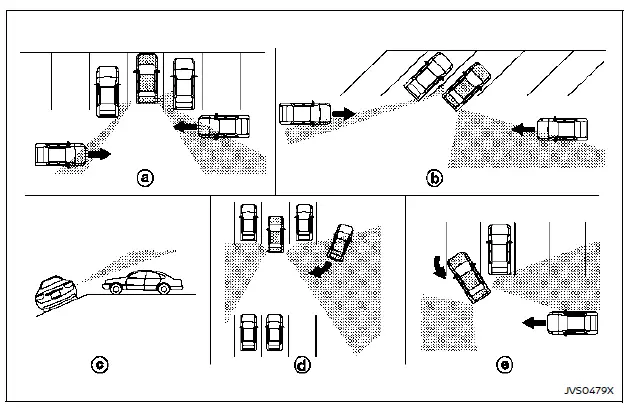
- The radar sensors may not detect approaching vehicles in certain situations:
- Illustration a: A vehicle parked next to the Nissan Rogue blocks the radar beam.
- Illustration b: The vehicle is parked in an angled parking space.
- Illustration c: The vehicle is parked on an incline.
- Illustration d: An approaching vehicle turns into the parking aisle of your vehicle.
- Illustration e: The angle between your vehicle and the approaching vehicle is small.
- The following conditions may reduce the radar’s ability to detect other vehicles:
- Severe weather
- Road spray
- Ice, frost or dirt build-up on the vehicle
- Do not place stickers (including transparent films), install accessories or apply additional paint near the radar sensors of the Nissan Rogue.
- These conditions may reduce the radar’s ability to detect other vehicles.
- Excessive noise (for example, loud audio system volume or open windows) can make the chime difficult to hear, and you may miss an RCTA warning.
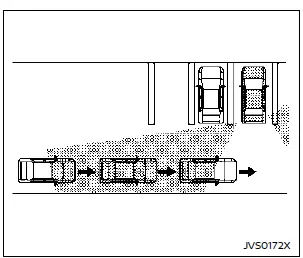
Illustration 1
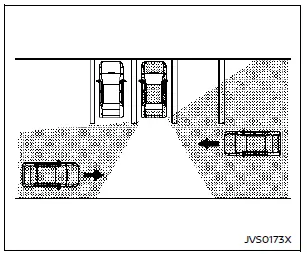
Illustration 2
NOTE:
When several vehicles approach in succession (Illustration 1) or when vehicles approach from opposite directions (Illustration 2), the RCTA system on the Nissan Rogue may not sound an additional chime after the first vehicle passes the sensors.
System temporarily unavailable
When radar blockage is detected on the Nissan Rogue, the system will deactivate automatically.
The "Unavailable Side Radar Obstruction" warning message appears in the vehicle information display.
The Nissan Rogue safety systems remain unavailable until the blocked conditions are cleared.
The radar sensors may be affected by temporary ambient factors such as splashing water, heavy mist or fog.
The same blocked condition on the Nissan Rogue can also be caused by ice, frost or dirt covering the radar sensor surfaces.
NOTE:
If the BSW system stops functioning, the RCTA and Intelligent Blind Spot Intervention (I-BSI) systems on the Nissan Rogue will also stop operating.
Action to take:
Once the obstructing conditions are gone, the Nissan Rogue system will automatically resume normal operation.
System malfunction
If the RCTA system experiences a malfunction, it turns off automatically. A "Malfunction See Owner's Manual" warning message will appear in the Nissan Rogue information display.
NOTE:
If the BSW system stops working, the RCTA and I-BSI functions on the Nissan Rogue will also stop working.
Action to take:
Stop the vehicle in a safe area, switch off the Nissan Rogue engine, then restart it. If the message continues, the system must be checked by a NISSAN dealer.
System maintenance
Basic information
The Nissan Rogue RCTA system uses two radar sensors A installed near the rear bumper.
Always keep the radar sensor area clean.
Radar sensors may become blocked by environmental conditions such as splashing water, fog or mist.
Obstructions such as accumulated ice, frost or dirt on the Nissan Rogue rear bumper area can also block the radar.
Remove any objects or buildup preventing the radar sensors from functioning correctly.
Do not apply stickers, paint, or accessories near the radar sensors of the Nissan Rogue.
Do not hit or damage the radar sensor area. If the area is damaged due to a collision, consult a NISSAN dealer.
Precautions on repairing the bumper
The radar sensors are built into the bumper of the Nissan Rogue, so caution is required during repairs.
The radar unit detects objects by emitting a radar wave and measuring the reflection.
WARNING
Improper repairs to the Nissan Rogue bumper—such as filler made from different materials or incorrect repainting—may weaken or block radar signals. This can cause detection failure and lead to serious personal injury.
If bumper repairs are necessary, it is recommended to visit a NISSAN dealer.
Radio frequency statement
NOTE:
FCC Notice:
For USA:
This device complies with Part 15 of the FCC Rules. Operation is subject to two conditions: (1) this device may not cause harmful interference, and (2) it must accept any interference received, including interference that may cause undesired operation.
CAUTION TO USERS
Unauthorized modifications may void the user's authority to operate the equipment.
For Canada:
This device includes licence-exempt transmitters/receivers that comply with ISED Canada RSS standards. Operation is permitted under two conditions: (1) the device may not cause interference, and (2) it must accept interference, including interference that may cause undesired operation.
Other materials:
Window washer fluid
Type A (if so equipped)
Type B (if so equipped)
For Type A systems on the Nissan Rogue, check the fluid level directly in the washer reservoir and refill when the level is low.
For Type B systems, plug the center hole A of the cap/tube assembly with your finger, remove the tube, and chec ...
U0101 Can Comm Circuit
DTC Description
DESCRIPTIONCAN (Controller Area Network) is a serial
communication line for real time application. It is an on-Nissan Ariya
vehicle multiplex communication line with high data communication speed
and excellent error detection ability. Many electronic control units are
equipp ...
P2483 Exhaust Gas Temperature Sensor
DTC Description
DTC DETECTION LOGIC DTC
CONSULT screen terms
(Trouble diagnosis content)
DTC detection condition
P2483
00
Exhaust gas temp sensor bank 1
(Exhaust Gas Temperature Sensor Circuit Range/Performance Bank 1 Sensor 5)
Diagnosis condition
Ignition switch ON
...