
Nissan Rogue (T33) 2021-Present Owner’s Manual & User Guide: Cruise control
Basic information
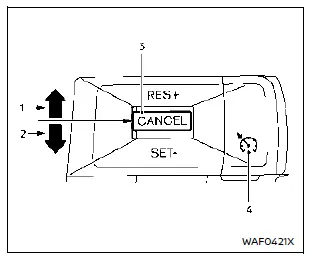
- RES+ operation
- SET- operation
- CANCEL switch
- Cruise ON/OFF switch
For Nissan Rogue models equipped with ProPILOT Assist, see the dedicated “Basic information� section.
WARNING
- Always follow posted speed limits and never set the Nissan Rogue cruise control above legal limits.
- Do not use cruise control in conditions where maintaining a steady speed is difficult, as it may lead to loss of control.
- Irregular or unstable traffic flow
- Heavy traffic situations
- Areas with strong winds
- Winding or steep roads
- Slippery road surfaces (rain, snow, ice)
Precautions on cruise control
- If the cruise control on the Nissan Rogue malfunctions, it deactivates automatically. The indicator will blink to alert the driver.
- If “Unavailable: Cruise system trouble� appears, turn OFF the Cruise switch and have the vehicle inspected at a NISSAN dealer.
- The indicator may blink if the Cruise switch is turned ON while the CANCEL switch is being operated. Follow standard procedures to set cruise control correctly.
Cruise control operations
Basic information
The cruise control system allows the Nissan Rogue to maintain speeds above 25 MPH (40 km/h) without pressing the accelerator pedal.
The cruise function will cancel automatically if the vehicle slows more than about 8 MPH (13 km/h) below the set speed. (“Unavailable: Under specified speed� will appear.) Shifting to N (Neutral) also cancels cruise control.
Turning on cruise control
Push the Cruise ON/OFF switch. The indicator and “Standby Push SET- to active� message appear on the Nissan Rogue display.
Setting cruising speed
1. Accelerate to the preferred speed.
2. Push down the CANCEL switch to SET- or up to RES+.
3. Release the accelerator pedal.
The Nissan Rogue will hold that speed. (“+/- Change Set speed� will appear.)
NOTE:
If RES+ is pressed while no speed is stored, the current vehicle speed becomes the set speed.
Passing another vehicle:
Press the accelerator to pass. After releasing it, the Nissan Rogue returns to the previously set speed.
Steep hills may prevent the system from maintaining speed; drive manually in such cases.
Resetting to slower speed:
- Tap the brake. When at the new speed, press SET-.
- Hold SET- until the Nissan Rogue reaches the preferred speed, then release.
- Press SET- briefly to reduce speed by about 1 MPH (1.6 km/h).
Resetting to faster speed:
- Accelerate manually, then press SET- to store the higher speed.
- Hold RES+ until reaching the new speed, then release.
- Press RES+ briefly to increase the set speed by about 1 MPH (1.6 km/h).
Resuming at preset speed:
Push RES+ and release.
The Nissan Rogue will resume the last stored speed above 25 MPH (40 km/h). (“Resumed� appears.)
Cancelling cruising speed
- Press the CANCEL switch.
- Tap the brake pedal.
- Turn OFF the Cruise switch. The indicator turns off.
Other materials:
Window washer fluid
Type A (if so equipped)
Type B (if so equipped)
For Type A systems on the Nissan Rogue, check the washer reservoir directly and refill with washer fluid when the level gets low.
For Type B systems, plug the center hole A of the cap/tube assembly with your finger and remove it from the re ...
P059f Active Grille Shutter
DTC Description
DTC DETECTION LOGICActive grille shutter normally stops within zone which is defined by zone (90°±10°).If the active grille shutter stops within zone stuck error is detected, and if the active grille shutter stops at position beyond zone overrun error is detected. DTC
CON ...
Remote engine start
Basic information
The remote engine start button is located on the Intelligent Key of the
Nissan Rogue, if equipped. This feature allows you to start the engine from outside
the vehicle, ensuring added comfort during hot or cold weather.
Some systems, including the air conditioning system, may ...