
Nissan Rogue (T33) 2021-Present Service Manual: Purge Pump
Exploded View
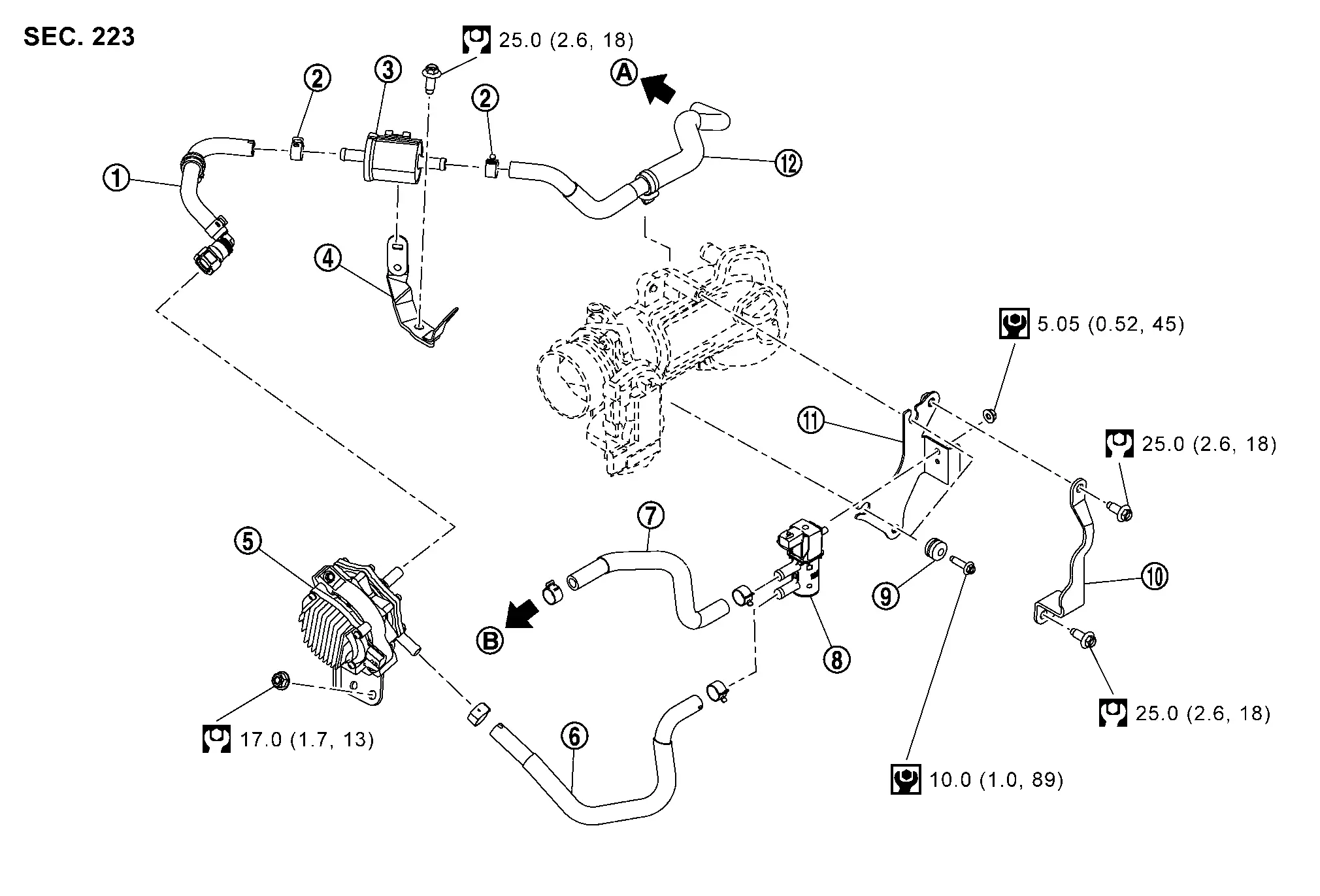
| 1. | Resonator hose 1 | 2. | Clamp | 3. | Resonator |
| 4. | Resonator bracket | 5. | Purge pump | 6. | Purge control valve hose 1 |
| 7. | Purge control valve hose 2 | 8. | Purge control valve | 9. | Mounting rubber |
| 10. | Purge control valve bracket 2 | 11. | Purge control valve bracket 1 | 12. | Resonator hose 2 |
| A | To EVAP canister. Refer to Hydraulic Layout. | B | To air duct. Refer to Exploded View. | — | — |
 |
: N·m (kg-m, ft-lb) | ||||
 |
: N·m (kg-m, in-lb) | ||||
Removal and Installation
REMOVAL
Purge Pump Assembly
Remove engine cover. Refer to Removal and Installation.
Remove resonator. Refer to Removal and Installation.
Remove air duct. Refer to Removal and Installation.
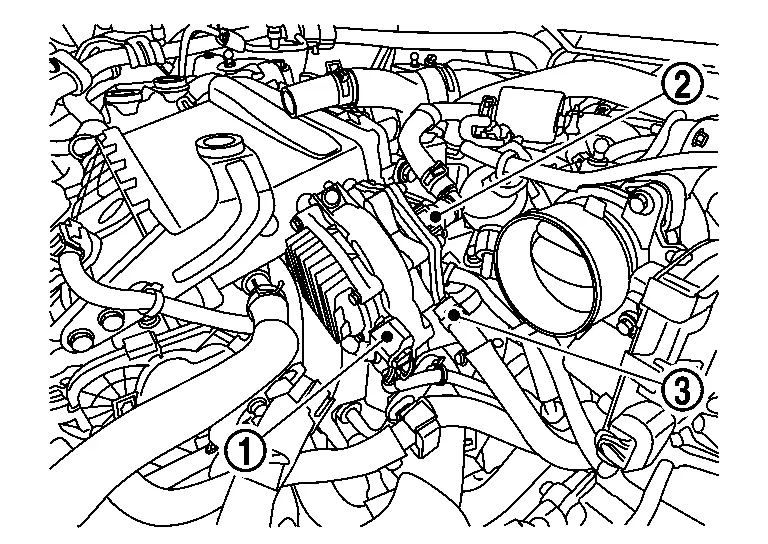
Disconnect the purge pump harness connector  , resonator hose 1
  and purge control valve hose 1
  .
.
Loosen the purge pump nuts  .
.
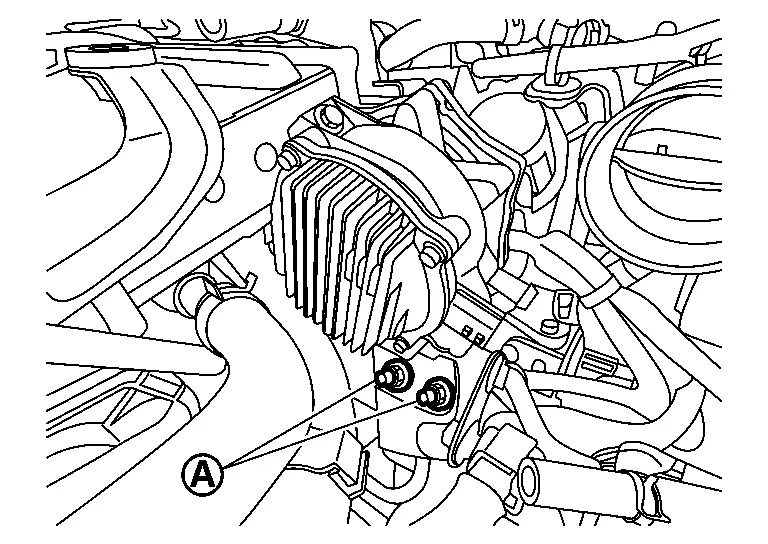
Remove the purge pump.
Purge Control Valve
Remove engine cover. Refer to Removal and Installation.
Remove the EVAP canister purge volume control solenoid valve harness connector .
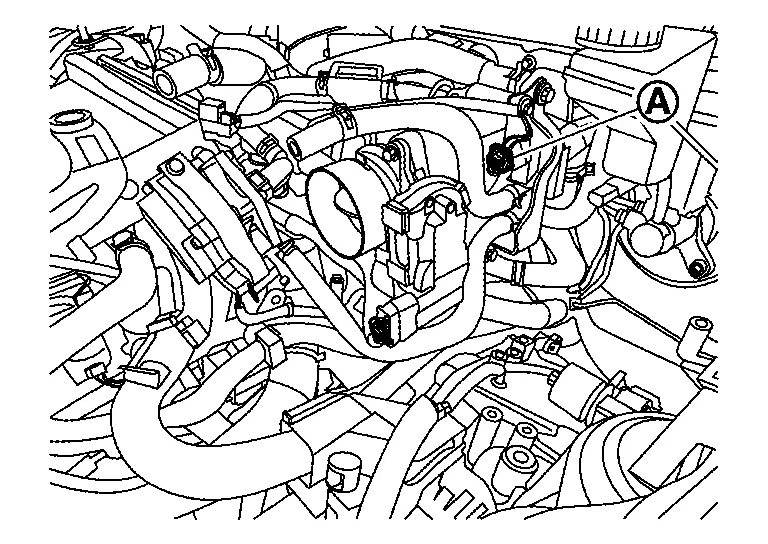
Disconnect purge control valve hose 1 and purge control valve hose 2 from purge control valve.
Loosen purge control valve nut and then remove purge control valve.
Remove purge control valve bracket 1 and purge control bracket 2 if necessary.
Resonator
Remove engine cover.
Disconnect resonator hose 1 and resonator hose 2 from resonator.
Loosen resonator nut and then resonator.
INSTALLATION
Install in the reverse order of removal.
Other materials:
Preparation
Special Service Tool
The actual shape of the tools may differ from those illustrated here.
Tool number
(TechMate No.)
Tool name Description
KV10115801
(NI-38956)
Oil filter wrench
Removing and installing oil filter
a: 64.3 mm (2.531 in)
KV311039S0
( — )
Chargin ...
Can Fundamental. Basic Inspection. Diagnosis and Repair Work Flow
Diagnosis and Repair Work Flow
Trouble Diagnosis Flow Chart
DESCRIPTIONDETAIL OF TROUBLE DIAGNOSIS FLOW CHARTINTERVIEW WITH CUSTOMER
Interview with the customer is important to detect the root cause of
CAN communication system errors and to understand Nissan Ariya vehicle
condition and sympto ...
Dtc/circuit Diagnosis. B2c20-23 Starter Control Relay
DTC Description
DTC DETECTION LOGIC DTC No.
CONSULT screen items
(Trouble diagnosis content) DTC detecting condition
B2C20-23
Starter control relay
(Starter control relay)
Diagnosis condition
Ignition switch ON
Signal (terminal)
Starter cut relay signal
Starter c ...