
Nissan Rogue (T33) 2021-Present Owner’s Manual & User Guide: Intelligent Lane Intervention (I-LI)
Basic information
WARNING
The Intelligent Lane Intervention system on the Nissan Rogue must be used with caution. Ignoring warnings or relying solely on the system may lead to loss of control, injury or death.
- I-LI will not steer the Nissan Rogue for you or prevent skidding. The driver must always stay attentive, maintain control, and keep the vehicle centered in its lane.
- The system works best on highways with clearly visible lane markings. Poor weather or worn road paint may limit performance.
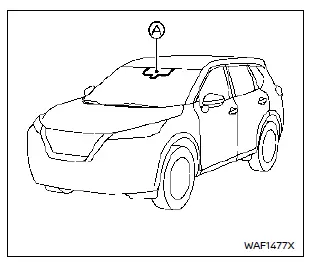
The I-LI feature must be activated each time the ignition is turned ON by pressing the ProPILOT Assist switch. When properly activated and the Nissan Rogue is moving above ~37 MPH (60 km/h), the system monitors lane edges and can provide vibration alerts and brief steering assistance to help guide the vehicle back to the lane center.
The system uses the forward camera mounted above the inside mirror to track lane markers and determine when the vehicle begins to drift.
I-LI system operation

- I-LI ON indicator
- I-LI intervention indicator
- Vehicle information display
- ProPILOT Assist switch
When the Nissan Rogue approaches a lane boundary, the steering wheel vibrates and the I-LI indicator flashes. If drifting continues, the system briefly applies gentle steering force to help guide the vehicle back toward the lane center. This assistance is momentary and does not replace driver input.
Pressing the ProPILOT Assist button turns the system ON or OFF. The vibration strength can be customized in the settings menu.
How to enable/disable the I-LI system
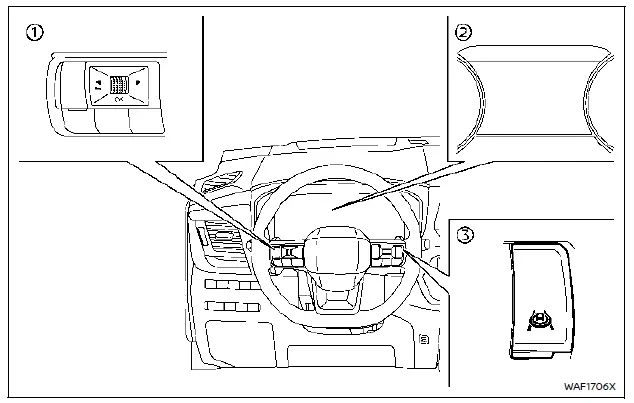
- Use steering-wheel controls
- Open vehicle information display
- Use the ProPILOT Assist switch for activation
To adjust I-LI settings on the Nissan Rogue:
- Push the
 button until “Settings� appears.
 - Select “Driver Assistance�.
- Select “Lane Assist�.
- Select “Intervention� to enable or disable I-LI.
NOTE:
- Turning on ProPILOT Assist enables I-LI and I-BSI automatically unless disabled manually.
- Your selected settings are stored even after restarting the engine.
Setting lane sensitivity
Lane sensitivity controls how quickly the Nissan Rogue reacts to lane drift:
- Go to “Settings� → “Driver Assistance�.
- Select “Lane Assist�.
- Choose “Lane Sensitivity�.
- Strong
- Normal
- Mild
NOTE: This setting also affects the Lane Departure Warning feature.
I-LI system limitations
WARNING
The I-LI system is assistance only. It may not detect all lane markers, weather conditions, or road shapes. Relying on it in these cases can be dangerous.
- I-LI may activate when changing lanes without signaling or when road construction alters markings. You may need to apply steering yourself.
- The system disables below ~37 MPH (60 km/h) or when lane lines are unclear.
- Avoid sudden steering inputs while I-LI is active to prevent loss of control.
- Do not use I-LI in rain, snow, ice, temporary lanes, extremely narrow lanes, or when vehicle tires or suspension components are not in normal condition.
- The system may misread shadows, seams, water lines, old paint, sharp curves, or areas where lanes merge.
- Camera performance may be reduced by dirt, fog, bright sunlight, dirty headlights, or sudden light changes such as tunnels.
- Vibration feedback may be weaker depending on road texture.
System temporarily unavailable
Condition A:
The Intelligent Lane Intervention system on the Nissan Rogue may stop providing its warning or assist actions in certain driving situations. These temporary conditions do not indicate a malfunction.
- When the turn signal is activated and the Nissan Rogue changes lanes in that direction. The system pauses for about 2 seconds after the signal is turned off.
- When vehicle speed drops below roughly 37 MPH (60 km/h).
Action to take:
Once normal conditions return and speed increases, the warning and assist features reactivate automatically.
Condition B:
Under the following conditions, the Nissan Rogue will still display lane warnings, but steering assist will not activate:
- Heavy braking or strong deceleration.
- Large steering inputs, such as during lane changes.
- Accelerating while the I-LI system is attempting to assist.
- When the Intelligent Cruise Control (ICC) approach warning activates.
- When hazard lights are turned on.
- Driving quickly through sharp curves.
- When the “Unavailable Slippery Road� condition triggers because VDC or ABS is active.
Action to take:
After these conditions pass, assist function returns once the required operating conditions are met.
Condition C:
The Nissan Rogue may automatically turn off the I-LI system when the following messages appear:
- “Currently Unavailable�:
- Vehicle Dynamic Control (VDC) is switched off.
- SNOW or OFF-ROAD mode is active (AWD only).
- “Unavailable Slippery Road�:
- When VDC (except traction function) or ABS is operating.
Action to take:
When these conditions end, switch off the I-LI system, then press the ProPILOT Assist button again to reactivate it.
High-temperature temporary disable:
If the Nissan Rogue is exposed to direct sunlight and the cabin temperature exceeds ~104°F (40°C), the system may shut down automatically and display:
- “Unavailable Camera Temperature High�
Allow the cabin to cool, turn the I-LI system off, then press the ProPILOT Assist switch again to restore functionality.
System malfunction
If a malfunction occurs, the I-LI system turns off automatically, the orange indicator illuminates, and a chime sounds. The message “Malfunction See Owner’s Manual� appears.
Action to take:
Safely park the Nissan Rogue, shut off the engine, restart it, and check if the alert disappears. If the indicator remains on, the system must be inspected by a Nissan dealer.
System maintenance
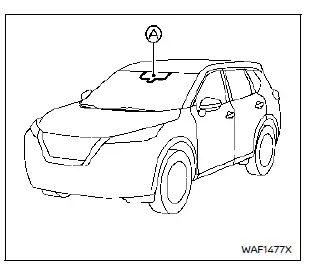
The forward camera for the Nissan Rogue I-LI system is mounted above the inside mirror. For reliable system operation:
- Keep the windshield clean and free of dirt or condensation.
- Avoid placing stickers or accessories near the camera area.
- Do not place reflective items on the dashboard, as bright reflections may interfere with camera detection.
- Avoid applying force, touching, or removing screws on the camera assembly. If damage occurs, have it inspected by a Nissan dealer.
Other materials:
Precaution. Precautions
Precaution for Supplemental Restraint System (SRS) "AIR BAG" and "SEAT BELT PRE-TENSIONER"
The Supplemental Restraint System such as “AIR BAG� and “SEAT BELT
PRE-TENSIONER�, used along with a front seat belt, helps to reduce the
risk or severity of injury to the driver and front passeng ...
B2721-81 Center Sensor [rl]
DTC Description
DTC DETECTION LOGIC DTC CONSULT screen items (Trouble diagnosis content) DTC detection condition
B2721-81
CENTER SENSOR [RL]
Center sensor [RL]
Diagnosis condition
When ignition switch is ON
Signal (terminal)
Rear sonar sensor signal LH inner
Threshold
...
P2617 Crankshaft Position Sensor
DTC Description
DTC DETECTION LOGIC DTC
CONSULT screen terms
(Trouble diagnosis content)
DTC detection condition
P2617
00
Crankshaft position signal
(Crankshaft position signal output circuit/open)
A
Diagnosis condition
Engine running at idle
Signal (terminal)
...