
Nissan Rogue (T33) 2021-Present Owner’s Manual & User Guide: Lane Departure Warning (LDW)
Basic information
WARNING
Incorrect use of the LDW system may lead to serious injury. This feature only warns the driver of unintended lane departure; it does not steer the Nissan Rogue or prevent loss of control. The driver must always remain attentive.
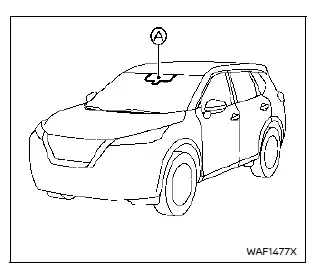
The LDW system activates when driving at approximately 37 MPH (60 km/h) or above, provided lane markings are visible. A camera located above the inside mirror monitors the road.
If the Nissan Rogue begins drifting out of its lane, the system alerts the driver with a vibration in the steering wheel and a visual indicator.
LDW system operation
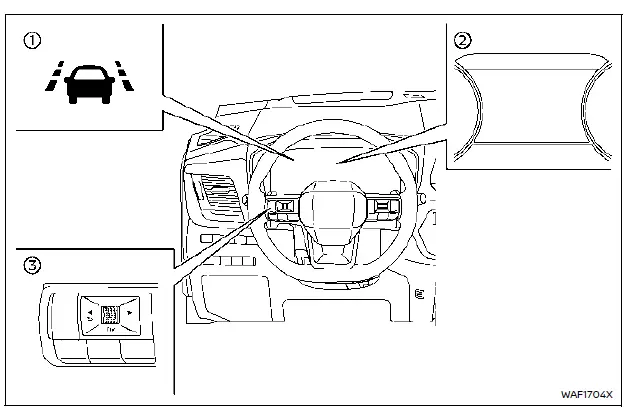
- LDW indicator in the vehicle information display
- Vehicle information display
- Steering-wheel-mounted controls (left side)
When lane departure is detected, the LDW indicator flashes and the steering wheel vibrates. The alert stops once the vehicle returns to the lane. Vibration strength can be adjusted in the settings menu.
How to enable/disable the LDW system
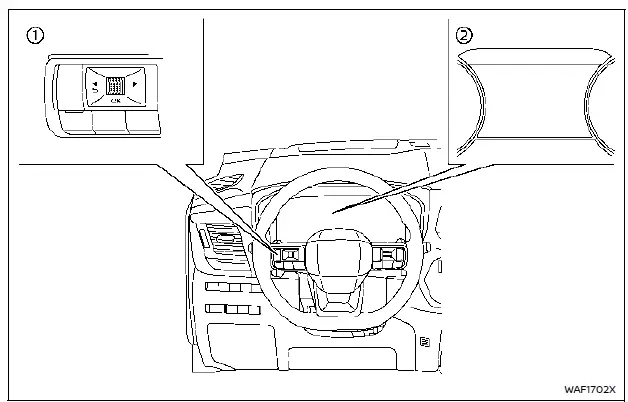
- Press the
 button until “Settings� appears, then press the scroll dial.
 - Select “Driver Assistance,� then select “Lane Assist.�
- Select “Warning� and confirm to enable or disable LDW.
NOTE:
If disabled, the LDW system remains off the next time the Nissan Rogue is started.
LDW system limitations
WARNING
Not all conditions allow the LDW system to function properly. Misuse can lead to an unsafe driving situation.
- The system will not work below 37 MPH (60 km/h) or when lane markings are not visible.
- Do not rely on LDW under conditions such as heavy rain, snow, ice, narrow roads, temporary lanes, damaged markings, poor tire conditions, towing, or when non-original steering/suspension components are installed.
- The LDW system may operate incorrectly when lane markings are faded, irregular, covered, or when strong shadows or reflections appear.
- Steering wheel vibration feedback may vary depending on road conditions.
System temporarily unavailable
Condition A:
If the Nissan Rogue is parked in direct sunlight and cabin temperatures exceed about 104ºF (40ºC), the LDW system may disable itself. The message “Unavailable Camera Temperature High� will appear.
Once the temperature decreases, LDW will resume automatically.
Condition B:
The LDW warning function in the Nissan Rogue will not operate under the following conditions:
- When the turn signal is activated and the vehicle changes lanes in the direction of the signal. The LDW system becomes active again approximately 2 seconds after the turn signal is turned off.
- When vehicle speed drops below approximately 37 MPH (60 km/h).
Action to take:
Once these conditions no longer apply and all required operating conditions are met, the LDW system will automatically resume operation.
System malfunction
If a malfunction occurs, the LDW system will automatically turn off and the message “Malfunction See Owner’s Manual� will appear in the vehicle information display.
If this warning appears, safely pull over, stop the vehicle, turn the ignition OFF, then restart the engine. If the message continues to appear, the system should be inspected by a Nissan dealer.
System maintenance
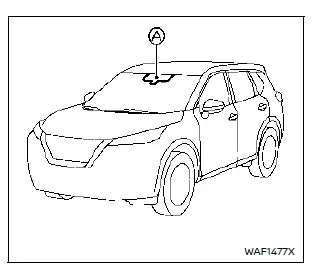
The lane camera unit A for the LDW system is mounted above the inside mirror of the Nissan Rogue.
To maintain correct operation and avoid malfunctions, follow these guidelines:
- Keep the windshield clean at all times.
- Do not apply stickers or mount accessories near the camera area.
- Avoid placing reflective objects such as white paper or mirrors on the dashboard, as reflected sunlight may interfere with lane marker detection.
- Do not strike or damage the camera area. Avoid touching the lens or tampering with screws. If the camera is damaged in an accident, consult a Nissan dealer.
Other materials:
Symptom Diagnosis. Front Passenger Side Power Window Does Not Operate
When Both Power Window Main Switch and Front Power Window Switch (passenger Side) Are Operated
Diagnosis Procedure
CHECK FRONT POWER WINDOW SWITCH (PASSENGER SIDE) POWER SUPPLY AND GROUND CIRCUIT
Check front power window switch (passenger side) power supply and ground circuit.
Refer to Diagnosis ...
Pns Relay (power Network Separate Relay)
B23c0-04 Power Network Separate Relay
DTC Description
DTC DETECTION LOGIC DTC CONSULT screen terms DTC detection condition
B23C0
04
Power network separate relay
Diagnosis condition
When engine is running
Signal (terminal)
—
Threshold
Power network separate rela ...
Rear Automatic Braking. Symptom Diagnosis
Rab System Symptoms
Symptom Table
CAUTION:
Perform the self-diagnosis with CONSULT before the symptom diagnosis. Perform the trouble diagnosis if any DTC is detected.
Symptom Confirmation item Reference page
RAB system display does not display
Combination meter
On Board Diagnosi ...