
Nissan Rogue (T33) 2021-Present Owner’s Manual & User Guide: Traffic Sign Recognition (TSR)
Basic information
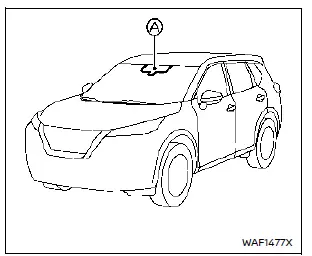
The Traffic Sign Recognition system in the Nissan Rogue provides real-time information on the most recently detected speed limit. Using the front multi-sensing camera mounted near the windshield, the system reads road signs and shows them on the vehicle information display. On models equipped with a map locator system, TSR combines camera detection with map data to improve accuracy. Information is also shown in the Head-Up Display (HUD) where available.
WARNING
The TSR system supports the driver but does not replace attention to road conditions. It cannot prevent accidents and does not override local traffic laws. The driver must remain alert and responsible for safe operation of the Nissan Rogue at all times.
System operation
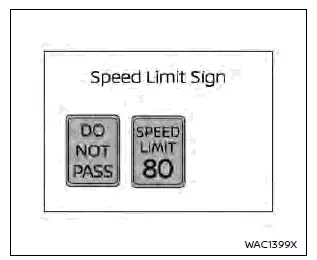
The system can display the following types of road signs:
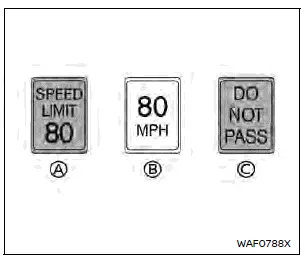
- Most recently detected speed limit
- Reduce-speed alert
- No-passing zone
CAUTION
- The TSR system assists safe driving but does not replace observing posted road signs.
- The TSR system may not work correctly under certain conditions:
- The road sign is unclear due to weather, damage or fading.
- Rain, snow or dirt obstructs the windshield near the camera.
- Dirty or poorly aimed headlights reduce visibility.
- Strong sunlight strikes the camera directly (sunrise/sunset).
- Sudden brightness changes (tunnels, bridges).
- Areas not covered by the map locator system.
- Navigation data out of date or incorrect.
- Following trucks/buses with speed-limit stickers.
- The TSR system may show incorrect or non-applicable signs, such as speed limits for trucks, advisory signs, or signs in different units near borders.
How to enable/disable the TSR system

- Steering-wheel-mounted controls (left side)
- Vehicle information display
To turn the TSR system on or off in the Nissan Rogue, follow these steps:
- Press the
 button until “Settings� appears in the vehicle information display, then press the scroll dial. Use the dial to select “Driver Assistance� and press it again.
 -
Type A models: Select “Traffic Sign Assist,� then choose “Speed Limit Sign� or “Speed Limit Warning� and toggle the setting on or off.
Type B models: Select “Speed Limit Sign� and toggle the setting on or off.
System temporarily unavailable
If the Nissan Rogue is parked in direct sunlight and the cabin temperature exceeds approximately 104ºF (40ºC), the TSR system may temporarily turn off. A warning message saying “Unavailable Camera Temperature High� will be shown.
Action to take:
The TSR system will automatically resume once the cabin temperature is reduced.
System malfunction
If the TSR system detects a malfunction, it will disable itself and display “Malfunction See Owner’s Manual.�
Action to take:
Safely stop the vehicle, switch off the engine, then restart it. If the message remains, the system should be inspected by a Nissan dealer.
System maintenance
The TSR system relies on the same multi-sensing front camera used for the Lane Departure Warning system, located near the inside mirror of the Nissan Rogue.
Other materials:
U0284 Active Grille Shutter
DTC Description
DTC DETECTION LOGICWhen ECM cannot receive the engine communication signal from active grille shutter. DTC No.
CONSULT screen terms
(Trouble diagnosis content) DTC detecting condition
U0284
00
LOST COMM (A/GRLL SHTTR MDL A)
(Lost communication with active grille air s ...
Dtc/circuit Diagnosis. Power Supply and Ground Circuit
Diagnosis Procedure (Without ProPILOT ASSIST 2.1)
CHECK ACCESSORY POWER SUPPLY FOR POWER STEERING CONTROL MODULE
Pull the parking brake switch.
NOTE:
Check to make sure that the parking brake switch indicator is turned ON.
Ignition switch OFF.
Get out of the Nissan Ariya vehicle ...
Comment garer le véhicule à l'aide des lignes de parcours prédictives
Informations de base
AVERTISSEMENT
En cas de remplacement des pneus par une taille différente de celle d’origine, les lignes de parcours prédictives du Nissan Rogue peuvent ne plus s’afficher correctement, ce qui compromet leur précision.
Sur route glissante ou enneigée, l’adhérenc ...