
Nissan Rogue (T33) 2021-Present Owner’s Manual & User Guide: Camera, radar and sonar locations
The Nissan Rogue uses multiple driver-assistance components placed around the vehicle, including cameras, radar sensors, and sonar sensors. These elements support features such as collision warnings, lane assistance, parking aids, and ProPILOT Assist. For cleaning and service instructions, refer to the “System maintenance� sections associated with each system.
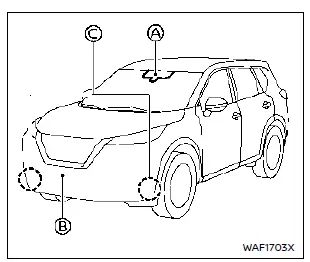
Vehicle front
- Front camera unit
- Automatic Emergency Braking (AEB) with Pedestrian Detection
- Lane Departure Warning (LDW)
- Intelligent Lane Intervention (I-LI)
- Intelligent Blind Spot Intervention (I-BSI)
- Steering Assist
- High Beam Assist
- Traffic Sign Recognition (TSR)
- Front radar sensor
- Automatic Emergency Braking (AEB) with Pedestrian Detection
- Intelligent Forward Collision Warning (I-FCW)
- Intelligent Cruise Control (ICC)
- Side radar sensor
- ProPILOT Assist 2.1

Vehicle rear
- Side radar sensor
- Blind Spot Warning (BSW)
- Intelligent Blind Spot Intervention (I-BSI)
- Rear Cross Traffic Alert (RCTA)
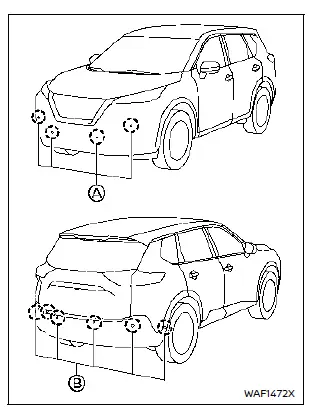
Sonar
- Front sonar sensors (if equipped)
- Sonar system
- ProPILOT Assist
- Rear and side sonar sensors (if equipped)
- Rear Automatic Braking (RAB)
- Sonar system
- Rear Sonar System (RSS)
- ProPILOT Assist
Other materials:
Drivetrain Can Communication 2 Circuit
Diagnosis Procedure
CHECK NETWORK DIAGNOSIS
Check the "Network diagnosis" results from CONSULT to see that the diagnostic CAN communication circuit have no malfunction.
Are the diagnostic CAN communication circuit normal?
YES>>
GO TO 2.
NO>>
Check and repair diagnostic CAN commu ...
Diagnosis System (adas Control Unit 2)
Without Propilot Assist 2.1
Diagnosis Description
APPLICATION ITEMSCONSULT performs the following functions via CAN communication using ADAS control unit 2. Diagnosis mode CGW Status Description
Restricted Mode Diag Test Mode Open Mode
Self Diagnostic Result
Display
Display
Di ...
Fonctionnement du système MOD
(modèles sans vue en 3D)
Le système de détection d’objets en mouvement (MOD) du Nissan Rogue s’active automatiquement dans les conditions suivantes, afin d’assister le conducteur lors des manœuvres à basse vitesse :
Lorsque le levier de changement de vitesses est placé sur la position R (marche arrière).
...