
Nissan Rogue (T33) 2021-Present Owner’s Manual & User Guide: Blind Spot Warning (BSW)
Basic information
WARNING
Failure to follow the warnings and instructions for proper use of the Blind Spot Warning system could result in serious injury or death.
- The BSW system is not a substitute for safe driving practices. It cannot prevent collisions with nearby vehicles or objects. Always check your mirrors and look over your shoulder before changing lanes.
- Never rely solely on the Blind Spot Warning system when maneuvering the Nissan Rogue.
The Blind Spot Warning feature on the Nissan Rogue assists the driver by detecting vehicles in adjacent lanes and notifying the driver before lane changes.
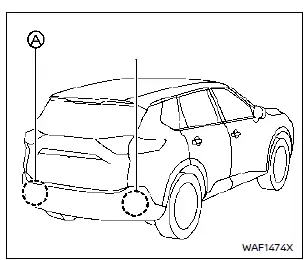
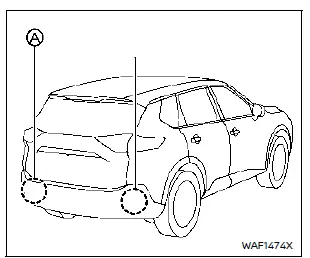
The system uses rear-mounted radar sensors A located near the bumper to scan both sides of the vehicle.
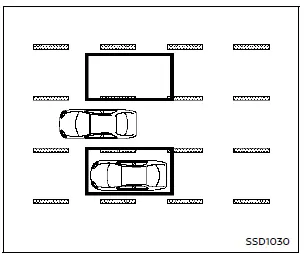
Detection zone
The detection area begins from the outside edge of the side mirrors and extends roughly 10 ft (3 m) behind and 10 ft (3 m) to each side. When another vehicle approaches quickly from behind, the monitored area expands automatically.
BSW system operation
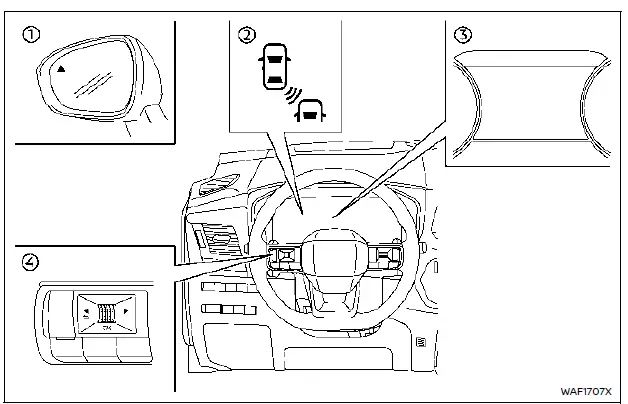
- Side indicator light
- BSW indicator on the display
- Vehicle information display
- Steering-wheel-mounted controls
The BSW system becomes active above approximately 20 MPH (32 km/h). When a vehicle enters the detection zone, the side indicator light turns on.
If the driver activates the turn signal, the system warns with two chimes and flashes both the side indicator light and the BSW display indicator. Flashing continues until the vehicle exits the detection zone.
The side indicator briefly lights up at ignition ON as a system check. Its brightness adjusts automatically depending on ambient lighting conditions.
How to enable/disable the BSW system
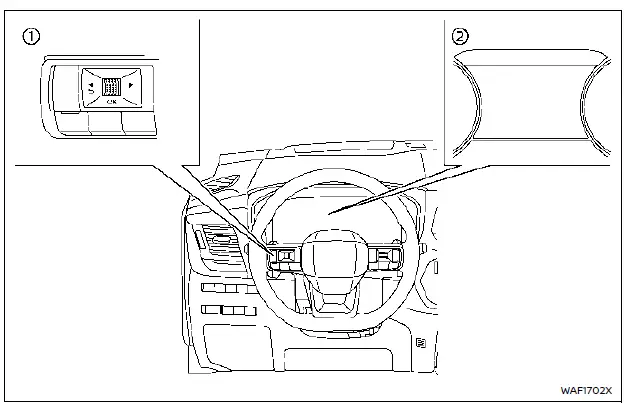
- Steering-wheel controls
- Vehicle information display
Steps:
1. Press the
 button until “Settings� appears, then press the scroll dial. Select “Driver Assistance� and confirm.
2. Select “Blind Spot Assist� and press the scroll dial.
3. Choose “Warning� and confirm to toggle the system on or off.
NOTE: Settings remain saved even after the engine is restarted.
BSW system limitations
WARNING
Understanding the limitations of the Blind Spot Warning system is essential to avoid accidents or serious injury.
- The Nissan Rogue BSW system cannot detect all vehicles under all conditions.
- The radar sensors may not detect certain objects or vehicles, including:
- Pedestrians, bicycles, or animals.
- Motorcycles, very low vehicles, or tall vehicles.
- Oncoming vehicles.
- Vehicles remaining in the detection zone when accelerating from a stop.
- Vehicles merging at similar speeds.
- Cars approaching rapidly from behind.
- Vehicles you pass quickly.
- Vehicles passing through the zone briefly.
- Multiple closely grouped vehicles.
- Detection accuracy depends on lane width. In wide lanes the system may miss vehicles; in narrow lanes it may detect vehicles two lanes away.
- Stationary objects (walls, rails, foliage, parked cars) may occasionally be detected — this is normal.
- Detection may be reduced by:
- Bad weather
- Road spray
- Dirt, ice, or frost on the sensors
- Avoid stickers, accessories, or added paint near the sensors — they may interfere with radar accuracy.
- Loud cabin noise (music, wind, open window) may prevent the BSW chime from being heard.
BSW driving situations
Basic information
Indicator on 
Indicator off 
Indicator flashing 
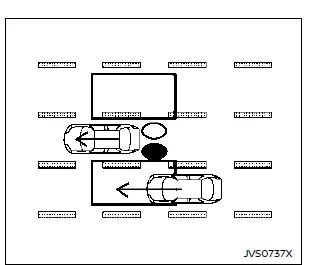
Illustration 1 — Approaching from behind
Another vehicle approaching from behind
Illustration 1: The side indicator light illuminates when a vehicle enters the detection zone from behind in an adjacent lane.
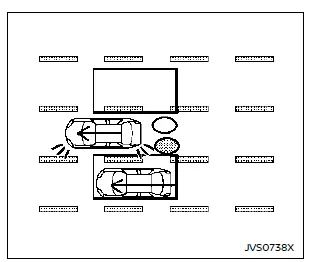
Illustration 2 — Approaching from behind
Illustration 2: If the driver activates the turn signal while a vehicle is in the detection zone, the system chimes twice and both the side indicator and BSW indicator flash.
NOTE:
- Vehicles approaching very quickly from behind may not always be detected.
- If the turn signal is activated before a vehicle enters the detection zone, indicators will flash but no chime will sound once the vehicle is detected.
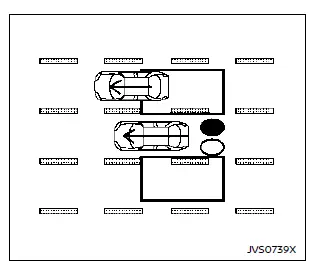
Illustration 3 — Overtaking another vehicle
Overtaking another vehicle
Illustration 3: The side indicator light turns on if you overtake a vehicle and it remains in the detection zone for roughly 3 seconds.
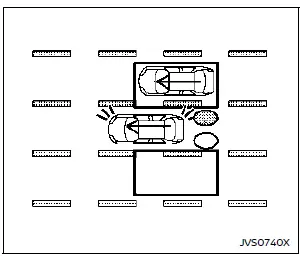
Illustration 4 — Overtaking another vehicle
Illustration 4: If the turn signal is activated while a vehicle is in the detection zone, the system chimes twice and the indicators flash.
NOTE:
- When passing multiple vehicles in quick succession, those following closely may not be detected.
- Slower vehicles may not be detected if overtaken very rapidly.
- If the turn signal is activated before a vehicle enters the detection zone, indicators will flash without a chime.
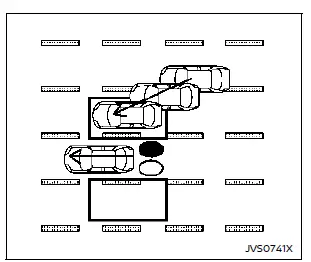
Illustration 5 — Entering from the side
Entering from the side
Illustration 5: The side indicator illuminates if a vehicle enters the detection area from either side of your Nissan Rogue.
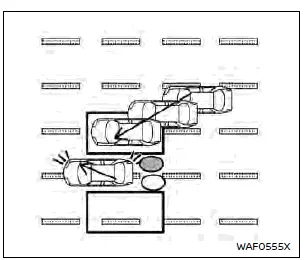
Illustration 6 — Entering from the side
Illustration 6: If the turn signal is activated while a vehicle is in the detection area, the system chimes twice and indicators flash.
NOTE:
- Vehicles moving at similar speeds may not always be detected when entering the zone.
- If the turn signal is activated before the vehicle enters the zone, only the flashing will occur, without a chime.
System temporarily unavailable
If radar blockage is detected, the Blind Spot Warning system turns off automatically, a chime sounds, and the “Unavailable Side Radar Obstruction� message appears on the display.
The system remains unavailable until the obstruction clears.
Radar blockage may be caused by water spray, mist, fog, or buildup such as ice, frost, or dirt on the sensors.
NOTE:
If BSW is disabled, Intelligent Blind Spot Intervention (I-BSI) and Rear Cross Traffic Alert (RCTA) will also stop operating.
Action to take: When the blockage is gone, the system will resume automatically.
System malfunction
If a malfunction occurs, the BSW system turns off, its indicator lights up, and “Malfunction See Owner’s Manual� appears on the display.
When BSW stops functioning, the I-BSI and RCTA systems also stop.
Action to take: Stop safely, turn the engine off, restart the vehicle. If the message persists, have the system inspected by a NISSAN dealer.
System maintenance
Basic information
The two radar sensors A for the Blind Spot Warning system are installed near the rear bumper of the Nissan Rogue.
Keep the area around the sensors clean to ensure proper system performance.
The radar sensors may be temporarily blocked by ambient conditions such as splashing water, heavy mist, or fog.
Blockage can also occur if ice, frost, or dirt accumulates in front of the sensors.
Inspect the rear bumper area regularly and remove anything that may obstruct the radar sensors.
Do not apply stickers (including transparent films), install accessories, or add paint near the radar sensor zones.
Avoid striking or damaging the area around the sensors, as this may affect system operation.
If the bumper or sensor area is damaged due to a collision, have the system inspected by a NISSAN dealer.
Precautions when repairing the bumper
Because the radar sensors are installed inside the bumper, use caution when performing repairs in this area.
The radar unit works by sending signals outward and measuring the reflections, so materials or repairs in front of the sensor could interfere with its accuracy.
WARNING
Improper bumper repairs—such as using incompatible filler materials, applying thick paint layers, or altering the structure—can weaken the radar signal or block it entirely. This may cause the sensor to detect objects incorrectly, increasing the risk of an accident and resulting in serious injury.
If bumper repair is needed, it is recommended to have the work performed at a certified NISSAN service center.
Radio frequency statement
NOTE:
FCC Notice (USA):
This device complies with Part 15 of the FCC Rules. Operation is subject to the following two conditions: (1) This device may not cause harmful interference; and (2) This device must accept any interference received, including interference that may cause undesired operation.
CAUTION TO USERS:
Changes or modifications not expressly approved by the party responsible for compliance could void the user’s authority to operate the equipment.
For Canada:
This device contains licence-exempt transmitter(s)/receiver(s) complying with Innovation, Science and Economic Development Canada RSS standards. Operation is subject to the following two conditions: (1) this device may not cause interference; and (2) this device must accept any interference, including interference that may cause undesired operation.
Other materials:
P00b3 Engine Coolant Temperature Sensor 2
DTC Description
DTC DETECTION LOGIC DTC
CONSULT screen terms
(Trouble diagnosis content)
DTC detection condition
P00B3
00
RADIATOR COOLANT TEMP SEN
(Radiator coolant temperature sensor circuit low)
Diagnosis condition
—
Signal (terminal)
—
Threshold
E ...
Removal and Installation. Luggage Trim
Exploded View
With ProPILOT Assist 2.1 1.
Tonneau cover assembly
2.
Luggage side upper finisher LH
3.
Luggage side lower finisher LH
4.
Luggage hook
5.
Seatback release lever cap (if so equipped)
6.
Luggage floor carpet
7.
Luggage rear plate
8.
Lugga ...
P1148 Closed Loop Control
DTC Description
DTC DETECTION LOGICNOTE:
DTC P1148 is displayed with DTC for A/F sensor 1.
When the DTC is detected, perform the trouble diagnosis of DTC corresponding to A/F sensor 1.
DTC
CONSULT screen terms
(Trouble diagnosis content)
DTC detection condition
P1148
00
CLOS ...