
Nissan Rogue (T33) 2021-Present Owner’s Manual & User Guide: Intelligent Key operating range (models with request switch)
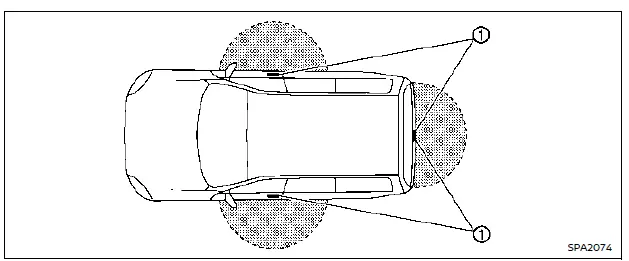
The Intelligent Key functions on the Nissan Rogue operate only when the key is positioned within the designated range from the request switch 1.
When the Intelligent Key battery is low or when strong radio interference is present near the vehicle, the effective operating range may decrease, causing the Nissan Rogue Intelligent Key system to function improperly.
The normal operating range is approximately 31.50 in (80 cm) from any request switch 1.
If the Intelligent Key is held too close to the door glass, door handle, or rear bumper, the request switches may not respond correctly.
When the Intelligent Key is within detection range, even someone who is not carrying the key can press the request switch to lock or unlock the doors or liftgate of the Nissan Rogue.
Door locks/unlocks precaution (models with request switch)
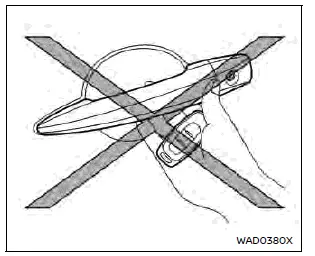
- Avoid pressing the request switch while holding the Nissan Rogue Intelligent Key in the same hand, as its proximity to the handle may prevent the system from detecting that the key is outside the vehicle.
- After locking using the request switch, always check that the doors of the Nissan Rogue are securely locked.
- To avoid accidentally leaving the Intelligent Key inside the Nissan Rogue, ensure you carry the key with you before locking the doors.
- Do not pull the door handle before pressing the request switch to lock or unlock the vehicle.
Other materials:
Fonction de verrouillage par l'éloignement
Lorsque vous vous éloignez du véhicule Ã
l'aide de la clé intelligente, le véhicule est
automatiquement verrouillé par la fonction
de verrouillage par éloignement (le
périmètre de fonctionnement est d'environ
2 m (7 pi) ). Cette fonction est désactivée
par le réglage par défaut. V ...
Fonctionnement du système RAB
Exemple
Témoin d'avertissement du système RAB (sur l'écran d'informations du véhicule)
Témoin d'avertissement de désactivation du système RAB (sur le tableau de bord)
Commandes au volant (côté gauche)
Écran d'informations du véhicule
Centre d'affichage (si le véhicule e ...
P0122 Tp Sensor
DTC Description
DTC DETECTION LOGIC DTC
CONSULT screen terms
(Trouble diagnosis content)
DTC detection condition
P0122
00
TP SEN 2/CIRC-B1
(Throttle/Pedal position sensor/switch “A� circuit low)
Diagnosis condition
Engine running at idle
Signal (terminal)
TP s ...