
Nissan Rogue (T33) 2021-Present Owner’s Manual & User Guide: Intelligent Key battery replacement
WARNING
- Do not ingest the battery — Chemical Burn Hazard. This product contains a coin/button cell battery. If swallowed, it can cause severe internal burns within hours and may lead to death.
- Keep both new and used batteries away from children. If the battery compartment of your Nissan Rogue key does not close securely, stop using it and store it safely.
- If you suspect a battery was swallowed or inserted into any part of the body, seek immediate medical attention.
- There is a risk of explosion if the battery is replaced incorrectly. Replace only with the same or an equivalent type to avoid injury.
CAUTION
- Be careful to prevent children from swallowing the removed battery or small components.
- Improper disposal of batteries can harm the environment. Follow local rules when discarding batteries.
- Avoid getting dust or oil on the battery or Intelligent Key components when replacing it.
- Do not expose the battery to extreme heat, including sunlight or fire.
- Do not crush, puncture, or cut the battery.
- Avoid exposing the battery to extremely low air pressure, such as at high altitudes.
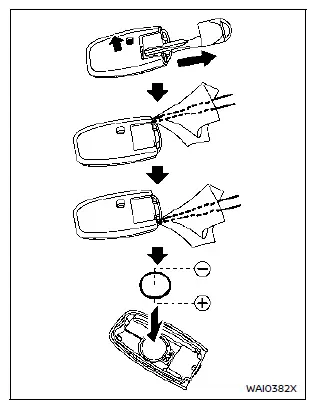
Replace the battery in the Intelligent Key of your Nissan Rogue using the following steps:
1. Remove the mechanical key from the Intelligent Key.
2. Insert a small screwdriver into the side slits and gently twist to separate the upper and lower halves. Use a cloth to protect the casing from scratches.
3. Install a new battery.
Recommended battery:
CR2032 or equivalent
- Do not touch the internal circuit or terminals to avoid malfunction.
- Hold the battery by the edges — touching the contact surfaces will significantly reduce its capacity.
- Ensure the “+� side faces downward when installing the battery.
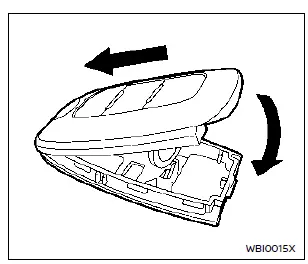
4. Align the tabs of both case halves and press them together until they snap securely.
5. Press the buttons on the key to confirm proper operation.
If you require help with the replacement procedure, it is recommended to visit a NISSAN dealer.
NOTE:
FCC Notice (USA):
This device complies with Part 15 of the FCC Rules. Operation is subject to two conditions: (1) the device may not cause harmful interference, and (2) it must accept any interference received, including interference that may cause undesired operation.
NOTE:
Changes or modifications not expressly approved by the responsible party could void the user’s authority to operate the device.
For Canada:
This device contains licence-exempt transmitter(s)/receiver(s) compliant with Innovation, Science and Economic Development Canada’s RSS(s). Operation is subject to the following conditions: (1) the device may not cause interference, and (2) it must accept any interference, including interference that may cause undesired operation.
Other materials:
B2721-81 Center Sensor [rl]
DTC Description
DTC DETECTION LOGIC DTC CONSULT screen items (Trouble diagnosis content) DTC detection condition
B2721-81
CENTER SENSOR [RL]
Center sensor [RL]
Diagnosis condition
When ignition switch is ON
Signal (terminal)
Rear sonar sensor signal LH inner
Threshold
...
Ecu Diagnosis Information. Moonroof Motor Assembly
Reference Value
TERMINAL LAYOUTPHYSICAL VALUES
Terminal No.
(Wire color) Description Condition
Value
(Approx.)
+ – Signal name Input/Output
1
(B)
Ground
Ground
—
—
0 V
4
(W)
Ground
Moonroof Tilt UP signal
Input
Moonroof switch
Operate
( ...
Kr15ddt. Symptom Diagnosis
Engine Control System
Symptom Table
SYSTEM — BASIC ENGINE CONTROL SYSTEM SYMPTOM Reference page
HARD/NO START/RESTART (EXCP. HA) ENGINE STALL HESITATION/SURGING/FLAT SPOT SPARK KNOCK/DETONATION LACK OF POWER/POOR ACCELERATION HIGH IDLE/LOW IDLE ROUGH IDLE/HUNTING IDLING VIBRATIO ...