
Nissan Rogue (T33) 2021-Present Owner’s Manual & User Guide: Lights
Basic information
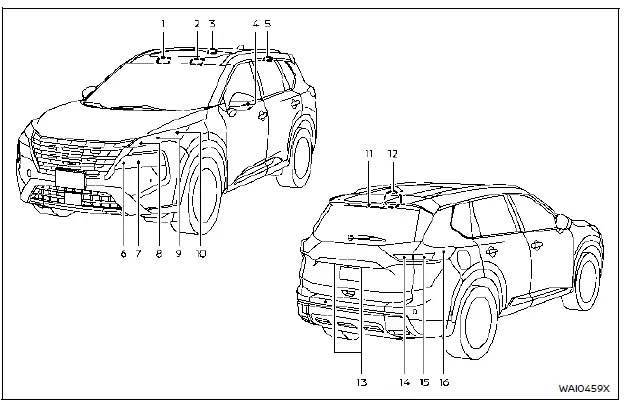
- Front map light
- Vanity mirror light (if so equipped)
- Room light (if so equipped)
- Side turn signal light (if so equipped)
- Rear personal light (if so equipped)
- Headlight (high-beam)
- Headlight (low-beam)
- Front parking light/Daytime running light/Front turn signal light (LED type)
- Front turn signal light (Bulb type)
- Front side marker light
- High-mounted stop light
- Cargo light
- License plate light
- Back-up light/Tail light
- Rear turn signal light/Stop light/Tail light
- Rear side marker light
Headlights
Basic information
During rain or after a car wash, you may notice temporary fog forming inside the exterior light lenses on your Nissan Rogue. This is caused by temperature differences and is considered normal.
If water droplets accumulate inside the lens, have the system inspected at a NISSAN dealer.
Replacing
If an LED headlight on your Nissan Rogue needs replacement, dealer servicing is recommended.
Exterior and interior lights
Basic information
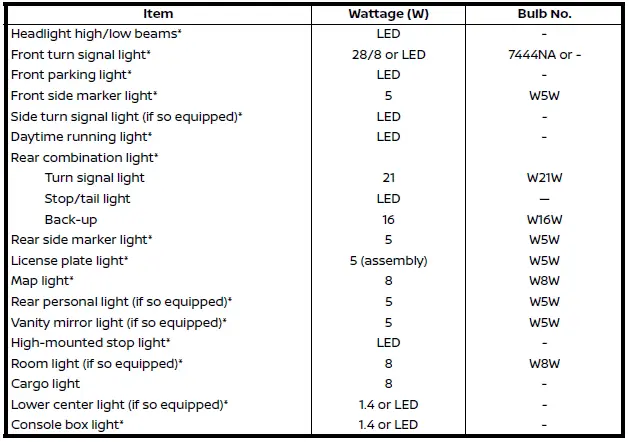
* Replacement of certain bulbs should be performed by a NISSAN dealer.
NOTE: For updated part information, check with the Parts Department at a NISSAN dealer.
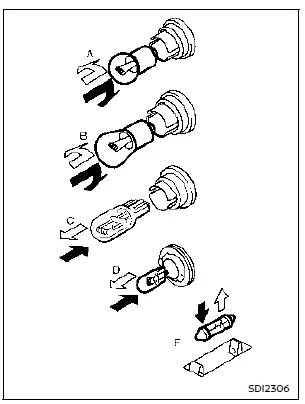
Replacement procedures
 : REMOVE
 : INSTALL
Most bulbs in the Nissan Rogue follow type A, B, C, D or E. Remove the lens or cover before replacing any bulb.
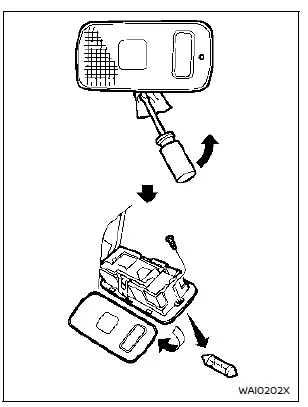
Cargo light
Other materials:
Dtc/circuit Diagnosis. U2154-87 Can Comm Err (miu)
DTC Description
DESCRIPTIONCAN (Controller Area Network) is a serial
communication line for real time applications. It is an on-Nissan Ariya
vehicle multiplex communication line with high data communication speed
and excellent error detection ability. Modern Nissan Ariya vehicle is
equipped ...
C1f36-55 Configuration
Without Propilot Assist 2.1
DTC Description
DTC DETECTION LOGIC DTC
CONSULT screen terms
(Trouble diagnosis content) DTC detection condition
C1F36
55
CONFIG UNFINISHED
(Configuration unfinished)
Diagnosis condition
When engine is running
When AEB system is ...
Removal and Installation. Passenger Air Bag Module
Exploded View
Instrument panel assembly
Steering member
Passenger air bag module
Screw
Bolt
: Always replace after every disassembly.
: N·m (kg-m, ft-lb)
, : Indicates that the part is connected at points with same symbol in actual Nissan Ariy ...