
Nissan Rogue (T33) 2021-Present Owner’s Manual & User Guide: Intelligent Driver Alertness (I-DA)
Basic information
WARNING
Failure to follow the warnings and instructions for proper use of the I-DA system could result in serious injury or death.
- The I-DA system is only a warning
to inform the driver of a potential
lack of driver attention or drowsiness.
It will not steer the vehicle or prevent loss of control.
- The I-DA system does not detect and provide an alert of the driver's lack of attention or fatigue in every situation.
- It is the driver's responsibility to:
- Stay alert.
- Drive safely.
- Keep the vehicle in the traveling lane.
- Be in control of the vehicle at all times.
- Avoid driving when tired.
- Avoid distractions (texting, etc.).
The I-DA system in the Nissan Rogue helps alert the driver if the system detects a lack of attention or signs of driving fatigue.
The system in your Nissan Rogue monitors driving style and steering behavior over a period of time, and it detects deviations from the normal pattern. If the system determines that driver attention is decreasing over time, audible and visual alerts are provided to suggest that the driver take a break.
I-DA system operation
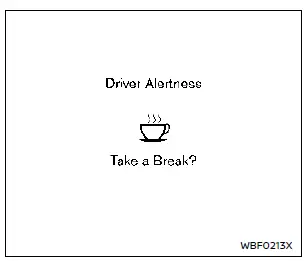
Example
If the system detects driver fatigue or that driver attention is decreasing, the message "Take a Break?" appears in the Nissan Rogue vehicle information display and a chime sounds when the vehicle is driven at speeds above 37 MPH (60 km/h).
The system continuously monitors driver attention and may provide multiple warnings during a single trip.
The system resets and begins reassessing driving style and steering behavior when the ignition switch is turned from the ON position to OFF and then back to ON.
The system will not operate when the Steering Assist system (if so equipped) is activated.
How to enable/disable the I-DA system
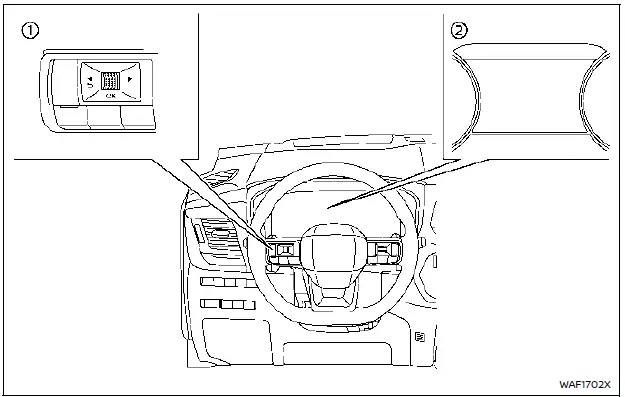
- Steering-wheel-mounted control (left side) Vehicle information display
Perform the
 following steps to enable or
disable the I-DA system on your Nissan Rogue.
following steps to enable or
disable the I-DA system on your Nissan Rogue.
1. Push the button until "Settings" appears in the vehicle information display and push the scroll dial. Use the scroll dial to select "Driver Assistance," then push the scroll dial.
2. Type A (if so equipped): Select "Driver Monitor" and push the scroll dial. Then select "Driver Alertness" and push the scroll dial to turn the system on or off.
Type B (if so equipped): Select "Driver Alertness" and push the scroll dial to turn the system on or off.
NOTE:
The I-DA system will automatically be enabled every time the Nissan Rogue engine is restarted.
I-DA system limitations
WARNING
Below are the I-DA system limitations. Failing to operate the Nissan Rogue in line with these limitations may lead to serious injury or death.
- The I-DA system may not function
correctly or may fail to provide an
alert under the following conditions:
- Poor road conditions such as an uneven road surface or potholes.
- Strong side winds.
- A sporty driving style with higher cornering speeds or rapid acceleration.
- Frequent lane changes or variations in vehicle speed.
- The I-DA system will not provide
an alert under the following conditions:
- Vehicle speeds below 37 MPH (60 km/h).
- Short lapses in attention.
- Instant distractions, such as dropping an object.
System malfunction
If the I-DA system malfunctions, the "Malfunction See Owner's Manual" warning message will be displayed in the Nissan Rogue information screen and the function will automatically turn off.
Action to take
Stop the vehicle in a safe place, shift the vehicle into P (Park), turn the engine off, and restart the Nissan Rogue. If the warning message continues to appear, have the system inspected. It is recommended to visit a NISSAN dealer for service.
Other materials:
P0446 Evap Canister Vent Control Valve
DTC Description
DTC DETECTION LOGIC DTC
CONSULT screen terms
(Trouble diagnosis content)
DTC detection condition
P0446
00
VENT CONTROL VALVE
(EVAP System Vent Control Circuit)
Diagnosis condition
Engine running at idle
Signal (terminal)
EVAP canister vent control ...
P0087 Frp Control System
DTC Description
DTC DETECTION LOGICNOTE:
DTC P0087 may be displayed when running out of gas.
DTC
CONSULT screen terms
(Trouble diagnosis content)
DTC detection condition
P0087
00
LOW FUEL PRES
(Fuel rail/system pressure - too low)
Diagnosis condition
Engine running at ...
Removal and Installation. Seat Memory Switch
Removal and Installation
REMOVALRemove front door finisher LH. Refer to Removal and Installation.
Disengage the fixing pawls using a remover tool (A) and then remove seat memory switch .
: Pawl
INSTALLATIONInstall in the reverse order of removal. ...