
Nissan Rogue (T33) 2021-Present Owner’s Manual & User Guide: Rear Automatic Braking (RAB)
Basic information
WARNING
Failure to observe the warnings and instructions for proper RAB system use could result in serious injury or death.
- The RAB system is only a supplemental
aid for the driver. It does not replace
proper driving techniques.
Always use your side and rear mirrors, and look in the direction you intend to move before and while reversing. Never rely solely on the RAB system. The driver must remain alert, exercise safe driving, and maintain control of the Nissan Rogue at all times.
- The RAB system has functional limitations and may not work effectively in all situations.
The RAB system assists the driver when the vehicle is backing up and approaching objects directly behind the Nissan Rogue.
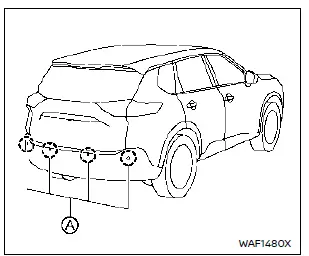
Models with 4 sonar sensors
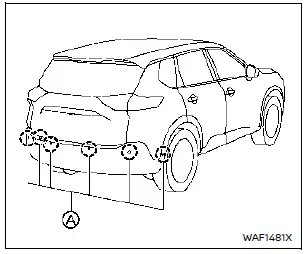
Models with 6 sonar sensors
The RAB system detects obstacles behind the vehicle using sonar sensors A mounted on the rear bumper.
NOTE:
You can temporarily disable the sonar function and the RAB system in the Nissan Rogue if needed.
RAB system operation
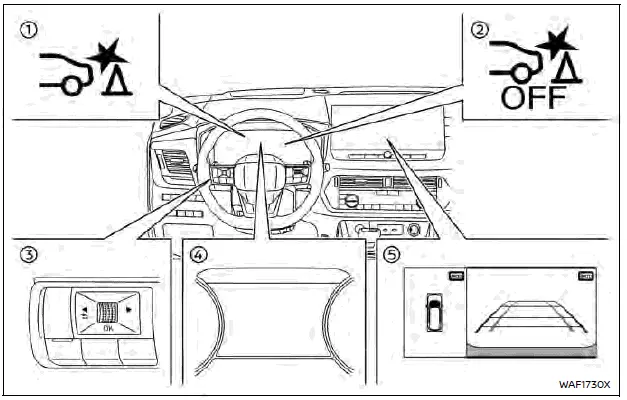
Example
- RAB system warning indicator (vehicle information display)
- RAB system OFF warning light (meter panel)
- Steering-wheel-mounted controls (left side)
- Vehicle information display
- Center display (if so equipped)
When the shift lever is in R (Reverse) and vehicle speed is below approximately 9 MPH (15 km/h), the RAB system becomes active.
If a collision risk with an obstacle is detected while the Nissan Rogue is backing up, the RAB warning indicator will flash on the information display, and a red frame will appear on the center display (on models equipped with the Intelligent Around View Monitor). The system will also sound three chimes before automatically applying the brakes. After automatic braking, the driver must press the brake pedal to maintain braking force.
NOTE:
- The stop lights activate when braking is applied by the RAB system.
- A noise may be heard when the brakes operate. This is normal and not a malfunction.
Turning the RAB system ON/OFF
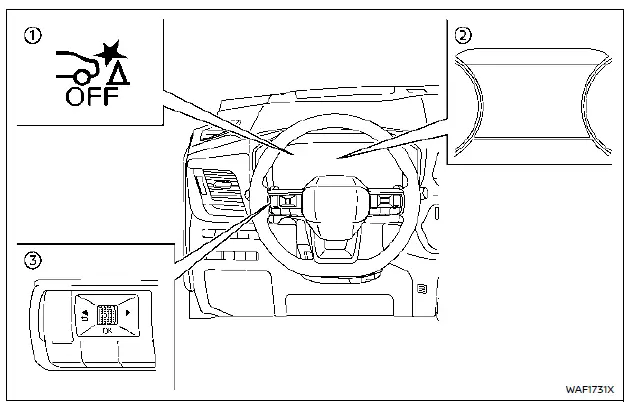
- RAB system OFF warning light
- Vehicle information display
- Steering-wheel-mounted control (left side)
Perform the following steps to turn the RAB system ON or OFF on your Nissan Rogue.
1. Push the
 button until
"Settings" appears in the vehicle
information display and then push the
scroll dial. Use the scroll dial to select
"Driver Assistance," then push the
scroll dial.
button until
"Settings" appears in the vehicle
information display and then push the
scroll dial. Use the scroll dial to select
"Driver Assistance," then push the
scroll dial.
2. Select "Emergency Assist" and push the scroll dial.
3. Select "Rear Auto Braking" and use the scroll dial to turn the system on or off.
When the RAB system is turned off, the RAB system OFF warning light illuminates when the Nissan Rogue is in the R (Reverse) position.
NOTE:
- The RAB system will automatically be turned on again when the Nissan Rogue engine is restarted.
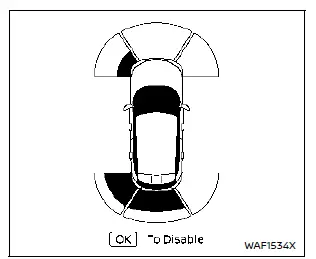
- When the shift lever is in the R (Reverse) position and the Parking Assist screen is displayed in the vehicle information display, the RAB system can be temporarily disabled by pushing the scroll dial on the steering wheel.
RAB system limitations
WARNING
Listed below are the system limitations for the RAB system. Failure to follow the warnings and instructions for proper use of the RAB system on the Nissan Rogue could result in serious injury or death.
- When the vehicle approaches an
obstacle while the accelerator or
brake pedal is depressed, the
function may not operate or the
start of the operation may be
delayed. The RAB system may not
operate or may not perform sufficiently
due to vehicle conditions,
driving conditions, the traffic
environment, the weather, or road
surface conditions. Do not
wait for the system to intervene.
Operate the brake pedal yourself as soon as necessary.
- If it is necessary to override RAB operation, firmly press the accelerator pedal.
- Always check your surroundings
and look behind you before and
while backing up in the Nissan Rogue.
The RAB system detects stationary objects behind the vehicle. The RAB system does not detect the following objects:
- Moving objects
- Low objects
- Narrow objects
- Wedge-shaped objects
- Complex-shaped objects
- Multiple objects in close proximity
- Objects close to the bumper (less than approximately 1 ft [30 cm])
- Objects that suddenly appear
- Thin objects such as rope, wire, chain, etc.
- The RAB system may not operate for pedestrians or animals.
- The RAB system may not operate
for the following obstacles:
- Obstacles located high off the ground
- Obstacles in a position offset from your vehicle
- Obstacles, such as spongy materials or snow, that have soft outer surfaces and can easily absorb a sound wave
- The RAB system may not operate
in the following conditions:
- There is rain, snow, ice, dirt, etc., attached to the sonar sensors.
- A loud sound is heard in the area around the vehicle.
- The surface of the obstacle is diagonal to the rear of the vehicle.
- The sonar sensors or the area around them are extremely hot or cold.
- The RAB system may unintentionally
operate in the following
conditions:
- There is overgrown grass in the area around the vehicle.
- There is a structure (e.g., a wall, toll gate equipment, a narrow tunnel, a parking lot gate) near the side of the vehicle.
- There are bumps, protrusions, or manhole covers on the road surface.
- The vehicle is driving through a draped flag or a curtain.
- The vehicle is approaching a high curb or car stop.
- The vehicle is driving on a steep hill.
- There is an accumulation of snow or ice behind the vehicle.
- An ultrasonic wave source, such as another vehicle's sonar, is near the vehicle.
- Once the automatic brake control operates, it will not operate again if the vehicle approaches the same obstacle.
- The automatic brake control can only operate for a short period of time. Therefore, the driver must depress the brake pedal.
- In the following situations, the
RAB system may not operate
properly or may not function
sufficiently:
- The vehicle is driven in bad weather (rain, fog, snow, etc.).
- The vehicle is driven on a steep hill.
- The vehicle's posture is changed (e.g., when driving over a bump).
- The vehicle is driven on a slippery road.
- The vehicle is turned sharply by turning the steering wheel fully.
- Snow chains are used.
- Wheels or tires other than NISSAN-recommended parts are used.
- The brakes are cold at low ambient temperatures or immediately after driving has started.
- The braking force becomes poor due to wet brakes after driving through a puddle or washing the vehicle.
- Turn the RAB system off in the
following conditions to prevent
unexpected activation caused by
sudden system operation:
- The vehicle is towed.
- The vehicle is carried on a flatbed truck.
- The vehicle is on a chassis dynamometer.
- The vehicle is driving on an uneven road surface.
- The vehicle is towing an object (if so equipped).
- Suspension parts other than those designated as genuine parts are used. (If the vehicle height or the vehicle body inclination is changed, the system may not detect an obstacle correctly.)
- If the vehicle is using an accessory such as a bike rack or cargo carrier that blocks the sensors.
- Excessive noise (e.g., high audio system volume or an open window) can interfere with the chime sound, and it may not be heard.
System temporarily unavailable
When the Vehicle Dynamic Control (VDC) system is OFF, the RAB system OFF warning light will illuminate on the Nissan Rogue.
When the VDC system is ON, the RAB system will resume automatically.
System malfunction
If the RAB system malfunctions, it will turn off automatically, a chime will sound, the RAB system OFF warning light will illuminate, and the "Malfunction See Owner's Manual" message will appear in the Nissan Rogue information display.
Action to take:
If the warning light turns on, park the vehicle in a safe place, shut off the engine, and restart the Nissan Rogue. If the warning light continues to illuminate, have the system inspected. A NISSAN dealer is recommended for this service.
NOTE:
If the RAB system cannot be operated temporarily, the RAB system OFF warning light will blink.
System maintenance
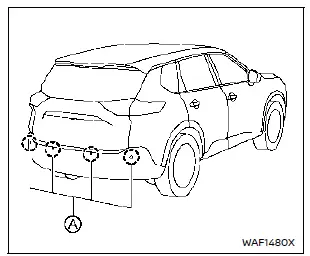
Models with 4 sonar sensors
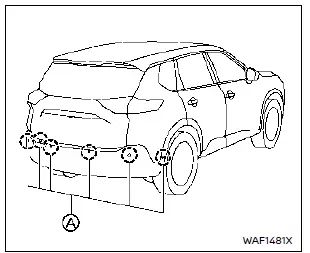
Models with 6 sonar sensors
The sonar sensors A are located on the rear bumper of the Nissan Rogue. Observe the following items to ensure proper system performance:
- Always keep the sonar sensors clean.
- If the sensors are dirty, wipe them with a soft cloth, being careful not to cause damage.
- The sensors may be temporarily blocked by splashing water, mist, fog, or by ice, frost, or dirt. Inspect and remove objects blocking the sensors whenever necessary.
- Avoid applying strong impact to the area around the sonar sensors. Do not remove or disassemble the sensors. If the sensors or bumper area become deformed after an impact, have them checked. A NISSAN dealer is recommended.
- Do not attach stickers, paint, accessories, or transparent films to the sensor area, as this may cause improper operation.
- When washing the vehicle with a high-pressure washer, avoid applying direct pressure to the sensors to prevent malfunction.
Break-in schedule
CAUTION
During the first 1,200 miles (2,000 km), follow these recommendations to ensure maximum engine performance and long-term reliability of your Nissan Rogue.
Failure to follow these guidelines may result in reduced engine performance and shortened engine life.
- Avoid driving for long periods at a constant speed. Do not exceed 4,000 rpm.
- Do not accelerate at full throttle in any gear.
- Avoid quick starts.
- Avoid hard braking whenever possible.
- Do not tow a trailer for the first 500 miles (800 km) to prevent potential engine, axle, or drivetrain damage.
Other materials:
B2223-1c Combination Meter
DTC Description
DTC DETECTION LOGIC DTC No.
CONSULT screen terms
(Trouble diagnosis content) DTC detected condition
B2223-1C
Combination meter
(Combination meter)
Diagnosis condition
When ignition switch is ON.
Signal (terminal)
—
Threshold
TFT error is detected ...
Removal and Installation. Washer Fluid Level Switch
Removal and Installation
CAUTION:
When washer fluid level switch is removed, washer fluid
may come out, so be prepared with a container to receive the fluid and
never allow fluid to be sprinkled.
REMOVALTurn the steering wheel to improve access to the washer tank near the front tire (RH).
Re ...
Ecu Diagnosis Information. Bcm, Power Window Main Switch, Passenger Door Mirror Control Module
List of ECU Reference
ECU Reference
BCM
Values on the Diagnosis Tool
Reference Value (With Type A Meter)
Reference Value (With Type B Meter)
Fail-safe
DTC Inspection Priority Chart
DTC Index
Power window main switch
Reference Value
Passenger door mirror ...