
Nissan Rogue (T33) 2021-Present Owner’s Manual & User Guide: Intelligent Forward Collision Warning (I-FCW)
Basic information
WARNING
Failure to follow the warnings and instructions for proper use of the I-FCW system on the Nissan Rogue could result in serious injury or death.
- The I-FCW system helps alert the driver before a potential collision but cannot prevent one. The driver must remain attentive, drive safely and maintain full control of the vehicle at all times.
The I-FCW system helps notify the driver when it detects sudden braking from a second vehicle traveling ahead of the one directly in front of the Nissan Rogue in the same lane.
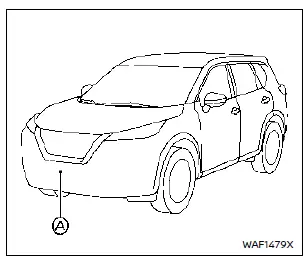
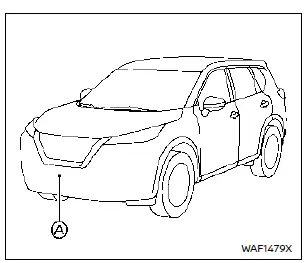
The I-FCW system uses a radar sensor A mounted at the front of the Nissan Rogue to measure the distance to the second vehicle ahead.
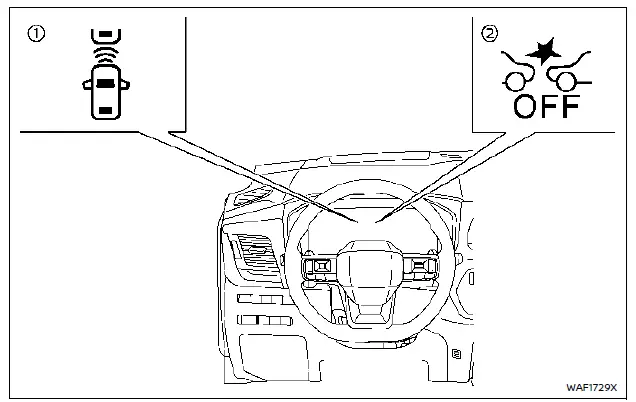
- Vehicle ahead detection indicator (shown on the vehicle information display)
- Automatic Emergency Braking (AEB) system OFF warning light (on the meter panel)
I-FCW system operation
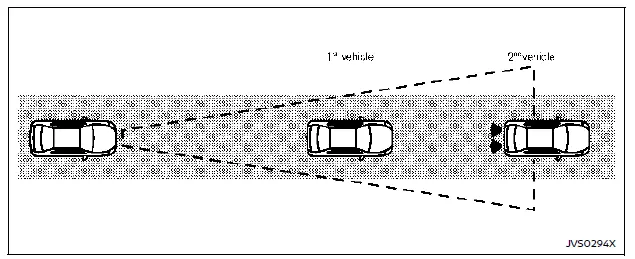
The I-FCW system activates at speeds above approximately 3 MPH (5 km/h).
If the Nissan Rogue detects a potential forward collision risk, the I-FCW system warns the driver by flashing the vehicle-ahead indicator and sounding an audible alert.
Turning the I-FCW system ON/OFF
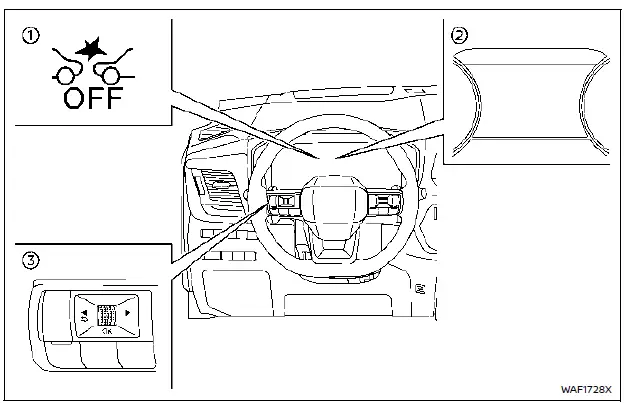
- AEB system OFF warning light (meter panel)
- Vehicle information display
- Steering-wheel-mounted controls (left side)
Perform the
 following steps to turn the I-FCW system on or off on your Nissan Rogue:
1. Press the button until “Settings� appears on the vehicle information display, then push the scroll dial. Use the scroll dial to choose “Driver Assistance� and confirm.
2. Select “Emergency Assist� and press the scroll dial.
3. Choose “Emergency Braking� and use the scroll dial to turn the I-FCW system on or off.
When the I-FCW system is turned off, the AEB system OFF warning light (orange) illuminates.
NOTE:
- The I-FCW system will automatically turn back ON each time the Nissan Rogue engine is restarted.
- The I-FCW system is integrated into the AEB system. There is no separate setting for I-FCW. When AEB is turned off, I-FCW is also turned off.
- The I-FCW system cannot be enabled or disabled while driving.
I-FCW system limitations
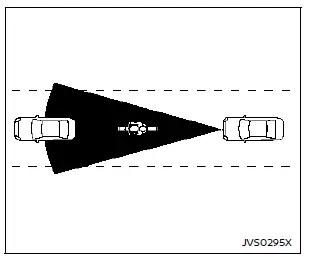
Illustration A

Illustration B
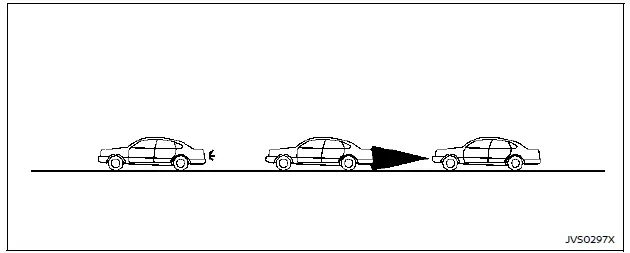
Illustration C
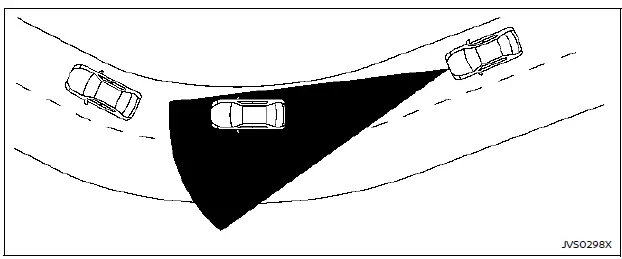
Illustration D
WARNING
The following points describe important limitations of the I-FCW system on your Nissan Rogue. Failure to drive in accordance with these limitations could result in serious injury or death.
- The I-FCW system cannot detect every vehicle in all driving situations.
- The radar sensor does not detect the following objects:
- Pedestrians, animals or stationary obstacles in the roadway
- Oncoming vehicles
- Vehicles crossing your path
- (Illustration A) The I-FCW system may not operate when the vehicle ahead is narrow, such as a motorcycle.
- The radar sensor may not detect a vehicle ahead under the following conditions:
- Snow or heavy rain
- Dirt, ice, snow or other material covering the radar sensor
- Interference from other radar sources
- Snow or road spray from surrounding traffic
- Driving through a tunnel
- Towing a trailer
- (Illustration B) When the vehicle ahead is being towed.
- (Illustration C) When the distance to the vehicle ahead is too short and the radar sensor beam is blocked.
- (Illustration D) When driving on steep downhill grades or on roads with sharp curves.
- The system is designed to automatically check the radar sensor’s operation, within certain limits. However, it may not detect some types of obstruction on the sensor area, such as ice, snow or stickers. In these situations, the system may not be able to provide an appropriate warning to the driver.
Make sure you inspect, clean and keep the sensor area clear on a regular basis.
- Excessive noise inside the vehicle can interfere with the warning chime, and you may not hear it.
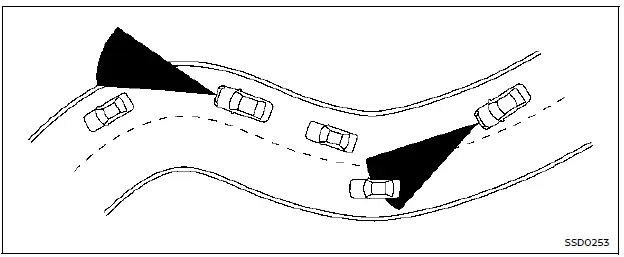
When driving your Nissan Rogue on certain types of roads, such as winding, hilly, sharply curved, narrow roads, or on roads under construction, the radar sensor may detect vehicles in another lane, or may temporarily fail to detect a vehicle traveling ahead. This can cause the I-FCW system to operate inappropriately.
The detection of vehicles by your Nissan Rogue may also be influenced by the way you drive (steering input, lane position, etc.) or by the vehicle’s condition. When this happens, the system may warn you unexpectedly by blinking the vehicle-ahead indicator and sounding the chime.
In all situations, you must manually maintain a safe distance from the vehicle traveling ahead.
System temporarily unavailable
Condition A
When the radar sensor picks up interference from another radar source and cannot properly detect a vehicle ahead, the I-FCW system on the Nissan Rogue is automatically turned off. The AEB system OFF warning light (orange) will illuminate and the "Driving Aids Temporarily limited Radar interference" warning message will appear in the vehicle information display.
Action to take: When these conditions are no longer present, the I-FCW system will automatically resume operation.
Condition B
Under the following conditions, which make it impossible to detect a vehicle ahead, the I-FCW system is automatically turned off.
The AEB system OFF warning light (orange) will illuminate and the "Forward Driving Aids temporarily disabled Front Sensor blocked" warning message will appear in the vehicle information display.
- When the sensor area at the front of the vehicle is covered with dirt or is otherwise obstructed
Action to take:
If the warning light (orange) illuminates, stop the vehicle in a safe place, push the park button to select the P (Park) position and turn the engine off. Gently clean the radar cover on the front of the vehicle with a soft cloth, then restart the engine. If the warning light remains illuminated, have the I-FCW system inspected. It is recommended you visit a NISSAN dealer for this service.
- When driving on roads with very few surrounding structures or buildings (for example, long bridges, deserts, snow fields, or when driving next to long walls)
Action to take:
When these conditions no longer apply, the I-FCW system will resume automatically.
System malfunction
If the I-FCW system malfunctions, it will turn off automatically, a chime will sound, the AEB system OFF warning light (orange) will illuminate and the "Malfunction See Owner's Manual" warning message will appear in the vehicle information display.
Action to take:
If the warning light (orange) illuminates, stop the vehicle in a safe location. Turn the engine off and then restart it. If the warning light continues to stay on, have the I-FCW system checked. It is recommended you visit a NISSAN dealer for this service.
System maintenance
Basic information
The radar sensor is located at the front of the Nissan Rogue.
To keep the Nissan Rogue system operating properly, be sure to observe the following:
- Always keep the sensor area on the front of the Nissan Rogue clean.
- Do not strike or damage the areas around the sensor.
- Do not cover or attach stickers or similar objects on the front bumper near the sensor area. This could lead to system failure or malfunction.
- Do not attach metallic objects near the sensor area (brush guard, etc.), as this could cause the system to fail or malfunction.
- Do not alter, remove or paint the front bumper. It is recommended you contact a NISSAN dealer before customizing or repairing the front bumper.
Radio frequency statement
NOTE:
FCC Notice:
For USA:
This device complies with Part 15 of the FCC Rules. Operation is subject to the following two conditions: (1) this device may not cause harmful interference, and (2) this device must accept any interference received, including interference that may cause undesired operation.
NOTE:
Changes or modifications not expressly approved by the party responsible for compliance could void the user's authority to operate the equipment.
For Canada:
This device contains licence-exempt transmitter(s)/receiver(s) that comply with Innovation, Science and Economic Development Canada's licence-exempt RSS(s). Operation is subject to the following two conditions: (1) This device may not cause interference. (2) This device must accept any interference, including interference that may cause undesired operation of the device.
Other materials:
Dtc/circuit Diagnosis. B2c20-12 Starter Control Relay
DTC Description
DTC DETECTION LOGIC DTC No.
CONSULT screen items
(Trouble diagnosis content) DTC detecting condition
B2C20-12
Starter control relay
(Starter control relay)
Diagnosis condition
Ignition switch ON
Signal (terminal)
Starter cut relay signal
Threshold
W ...
P00de Charge Air Cooler Coolant Temperature Sensor
DTC Description
DTC DETECTION LOGIC DTC
CONSULT screen terms
(Trouble diagnosis content)
DTC detection condition
P00DE
00
Charge air cooler coolant temp sensor
(Charge Air Cooler Coolant Temperature Sensor "A" Circuit)
Diagnosis condition
Engine is run for 5 minutes after ...
Ecu Diagnosis Information. Intelligent Key Unit
Reference Value
VALUES ON THE DIAGNOSIS TOOLNOTE:
The following table includes information (items)
inapplicable to this Nissan Ariya vehicle. For information (items)
applicable to this vehicle, refer to CONSULT display items.
CONSULT MONITOR ITEM Monitor Item Condition Value/Status
Intel ...