
Nissan Rogue (T33) 2021-Present Owner’s Manual & User Guide: I-BSI system operation
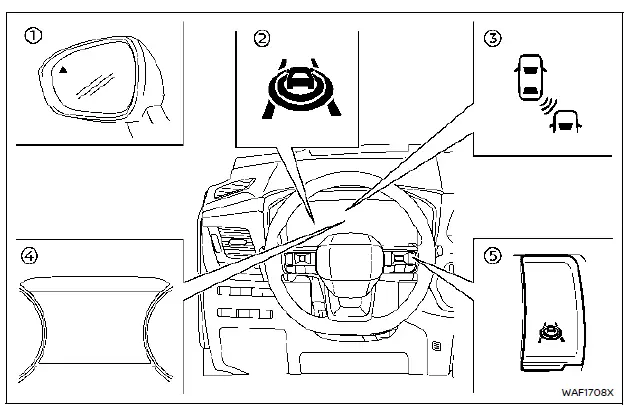
- Side indicator light
- I-BSI ON indicator
- I-BSI warning indicator
- Vehicle information display
- ProPILOT Assist switch
The I-BSI system functions above approximately 37 MPH (60 km/h).
If a vehicle enters the detection zone, the side indicator light turns on.
If the turn signal is activated while a vehicle is detected, the system chimes twice and both the side indicator and I-BSI indicator flash.
If I-BSI is ON and your vehicle drifts toward a lane marker while another vehicle is detected, the system chimes three times and flashes both indicators.
The system may also apply brief steering assistance to help guide the vehicle back toward the center of the lane.
Use the ProPILOT Assist switch to turn the system ON or OFF. The indicator will illuminate when active.
NOTE:
- I-BSI warnings and steering assistance only occur if a vehicle is already detected when your vehicle approaches the lane marker.
- The I-BSI system typically activates earlier than Intelligent Lane Intervention (I-LI) when approaching a lane boundary.
Other materials:
P11a1 Vcr Motor
DTC Description
DTC DETECTION LOGIC DTC
CONSULT screen terms
(Trouble diagnosis content) DTC detection condition
P11A1
00
VCR motor
(Variable compression ratio motor)
Diagnosis condition
Engine running at idle
Engine speed : 4,500 rpm or more
Signal (termina ...
Basic information
Example
The vehicle information display 1, featured in the Nissan Rogue, is positioned as shown above and provides a wide range of warnings and operational details. Depending on the configuration of your Nissan Rogue, the system may also present the following information:
Tachometer
Sp ...
Keys
Intelligent Key
Type A (if so equipped)
Type B (if so equipped)
Type C (if so equipped)
Intelligent Key (2 sets)
Mechanical key (inside Intelligent Key) (2 sets)
Key number plate
Basic information
Your Nissan Rogue can be operated only with Intelligent Keys that are programmed to its I ...