
Nissan Rogue (T33) 2021-Present Service Manual: How to Set Srt Code
SRT Set Driving Pattern
CAUTION:
Always drive the vehicle in safe manner according to traffic conditions and obey all traffic laws.
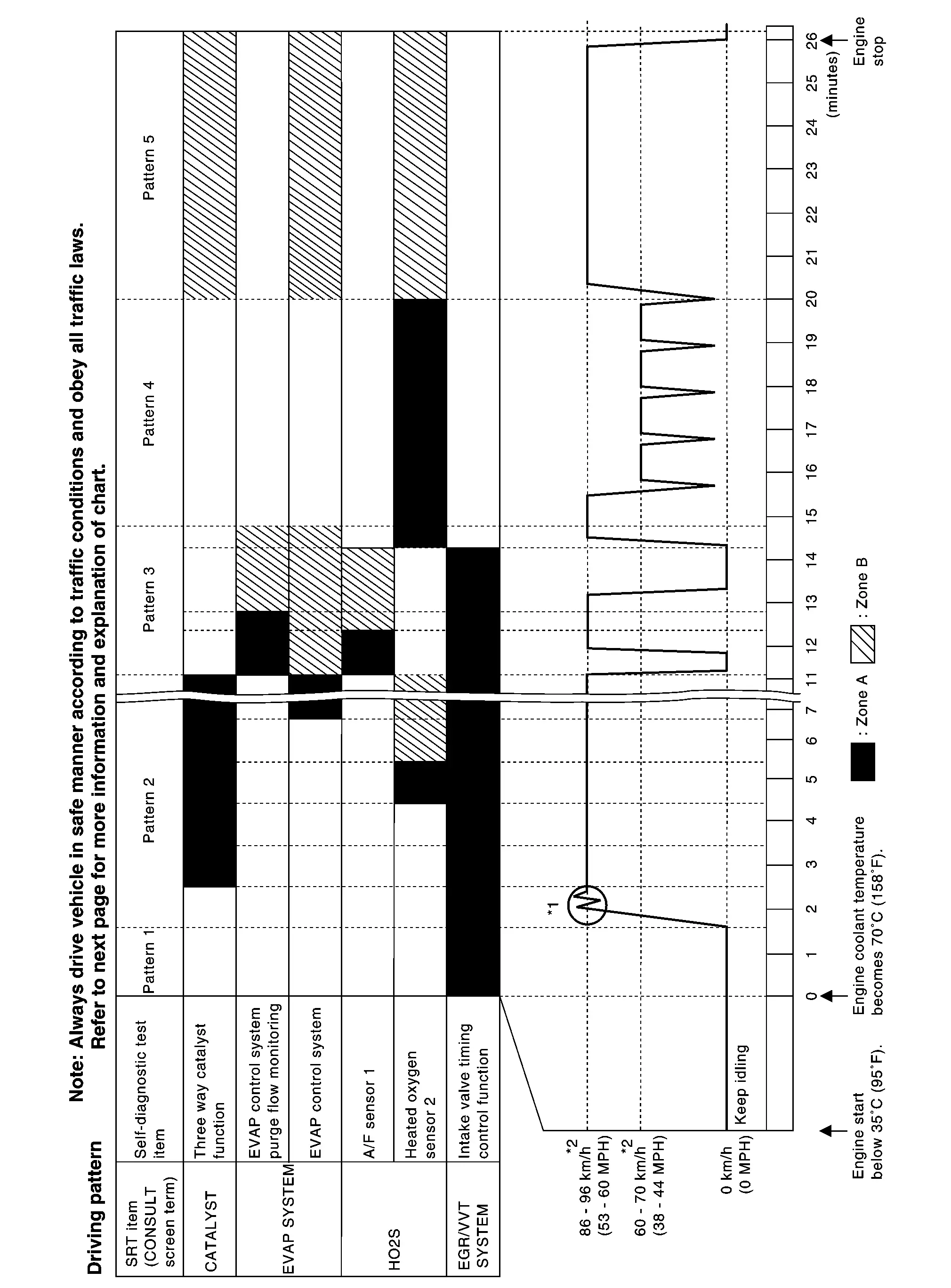
*1: Depress the accelerator pedal until vehicle speed is 90 km/h (56 MPH), then release the accelerator pedal and keep it released for more than 10 seconds. Depress the accelerator pedal until Nissan Ariya vehicle speed is 90 km/h (56 MPH) again.
*2: Checking the vehicle speed with GST is advised.
-
The time required for each diagnosis varies with road surface conditions, weather, altitude, individual driving habits, etc.
-
“Zone A” is the fastest time where required for the diagnosis under normal conditions*. If the diagnosis is not completed within “Zone A”, the diagnosis can still be performed within “Zone B”.
-
When, the fuel tank is fully filled, “EVAP SYSTEM” on CONSULT may not indicate “completed”.
*: Normal conditions
-
Sea level
-
Flat road
-
Ambient air temperature: 20 – 30°C (68 – 86°F)
-
 NOTE:
NOTE:
Diagnosis is performed as quickly as possible under normal conditions. However, under other conditions, diagnosis may also be performed. [For example: ambient air temperature other than 20 – 30°C (68 – 86°F)]
Description
In order to set all SRTs, the self-diagnoses as in the “SRT ITEM” table must have been performed at least once. Each diagnosis may require actual driving for a long period of time under various conditions.
SRT ITEM
The table below shows required self-diagnostic items to set the SRT to “CMPLT”.
|
SRT item (CONSULT indication) | Required self-diagnostic items to set the SRT to “CMPLT” | Corresponding DTC No. |
|---|---|---|
| FUEL SYSTEM | Cylinder air-fuel inbalance | P0171, P0172, P219A |
| CATALYST | Three way catalyst function | P0420 |
| EVAP SYSTEM | EVAP control system purge flow monitoring | P0441, P04F1 |
| EVAP control system | P00FE, P0456 | |
| HO2S | Air fuel ratio (A/F) sensor 1 | P0130, P0131, P0132, P014C, P014D, P015A, P015B, P2096, P2097, P2237, P2238, P2239, P2251, P2252, P2253, P2297 |
| Heated oxygen sensor 2 | P0136, P0137, P0138, P0139, P2270, P2271, P2A01 | |
| HO2S Heater | Air fuel ratio (A/F) sensor 1 heater | P0053 |
| Heated oxygen sensor 2 heater | P00D2 | |
| EGR/VVT SYSTEM | Intake/Exhaust valve timing control function | P0011, P0012, P0014, P0015, P0401, P0402, P052A, P052B, P054A, P054B |
SRT SERVICE PROCEDURE
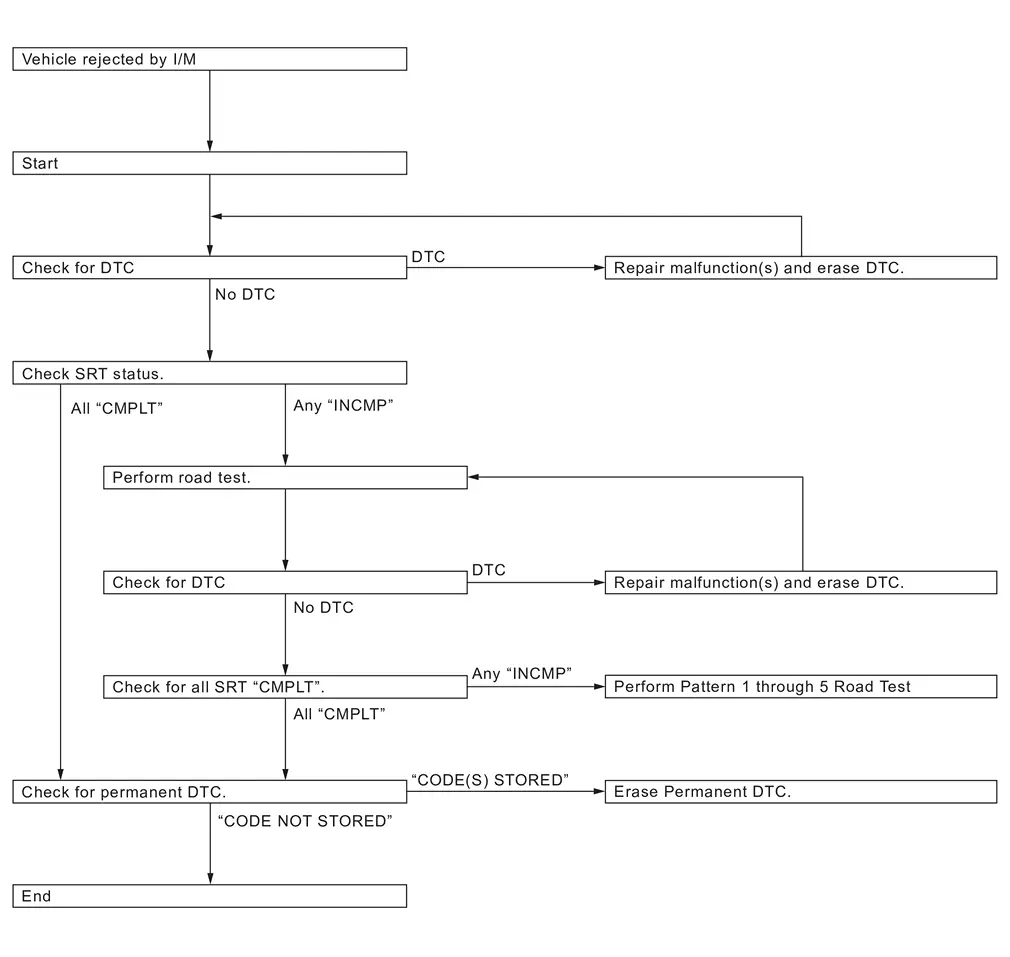
If a vehicle has failed the state emissions inspection due to one or more SRT items indicating “INCMP”, review the flowchart diagnostic sequence, referring to the following flowchart.
Work Procedure
CHECK DTC
Check DTC.
Is any DTC detected?
YES>>Repair malfunction(s) and erase DTC. Refer to DTC Index.
NO>>GO TO 2.
CHECK SRT STATUS
 With CONSULT
Select “SRT STATUS” in “DTC & SRT CONFIRMATION” mode with CONSULT.
 Without CONSULT
Perform “SRT status” mode with Refer to CONSULT Function.
 With GST
Select Service $01 with GST.
Is SRT code(s) set?
YES>>GO TO 11
NO-1>>With CONSULT: GO TO 3.
NO-2>>Without CONSULT: GO TO 4.
DTC CONFIRMATION PROCEDURE
-
Select “SRT WORK SUPPORT” in “DTC & SRT CONFIRMATION” mode with CONSULT.
-
For SRT(s) that is not set, perform the corresponding “DTC CONFIRMATION PROCEDURE” according to the “Performance Priority” in the “SRT ITEM” table. Refer to Description.
-
Check DTC.
Is any DTC detected?
YES>>Repair malfunction(s) and erase DTC. Refer to DTC Index.
NO>>GO TO 10.
PERFORM ROAD TEST
-
Check the “Performance Priority” in the “SRT ITEM” table. Refer to Description.
-
Perform the most efficient SRT set driving pattern to set the SRT properly. Refer to SRT Set Driving Pattern.
In order to set all SRTs, the SRT set driving pattern must be performed at least once.
>>
GO TO 5.
PATTERN 1
-
Check the Nissan Ariya vehicle condition;
-
Engine coolant temperature is −10 to 35°C (14 to 95°F).
-
Fuel tank temperature is more than 0°C (32°F).
-
-
Start the engine.
-
Keep engine idling until the engine coolant temperature is greater than 70°C (158°F)
NOTE:
ECM terminal voltage is follows (Refer to Physical Values.)
-
Engine coolant temperature
-
−10 to 35°C (14 to 95°F): 3.0 – 4.3 V
-
70°(158°F): Less than 4.1 V
-
-
Fuel tank temperature: Less than 1.4 V
>>
GO TO 6.
PATTERN 2
-
Drive the Nissan Ariya vehicle. And depress the accelerator pedal until vehicle speed is 90 km/h (56 MPH), then release the accelerator pedal and keep it released for more than 10 seconds.
-
Depress the accelerator pedal until Nissan Ariya vehicle speed is 90 km/h (56 MPH) again
NOTE:
-
Checking the Nissan Ariya vehicle speed with GST is advised.
-
When steady-state driving is performed again even after it is interrupted, each diagnosis can be conducted. In this case, the time required for diagnosis may be extended.
>>
GO TO 7.
PATTERN 3
-
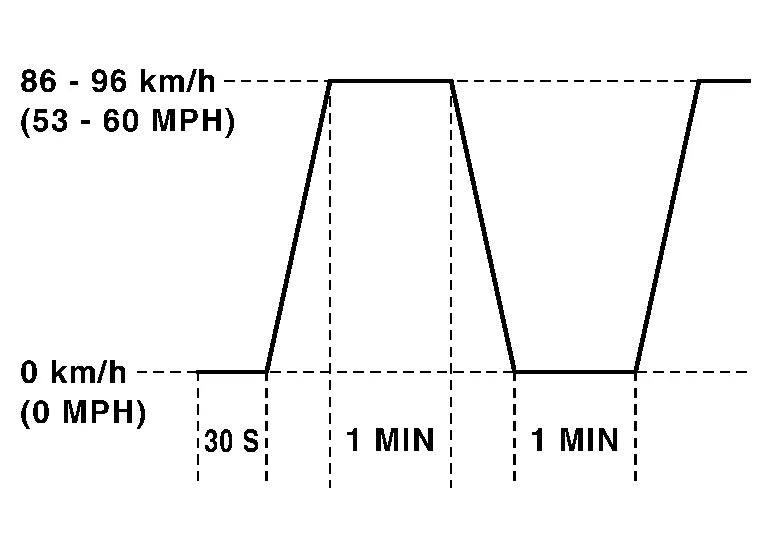
Operate Nissan Ariya vehicle following the driving pattern shown in the figure.
-
Release the accelerator pedal during deceleration of Nissan Ariya vehicle speed from 90 km/h (56 MPH) to 0 km/h (0 MPH).
-
>>
GO TO 8.
PATTERN 4
-
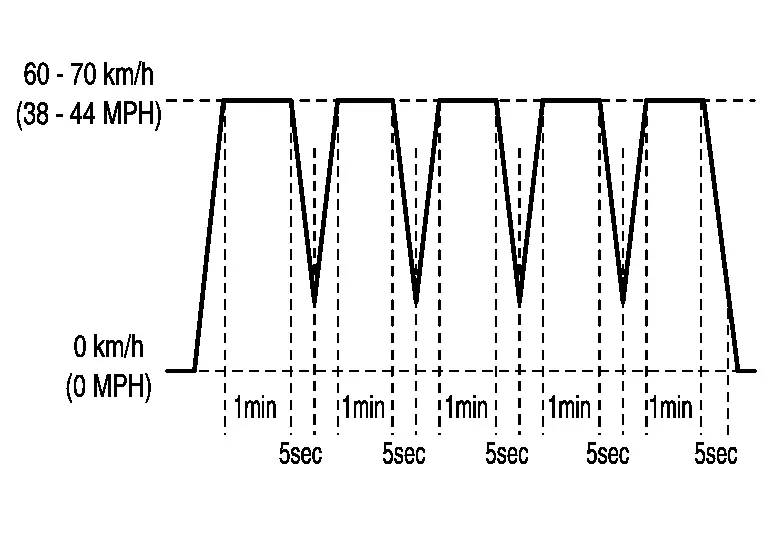
Operate Nissan Ariya vehicle following the driving pattern shown in the figure.
-
Drive the Nissan Ariya vehicle in a proper gear at 60 km/h (38 MPH) and maintain the speed.
-
Release the accelerator pedal fully at least 5 seconds.
-
Repeat the above two steps at least 5 times.
-
>>
GO TO 9.
PATTERN 5
-
The accelerator pedal must be held very steady during steady-state driving.
-
If the accelerator pedal is moved, the test must be conducted again.
>>
GO TO 10.
CHECK SRT STATUS
With CONSULT
Select “SRT STATUS” in “DTC & SRT CONFIRMATION” mode using CONSULT.
Without CONSULT
Perform “SRT status” mode with refer to CONSULT Function.
With GST
Select Service $01 with GST.
Is SRT(s) set?
YES>>GO TO 11
NO>>Perform pattern 1 through 5 road test.
CHECK PERMANENT DTC
NOTE:
Permanent DTC cannot be checked with a tool other than CONSULT or GST.
With CONSULT
Select “SRT STATUS” in “DTC & SRT CONFIRMATION” mode using CONSULT.
With GST
Select Service $0A with GST.
Is permanent DTC(s) detected?
YES>>Refer to Work Procedure (Group A) and Work Procedure (Group B).
NO>>END
Other materials:
Conseils pour une conduite économique
Appliquez ces conseils simples pour améliorer le rendement énergétique et réduire la consommation de carburant de votre Nissan Rogue au quotidien.
1. Appuyez sur les pédales avec douceur.
Évitez les démarrages et arrêts brusques.
Accélérez et freinez progressivement.
Maintenez u ...
System Description. Component Parts. Wiper and Washer System
Wiper and Washer System
Component Parts Location
Component Parts Location A.
View with washer tank removed from Nissan Ariya vehicle (for USA)
B.
View with washer tank removed from vehicle
C.
Behind LH side of front fascia assembly (view with front fascia assembly) removed
No. ...
Dtc/circuit Diagnosis. B2010-1c Battery Voltage
DTC Description
DTC DETECTION LOGIC DTC No.
CONSULT screen items
(Trouble diagnosis content) DTC Detection Condition
B2010-1C
Battery voltage
(Battery voltage)
Diagnosis condition
All times
Signal (terminal)
Intelligent Key unit battery power supply signal
Threshold
...