
Nissan Rogue (T33) 2021-Present Service Manual: How to Erase Permanent Dtc
Description
OUTLINE
When a DTC is stored in control module
When a DTC is stored in control module and MIL is ON, a permanent DTC is erased with MIL shutoff if the same malfunction is not detected after performing the driving pattern for MIL shutoff three times in a raw.
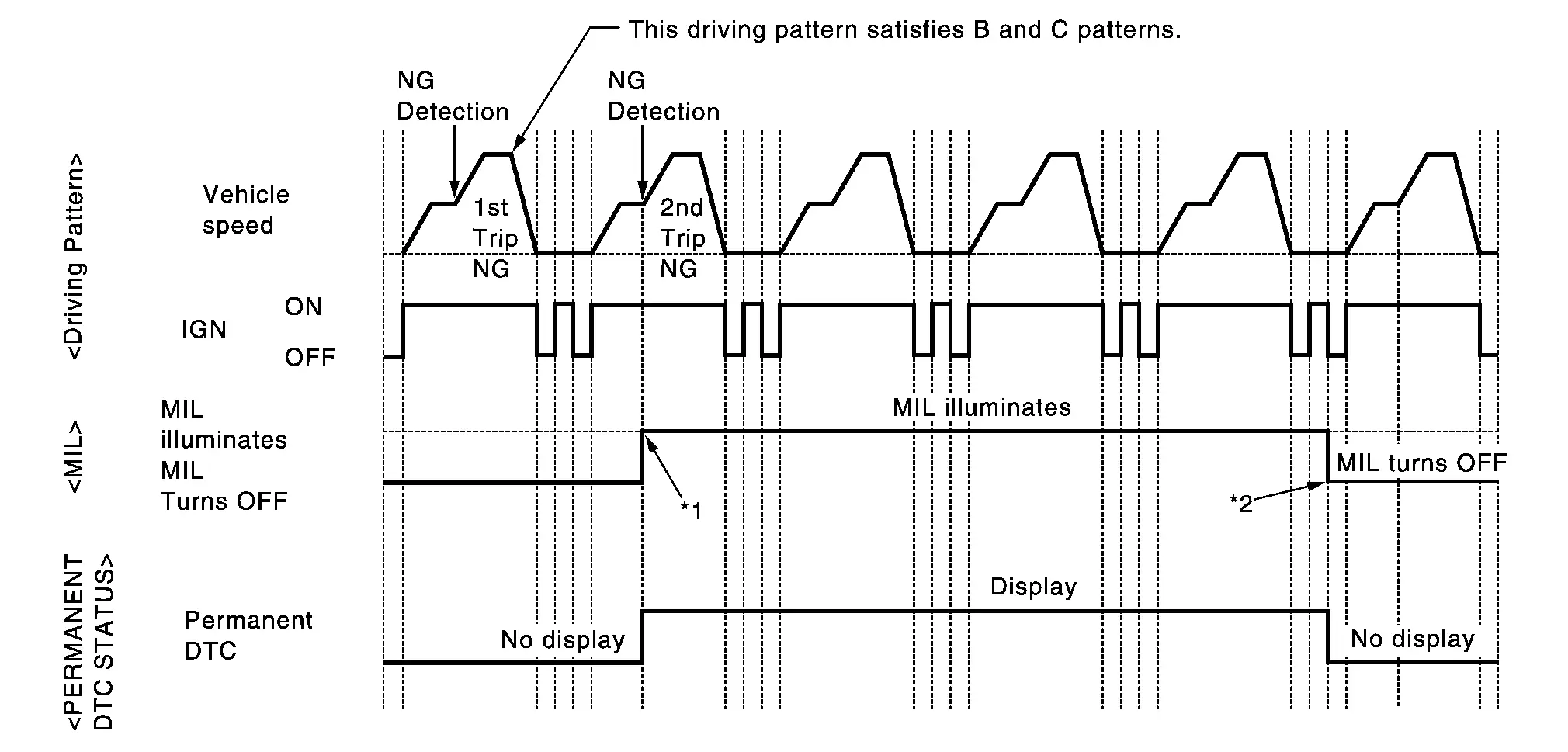
| *1: | When the same malfunction is detected in two consecutive trips, MIL will illuminate. | *2: | MIL will turn off after Nissan Ariya vehicle is driven 3 times (driving pattern B) without any malfunctions. |
When a DTC is not stored in control module
The erasing method depends on a permanent DTC stored in control module. Refer to the following table.
 NOTE:
NOTE:
If the applicable permanent DTC includes multiple groups, perform the procedure of Group B first. If the permanent DTC is not erased, perform the procedure of Group A.
×: Applicable —: Not applicable
| Group* | Perform “DTC CONFIRMATION PROCEDURE� for applicable DTCs. | Driving pattern | Reference | |
|---|---|---|---|---|
| B | D | |||
| A | × | — | — | Work Procedure (Group A) |
| B | — | × | × | Work Procedure (Group B) |
*: For group, refer to “DTC Index� of each control module.
PERMANENT DTC ITEM
For permanent DTC items, MIL turns ON. Refer to “DTC Index� of each control module.
PERMANENT DTC SERVICE PROCEDURE
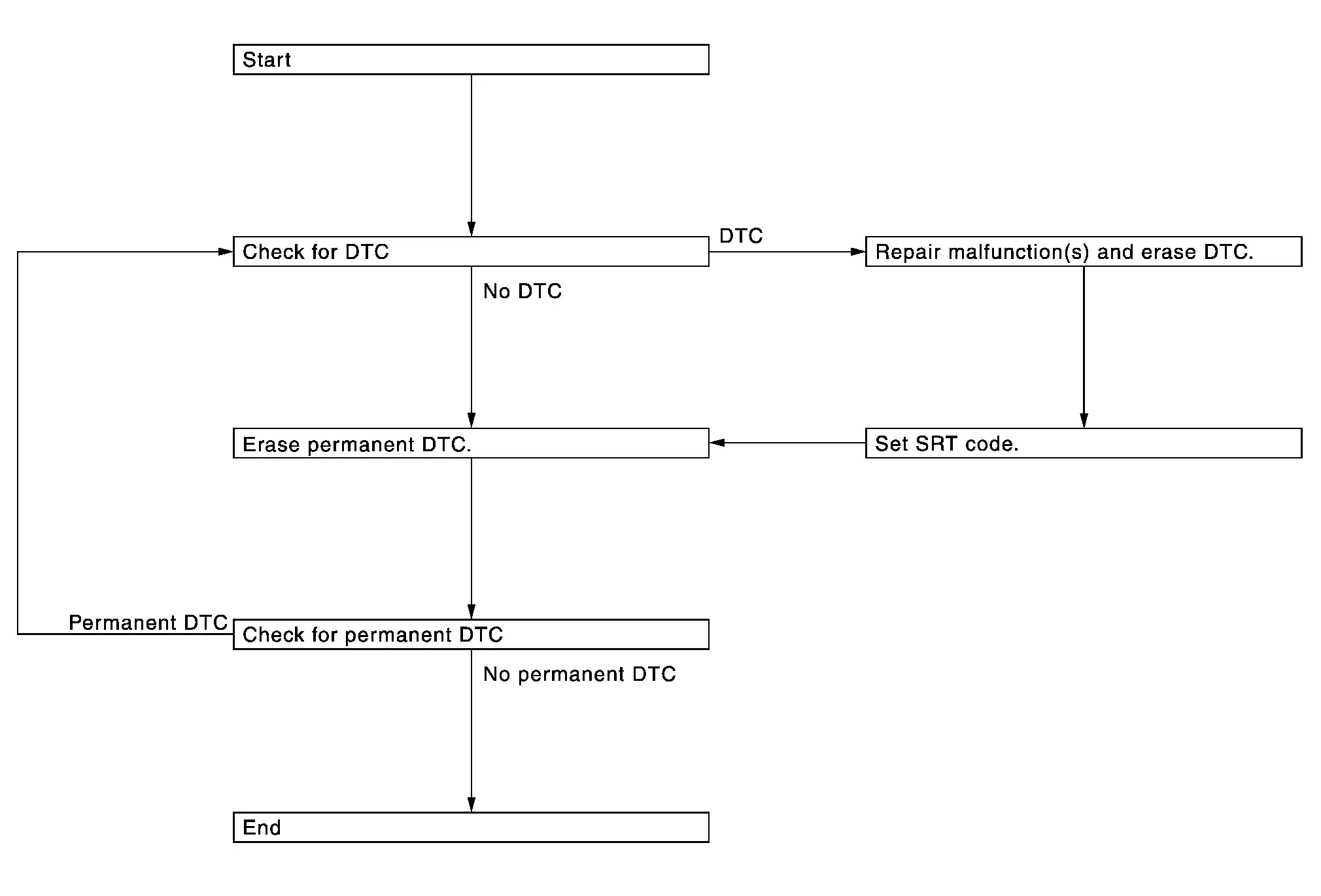
Work Procedure (Group A)
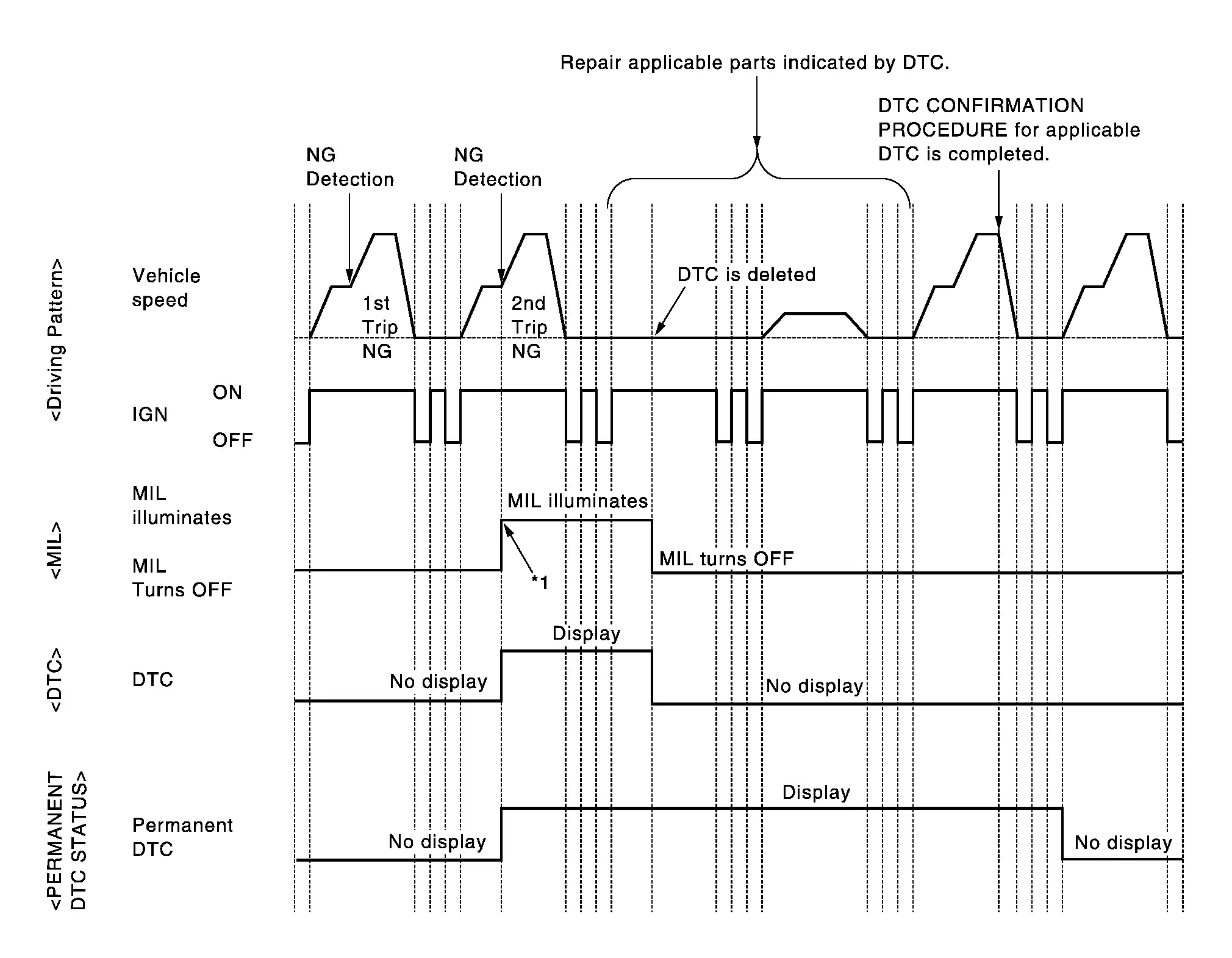
| *1: | When the same malfunction is detected in two consecutive trips, MIL will illuminate. |
CHECK DTC
Check DTC.
Is any DTC detected?
YES>>Repair malfunction(s) and erase DTC. Refer to “DTC Index� of each control module.
NO>>GO TO 2.
CHECK PERMANENT DTC
 With CONSULT
-
Turn ignition switch OFF and wait at least 10 seconds.
-
Turn ignition switch ON.
-
Turn ignition switch OFF and wait at least 10 seconds.
-
Turn ignition switch ON.
-
Select “PERMANENT DTC STATUS� mode with CONSULT.
 With GST
-
Turn ignition switch OFF and wait at least 10 seconds.
-
Turn ignition switch ON.
-
Turn ignition switch OFF and wait at least 10 seconds.
-
Turn ignition switch ON.
-
Select Service $0A with GST.
Is any permanent DTC detected?
YES>>GO TO 3.
NO>>END
PERFORM DTC CONFIRMATION PROCEDURE
Perform “DTC CONFIRMATION PROCEDURE� for DTCs which are the same as permanent DTCs stored in control module.
>>
GO TO 4.
CHECK PERMANENT DTC
With CONSULT
-
Turn ignition switch OFF and wait at least 10 seconds.
-
Turn ignition switch ON.
-
Turn ignition switch OFF and wait at least 10 seconds.
-
Turn ignition switch ON.
-
Select “PERMANENT DTC STATUS� mode with CONSULT.
With GST
-
Turn ignition switch OFF and wait at least 10 seconds.
-
Turn ignition switch ON.
-
Turn ignition switch OFF and wait at least 10 seconds.
-
Turn ignition switch ON.
-
Select Service $0A with GST.
Is any permanent DTC detected?
YES>>GO TO 1.
NO>>END
Work Procedure (Group B)
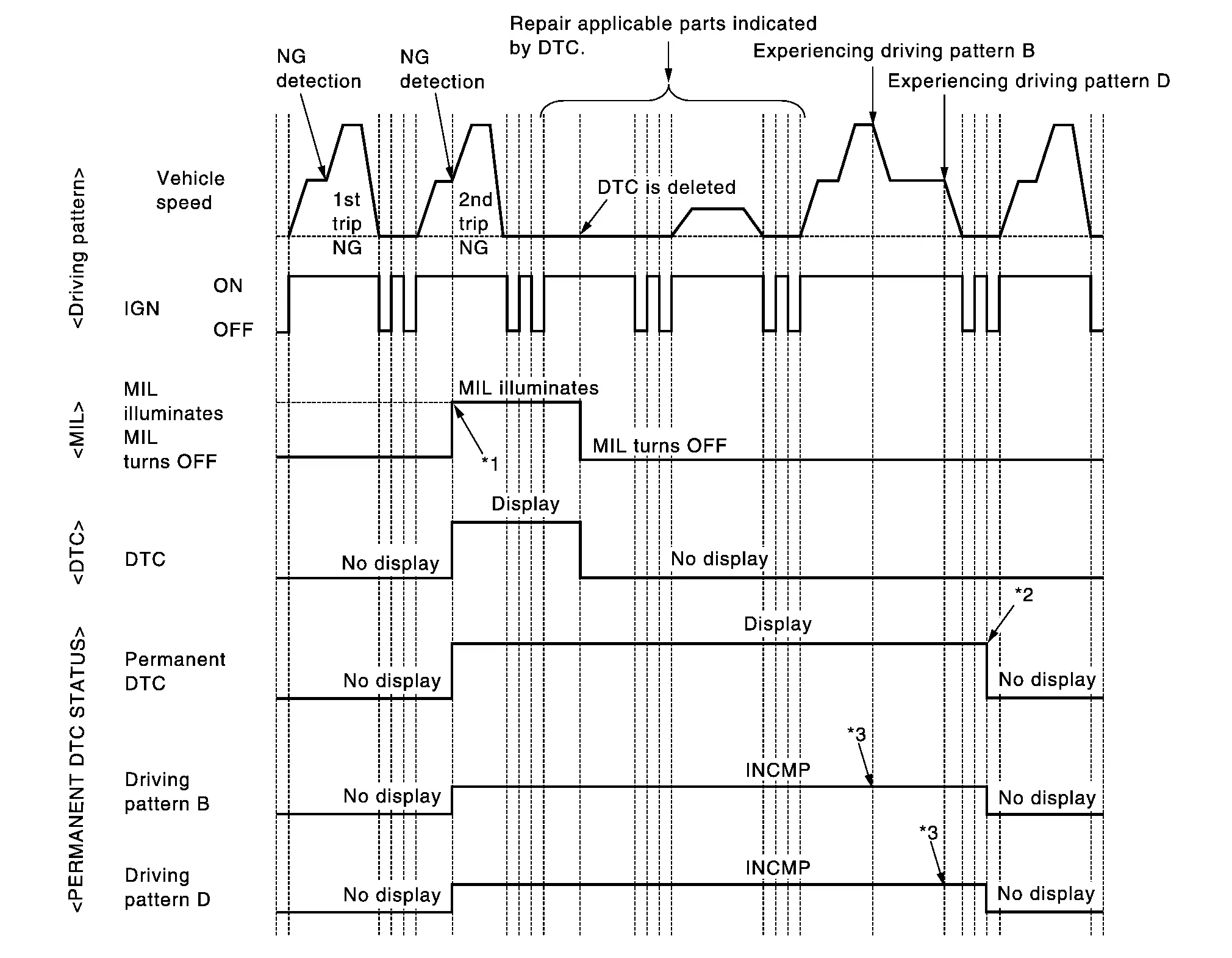
| *1: | When the same malfunction is detected in two consecutive trips, MIL will illuminate. | *2: | After experiencing driving pattern B and D, permanent DTC is erased. | *3: | Indication does not change unless the ignition switch is turned from ON to OFF twice even after experiencing driving pattern B or D. |
NOTE:
Drive the vehicle according to only driving patterns indicating “INCMP� in driving patterns B and D on the “PERMANENT DTC STATUS� screen.
CHECK DTC
Check DTC.
Is any DTC detected?
YES>>Repair malfunction(s) and erase DTC.
NO>>GO TO 2.
CHECK PERMANENT DTC
With CONSULT
-
Turn ignition switch OFF and wait at least 10 seconds.
-
Turn ignition switch ON.
-
Turn ignition switch OFF and wait at least 10 seconds.
-
Turn ignition switch ON.
-
Select “PERMANENT DTC STATUS� mode with CONSULT.
With GST
-
Turn ignition switch OFF and wait at least 10 seconds.
-
Turn ignition switch ON.
-
Turn ignition switch OFF and wait at least 10 seconds.
-
Turn ignition switch ON.
-
Select Service $0A with GST.
Is any permanent DTC detected?
YES>>GO TO 3.
NO>>END
DRIVE DRIVING PATTERN B
CAUTION:
-
Always drive at a safe speed.
-
Never erase self-diagnosis results.
-
If self-diagnosis results are erased during the trip of driving pattern B or D, the counter of driving pattern B and D is reset.
With CONSULT
-
Turn ignition switch ON.
-
Start engine and warm it up to normal operating temperature.
-
Use “PERMANENT DTC WORK SUPPORT� mode with CONSULT to drive the Nissan Ariya vehicle according to driving pattern B. Refer to CONSULT Function, Driving Pattern.
With GST
-
Turn ignition switch ON.
-
Start engine and warm it up to normal operating temperature.
-
Drive the Nissan Ariya vehicle according to driving pattern B. Refer to Driving Pattern.
>>
GO TO 4.
CHECK PERMANENT DTC
With CONSULT
-
Turn ignition switch OFF and wait at least 10 seconds.
-
Turn ignition switch ON.
-
Turn ignition switch OFF and wait at least 10 seconds.
-
Turn ignition switch ON.
-
Select “PERMANENT DTC STATUS� mode with CONSULT.
With GST
-
Turn ignition switch OFF and wait at least 10 seconds.
-
Turn ignition switch ON.
-
Turn ignition switch OFF and wait at least 10 seconds.
-
Turn ignition switch ON.
-
Select Service $0A with GST.
Is any permanent DTC detected?
YES>>GO TO 5.
NO>>END
DRIVE DRIVING PATTERN D
CAUTION:
-
Always drive at a safe speed.
-
Never erase self-diagnosis results.
-
If self-diagnosis results are erased during the trip of driving pattern B or D, the counter of driving pattern B and D is reset.
-
Drive the Nissan Ariya vehicle according to driving pattern D. Refer to Driving Pattern.
>>
GO TO 6.
CHECK PERMANENT DTC
With CONSULT
-
Turn ignition switch OFF and wait at least 10 seconds.
-
Turn ignition switch ON.
-
Turn ignition switch OFF and wait at least 10 seconds.
-
Turn ignition switch ON.
-
Select “PERMANENT DTC STATUS� mode with CONSULT.
With GST
-
Turn ignition switch OFF and wait at least 10 seconds.
-
Turn ignition switch ON.
-
Turn ignition switch OFF and wait at least 10 seconds.
-
Turn ignition switch ON.
-
Select Service $0A with GST.
Is any permanent DTC detected?
YES>>GO TO 1.
NO>>END
Other materials:
Remplacement de la pile de clé intelligente
AVERTISSEMENT
Risque en cas d’ingestion : l’ingestion d’une pile bouton peut entraîner des blessures graves, voire mortelles.
Une pile avalée peut provoquer des brûlures chimiques internes en seulement deux heures.
Conservez toujours les piles neuves et usagées hors de portée des ...
System Description. Component Parts. Moonroof System
Moonroof System
Component Description
No. Component Function
1.
Moonroof switch assembly
Refer to Moonroof Switch Assembly.
2.
Moonroof motor assembly
Refer to Moonroof Motor Assembly.
3.
Front door lock assembly RH (door switch)
Detects door open/close condition ...
Extérieur avant
Cette vue avant du Nissan Rogue présente les éléments de carrosserie, d’éclairage et d’aide à la conduite visibles depuis l’avant du véhicule. Les équipements marqués d’un astérisque peuvent dépendre de la finition.
Capot : accès au compartiment moteur et aux points de con ...