
Nissan Rogue (T33) 2021-Present Owner’s Manual & User Guide: Engine compartment
KR15DDT engine model
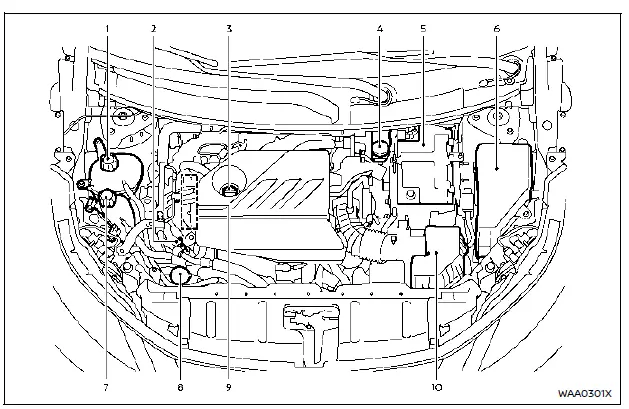
Example
- Engine coolant reservoir — stores coolant used to regulate engine temperature.
- Engine oil dipstick — allows checking the oil level in the KR15DDT engine.
- Engine oil filler cap — location where engine oil is added.
- Brake fluid reservoir — holds brake fluid for the braking system.
- Battery — supplies electrical power to start and operate the Nissan Rogue.
- Fuse/fusible link box — contains essential fuses and protection circuits.
- Intercooler coolant reservoir — provides cooling fluid for the turbocharged system.
- Window washer fluid reservoir — stores cleaning fluid for windshield washers.
- Drive belt — transmits power to various engine components.
- Air cleaner — filters incoming air before it enters the engine.
NOTE:
Your Nissan Rogue may not be equipped with an engine cover.
Other materials:
Intelligent Key System/engine Start Function
System Description
SYSTEM DIAGRAM Component Function
Door switch
Door switch detects door switch condition and then transmits door switch signal to BCM.
Inside key antenna
Inside key antenna detects whether Intelligent Key is
inside the Nissan Ariya vehicle, and transmits the key I ...
Basic Inspection. Configration (intelligent Key Unit)
Description
Vehicle specification needs to be written with CONSULT because it is not written after replacing the Intelligent Key unit.The
configuration requires network connection. CONSULT connects to network
and then it downloads the configuration data from the server. Then
CONSULT writes th ...
Shortcut Menu
When the button is pressed, the "Shortcut Menu" appears on the Nissan Rogue vehicle information display. Turn the scroll dial to highlight an item, then press to select.
The following shortcut options are available:
Change Meter View (if equipped)
Allows the driver to select ...