
Nissan Rogue (T33) 2021-Present Service Manual: Dtc/circuit Diagnosis :: Communication Signal Circuit
Component Function Check
CHECK SUNSHADE FUNTION
Check sunshade open/close operations with sunshade switch.
Is the inspection result normal?
YES>>Inspection End.
NO>>Refer to Diagnosis Procedure.
Diagnosis Procedure
CHECK COMMUNICATION SIGNAL
-
Ignition switch OFF.
-
Disconnect sunshade motor assembly connector.
-
Ignition switch ON.
-
Check signal between sunshade motor assembly harness connector and ground with oscilloscope.
(+) (—) Signal Sunshade motor assembly Connector Terminal R5 7 Ground 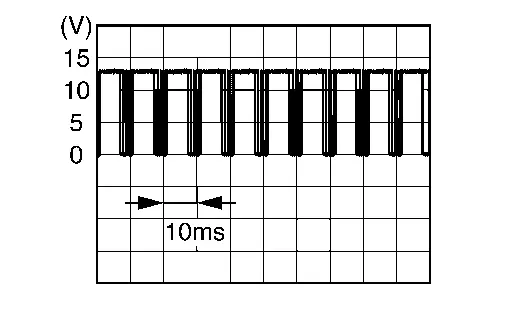
Is the inspection result normal?
YES>>Replace sunshade motor assembly. Refer to Removal and Installation.
NO>>GO TO 2.
CHECK COMMUNICATION SIGNAL CIRCUIT
-
Ignition switch OFF.
-
Disconnect moonroof motor assembly connector.
-
Check continuity between moonroof motor assembly harness connector and sunshade motor assembly harness connector.
Moonroof motor assembly Sunshade motor assembly Continuity Connector Terminal Connector Terminal R4 7 R5 7 Yes -
Check continuity between sunshade motor assembly harness connector and ground.
Sunshade motor assembly — Continuity Connector Terminal R5 7 Ground No
Is the inspection result normal?
YES>>Replace moonroof motor assembly. Refer to Removal and Installation.
NO>>Repair or replace harness.
Other materials:
Moniteur de vue arrière (Caméra de recul)
Informations de sécurité
Bouton d'accès rapide CAMÉRA
AVERTISSEMENT CRUCIAL
La caméra de votre Nissan Rogue est une aide au stationnement, mais elle ne remplace en aucun cas la vigilance humaine. Vérifiez toujours physiquement votre environnement direct.
Les lignes ...
System Description. System
Lithium Ion Battery 12v
System Description
SYSTEM DIAGRAM
Component Function
12V sub battery (lithium ion battery)
Refer to 12V Sub Battery (Lithium Ion Battery).
Combination Meter
Receives li-ion battery error signal from 12V sub battery (lithium ion battery) through IPDM E/R via ...
P2135 Tp Sensor
DTC Description
DTC DETECTION LOGICNOTE:
If DTC P2135 is displayed with DTC P06B0, first perform the trouble diagnosis for DTC P06B0. Refer to DTC Description.
DTC
CONSULT screen terms
(Trouble diagnosis content)
DTC detection condition
P2135
00
TP SENSOR-B1
(Throttle/Pedal ...