
Nissan Rogue (T33) 2021-Present Owner’s Manual & User Guide: Driver and front passenger supplemental knee air bag
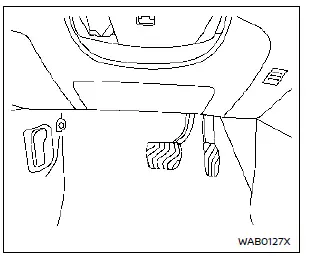
Driver's side
The knee air bag is integrated into the knee bolster on both the driver's and front passenger's sides of your Nissan Rogue. All safety information, cautions and warnings in this manual apply and must be followed. The knee air bag is engineered to deploy in higher severity frontal collisions, although it may also deploy if another type of impact generates forces similar to those of a severe frontal collision. In some lower severity impacts, it may not deploy.
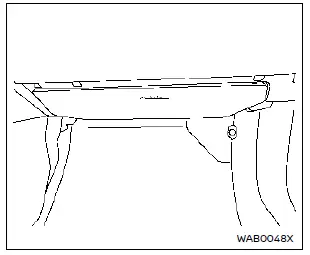
Front passenger's side
Visible vehicle damage (or the lack of it) is not always a reliable indication of correct knee air bag operation in your Nissan Rogue.
When the knee air bag deploys, you may hear a relatively loud noise, followed by the release of smoke. This smoke is not harmful and does not indicate a fire. However, avoid breathing it in, as it may cause temporary irritation or coughing. Anyone with a history of breathing difficulties should move to fresh air as soon as possible.
The knee air bag helps cushion impact forces on the knees of the driver and front passenger, helping to reduce the risk of serious lower body injuries in a collision. However, a deploying knee air bag can also cause abrasions or minor injuries. The knee air bag specifically provides restraint to the lower body.
Because the knee air bag inflates rapidly to help protect the occupants, the force of deployment can increase the risk of injury if an occupant is sitting too close to, or leaning against, the knee air bag module when it inflates. After a collision, the knee air bag will either deflate quickly or remain inflated for a short time before venting.
The knee air bag operates only when the ignition switch is placed in the ON position.
After placing the ignition switch in the ON position, the supplemental air bag warning light illuminates. The supplemental air bag warning light will turn off after about 7 seconds if the system is operational.
WARNING
- Do not place any objects between the knee bolster and the driver's or front passenger's seat. In the event of a collision, such objects may become dangerous projectiles and cause injury if a knee air bag deploys.
- Immediately after deployment, knee air bag components will be very hot. Do not touch them to avoid severe burns.
- No unauthorized modifications should
be made to any components or
wiring of the knee air bag system.
This helps prevent damage to, or accidental deployment of, the knee air bag system.
- Do not make unauthorized changes to your vehicle's electrical or suspension systems. Such changes could affect the proper operation of the knee air bag system.
- Tampering with the knee air bag system can lead to serious personal injury. For example, do not alter the driver or front passenger knee bolster or install additional trim material around the knee air bag area.
- It is recommended that you visit a NISSAN dealer for any work on or around the knee air bag. It is also recommended that you visit a NISSAN dealer for installation of additional electrical equipment. The SRS wiring harnesses* must not be modified or disconnected. Unauthorized test equipment and probing devices should not be used on the knee air bag system.
*The SRS wiring harness or connectors are yellow or orange for easy identification.
When selling your Nissan Rogue, please inform the new owner about the knee air bag system and direct them to the appropriate safety sections in this manual.
Other materials:
P2617 Crankshaft Position Sensor
DTC Description
DTC DETECTION LOGIC DTC
CONSULT screen terms
(Trouble diagnosis content)
DTC detection condition
P2617
00
Crankshaft position signal
(Crankshaft position signal output circuit/open)
A
Diagnosis condition
Engine running at idle
Signal (terminal)
...
Restraints. Seat Belt Control System
Precaution :: Precautions
Precaution for Supplemental Restraint System (SRS) "AIR BAG" and "SEAT BELT PRE-TENSIONER"
The Supplemental Restraint System such as “AIR BAG� and “SEAT BELT
PRE-TENSIONER�, used along with a front seat belt, helps to reduce the
risk or severity of injury to t ...
P1c91-14 Sub Starter & Generator
DTC Description
DTC DETECTION LOGIC DTC No. CONSULT screen terms (Trouble diagnosis content) DTC detection condition
P1C91-14
Sub starter & generator
(Sub starter & generator)
Diagnosis condition
Engine running at idle
Signal (terminal)
Battery voltage
Threshold ...