
Nissan Rogue (T33) 2021-Present Service Manual: Wireless Charger :: Basic Inspection. Diagnosis and Repair Work Flow
Diagnosis and Repair Work Flow
Work Flow
OVERALL SEQUENCE
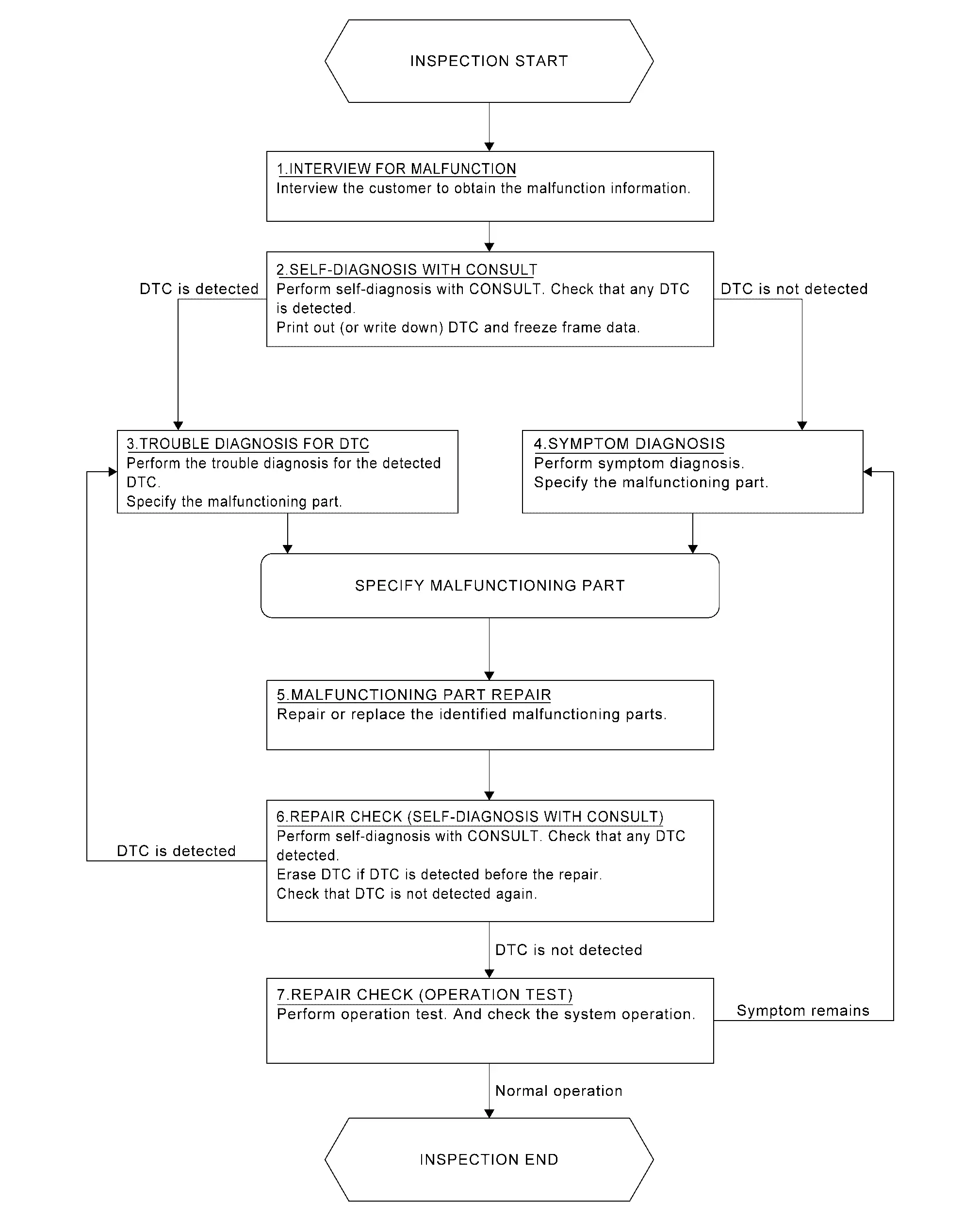
DETAILED FLOW
INTERVIEW FOR MALFUNCTION
It is also important to clarify the customer concerns before starting the inspection. Interview the customer about the concerns carefully and understand the symptoms fully.
 NOTE:
NOTE:
The customers are not professionals. Never assume that “maybe the customer means···� or “maybe the customer mentioned this symptom�.
>>
GO TO 2.
SELF-DIAGNOSIS WITH CONSULT
 CONSULT
Perform self-diagnosis of “Wireless charger". Refer to CONSULT Function.
NOTE:
Skip to step 4 of the diagnosis procedure if “Wireless charger� is not displayed.
Is any DTC detected?
YES>>GO TO 3.
NO>>GO TO 4.
TROUBLE DIAGNOSIS FOR DTC
CONSULT
-
Check the DTC indicated in the “Self diagnosis result�.
-
When DTC is detected, follow the instructions below:
-
Record DTC
-
Freeze Frame Data (FFD)
-
-
Perform the relevant diagnosis referring to the DTC Index. Refer to DTC Index.
>>
GO TO 5.
SYMPTOM DIAGNOSIS
Perform the applicable diagnosis according to the diagnosis chart by symptom. Refer to Symptom Table.
>>
GO TO 5.
MALFUNCTIONING PART REPAIR
Repair or replace the identified malfunctioning parts.
>>
GO TO 6.
REPAIR CHECK (SELF-DIAGNOSIS WITH CONSULT)
CONSULT
-
Erases self-diagnosis results.
-
Perform self-diagnosis of “Wireless charger� again after repairing or replacing the specific items.
-
Check if any DTC is detected in self-diagnosis results of “Wireless charger� .
Is any DTC detected?
YES>>GO TO 3.
NO>>GO TO 7.
REPAIR CHECK (OPERATION TEST)
Perform operation test. Check that the malfunction symptom is solved or no other symptoms occur.
Is there a malfunction symptom?
YES>>GO TO 4.
NO>>Inspection End.
Other materials:
Basic information
WARNING
Improper loading or overloading of a trailer can negatively impact vehicle handling, braking, and overall performance, increasing the risk of an accident.
CAUTION
Do not tow a trailer or haul heavy loads during the first 500 miles (800 km) of vehicle operation. Doing so may damage the eng ...
P2122 App Sensor
DTC Description
DTC DETECTION LOGIC DTC
CONSULT screen terms
(Trouble diagnosis content)
DTC detection condition
P2122
00
APP SEN 1/CIRC
(Throttle/Pedal position sensor/switch D circuit low)
Diagnosis condition
Engine running at idle
Signal (terminal)
Accelerator ...
Removal and Installation. Back Door
Exploded View
Roof seal
Back door weather-strip
Back door hinge LH
Back door stay LH*
Stud ball
Back door bumper rubber upper
Back door bumper rubber lower
Back door striker
TORX bolt
Back door panel
Back door stay RH*
Back door hinge RH ...