
Nissan Rogue (T33) 2021-Present Owner’s Manual & User Guide: Windshield deicer switch
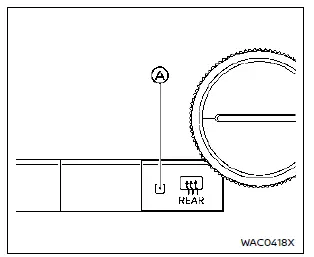
Example
The windshield deicer helps remove ice when the wiper is frozen to the glass — a useful function during winter driving in your Nissan Rogue.
Start the engine and press the switch. The indicator light A illuminates, and the deicer will operate for about 20 minutes. The rear window defroster activates simultaneously. After the preset time, the system switches off automatically.
To turn it off manually, press the switch again.
CAUTION
- When using the deicer, always keep the engine running to avoid draining the battery.
A discharged battery could prevent the Nissan Rogue from starting.
- When cleaning the inside of the windshield, be careful not to damage the electrical conductors.
Other materials:
C106b-64 Stop Lamp Sw
DTC Description
DTC DETECTION LOGIC DTC No.
CONSULT screen terms
(Trouble diagnosis content) DTC detection condition
C106B
64
Stop lamp SW
(Stop lamp switch)
Diagnosis condition
When ignition switch is ON.
When the power supply voltage is normal.
Signal (ter ...
Habitacle
Le plan de l’habitacle du Nissan Rogue met en évidence les rangements, commandes et éclairages à portée de main. Pour un confort optimal, ajustez votre position de conduite avant de prendre la route et identifiez les commandes essentielles.
Rétroviseur : visibilité arrière et réduc ...
Paddle Shifter
Removal and Installation
REMOVALFor servicing the Japan production paddle
shifter, service the Japan production steering wheel. Refer to Removal
and Installation.NOTE:
The Japan production paddle shifter is serviced as an
assembly with the Japan production ASCD steering switch (if so
equip ...