
Nissan Rogue (T33) 2021-Present Owner’s Manual & User Guide: Headlight and turn signal switch
Headlight switch
Basic information
CAUTION
Use headlights only with the engine running to prevent battery drain.
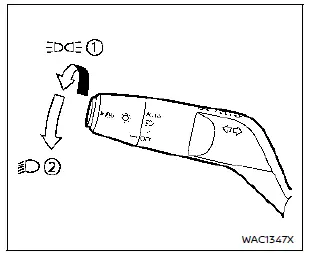
Lighting
Type A (if so equipped):
- Rotate the switch to the
 position to turn on the parking, tail, license plate, and instrument panel lights.
 - Rotate to the
 position to activate the headlights. Daytime running lights turn off.
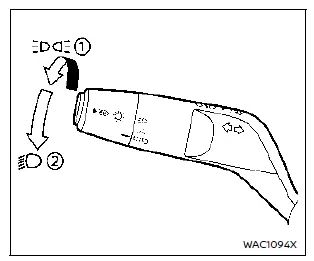
Type B (if so equipped):
- Rotate to
 to activate parking and panel lights. This also enables Intelligent Auto Headlights.
 - Rotate to
 to turn on the headlights; daytime running lights turn off.
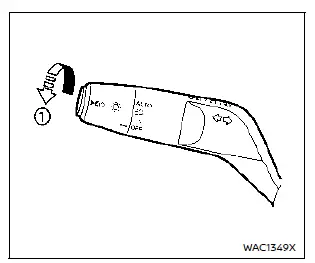
Intelligent Auto Headlight system
Type A (if so equipped):
This system automatically turns headlights on or off based on ambient light conditions — improving convenience for Nissan Rogue drivers.
To activate:
1. Set the headlight switch to AUTO (1).
2. Turn the ignition ON.
3. The system will control headlights automatically.
To turn off the system, move the switch to OFF,  or
or  .
.
The headlights turn on automatically in darkness, at twilight, or in rainy weather when wipers operate continuously.
If the ignition is turned OFF and a door is opened, headlights stay on for 5 minutes.
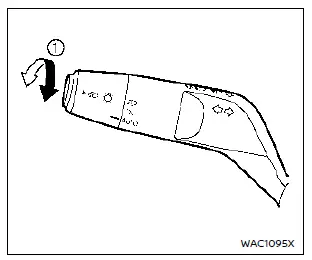
Type B (if so equipped):
Functions similarly to Type A but adds additional switch options.
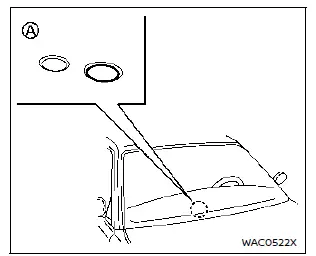
Be sure not to cover the photo sensor A on the dashboard, as it controls the automatic headlight function.
Automatic headlights off delay:
You may keep headlights on for up to 180 seconds after switching the ignition OFF and closing the doors. Factory default is 30 seconds.
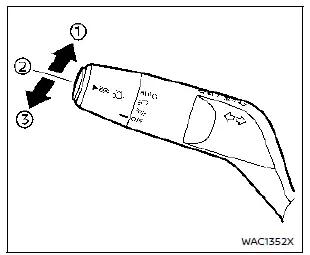
Example
Headlight beam select
- Push the lever forward to activate high beams; the
 indicator illuminates.
 - Pull backward to select low beam.
- Pull gently to flash high beams (single or double pull depending on current beam setting).
High beam assist
The high beam assist system automatically operates when the vehicle is traveling at approximately 19 MPH (30 km/h) or more. When an oncoming or preceding vehicle is detected while the Nissan Rogue headlights are on high beam, the system will switch to low beam automatically.
Precautions on high beam assist:
WARNING
- The high beam assist system is a convenience feature and does not replace safe driving practices.
The driver must remain attentive at all times, drive safely, and manually switch between high and low beams whenever necessary.
- The high beam or low beam may not change automatically under the following conditions. In these situations, switch the high and low beams manually.
- During adverse weather such as rain, fog, snow, or strong winds.
- When there are light sources near the vehicle that resemble headlights or tail lights.
- When headlights of oncoming or leading vehicles are turned off, when their light color is affected by dirt or damage, or when their light beam is misaligned.
- When there is a sudden or continuous change in brightness.
- When driving on roads with rolling hills or noticeable level changes.
- When driving on roads with many curves.
- When bright light is reflected toward the front of the vehicle from a sign or mirror-like surface.
- When a container or similar object being towed by a leading vehicle reflects intense light.
- When a headlight on your vehicle is damaged or dirty.
- When the vehicle is leaning at an angle due to a flat tire, towing, or similar conditions.
- The timing of the switch between low and high beam may vary under the following conditions.
- Brightness of the headlights of the oncoming or leading vehicle.
- Movement and direction of the oncoming or leading vehicle.
- When only one light on the oncoming or leading vehicle is illuminated.
- When the oncoming or leading vehicle is a two-wheeled vehicle.
- Road conditions, including inclines, curves, and surface type.
- The number of passengers and the amount of cargo in the Nissan Rogue.
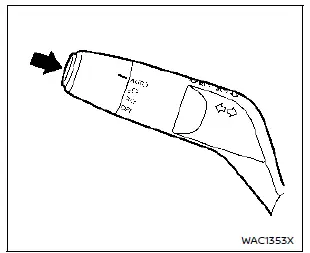
Example
To activate the high beam assist system, push the switch as shown with the AUTO position (or  position, depending on the model). The high beam assist indicator in the meter lights up while the headlights are on.
If the high beam assist indicator does not illuminate under these conditions, the system may not be functioning correctly. It is recommended that you have the Nissan Rogue inspected by a NISSAN dealer.
When the speed drops below approximately 13 MPH (20 km/h), the headlights remain on low beam.
To turn the high beam assist system off, push the switch again.
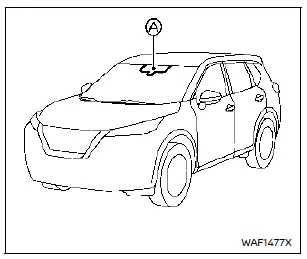
Ambient image sensor maintenance:
The ambient image sensor A for the high beam assist system is located in front of the inside mirror. To keep the system working properly and avoid malfunctions, observe the following precautions:
- Keep the windshield clean in the area around the sensor.
- Do not place stickers (even transparent ones) or accessories near the ambient image sensor.
- Do not strike or damage the area around the sensor and avoid touching the sensor lens.
If the ambient image sensor is damaged, it is recommended you have the Nissan Rogue checked by a NISSAN dealer.
Battery saver system
- When the headlight switch is in the
 or
or  position with the ignition switch in the ON position, the lights will automatically turn off after a period of time once the ignition is switched OFF.
 - With the engine off, the headlights can be turned on, but they will switch off automatically after a certain period.
- When the headlight switch remains in the
 or
or  position after the lights turn off automatically, the lights will turn on again:
- When the ignition switch is turned to the ON position.
- When the headlight switch is operated.
In this case, the lights will once again turn off automatically after a set period of time.
CAUTION
- If you turn the headlight switch on again after the automatic shutoff, the lights may not turn off automatically. Always return the switch to OFF (if equipped) or AUTO when leaving the Nissan Rogue for an extended time to prevent battery discharge.
- Never leave the light switch on for long periods when the engine is not running, even if the automatic shutoff is active.
Daytime Running Light (DRL) system
The LED Daytime Running Lights (DRL) automatically illuminate when the engine is started and the parking brake is released. On the Nissan Rogue, the LED DRL operate when the headlight switch is in the OFF position (if equipped),  , or AUTO mode (when the headlights are off). When the headlight switch is turned to
  for full illumination, the LED lights change from DRL mode to the park light function.
Type A: If the parking brake is applied before the engine starts, the LED DRL will not illuminate. They will turn on once the parking brake is released. This feature functions when the switch is in  , AUTO, or OFF. The LED DRL remain on until the ignition is switched OFF.
Type B: If the parking brake is applied before starting the engine, the LED DRL remain off and illuminate only when the parking brake is released. Type B works in AUTO or  mode. The DRL remain active until the ignition is turned OFF.
WARNING
When the LED DRL system is active with the headlight switch in OFF mode (if equipped), the tail lights are not illuminated. At dusk or in low visibility, manually turn on your headlights.
Failure to activate the headlights may reduce visibility and increase the risk of an accident.
Turn signal switch
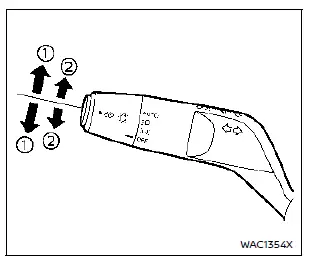
Example
- Turn signal
Move the lever up or down to indicate a turn. In the Nissan Rogue, the signal will cancel automatically once the turn is completed.
For models equipped with ProPILOT Assist 2.1: The lever returns to neutral after you move and release it. To cancel the signal, lightly move the lever to position 2 in the opposite direction and release it.
- Lane change signal
To signal a lane change, move the lever up or down until the turn signal flashes without latching. Hold the lever until the lane change is complete.
You may also move the lever briefly until the indicator flashes, then release it—this causes the signal to blink three times automatically.
Select the appropriate signaling method based on road and traffic conditions to ensure safe operation of your Nissan Rogue.
Other materials:
Head Up Display (HUD)
Basic information
Example
Example
WARNING
Failure to correctly adjust the brightness or position of the HUD image may reduce visibility through the windshield, which could lead to an accident resulting in serious injury or death.
Avoid focusing on the Head Up Display (HUD) for extended per ...
U0101 Can Comm Circuit
DTC Description
DESCRIPTIONCAN (Controller Area Network) is a serial
communication line for real time application. It is an on-Nissan Ariya
vehicle multiplex communication line with high data communication speed
and excellent error detection ability. Many electronic control units are
equipp ...
Configuration
Description
Vehicle specification needs to be written with CONSULT because it is
not written after replacing the ABS actuator and electric unit (control
unit).The configuration requires network connection. CONSULT
connects to network and then it downloads the configuration data from
the ser ...