
Nissan Rogue (T33) 2021-Present Owner’s Manual & User Guide: Window washer fluid
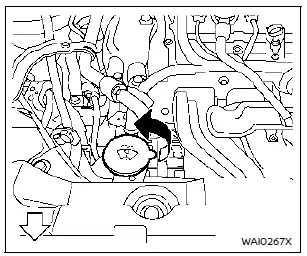
Type A (if so equipped)
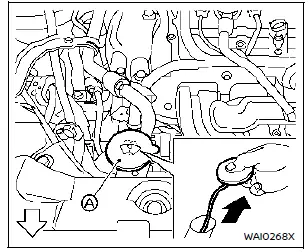
Type B (if so equipped)
For Type A systems on the Nissan Rogue, check the fluid level directly in the washer reservoir and refill when the level is low.
For Type B systems, plug the center hole A of the cap/tube assembly with your finger, remove the tube, and check for fluid. If the tube is empty, add washer fluid.
Using a washer solvent improves cleaning performance. During colder months, add a winter-grade windshield washer antifreeze according to the manufacturer’s mixing recommendations.
The washer reservoir should be topped up regularly, especially when the low washer fluid warning appears (if equipped). Frequent refills may be necessary depending on road and weather conditions.
Recommended fluid: Genuine NISSAN Windshield Washer Concentrate Cleaner & Antifreeze or an approved equivalent.
CAUTION
- Do not use engine antifreeze in place of washer solution — it can damage painted surfaces.
- Avoid filling the reservoir with full-strength washer concentrates. Some methyl alcohol–based liquids can stain exterior trim if spilled.
- Always pre-mix concentrates with water to the specified ratio before adding them to the washer reservoir. Do not mix fluids directly inside the reservoir.
Other materials:
Dtc/circuit Diagnosis. Washer Fluid Level Switch Circuit
Diagnosis Procedure
CHECK WASHER FLUID LEVEL SWITCH CIRCUIT
Disconnect combination meter and washer fluid level switch connector.
Check continuity between combination meter harness connector and washer fluid level switch harness connector.
Combination meter Washer fluid level switch C ...
Fusibles
Compartiment moteur
Informations de base
AVERTISSEMENT
N’utilisez jamais un fusible dont l’ampérage est supérieur ou inférieur à la valeur indiquée sur le couvercle de la boîte à fusibles. L’utilisation d’un fusible inadapté peut endommager le circuit électrique, les unit ...
Meter Speaker Signal Circuit
Diagnosis Procedure
CHECK METER SPEAKER CIRCUIT FOR OPEN
Ignition switch OFF.
Disconnect combination meter harness connector and meter speaker harness connector.
Check the continuity between combination meter harness connector and meter speaker harness connector.
Combination meter ...