
Nissan Rogue (T33) 2021-Present Service Manual: Unit Disassembly and Assembly :: Steering Gear and Linkage
Exploded View
DISASSEMBLY (NORTH AMERICA PRODUCTION MODELS)
DISASSEMBLY (JAPAN PRODUCTION MODELS)
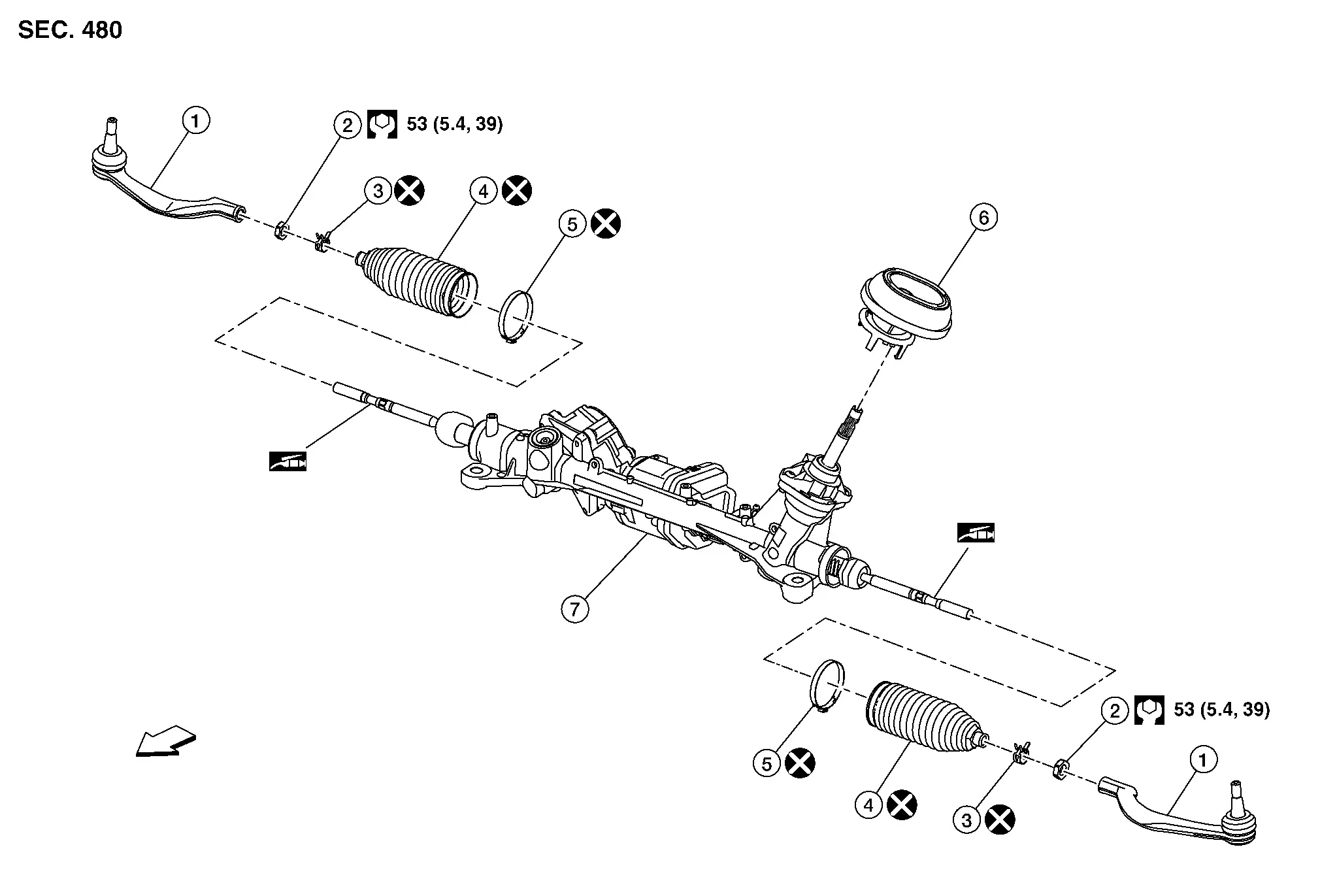
 |
Outer socket |  |
Outer socket lock nut |  |
Boot clamp (small diameter) |
 |
Boot |  |
Boot clamp (large diameter) |  |
Hole cover seal |
 |
Gear housing assembly | ||||
 |
: N·m (kg-m, ft-lb) | ||||
 |
: Apply Dow Corning 111 or equivalent. | ||||
 |
: Always replace after every disassembly. | ||||
CAUTION:
Never apply the grease to the surface between steering rack and inner socket screw part.
DISASSEMBLY (NORTH AMERICA PRODUCTION MODELS)
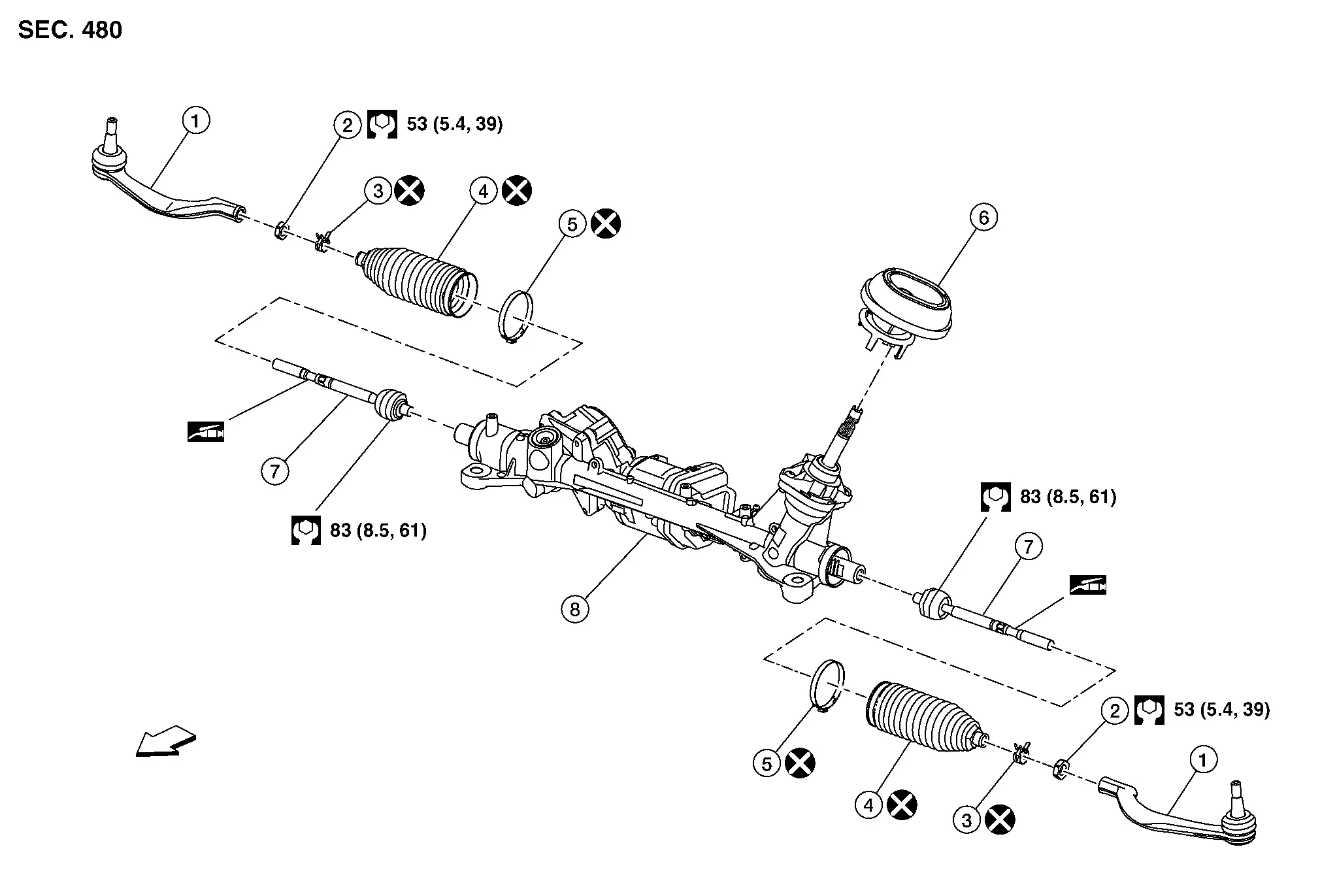
| 1. | Outer socket | 2. | Outer socket lock nut | 3. | Boot clamp (small diameter) |
| 4. | Boot | 5. | Boot clamp (large diameter) | 6. | Hole cover seal |
| 7. | Inner socket | 8. | Gear housing assembly | ||
|
: N·m (kg-m, ft-lb) | ||||
|
: Apply Dow Corning 111 or equivalent. | ||||
|
: Always replace after every disassembly. | ||||
CAUTION:
Never apply the grease to the surface between steering rack and inner socket screw part.
Disassembly and Assembly
DISASSEMBLY (JAPAN PRODUCTION MODELS)
CAUTION:
Disassemble and assemble steering gear assembly by fixing the mounting area with a vise using copper plates.
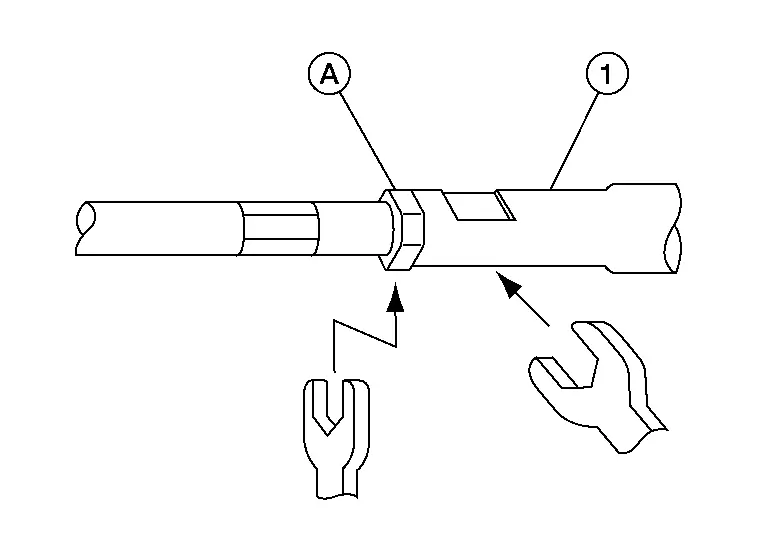
Loosen inner socket lock nut (A).
CAUTION:
To prevent damage, hold outer socket (1) across flats using suitable tool while loosening inner socket lock nut (A).
Remove boot clamps, and then remove boot from inner socket and housing.
CAUTION:
Never damage inner socket part of gear housing assembly when removing boot. Steering gear assembly must be replaced if gear housing assembly are damaged because it may cause foreign material interfusion.
Remove hole cover seal.
Perform inspection after disassembly. Refer to Inspection.
DISASSEMBLY (NORTH AMERICA PRODUCTION MODELS)
CAUTION:
Disassemble and assemble steering gear assembly by fixing the mounting area with a vise using copper plates.
Loosen inner socket lock nut (A).
CAUTION:
To prevent damage, hold outer socket (1) across flats using suitable tool while loosening inner socket lock nut (A).
Remove boot clamps, and then remove boot from inner socket and housing.
CAUTION:
Never damage inner socket part of gear housing assembly when removing boot. Steering gear assembly must be replaced if gear housing assembly are damaged because it may cause foreign material interfusion.
Remove the inner socket.
CAUTION:
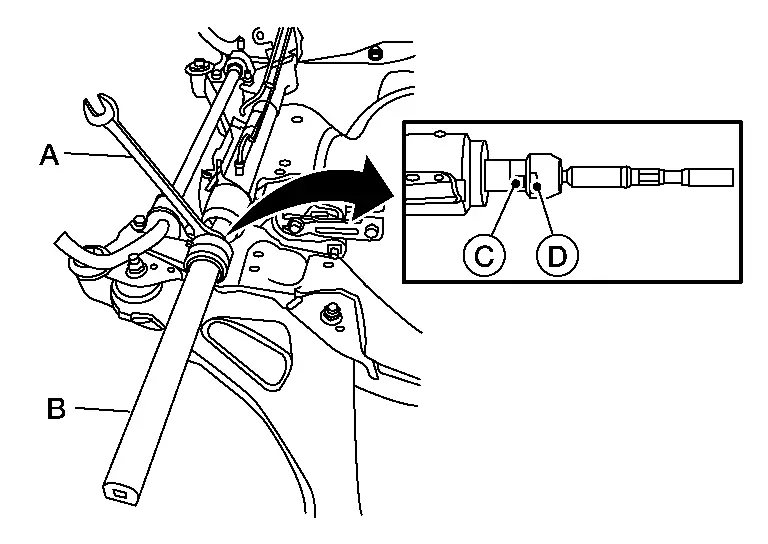
To prevent damage to the steering gear when installing the inner socket, hold suitable tool (A) across steering gear flats (C) while turning suitable tool (B) across inner socket flats (D).
Remove hole cover seal.
Perform inspection after disassembly. Refer to Inspection.
ASSEMBLY (JAPAN PRODUCTION MODELS)
Install hole cover seal to gear housing assembly.
Apply recommended grease to part (A) of inner socket, and install boot to inner socket and gear housing.
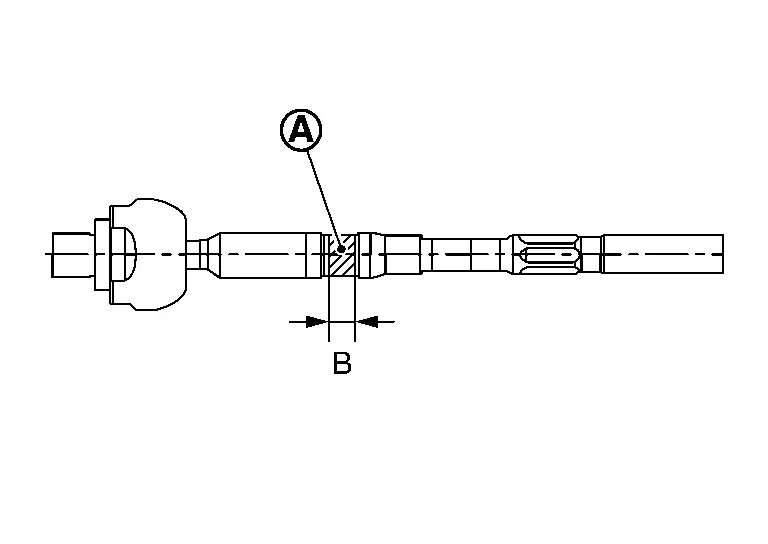
Use Dow Corning 111 (manufactured by TOURE·DAUKONINGU) or equivalent.
CAUTION:
Never reuse boot.
| Grease application position (Reference) | |
| B | : 10 mm (0.39 in) |
Install boot clamp (large diameter) (1) to boot using boot band crimping tool (SST: KV40107300) (A).
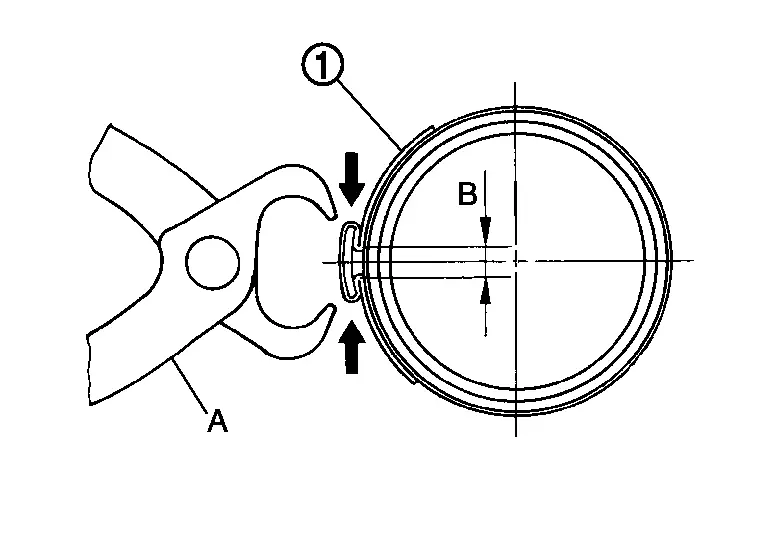
CAUTION:
-
Never reuse boot clamp (large diameter).
-
Install boot clamp (large diameter) securely to boot groove, and crimp it so as to have clearance (B) of 3 mm (0.12 in) or less as shown.
Install boot clamp (small diameter) to boot.
Adjust inner socket to standard length (L), and then tighten lock nut to the specified torque. Check length again after tightening lock nut.
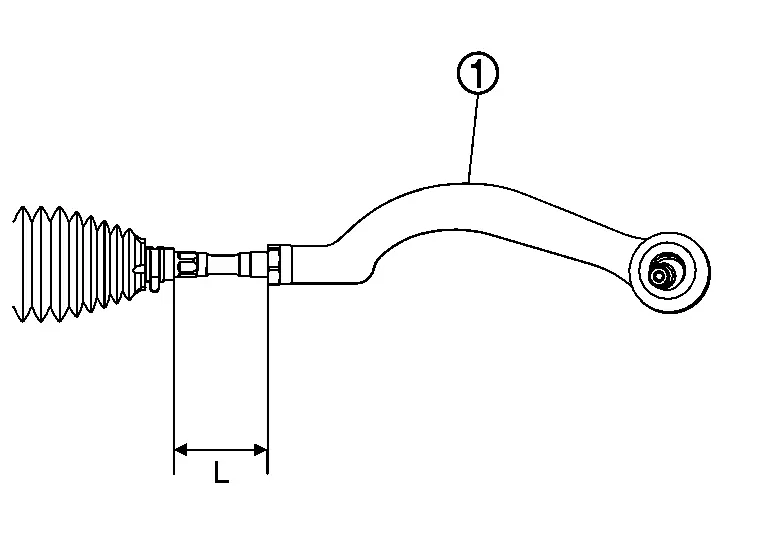
| 1. | : Outer socket |
| Inner socket length (L) | : Steering Gear and Linkage |
CAUTION:
-
When tightening the lock nut (1), be sure to fix outer socket (2) with a wrench or an equivalent to prevent the ball joint from getting contact with the knuckle.
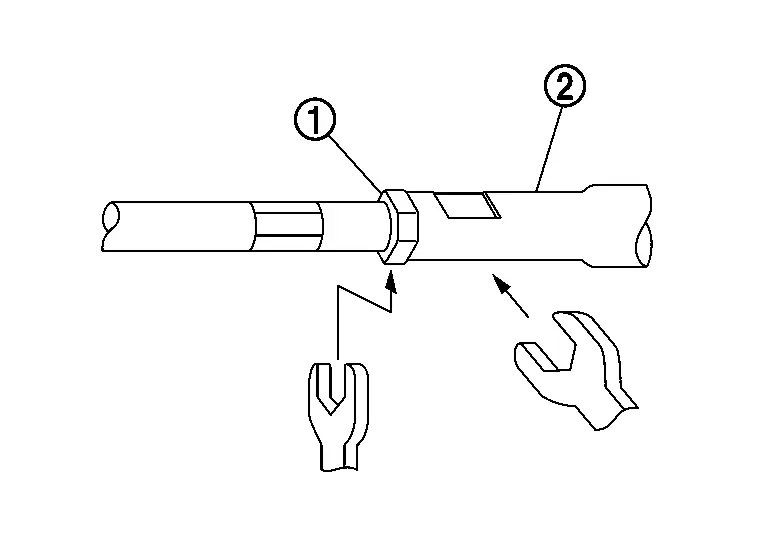
-
Adjust toe-in after this procedure. The length achieved after toe-in adjustment is not necessarily the above value.
ASSEMBLY (NORTH AMERICA PRODUCTION MODELS)
Install hole cover seal to gear housing assembly.
Install inner socket. Tighten to specified torque. Refer to Exploded View.
CAUTION:
To prevent damage to the steering gear when installing the inner socket, hold suitable tool (A) across steering gear flats (C) while turning suitable tool (B) across inner socket flats (D).
Apply recommended grease to part (A) of inner socket, and install boot to inner socket and gear housing.
Use Dow Corning 111 (manufactured by TOURE·DAUKONINGU) or equivalent.
CAUTION:
Never reuse boot.
| Grease application position (Reference) | |
| B | : 10 mm (0.39 in) |
Install boot clamp (large diameter) (1) to boot using boot band crimping tool (SST: KV40107300) (A).
CAUTION:
-
Never reuse boot clamp (large diameter).
-
Install boot clamp (large diameter) securely to boot groove, and crimp it so as to have clearance (B) of 3 mm (0.12 in) or less as shown.
Install boot clamp (small diameter) to boot.
Adjust inner socket to standard length (L), and then tighten lock nut to the specified torque. Check length again after tightening lock nut.
| 1. | : Outer socket |
| Inner socket length (L) | : Steering Gear and Linkage |
CAUTION:
-
When tightening the lock nut (1), be sure to fix outer socket (2) with a wrench or an equivalent to prevent the ball joint from getting contact with the knuckle.
-
To prevent damage, hold outer socket across flats using suitable tool while tightening inner socket lock nut.
-
Adjust toe-in after this procedure. The length achieved after toe-in adjustment is not necessarily the above value.
-
Inspect to make sure no boot deformation has occurred during toe-in adjustment. Adjust boot as necessary.
-
Adjust toe-in after this procedure. The length achieved after toe-in adjustment is not necessary the above value.
Other materials:
P0446 Evap Canister Vent Control Valve
DTC Description
DTC DETECTION LOGIC DTC
CONSULT screen terms
(Trouble diagnosis content)
DTC detection condition
P0446
00
VENT CONTROL VALVE
(EVAP System Vent Control Circuit)
Diagnosis condition
Engine running at idle
Signal (terminal)
EVAP canister vent control ...
U2212 Can Comm Err (brake Unit)
DTC Description
DTC DETECTION LOGIC DTC
CONSULT screen terms
DTC detection condition
U2212
87
CAN communication error brake unit
Diagnosis condition
Ignition switch ON
Signal (terminal)
CAN communication signal
Threshold
ECM is not recieving CAN communication ...
Symptom Diagnosis. Heated Steering Wheel System Does Not Activate
Description
The heated steering wheel does not warm up.
The heated steering wheel system cannot be turned OFF.
Diagnosis Procedure
PERFORM SELF DIAGNOSTIC RESULT
CONSULT
Ignition switch ON.
Select “Self Diagnostic Result� mode of “HVAC�.
Check DTC.
Is DT ...