
Nissan Rogue (T33) 2021-Present Service Manual: System
Propilot Assist 2.1
System Description
SYSTEM DIAGRAM
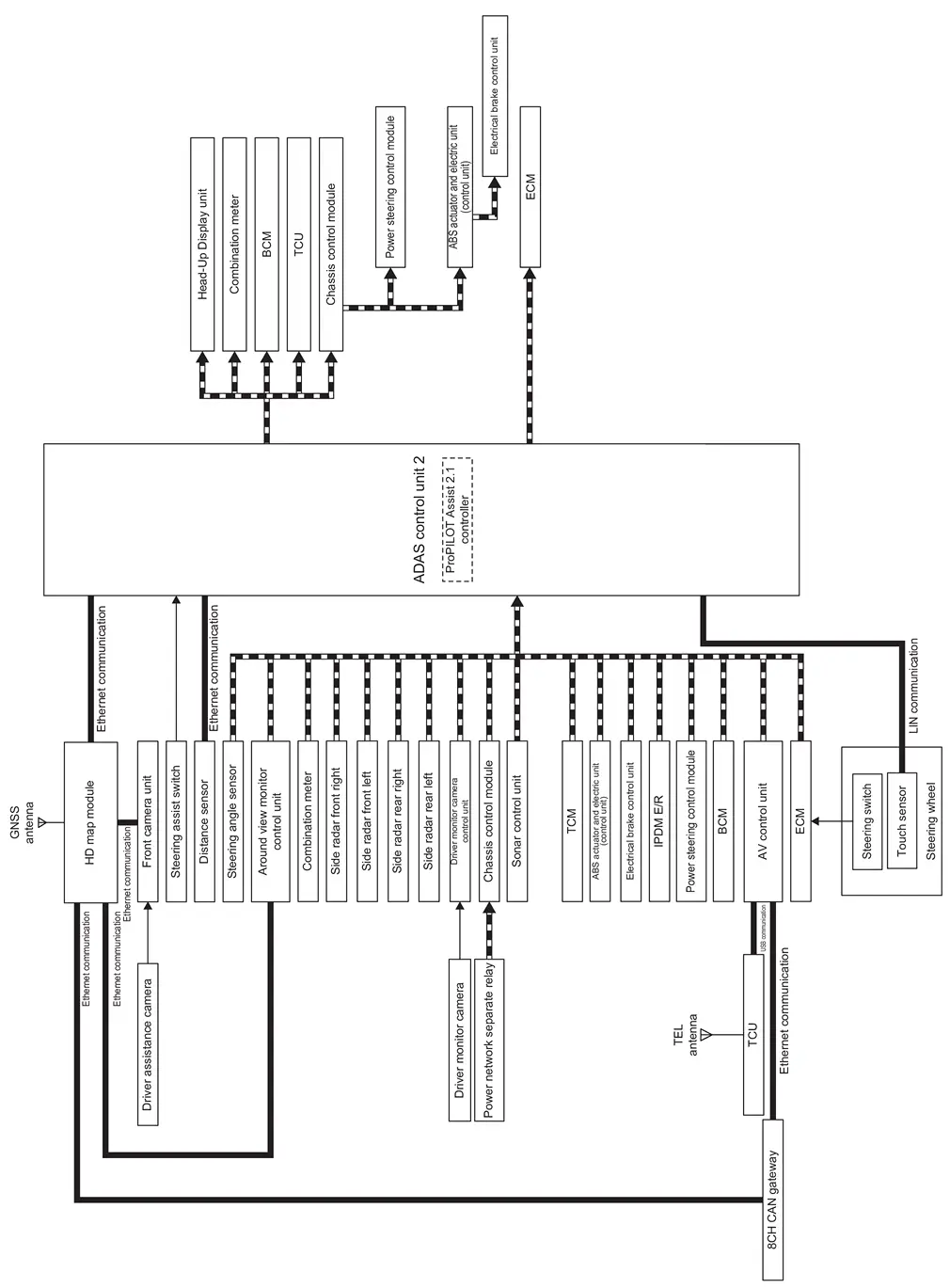
| Component | Description |
|---|---|
| ADAS control unit 2 | ADAS Control Unit |
| GNSS antenna | ROOF ANTENNA AND ANTENNA FEEDER |
| HD map module | HD MAP MODULE |
| Front camera unit | Front Camera Unit |
| Steering assist switch | Steering Assist Switch |
| Distance sensor | Distance Sensor |
| Steering angle sensor | Steering Angle Sensor |
| Around view monitor control unit | Around View Monitor Control Unit |
| Combination meter |
|
| Side radar front right | Side Radar LH/RH |
| Side radar front left | Side Radar LH/RH |
| Side radar rear right | Side Radar LH/RH |
| Side radar rear left | Side Radar LH/RH |
| Driver monitor camera control unit | Driver Monitor Camera Control Unit |
| Chassis control module | Chassis Control Module |
| Sonar control unit | Sonar Control Unit |
| ABS actuator and electric unit (control unit) | ABS Actuator and Electric Unit (Control Unit) |
| Electrical brake control unit | Component Description |
| IPDM E/R | System Description |
| Power steering control module | STEERING GEAR ASSEMBLY |
| BCM | System Description |
| AV control unit | AV Control Unit |
| ECM | ECM |
| Driver monitor camera | Driver Monitor Camera |
| Power network separate relay | POWER NETWORK SEPARATE RELAY |
| ProPILOT Assist steering switch | ProPILOT Assist Steering Switch |
| Steering wheel touch sensor | STEERING WHEEL TOUCH SENSOR |
| Head-Up Display unit | Head Up Display Unit |
| TCU | TCU |
| TEL antenna | Telematics Antenna |
| 8CH CAN gateway | 8CH CAN Gateway |
| Driver assistance camera | Driver Monitor Camera Control Unit |
| TCM | TCM |
ADAS CONTROL UNIT 2 INPUT/OUTPUT SIGNAL ITEM
Input Signal Item
| Transmit unit | Signal name | Description | ||
|---|---|---|---|---|
| HD map module | Ethernet communication | HD map data signal | Receives HD map data to grasp accurate road information | |
| GNSS signal | Receives GNSS signal to identify current Nissan Ariya vehicle position | |||
| Front camera unit |
Ethernet communication (via HD map module) |
Nissan Ariya Vehicle ahead signal | Structure detection signal vehicle ahead | |
| Pedestrian ahead signal | Receives pedestrian detection results in front of Nissan Ariya vehicle | |||
| Detected lane condition signal | Receives lane marker detection results | |||
| Traffic sign detection signal | Receives detection results of no-entry sign and speed sign | |||
| Structure detection signal | Receives structure detection results in front of Nissan Ariya vehicle | |||
| Free space detection signal | Receives information of occupied or unoccupied zone in front of Nissan Ariya vehicle | |||
| Steering assist switch | Steering assist switch signal | Receives on operational state of the steering assist switch | ||
| Distance sensor | Ethernet communication | Distance sensor signal | Receives detection results of leading Nissan Ariya vehicle and distance from it | |
| Steering angle sensor | CAN communication | Steering angle sensor malfunction signal | Receives a malfunction state of steering angle sensor | |
| Steering angle sensor signal | Receives the number of revolutions, turning direction of the steering wheel | |||
| Steering angle speed signal | Receives the turning angle speed of the steering wheel | |||
| Around view monitor control unit | CAN communication |
Camera image signal (Side camera) |
Receives detection results of lane marker and nearby motorcycle | |
| Combination meter | CAN communication | System selection signal | Receives a selection state of each item selected with the steering switch | |
| Side radar front right | CAN communication | Nissan Ariya Vehicle detection signal | Receives vehicle detection results within vehicle detection area of the front right side radar | |
| Free space detection signal | Receives detection results of occupied or unoccupied zone within Nissan Ariya vehicle detection area of the front right side radar | |||
| Side radar front left | CAN communication | Nissan Ariya Vehicle detection signal | Receives vehicle detection results within vehicle detection area of the front left side radar | |
| Free space detection signal | Receives detection results of occupied or unoccupied zone within Nissan Ariya vehicle detection area of the front left side radar | |||
| Side radar rear right | CAN communication | Nissan Ariya Vehicle detection signal | Receives vehicle detection results within vehicle detection area of the rear right side radar | |
| Rear Nissan Ariya vehicle approach signal | Receives detection results of vehicle approaching at high speed from the rear right side | |||
| Free space detection signal | Receives detection results of occupied or unoccupied zone within Nissan Ariya vehicle detection area of the rear right side radar | |||
| Side radar rear left | CAN communication | Nissan Ariya Vehicle detection signal | Receives vehicle detection results within vehicle detection area of the rear left side radar | |
| Rear Nissan Ariya vehicle approach signal | Receives detection results of vehicle approaching at high speed from the rear left side | |||
| Free space detection signal | Receives detection results of occupied or unoccupied zone within Nissan Ariya vehicle detection area of the rear left side radar | |||
| Driver monitor camera control unit | CAN communication | Inattentive warning signal | Receives driver's inattentive state | |
| Doze warning signal | Receives driver's doze state | |||
| Chassis control module | CAN communication | Power supply state signal | Receives power supply state | |
| Brake control permission signal | Receives necessary brake control permission status in the control of ProPILOT Assist 2.1 | |||
| Sonar control unit | CAN communication | Nissan Ariya Vehicle detection signal | Receives vehicle detection results within sonar sensor detection area | |
| Obstacle signal | Receives detection results of obstacle and distance from it | |||
| ABS actuator and electric unit (control unit) | CAN communication | ABS malfunction signal | Receives a malfunction state of ABS | |
| ABS operation signal | Receives an operational state of ABS | |||
| ABS warning lamp signal | Receives an ON/OFF state of ABS warning lamp | |||
| TCS malfunction signal | Receives a malfunction state of TCS | |||
| TCS operation signal | Receives an operational state of TCS | |||
| VDC OFF signal | Receives an ON/OFF state of VDC | |||
| VDC malfunction signal | Receives a malfunction state of VDC | |||
| VDC operation signal | Receives an operational state of VDC | |||
| Nissan Ariya Vehicle speed signal (ABS) | Receives wheel speeds of four wheels | |||
| Yaw rate signal | Receives yaw rate acting on the Nissan Ariya vehicle | |||
| Side G sensor signal | Receives front G and side G acting on the Nissan Ariya vehicle | |||
| Electric parking brake operation signal | Receives an operational state of the parking brake | |||
| Brake pedal position switch signal | Receives an operational state of the brake pedal | |||
| Brake control permission signal | Receives necessary brake control permission status in the control of ProPILOT Assist 2.1 | |||
| Electrical brake control unit | CAN communication | Driver brake detection signal | Receive the brake operation status by the driver | |
| IPDM E/R | CAN communication | 12V battery (Li-ion battery) status signal | Receives 12 V battery (Li-ion battery) status | |
| Power steering control module | CAN communication | Pinion angle signal | Receives pinion angle of steering angle actuator | |
| Steering torque signal | Receives steering torque generated by driver | |||
| Steering control permission signal | Receives necessary steering control permission status in the control of ProPILOT Assist 2.1 | |||
| BCM | CAN communication | Front wiper request signal | Receive the front wiper operation status | |
| Turn indicator signal | Receives an operational state of the turn signal lamp and the hazard lamp | |||
| Door switch signal | Receives an operational state of the each doors | |||
| Driver's seat belt buckle signal | Receive driver's seatbelt fastening status | |||
| Stop lamp switch signal | Receive the brake operation status by the driver | |||
| Stop lamp status signal | Receive the lighting status of the stop lamp | |||
| AV control unit | CAN communication | Curve signal | Receives forward curve information | |
| Nissan Ariya Vehicle speed signal | Receives vehicle speed calculated by AV control unit | |||
| Road information signal | Receives forward road information | |||
| Navigation status signal | Receives navigation status | |||
| Route guide status signal | Receives whether Nissan Ariya vehicle is on the route or not during route guide driving | |||
| ECM | CAN communication | ProPILOT Assist steering switch signal | Receives the operational state of the ProPILOT Assist steering switch | |
| Accelerator pedal position signal | Receives accelerator pedal position (angle) | |||
| Driving force control permission signal | Receives necessary traction force control permission status in the control of ProPILOT Assist 2.1 | |||
| Engine speed signal | Receives engine speed | |||
| Power supply state signal | Receives power supply state | |||
| TCM | CAN communication | Shift position signal | Receives the shift position | |
| Steering wheel touch sensor | LIN communication | Steering wheel touch sensor signal | Receives driver's steering wheel holding or not holding status | |
Output Signal Item
| Reception unit | Signal name | Description | ||
|---|---|---|---|---|
| Head-Up Display unit | CAN communication | Display signal | Transmits a signal to display a state of the system on the Head Up Display | |
| Combination meter | CAN communication | Meter display signal | Transmits a signal to display a state of the system on the information display | |
| Buzzer output signal | Transmits a signal to activate buzzer | |||
| BCM | CAN communication | Hazard lamp request signal | Transmits a signal to blink the hazard lamp | |
| Turn signal lamp request signal | Transmits a signal to blink the turn signal lamp | |||
| ABS actuator and electric unit (control unit) | CAN communication | Electric parking brake operation request signal | Transmits the electric parking brake operation request | |
| Decelerate control command signal | Transmits necessary decelerate control command in the control of ProPILOT Assist 2.1 | |||
| TCU | CAN communication | SOS call request signal | Transmits signal for connection request with SOS call service, after making an emergency stop of the Nissan Ariya vehicle if necessary | |
| Power steering control module |
CAN communication (via chassis control module) |
Steering angle command signal | Transmits a signal to steer the steering wheel | |
| ECM |
CAN communication (via chassis control module) |
ProPILOT Assist 2.1 operation signal | Transmits an ProPILOT Assist 2.1 operation signal necessary for ProPILOT Assist 2.1 | |
| Target wheel end torque signal | Transmits a target wheel end torque necessary for ProPILOT Assist 2.1 | |||
DESCRIPTION
ProPILOT Assist 2.1 system has the following functions.
CAUTION:
-
ProPILOT Assist 2.1 is not an automatic driving device. The driver is responsible for always paying attention to the surroundings, operating the steering, brakes, and accelerator pedal according to the road, traffic and Nissan Ariya vehicle conditions, and driving safely.
-
ProPILOT Assist 2.1 controls the steering to drive near the center of the lane. Even if the Nissan Ariya vehicle approaches from the side, it does not react.
VEHICLE SPEED/VEHICLE-TO-VEHICLE DISTANCE CONTROL MODE FUNCTION
-
When vehicle is not detected ahead, the vehicle speed set by the driver is controlled to maintain.
-
When Nissan Ariya vehicle is detected ahead, the vehicle-to-vehicle distance is controlled to be maintained according to the vehicle speed of the Nissan Ariya vehicle ahead. But the vehicle speed set by driver is the upper limit.
-
When there is a curve ahead, decelerate according to the size of the curve.
-
The speed detected by the road sign detection function can be set as the set Nissan Ariya vehicle speed.
-
For details on the vehicle speed / vehicle-to-vehicle distance control mode function. Refer to System Description.
LANE KEEPING FUNCTION
-
Controls the steering to travel the vehicle near the center of the lane for assisting driver's steering operation.
-
The driver always pay attention to the front and can take hands off the steering wheel as long as the driver can operate the steering wheel immediately according to the road, traffic, and Nissan Ariya vehicle conditions.
-
For more information on the lane keeping feature. Lane change support function. Refer to System Description.
LANE CHANGE SUPPORT FUNCTION
-
When the driver operates the turn signal switch, necessary steering operation is assisted for lane change by controlling steering.
-
For details on the lane change support function. Refer to System Description.
OVERTAKING SUPPORT FUNCTION
-
When a vehicle slower than the set vehicle speed is detected ahead, the driver is suggested to overtake.
-
When the driver presses the lane change support switch, the overtaking operation is assisted by controlling steering.
-
For details on the overtaking support function. Refer to System Description.
FUNCTION
OPERATION DESCRIPTION
-
When pressing ProPILOT Assist switch for less than 1.5 seconds, ProPILOT Assist 2.1 is ON.
-
Accelerate or decelerate to the set speed desired.
-
Press the SET switch.
-
When driving on the main lane of a highway or motorway, the speed detected by the road sign detection function becomes the set Nissan Ariya vehicle speed, and ProPILOT Assist 2.1 starts operating.
-
When driving on other than the main road of a highway or motorway, the set Nissan Ariya vehicle speed is upon pressing SET switch, and ProPILOT Assist 2.1 starts operating.
-
CAUTION:
-
ProPILOT Assist 2.1 is designed for use on straight and gentle curves on highways and motorways.
-
Do not use on public roads because it may lead to unexpected accidents.
-
-
Do not use under the following conditions because proper control may be lost and may lead to an unexpected accident.
-
When driving on sharp curves or winding roads
-
When driving on slippery roads such as icy roads and snowy roads
-
During bad weather (rain, fog, snow, etc.)
-
When driving on a steep uphill or downhill
-
In traffic conditions where it is difficult to maintain the distance between Nissan Ariya vehicles due to frequent acceleration and deceleration
-
 NOTE:
NOTE:
-
When the ignition switch is turned off, ProPILOT Assist 2.1 is automatically turned off.
-
Press and hold ProPILOT Assist switch for 1.5 seconds approx. to switch to constant speed control function.
CANCELLATION DESCRIPTION
ProPILOT Assist 2.1 is canceled by one of the followings:
-
When CANCEL switch is pressed
-
When brake pedal is depressed (Except when the Nissan Ariya vehicle is stopped due to the vehicle speed/Vehicle-to-vehicle distance control function)
When starting again at the set vehicle speed canceled before, operate RES +/- switch (upward / downward).
NOTE:
The electric parking brake is activated when the system is canceled while the Nissan Ariya vehicle is stopped by the vehicle speed /vehicle-to-vehicle distance control.
STEERING OPERATION MONITOR FUNCTION
While the lane keeping function, lane change support function, and overtaking support function are in control, the driver's steering operation is detected based on that ADAS control unit 2 receives information from the steering touch sensor and steering torque signal received from the power steering control module via CAN communication.
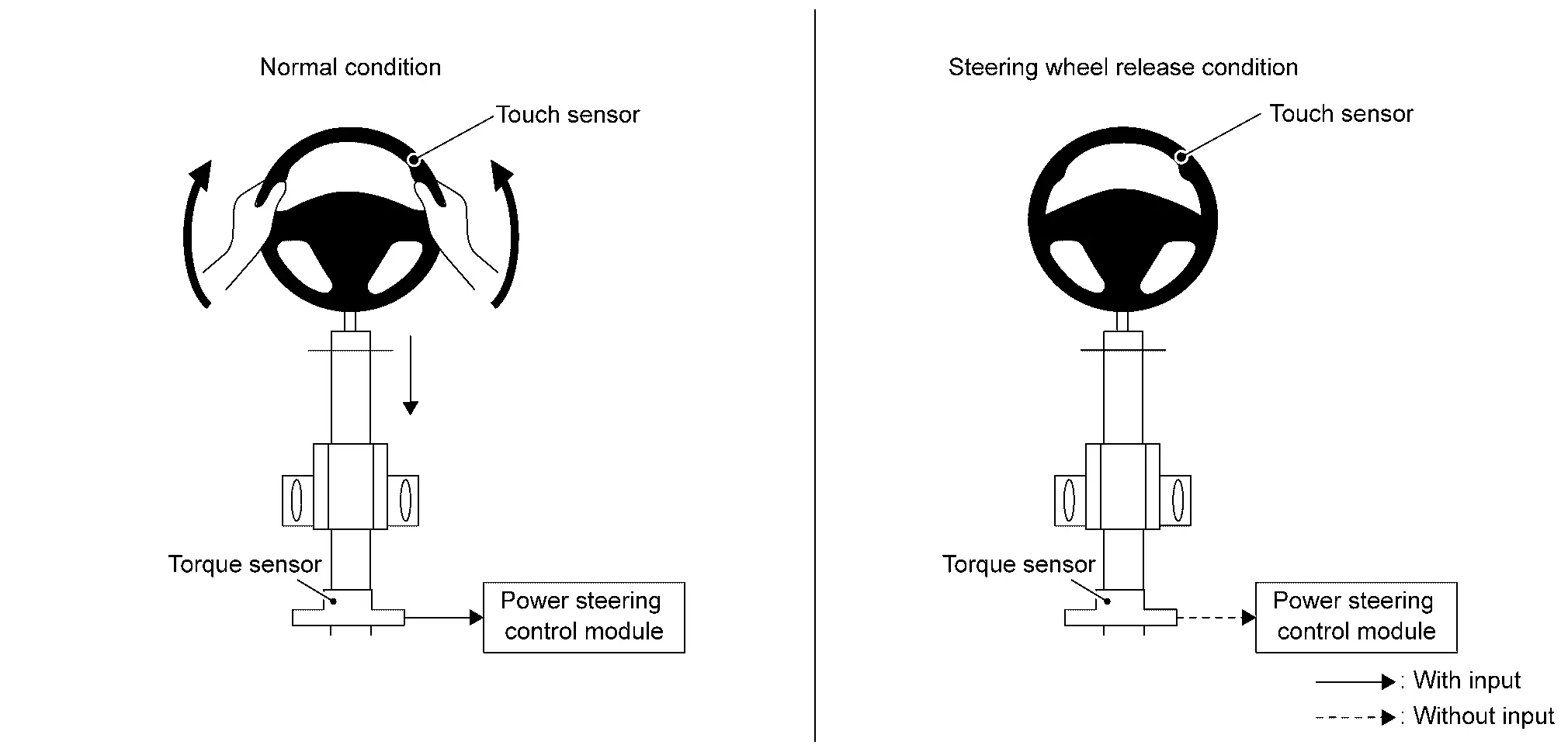
ADVANCED AMBIENT LIGHTING SYSTEM
-
According to ProPILOT Assist 2.1 operation status, ADAS control unit 2 transmits ProPILOT Assist 2.1 operation status signal to BCM, and BCM turns on or off, or changes the lighting color of the line lights located around the interior.
ProPILOT Assist 2.1 control status Lighting color OFF White Set standby state OFF Nissan Ariya Vehicle speed only ON White Lane keeping function ON*1 Green Lane keeping function ON*2 Blue Warning lamp ON in combination meter OFF *1: Display of ProPILOT Assist 2.1 is green state
*2: Display of ProPILOT Assist 2.1 is blue state
-
For BCM control regarding advanced ambient lighting, Refer to System Description.
HD MAP DATA
-
If the HD map license is contracted and there is new data for HD map, when the ignition switch is turned on, the latest difference map data is received and the map data in HD map module is automatically updated.
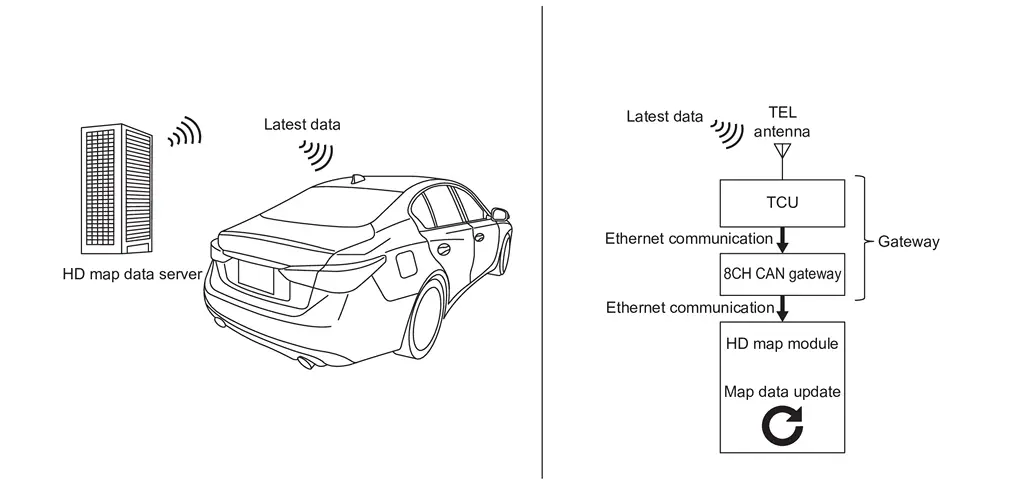
-
HD map module improves the accuracy of grasping the position of own Nissan Ariya vehicle by receiving signals from HD map data server and positioning information from the global navigation satellite system.
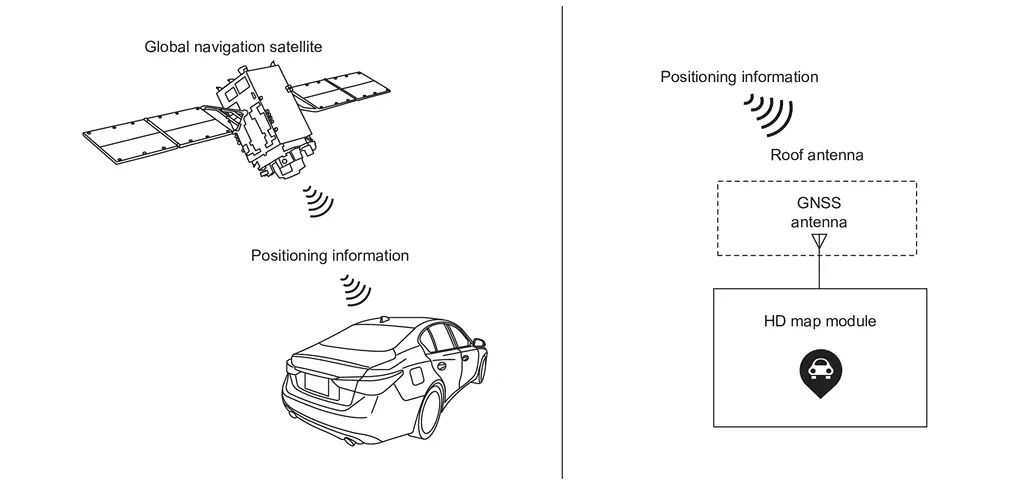
-
If the HD map license contract is canceled, the following functions are restricted.
-
Some steering wheel support functions of ProPILOT Assist 2.1
NOTE:
-
The map update for the navigation system is done by the telematics system.Refer to System Description.
-
In addition, HD map data and the map data of the navigation system use different data. Therefore, the update time of the latest map data may be different between HD map data and the navigation system.
-
When using the ProPILOT Assist 2.1 system after cancelling the HD map license contract, "Steering Assist Limited HD Map License Expired" is displayed.
-
RECORDING AND ACCUMULATION OF VEHICLE DATA
RECORDING AND COLLECTING VEHICLE DATA
ProPILOT Assist 2.1 has a function to record and store the following vehicle data in the controller in the Nissan Ariya vehicle and the server for data recording.
-
Operation status of accelerator pedal, brake pedal, steering, etc.
-
Detection status such as the driver's face orientation and eye open/close state
-
ProPILOT Assist 2.1 operation status
-
Information of Nissan Ariya vehicles ahead and surrounding , lane markers, and road structures
-
Vehicle information such as Nissan Ariya vehicle speed and GPS
-
Front camera unit image information (When SRS airbag or forward emergency brake is activated)
NOTE:
Conversation voice or image information of the driver monitor camera is not recorded.
DATA HANDLING
Nissan Motor and third parties contracted by Nissan Motor may acquire and use the recorded and collected data for the purpose of improving Nissan Nissan Ariya vehicles.
In addition, Nissan Motor and third parties contracted by Nissan Motor shall not disclose or provide the acquired data to other third parties except in the following cases.
-
With the consent of the vehicle user
-
Based on a legally enforceable request, such as a court order
-
After the data is processed, such as by statistical processing not to identify the user or Nissan Ariya vehicle, the data is provided to research institutes or similar body
Fail-safe (HD Map Module)
If a malfunction occurs, the system will be canceled.
Fail-safe (Power Network Separate Relay)
If a malfunction occurs, the system will be canceled.
Fail-safe (ADAS Control Unit 2)
Refer to Fail-safe (ADAS Control Unit).
Fail-safe (Distance Sensor)
Refer to Fail-safe.
Fail-safe (Front Camera Unit)
Refer to Fail-safe.
Fail-safe (Side Radar)
Refer to Fail-safe (Side Radar).
Fail-safe (Driver Monitor Camera Control Unit)
Refer to Fail-safe (Driver Monitor Camera Control Unit).
Warning/Indicator/Chime list
Warning/Indicator
| Name | Design | Function |
|---|---|---|
| Hands OFF warning lamp |  |
|
Warning/Indicator (On Information Display)
| Name | Function |
|---|---|
| ProPILOT Assist 2.1 system display | Refer to Operation. |
Vehicle-To-Vehicle Distance Control Mode Function
System Description
FUNCTION DESCRIPTION
VEHICLE-TO-VEHICLE DISTANCE CONTROL MODE FUNCTION
-
When there are no vehicles traveling ahead, the vehicle-to-vehicle distance control mode maintains the speed set by the driver.
-
When there is a Nissan Ariya vehicle traveling ahead, the vehicle-to-vehicle distance control mode turns off vehicle ahead detection indicator and adjusts the speed to maintain the distance, selected by driver, from a Nissan Ariya vehicle ahead. The adjusting speed range is up to the set speed.
-
When the vehicle traveling ahead moves out from its travelling lane, the Nissan Ariya vehicle-to-vehicle distance control mode accelerates and maintains vehicle speed up to the set speed. Maximum speed: 144 km/h (90 MPH).
-
Nissan Ariya Vehicle-to-vehicle distance can be set by vehicle-to-vehicle distance control switch.
-
When brake is activated by Nissan Ariya vehicle-to-vehicle distance control mode, stop lamps of the vehicle are turned on.
-
If the ahead Nissan Ariya vehicle stops while the vehicle is traveling on the main lane of highway or motorway with vehicle-to-vehicle distance control function, the Nissan Ariya vehicle also stops following the vehicle ahead and follows the vehicle ahead for about 30 seconds.
-
If stopped for more than about 30 seconds, the stopped state is maintained. When RES +/- switch (upward / downward) is operated or the accelerator pedal is depressed after the Nissan Ariya vehicle ahead starts, the vehicle also starts following driving again by vehicle-to-vehicle distance control function.
NOTE:
-
When the Nissan Ariya vehicle ahead starts and it is determined that driver of the vehicle does not face the front, activate warning with sound and display.
-
In the following cases, the Nissan Ariya vehicle does not resume to follow after stopping due to vehicle-to-vehicle distance control function.
-
Approximately 30 seconds passed after stopping
-
When the brake pedal is depressed after stopping
-
When stopped on a road that is not on HD map
-
-
CAUTION:
-
This system performance is limited. When a vehicle suddenly cuts in front of own Nissan Ariya vehicle or when a vehicle ahead suddenly brakes, or when a vehicle stopped appears after curving with poor visibility, or when weather is bad, proper deceleration may not be possible and the Nissan Ariya vehicle may approach the vehicle ahead. The driver should operate the accelerator pedal, brake pedal, and steering wheel according to the distance to Nissan Ariya vehicle ahead and the surrounding conditions, and always try to drive safely.
-
This system does not detect anything other than Nissan Ariya vehicles such as pedestrians, bicycles and construction pylon. The driver should always pay attention to the situation ahead and operate the brake pedal and steering wheel if necessary.
-
If a Nissan Ariya vehicle cuts in ahead after stopping with vehicle-to-vehicle distance control mode function, vehicle cuts in ahead may not be detected due to its position or orientation. Then when the Nissan Ariya vehicle ahead starts, own vehicle also starts to follow it and may approach to vehicle cuts in ahead.
VEHICLE CUTS IN DETECTION
When another vehicle cuts in ahead to close to own vehicle, vehicle ahead detection display flashes with a "plonk" sound to notify the driver.
APPROACH WARNING
-
During vehicle-to-vehicle distance control, if own vehicle comes closer to a vehicle ahead due to rapid deceleration of that Nissan Ariya vehicle or if another vehicle suddenly cuts in, the system warns the driver with the chime and warning display.
-
When own Nissan Ariya vehicle comes closer to the vehicle ahead and it is judged that the distance between the vehicles is not sufficient, the buzzer beeps "beep, beep, beep...", Nissan Ariya vehicle ahead detection display and approach warning display are blink.
CAUTION:
Even when inter-vehicle distance is short, approach warning may be not operated under the following conditions.
-
When the relative speed compared to the Nissan Ariya vehicle ahead is small (When driving at almost the same speed)
-
When the vehicle ahead is traveling faster than the Nissan Ariya vehicle (When the distance between the vehicles is gradually increasing)
-
When another vehicle cuts in the lane at very close distance in front of the Nissan Ariya vehicle.
CURVE WARNING
If it is determined that sufficient deceleration cannot be achieved during deceleration control according to the size of the curve ahead, "CURVE" is displayed on the combination meter to warn the driver.
ACCELERATION FUNCTION AT OVERTAKING
-
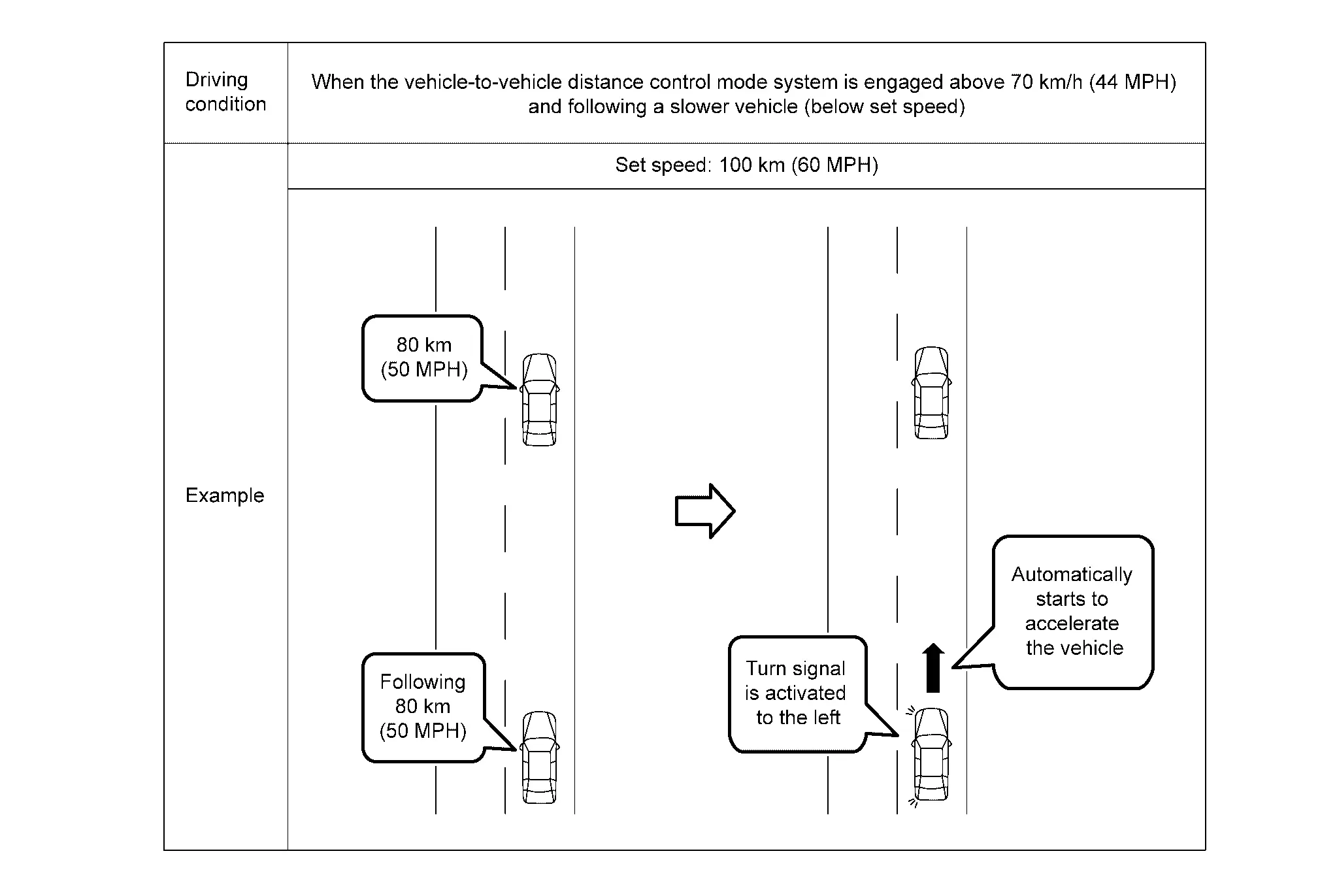
When the turn signal switch operated to the right turn side while all of the following conditions are satisfied, the Nissan Ariya vehicle start to accelerate and prepare to overtake the vehicle ahead.
-
Set vehicle speed is 70 km/h (43 MPH) or more
-
During Nissan Ariya vehicle-to-vehicle distance control
-
Speed of the vehicle ahead is the set vehicle speed or less
-
-
When next Nissan Ariya vehicle ahead is detected after driver changes lane to overtake the vehicle ahead, the distance between the Nissan Ariya vehicles is maintained according to the speed of next vehicle ahead.
-
When next vehicle ahead is not detected, the Nissan Ariya vehicle travels at a constant speed set by the driver.
-
When the vehicle is accelerating after the driver operates the turn signal to the right turn side and the distance to the Nissan Ariya vehicle ahead is too close, the acceleration is stopped and the vehicle returns to the set inter-vehicle distance.
-
The overtaking acceleration function is canceled under the following cases.
-
When brake pedal is depressed
-
When cancel switch is pressed
-
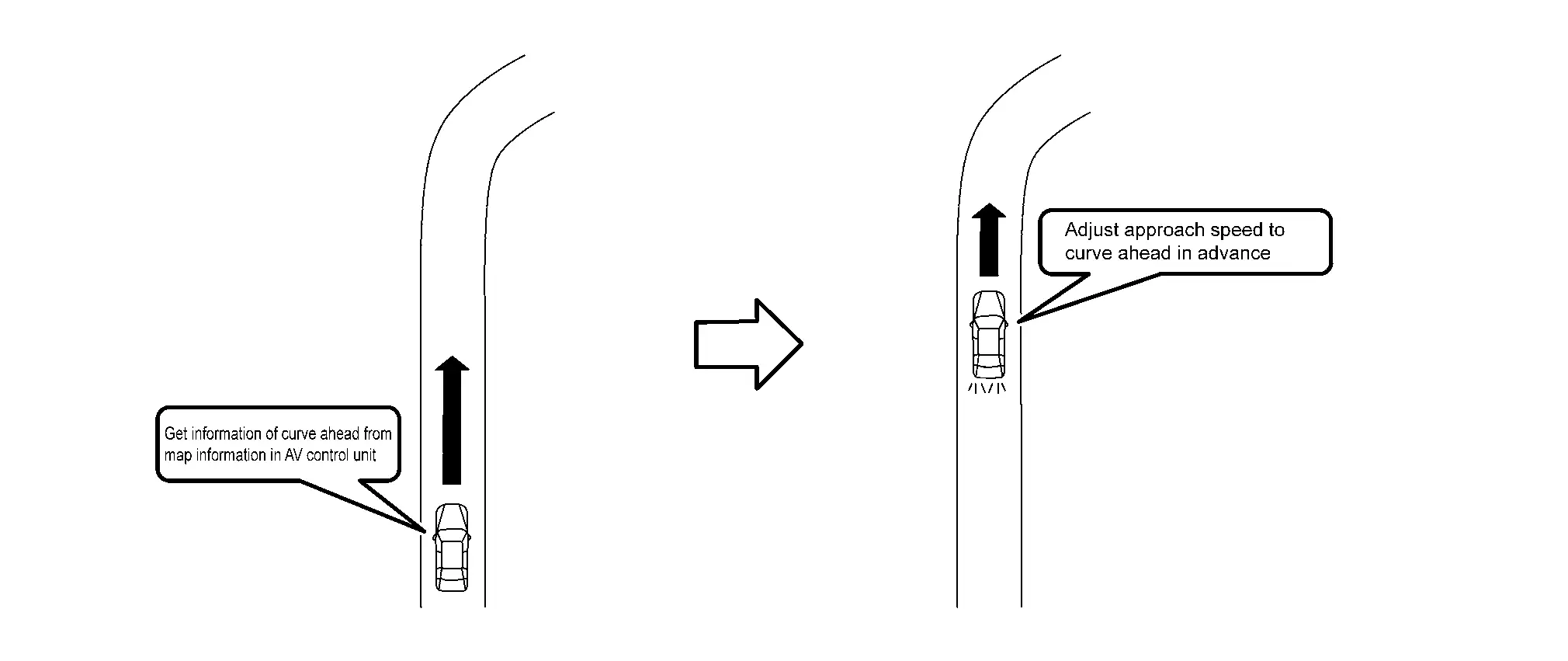
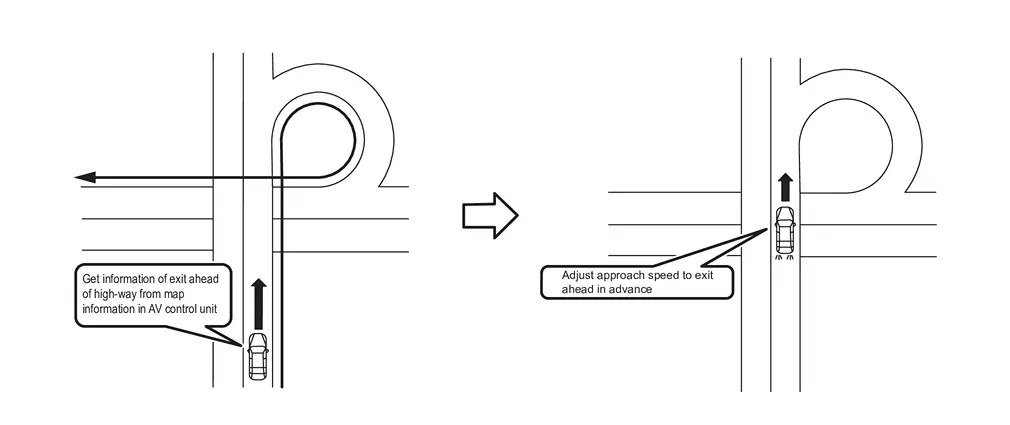
ROUTE DECELERATION SUPPORT FUNCTION (CURVE DECELERATION SUPPORT FUNCTION)
-
When route deceleration support function is ON, the entering speed is adjusted in advance according to curve ahead detected from map information in the map locator system.
-
When route deceleration support function is ON, the entering speed is adjusted in advance according to freeway interchanges ahead detected from map information in the map locator system.
-
Control unstable driving due to over speed.
SPEED LIMIT SUPPORT FUNCTION
-
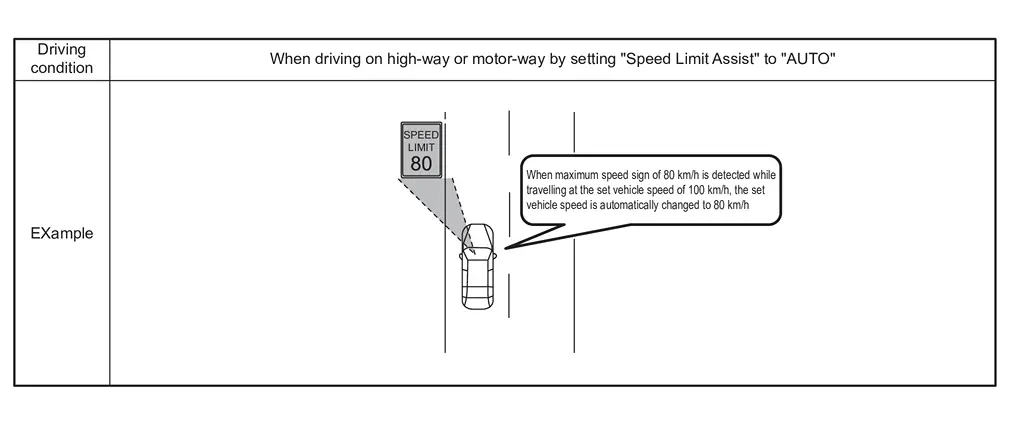
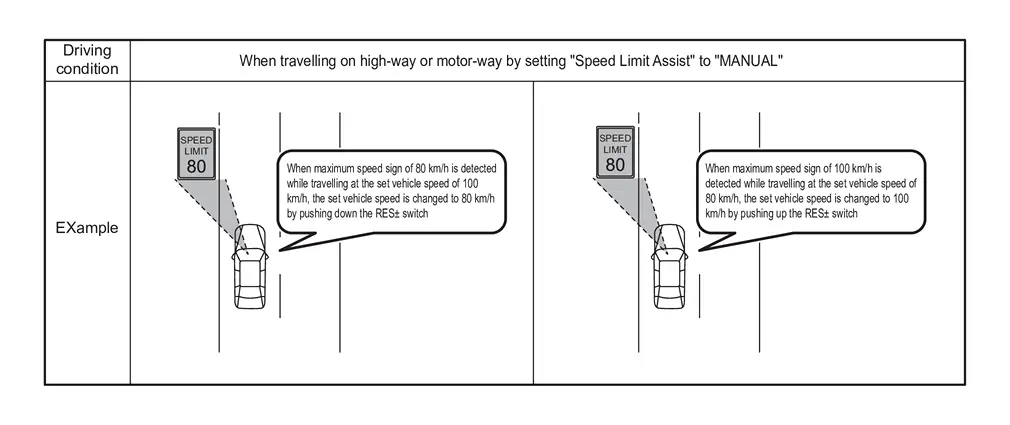
When a new maximum speed sign is detected with the road sign detection function, the new speed can be automatically or manually reflected in the set Nissan Ariya vehicle speed.
-
When speed limit function is set to "AUTO" in the combination meter, the detected speed of the maximum speed sign is automatically reflected in the Nissan Ariya vehicle set speed.
-
When operating RES +/- switch within 10 seconds approx. after the maximum speed sign is detected (the speed sign support display "↑" or "↓" is displayed in the combination meter), while the speed limit support function is set to "manual" in the combination meter, the speed is reflected in the set Nissan Ariya vehicle speed.
NOTE:
-
When the detected maximum speed sign is higher than the current Nissan Ariya vehicle speed (“↑� is displayed in the combination meter), operate RES + switch.
-
When the detected maximum speed sign is lower than the current Nissan Ariya vehicle speed (“↓� is displayed in the combination meter), operate RES - switch.
-
When pressing the switches in the opposite direction, the speed sign support display is turned off.
-
When the maximum speed sign is not detected, the speed limit support function does not work.
-
TEMPORARY ACCELERATION AND DECELERATION
-
When acceleration is required, hold the steering wheel and depress the accelerator pedal to accelerate.
-
When this occurs, the ProPILOT Assist 2.1 activation indicator turns from blue to green.
-
When the actual Nissan Ariya vehicle speed is higher than the set vehicle speed by depressing the accelerator pedal, the set vehicle speed display flashes.
-
When the accelerator pedal is released, the Nissan Ariya vehicle speed/vehicle-to-vehicle distance control mode is performed again.
-
-
When deceleration is required, depress the brake pedal. ( ProPILOT Assist 2.1 is canceled)
-
When resuming at the set Nissan Ariya vehicle speed before cancellation, operate the RES +/- switch.
CAUTION:
-
When the acceleration pedal is pressed without the steering wheel, acceleration is possible but a warning screen (red) is displayed that requires steering operation.
-
When accelerating by operating the accelerator pedal, brake control, approach warning, and curve warning are not performed.
-
Normally, during Nissan Ariya vehicle-to-vehicle distance control, the vehicle is automatically accelerated and decelerated according to the speed of Nissan Ariya vehicle ahead.
-
When acceleration is required due to lane change, sudden deceleration of vehicle ahead, or approaching to the Nissan Ariya vehicle ahead that cuts in, the accelerator pedal or brake pedal is properly depressed according to the surrounding conditions.
-
OPERATION DESCRIPTION
-
When pressing ProPILOT Assist switch (less than 1.5 seconds) during ProPILOT Assist 2.1 OFF, ProPILOT Assist 2.1 state is displayed and is set to a standby state.
-
Accelerate or decelerate Nissan Ariya vehicle to the desired speed and press SET switch.
-
ADAS control unit 2 performs the control as follows:
Constant speed Comparing the set Nissan Ariya vehicle speed with the current vehicle speed, transmit the command to ECM via CAN communication to reach the set Nissan Ariya vehicle speed, and controls the electric throttle control actuator Following According to speed change of Nissan Ariya vehicle ahead, the command is transmitted ECM and the electric control brake unit to control the vehicle speed so that Nissan Ariya vehicle-to-vehicle distance is held properly Fllowing→Stop When Nissan Ariya vehicle ahead stops, own vehicle also stops accordingly. Even after stopping, the electric control brake unit keeps the hydraulic pressure and keeps the Nissan Ariya vehicle stopped state. Start→Following -
When Nissan Ariya vehicle ahead starts within 30 seconds after own vehicle stops, own vehicle also starts following vehicle ahead and resumes following driving by the Nissan Ariya vehicle speed / vehicle-to-vehicle distance control function
-
When own vehicle stops for more than 30 seconds, operating RES +/- switch (upward / downward) or depress the accelerator pedal after Nissan Ariya vehicle ahead starts, and the vehicle speed/vehicle-to-vehicle distance control function start following the Nissan Ariya vehicle again
NOTE:
It does not start under the following conditions
-
When the sensor detects an obstacle
-
When the driver monitor is detecting blindness
-
-
When Nissan Ariya vehicle ahead is detected, ADAS control unit 2 determines size of object from signals of distance sensor and front camera unit. ADAS control unit 2 makes combination meter distinguish between passenger cars, lorries and motorcycles and display.
-
When driving on a curve, ADAS control unit 2 detects size of curve ahead based on signals from HD map and front camera unit. Decelerate according to the size of the detected curve.
-
When new maximum speed sign is detected by sign detection function, Based on sign detection signal received from front camera unit ADAS control unit 2 transmits signal to each ECU that controls Nissan Ariya vehicle speed up to the speed sign displayed. In addition, signal is transmitted to combination meter and head-up display to display detected speed sign.
SET CONDITION
Refer to System Description.
CANCEL CONDITION
-
Vehicle speed/vehicle-to-vehicle distance control function is canceled due to driver's operation
Nissan Ariya Vehicle speed/vehicle-to-vehicle distance control function is canceled due to any following operation
-
When CANCEL switch is pressed
-
When brake pedal is depressed (Except when own Nissan Ariya vehicle is stopped due to vehicle speed/vehicle-to-vehicle distance control function)
When starting again required at set Nissan Ariya vehicle speed before cancellation, operate RES +/- switch.
NOTE:
When ProPILOT Assist 2.1 system is canceled while own Nissan Ariya vehicle is stopped due to vehicle speed/vehicle-to-vehicle distance control function, electric parking brake is operated.
-
-
Automatic cancellation of Nissan Ariya vehicle speed/vehicle-to-vehicle distance control function
In the following cases, the vehicle speed/Nissan Ariya vehicle-to-vehicle distance control function is automatically canceled with a warning sound.
-
When Nissan Ariya vehicle speed is below 25 km/h (16 MPH) approx. during no vehicle ahead detected
-
One of driver's, co-driver's and rear passengers doors is opened
-
When seatbelt becomes unfasten state
-
When 3 minutes approx. passed after own Nissan Ariya vehicle is stopped due to vehicle speed/vehicle-to-vehicle distance control function
-
When shift position is except "D" or "B"
-
When parking brake is applied
-
When VDC is switched to OFF
-
When VDC (including traction control) is operated
-
When a wheel slips
-
ALARM AND WARNING
When vehicle speed/vehicle-to-vehicle distance control function is abnormal
-
When it is determined that distance sensor is dirty and cannot detect vehicle ahead, vehicle speed/Nissan Ariya vehicle-to-vehicle distance control warning lamp (orange) is turned on with warning sound, warning message is displayed in the combination meter, and Nissan Ariya vehicle speed/vehicle-to-vehicle distance control function is automatically stopped.
-
When Nissan Ariya vehicle speed/vehicle-to-vehicle distance control function is abnormal, vehicle speed/vehicle-to-vehicle distance control warning lamp (orange) is turned on with warning sound, and Nissan Ariya vehicle speed/vehicle-to-vehicle distance control functions automatically stopped.
For warning message, refer to Operation.
Lane Keeping Function
System Description
FUNCTION DESCRIPTION
LANE KEEPING FUNCTION DESCRIPTION
-
Controls steering to travel vehicle near the center of lane and support driver's steering operation.
CAUTION:
Controls steering to travel Nissan Ariya vehicle near the center of lane. Does not react to a vehicle on the side approaching.
-
Straight road

Detects lane markers in the travelling lane and supports steering to keep the travelling lane.
-
Curved road

Detects lane makers in the travelling lane and support steering to keep the travelling lane in accordance with curve.
OPERATION DESCRIPTION
-
When the operating conditions are satisfied, ADAS control unit 2 controls the steering to travel near the center of the lane due to signals from each ECU, and support driver's steering operation.
-
ADAS control unit 2 turns on the steering wheel support operation indicator in blue when the conditions are satisfied while travelling on highway or motorway with HD map. (ProPILOT Assist 2.1 display turns blue)
When the lane keeping function is activated, ADAS control unit 2 controls as follows.
-
Under control (When ProPILOT Assist 2.1 display is blue)
(Straight road) -
Front camera unit detects lane markers in the travelling lane and transmits lane marker detection signal via CAN communication to ADAS control unit 2
-
Based on lane marker detection signal and HD map data, ADAS control unit 2 transmits commands via CAN communication to the power steering control module for keeping the Nissan Ariya vehicle in the lane and supports steering
(Curved road) -
Font camera unit detects lane markers in the travelling lane and transmits lane marker detection signal to ADAS control unit 2 via CAN communication
-
ADAS control unit 2 transmits commands to power steering control module via CAN communication based on lane marker detection signal and HD map data for keeping the Nissan Ariya vehicle in the lane, and supports steering steers according to the curve
-
-
SIDE ATTENTION DETECTION
ADAS control unit 2 detects presence or absence of Nissan Ariya vehicles on the side of own vehicle due to signal from side radar. When ProPILOT Assist 2.1 display is blue and there is a Nissan Ariya vehicle on the side of own vehicle, ADAS control unit 2 makes the combination meter display the presence of the Nissan Ariya vehicle.
OPERATION CONDITION
-
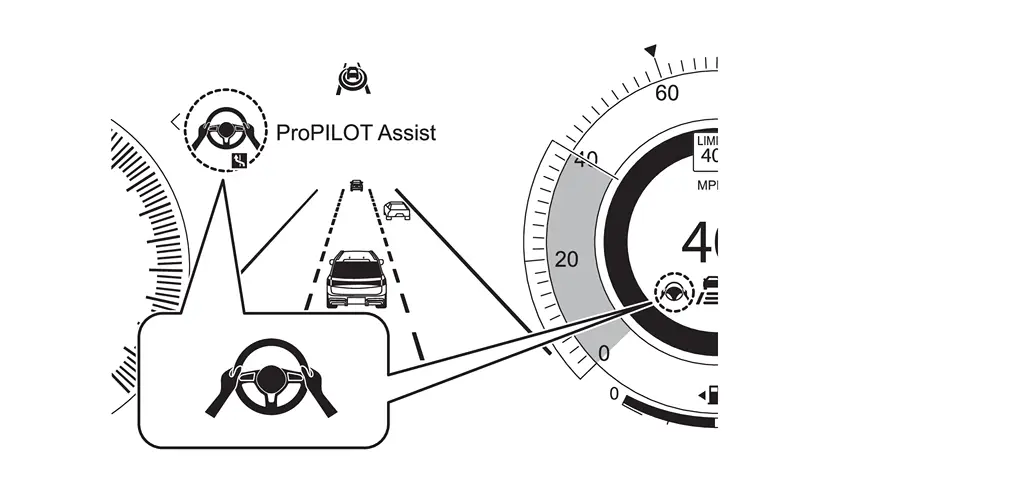
When the following conditions are satisfied, the steering support operation display turns on in green and the operation starts. (The display of ProPILOT Assist 2.1 turns green)
-
When Nissan Ariya vehicle speed/vehicle-to-vehicle distance control function is operated
-
When lane markers on both sides are detected
-
When driver holds steering wheel
-
When driving near the center of the lane
-
When turn signal lamps are OFF
-
When wiper is not operated at high speed
-
When steering support is set to ON
NOTE:
-
Lane markers are lines drawn on the right and/or left side of a lane.
-
It is displayed for both single lane and multi-lane.
-
-
When travel on highway or motorway with HD map, the steering support operation indicator turns ON in blue. ( ProPILOT Assist 2.1 display turns blue)
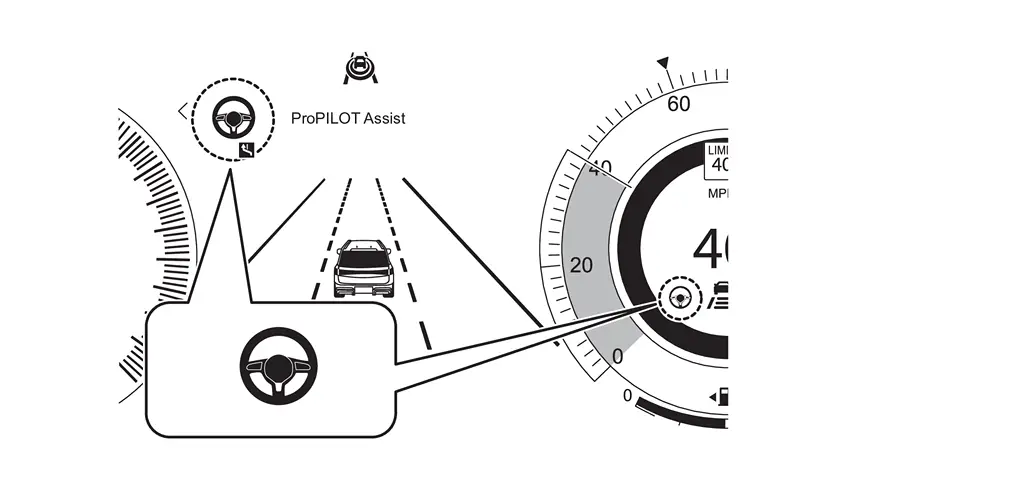
However, in the following cases, ProPILOT Assist 2.1 display does not turn blue.
-
When travelling beyond the speed detected by the sign detection function
-
When there are points where the number of lanes decreases nearby tollhouses, exits, road splits, or intersections
-
When no GPS signal is received
-
When driving on a road that is not separated from the oncoming lane
-
When wiper is operated at high speed
-
When judging that driver does not hold or not operate the steering wheel
-
When driver is not looking forward
-
When accelerating by depressing accelerator pedal
-
When approaching warning is activated
-
When lane departure warning is activated
NOTE:
-
When the combination meter displays "Some steering support function cannot be operated", the steering support operation does not display and the display of ProPILOT Assist 2.1 does not turn blue.
-
The driver's steering operation is always prioritized.
-
-
In the following cases, the steering support operation display changes from blue to green with warning sound, and "Hold steering wheel" is displayed. (The display of ProPILOT Assist 2.1 turns green)
CAUTION:
When the ProPILOT Assist 2.1 display turns green, hold the steering wheel immediately.
-
When traveling on no longer highway or motorway
-
When approaching section without HD map
-
When the speed detected by the sign detection function is exceeded
-
When approaching a sharp curve, tollhouse, exit, road split, intersection, or points where the number of lanes decreases
-
When approaching the exit of highway or motorway without tollhouse
-
When approaching two-way section
-
When driving in a tunnel
-
When GPS signals can no longer be received
-
When traveling in section where road spliting and merging continue
-
When traveling on narrow lanes
-
When section with traffic restrictions such as a construction section is detected
-
When driver cannot be detected
-
When driver keeps not facing forward
-
When the approach warning is activated
NOTE:
When wiper switch position is AUTO, wiper may be operated at high speed or low speed depending on the amount of rainfall and Nissan Ariya vehicle speed.
-
-
In the following cases, the steering support operation display changes from blue to green with warning sound, and screen (red) requesting steering operation is displayed. (The display of ProPILOT Assist 2.1 turns green)
-
When it is determined that HD map and the actual road are different
-
When the lane departure warning is activated
-
-
When depressing accelerator pedal while holding the steering wheel, the steering support operation display changes from blue to green. (The display of ProPILOT Assist 2.1 turns green)
CANCELLATION CONDITION
-
In the following cases, the steering support operation display is turned off with sound, and the lane keeping function is canceled. (The display of ProPILOT Assist 2.1 turns white)
-
When Nissan Ariya vehicle speed/vehicle-to-vehicle distance control function is canceled
-
When lane marker is no longer detected
-
When approaching tollhouse, exit, road split, intersection, or points where the number of lanes decreases (when travelling on road with HD map)
-
When driver steers
-
When visibility of front camera unit cannot be secured due to rain, snow, fog, or freezing or dirt on the windshield glass in front of the front camera unit
-
When receiving strong light from the front
-
When the temperature of front camera unit and its surroundings are high
NOTE:
-
When approaching road without HD map, the road area is judged as an exit of highway or motorway and ProPILOT Assist 2.1 is canceled.
-
When wiper switch position is AUTO, the wiper may be operated at high speed or low speed according to amount of rainfall and Nissan Ariya vehicle speed.
-
When wiper is operated at high speed and the lane keeping function is canceled, the lane keeping function cannot be restarted unless ProPILOT Assist 2.1 is canceled once.
-
-
When approaching tollhouse, road splits, intersections, etc.
-
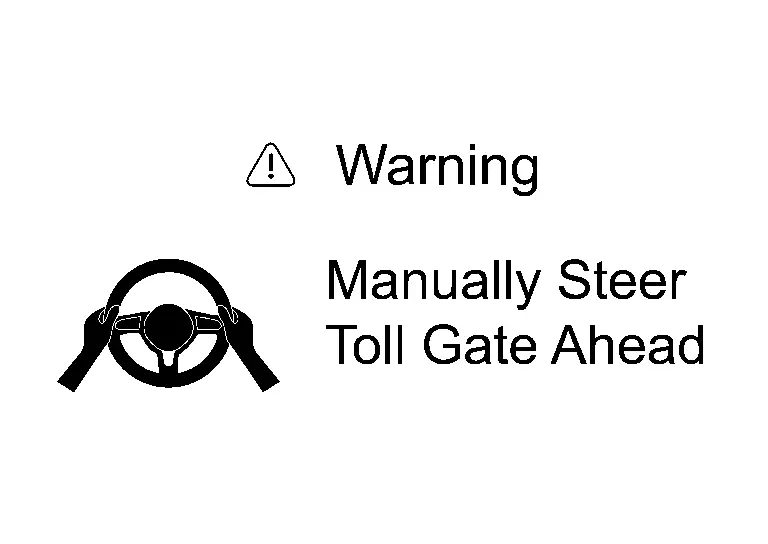
When approaching tollhouse, road splits, intersections while travelling with blue display of ProPILOT Assist 2.1, ProPILOT Assist 2.1 display turns green etc.
-
After ProPILOT Assist 2.1 display turns green, when getting closer, screen (red) requests with a sound to steer the Nissan Ariya vehicle.
-
When driver operates steering, lane keeping function is canceled.
NOTE:
-
When driver's steering operation is not detected, an emergency warning sounds and "Deceleration" is displayed in the head-up display and combination meter and decelerates and stops the Nissan Ariya vehicle in an emergency.
-
After making emergency stop of the vehicle, connect to SOS call service operator and then the operator requests rescue to public organizations (police, fire department, medical institution).
-
After the emergency stop function is activated, the Steering Assist function will be disabled with the “Steering Assist OFF� message displayed until the ignition switch has been switched off and on again.
-
When the emergency warning sound is activated, the Nissan Ariya vehicle slows down below 65 km/h (40 MPH) approx., the hazard lamp automatically turns ON. When the steering is operated, the hazard lamp turns off automatically.
-
-
When system is canceled during blue display of ProPILOT Assist 2.1
-
When ProPILOT Assist 2.1 is canceled, warning screen (red) requesting steering operation is displayed with warning sound.
CAUTION:
When warning screen is displayed, operate steering immediately.
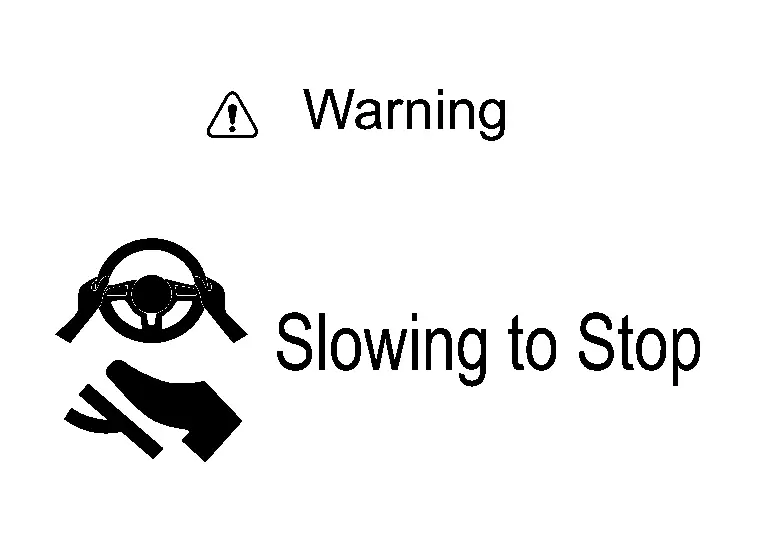
-
When driver operates steering, Nissan Ariya vehicle speed/vehicle-to-vehicle distance control function and lane keeping function are canceled.
-
If driver's steering operation is not detected, emergency warning sounds and "Slowing to stop" is displayed in the head-up display and combination meter to decelerate and make emergency stop.
-
After making emergency stop of Nissan Ariya vehicle, connect to SOS call service operator and then operator requests rescue from public organization (police, fire, medical institutions).
-
When emergency warning sound is activated, Nissan Ariya vehicle slows down below 65 km/h (40 MPH) approx., the hazard lamps automatically turn ON. When steering is operated, hazard lamps turn off automatically.
-
-
When lane keeping function is canceled during blue display of ProPILOT Assist 2.1
-
When lane keeping function is canceled, warning screen (red) requesting steering operation is displayed with warning sound.
CAUTION:
When warning screen is displayed, operate steering immediately.
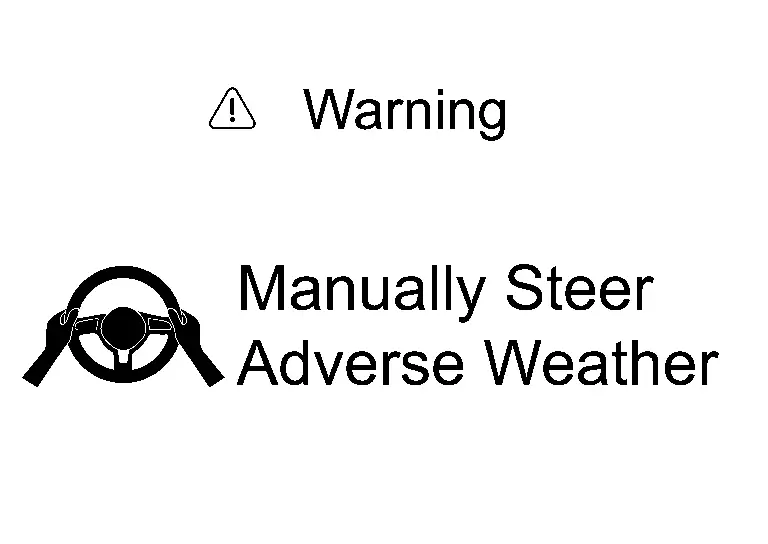
-
When driver operates steering, lane keeping function is canceled
NOTE:
-
If driver's steering operation is not detected even after warning, emergency warning sounds and "Slowing to stop" is displayed in the head-up display and combination meter to decelerate and make emergency stop.
-
After making emergency stop of Nissan Ariya vehicle, connect to SOS call service operator and then operator requests rescue from public organization (police, fire, medical institutions).
-
When emergency warning sound is activated, Nissan Ariya vehicle slows down below 65 km/h (40 MPH) approx., the hazard lamps automatically turn ON. When steering is operated, hazard lamps turn off automatically.
-
ALARM AND WARNING
-
When driver is judged that driver does not pay attention to the situation ahead
CAUTION:
Driver should always be careful ahead and drive.
-
Driver monitor camera monitors the orientation of driver's face and open/closed eyes state.
-
If driver is judged not to pay attention to the situation ahead during blue display of ProPILOT Assist 2.1, a warning is given by sound and display to pay attention to the situation ahead.

-
When driver continues not to pay attention to the situation ahead, the driver is gradually warned by sound, display and short-time brake control to operate steering.
-
If driver's steering operation is not detected even after warning, emergency warning sounds and "Deceleration" is displayed in the head-up display and combination meter to decelerate and make emergency stop.
-
After making emergency stop of Nissan Ariya vehicle, connect to SOS call service operator and then operator requests rescue from public organization (police, fire, medical institutions).
NOTE:
-
Driver monitor camera may be unable to detect driver when the contours of eyes, nose, mouth or face are hidden, such as when wearing sunglasses, face mask, eyepatch, hat, mufflers, etc.
-
When emergency warning sound is activated, Nissan Ariya vehicle slows down below 65 km/h (40 MPH) approx., the hazard lamps automatically turn ON. When steering is operated, hazard lamps turn off automatically.
Display Description Action 
-
When judges that driver does not to pay attention to the situation ahead
-
Warns with sound and display (red)
-
Driver faces forward and always pay attention to the situation ahead
-
Warning is turned OFF when driver faces forward
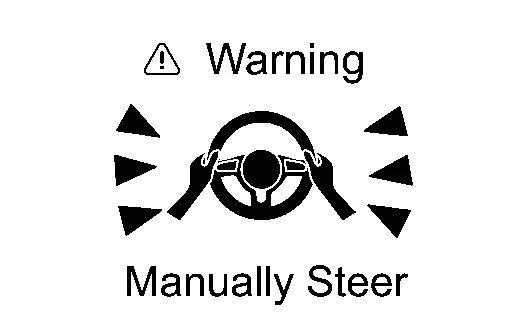
-
When driver continues not to pay attention to the situation ahead
-
Warns gradually by sound, display and short-time brake control
-
Driver holds and operates steering immediately
-
Warning is turned OFF when driver's steering operation is detected
-
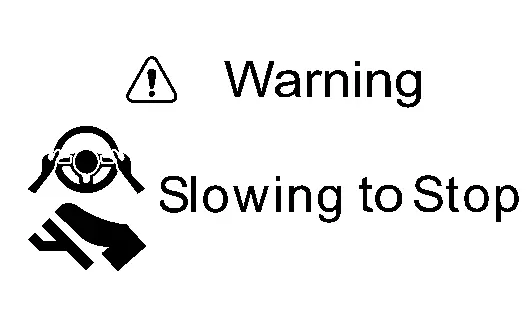
When driver continues not to operate steering even after warning
-
Emergency warning sounds, Nissan Ariya vehicle slows down, and vehicle makes emergency stop
-
Driver holds and operates steering immediately
-
Warning is turned OFF when driver's steering operation is detected and ProPILOT Assist 2.1 system is canceled
-
-
When driver is judged not to hold steering wheel
-
Driver is monitored if holding or operating steering wheel under operation of lane keeping function.
-
When driver is judged not to hold or operate steering wheel during green display of ProPILOT Assist 2.1, warning display is given to driver to operate steering.
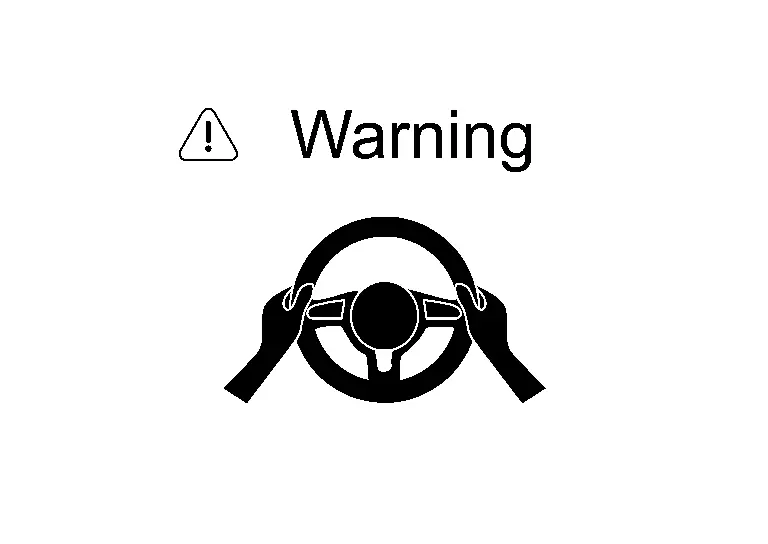
CAUTION:
When ProPILOT Assist 2.1 display is green, be sure to drive by holding steering wheel.
-
When driver does not operate steering, the driver is gradually warned by sound, display and short-time brake control.
-
When driver continues not to operate steering even after warning, emergency warning sounds and "Deceleration" is displayed in the head-up display and combination meter to decelerate and make emergency stop.
-
After making emergency stop of Nissan Ariya vehicle, connect to SOS call service operator and then operator requests rescue from public organization (police, fire, medical institutions).
NOTE:
-
Steering wheel holding detection is / will be not accurate in the following conditions. Therefore, even if steering wheel is held, a warning may be displayed.
-
When driver is wearing gloves
-
When cover is attached to steering wheel
-
When gripping leather joints or spokes
-
-
When emergency warning sound is activated, Nissan Ariya vehicle slows down below 65 km/h (40 MPH) approx., the hazard lamps automatically turn ON. When steering is operated, hazard lamps turn off automatically.
Display Description Action 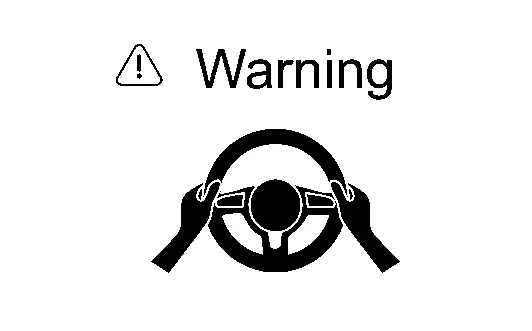
-
Driver does not hold or operate steering wheel
-
Warns by display (red)
-
Driver holds and operates steering immediately
-
Warning is turned OFF when driver's steering operation is detected
-
Displays when driver does not operate steering even after warning
-
Warns gradually by sound, display and short-time brake control
-
Driver holds and operates steering immediately
-
Warning is turned OFF when driver's steering operation is detected
-
When driver continues not to operate steering even after warning
-
Emergency warning sounds, Nissan Ariya vehicle slows down, and vehicle makes emergency stop
-
Driver holds and operates steering immediately
-
Warning is turned OFF when driver's steering operation is detected and ProPILOT Assist 2.1 system is canceled
-
-
SIDE ATTENTION DETECTION
When there is a Nissan Ariya vehicle on the side of own vehicle during blue of ProPILOT Assist 2.1, call attention by display.
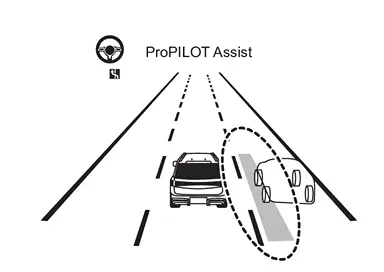
CAUTION:
Own Nissan Ariya vehicle does not react even if the vehicle on the side approaches.
-
Pay particular attention to nearby Nissan Ariya vehicles and steer if necessary when driving in road split, curves, or when large lorries are driving in the next lane.
-
-
LANE DEPARTURE WARNING
-
The system display and the lane detection display flash orange to alert the driver. When own Nissan Ariya vehicle judges to be approaching lane marker on the right or left side of the driving lane under operating lane keeping function, LDW/LDP display and lane detection display are blinking in the combination meter along with warning sound to warn driver.
-
When lane departure warning is operated during blue display of ProPILOT Assist 2.1, the display also warns driver to operate steering.
-
-
When lane keeping function is abnormal
-
When lane keeping function is abnormal, steering wheel support warning lamp (orange) turns ON with warning sound, and lane keeping function is automatically canceled.
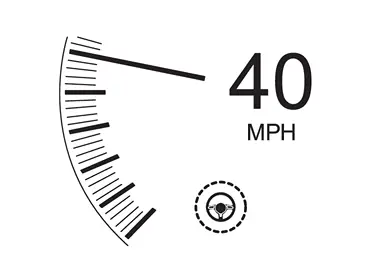
NOTE:
For warning message, refer to Operation.
-
-
When system error is detected during blue display of ProPILOT Assist 2.1
-
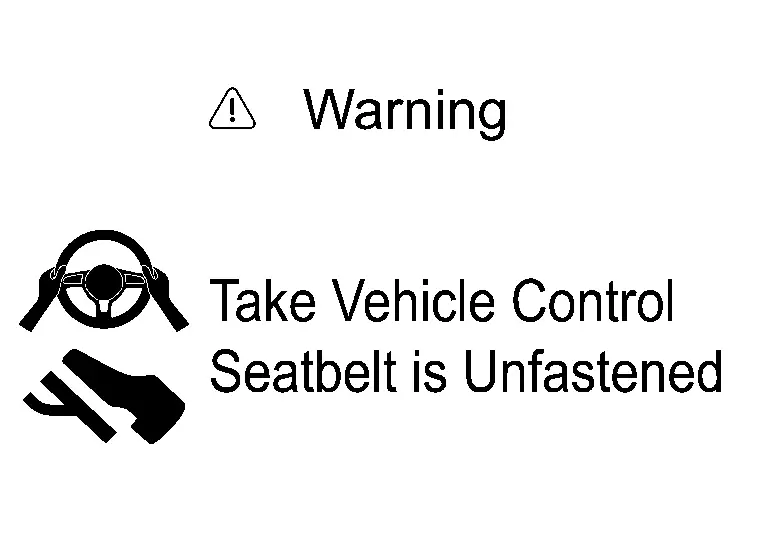
When system error is detected during blue display of ProPILOT Assist 2.1, "Take Nissan Ariya Vehicle Control" and "Slowing to Stop" is displayed in the combination meter with emergency warning sound, and Nissan Ariya vehicle decelerates and makes emergency stop.
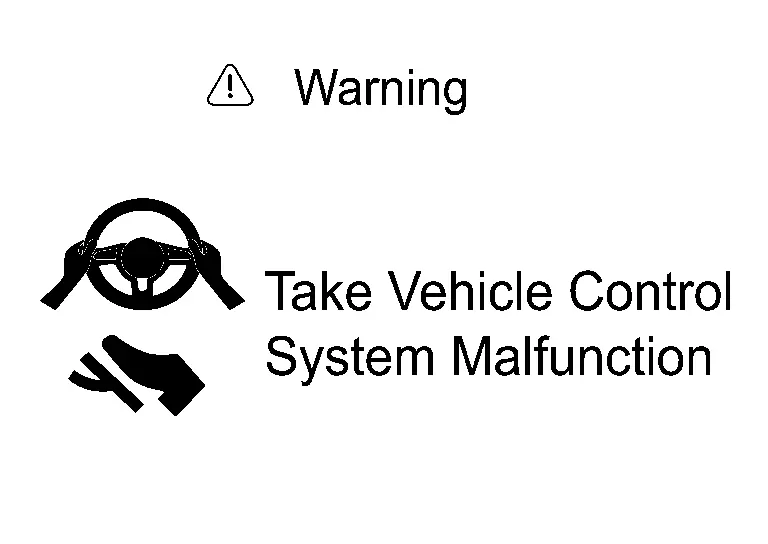
-
After making emergency stop of Nissan Ariya vehicle, connect to SOS call service operator and then operator requests rescue from public organization (police, fire, medical institutions).
NOTE:
When emergency warning sound is activated, Nissan Ariya vehicle slows down below 65 km/h (40 MPH) approx., the hazard lamps automatically turn ON. When steering is operated, hazard lamps turn off automatically.
-
Lane Change Support Function
System Description
FUNCTION DESCRIPTION
When driver holds and operates steering wheel, and operates turn signal switch in the direction of the desired lane while lane change support operation lamps in combination meter and head-up display are turned ON in blue, lane change support is started.
CAUTION:
-
Driver is responsible for making safe lane changes depending on road, traffic and own Nissan Ariya vehicle conditions.
-
When changing lanes, be sure to check the surrounding conditions and move safely to the desired lane.
-
-
The lane change support function does not have a steering control function to avoid a collision.
-
When changing lanes, be sure to hold the steering wheel and safely move to the desired lane.
-
LANE CHANGE SUPPORT FUNCTION
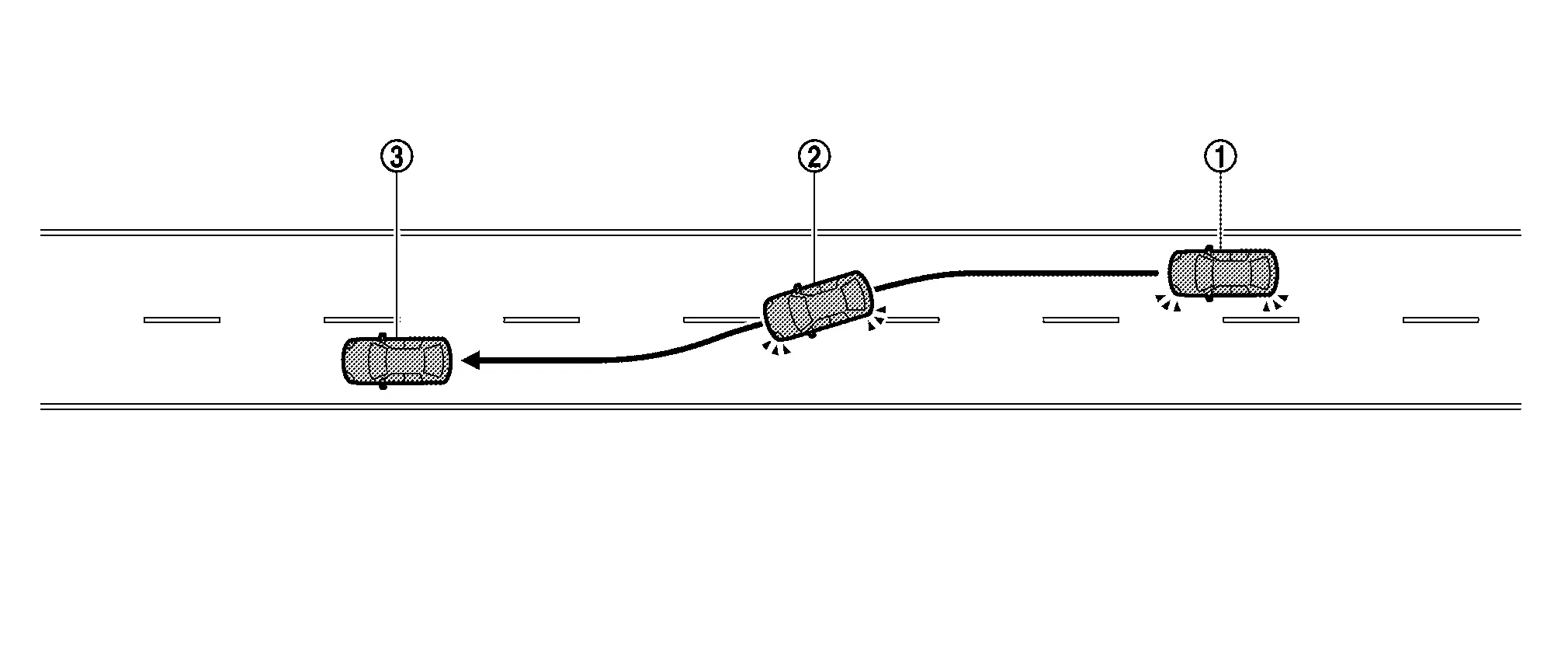
-
 Check visually desired
lane for safety, hold steering wheel, operate turn signal switch, and
activate turn signal in the direction of desired lane.
Check visually desired
lane for safety, hold steering wheel, operate turn signal switch, and
activate turn signal in the direction of desired lane. -
 Lane change support display blinks in green, and then steering control assists to move to desired lane.NOTE:
-
When lane change support is initiated, the lane change support function indicator in the head-up display flashes in green.
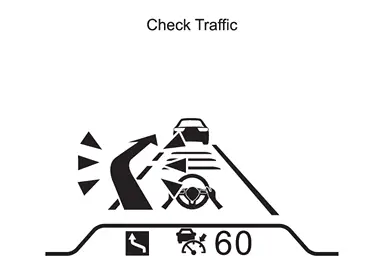
-
Driver's steering operation is always prioritized.
-
-
 When the change to
desired lane is completed, turn signal lamps automatically turn off and
lane keeping function is activated again.
When the change to
desired lane is completed, turn signal lamps automatically turn off and
lane keeping function is activated again.
OPERATION DESCRIPTION
-
When ADAS control unit 2 satisfies conditions, lane change support operation lamps of combination meter and head-up display are turned on in blue.
-
ADAS control unit 2 controls lane change support function as follows.
-
ADAS control unit 2 detects driver's steering operation based on steering torque signal from power steering control module and signal from steering wheel touch sensor.
-
When driver operates turn signal switch, BCM transmits turn signal indicator signal to ADAS control unit 2 via CAN communication.
-
When ADAS control unit 2 CAN receives turn signal indicator signal while detecting driver's steering operation ADAS control unit 2 transmits steering angle command signal via CAN communication to the power steering control module to change lanes in the direction in which turn signal switch is operated.
-
Power steering control module receives steering angle command signal from ADAS control unit 2 and steers the steering.
-
When ADAS control unit 2 determines that lane change to desired lane is completed, it transmits signal to BCM to turn off turn signal lamps.
-
ADAS control unit 2 resumes control of lane keeping function when operating conditions of lane keeping function are satisfied.
-
OPERATION CONDITION
When the following conditions are satisfied, lane change support lamp is turned ON in blue.
-
When ProPILOT Assist 2.1 display is blue
-
When traveling at vehicle speed of 60 km/h (37 MPH) approximately or higher
-
When driving on a road with two or more lanes
-
When either the left or right or both lane markers are dashed white
-
When driving on a straight or a gentle curve roads.
-
When driving on road with speed limit of 70 km/h (45 MPH) or more
NOTE:
When the setting of "Turn signal switch is linked" is OFF in the combination meter, lane change support function by operating turn signal switch does not operate, even if lane change support operation lamp is turned ON in blue.
CANCEL CONDITION
Cancel supporting lane changes by any of the following operations.
(The lane change support display turns off)
-
When the steering is operated by the driver
-
When turn signal switch is operated in the direction opposite to the desired direction.
NOTE:
-
When lane change support is canceled in lane where lane change support is started, steering is controlled in the direction of returning to almost center of lane where lane change support is started.
-
When lane change support is started by operation other than comfort flasher function position
the turn signal does not turn off even if the lane change is canceled. -
When lane change support is started by operating comfort flasher function position
 and operation is canceled after turn signal lamps are turned ON three
or more times, operation is canceled and turn signal lamps are turned
OFF.
and operation is canceled after turn signal lamps are turned ON three
or more times, operation is canceled and turn signal lamps are turned
OFF.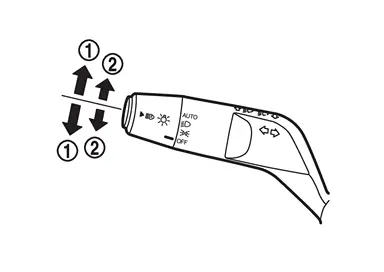
-
In the following conditions, lane change support display turns off with sound, and lane change support is canceled.
-
When vehicle is detected in the desired lane
-
When lane marker cannot be detected
-
When Nissan Ariya vehicle speed drops below 60 km/h (37 MPH) approx.
-
When it detects that driver does not hold steering wheel
-
When Nissan Ariya vehicle speed/vehicle-to-vehicle distance control function is canceled
-
When shield is detected near lane marker in the direction of the desired lane
ALARM/WARNING
When driver is judged not to hold steering wheel
CAUTION:
When changing lanes, be sure to hold steering wheel while driving.
-
Monitors whether driver holds or operates steering wheel, when assisting lane change.
-
When driver is judged not to hold or operate steering wheel while assisting lane change, driver is warned by display to operate steering wheel.
-
When driver does not operate steering even after warning display, the driver is gradually warned by sound, display and short-time brake control.
-
When driver continues not to operate steering, emergency warning sounds and "Deceleration" is displayed in the head-up display and combination meter to decelerate and make emergency stop.
For warning message, refer to Operation.
NOTE:
Steering wheel holding detection is / will be not accurate in the following conditions. Therefore, even if steering wheel is held, a warning may be displayed.
-
When driver is wearing gloves
-
When cover is attached to steering wheel
-
When gripping leather joints or spokes
Overtaking Support Function
System Description
FUNCTION DESCRIPTION
Overtaking support function description
When vehicle slower than set vehicle speed is detected ahead, display suggests overtaking to driver. When driver presses lane change support switch, steering and turn signal lamps are controlled to support overtaking operation.
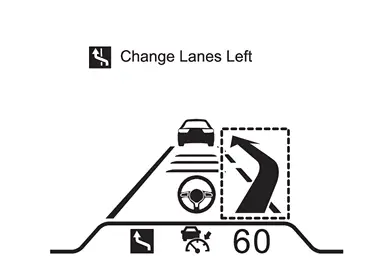
CAUTION:
-
Driver is responsible for making safe lane changes depending on road, traffic and Nissan Ariya vehicle conditions.
-
When changing lane, be sure to check surrounding conditions and move safely to the desired lane.
-
-
Overtaking support function does not have steering control function to avoid collision.
-
Always hold steering wheel when changing lane and safely move to desired lane.
-
OPERATION DESCRIPTION
-
When slow vehicle is detected ahead.
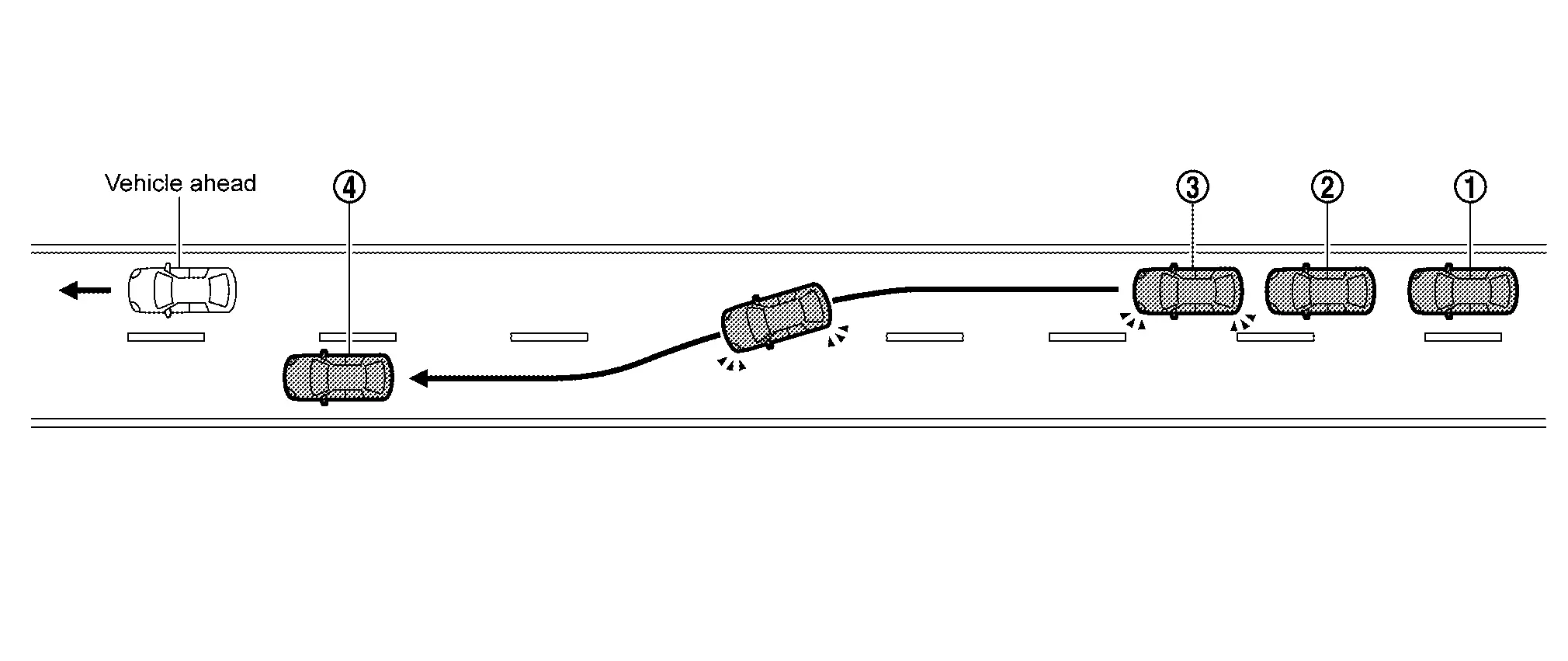
-
When slow Nissan Ariya
vehicle is detected ahead, lane change support operation display turns
on in white in head-up display, and message of "Change lane to the right
with
 " and slower Nissan Ariya vehicle is detected ahead, the message "Slow Vehicle Ahead
  Change Lanes Left" appears is displayed.
 -
Check visually left lane for safety, hold steering wheel and press lane change support switch.
-
 Lane change support operation
display flashes in green, turn signal lamps are turned on, and then
steering control supports movement to left lane.
Lane change support operation
display flashes in green, turn signal lamps are turned on, and then
steering control supports movement to left lane. -
 When movement to left lane is completed, turn signal lamps are turned off and lane keeping function is operated again.NOTE:
Driver's steering operation is always prioritized
-
-
When overtaking slow Nissan Ariya vehicle with overtaking support function
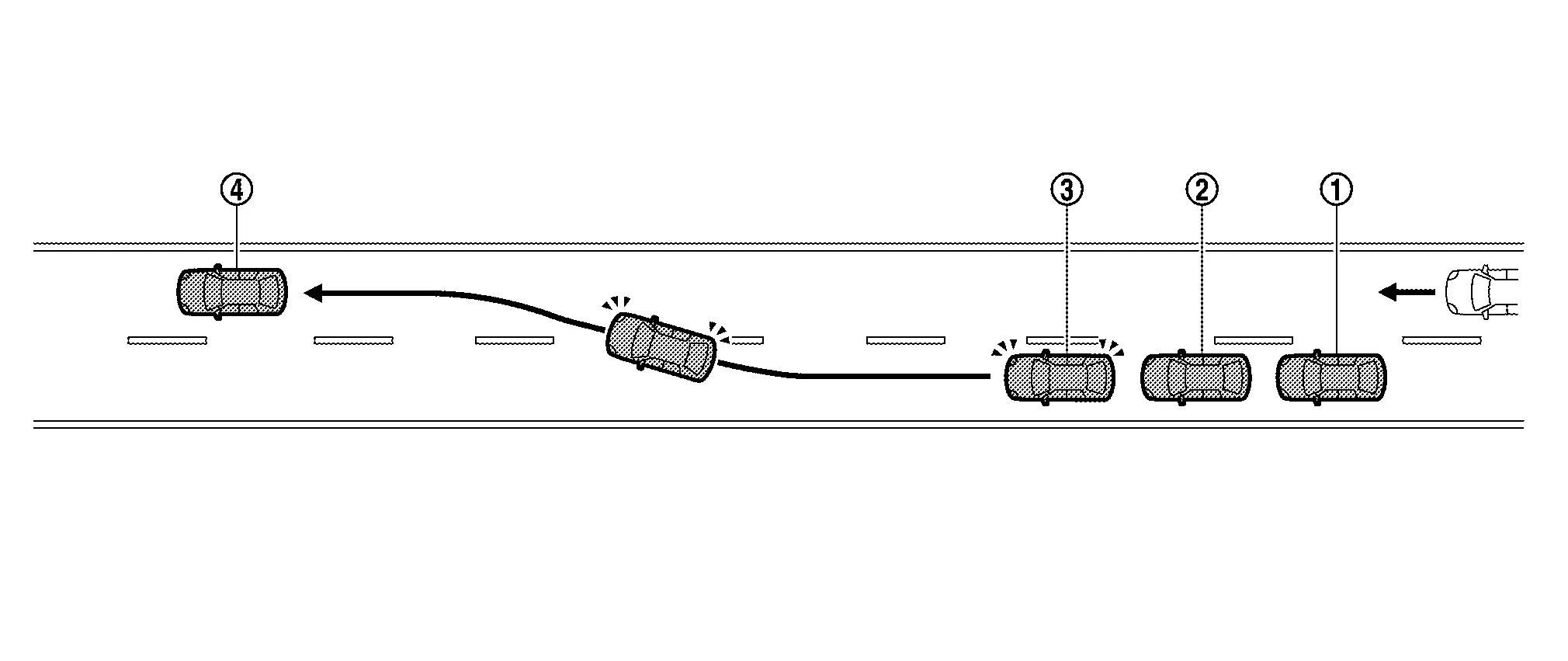
-
When slow Nissan Ariya
vehicle is detected ahead, lane change support operation display turns
on in white in head-up display, and message of "Change lane to the left
with " is displayed.
-
Check visually right lane for safety, hold steering wheel and press lane change support switch.
-
Lane change support
operation display flashes in green, turn signal lamps are turned on, and
then steering control supports movement to right lane.
-
When movement to right lane is completed, turn signal lamps are turned off and lane keeping function is operated again.NOTE:
Driver's steering operation is always prioritized.
-
-
When lane change support switch is pressed while detecting Nissan Ariya vehicle in the desired lane
OPERATION DESCRIPTION
When detecting slow vehicle ahead
-
When ADAS control unit 2 satisfies conditions, lane change support operation lamps of combination meter and head-up display are turned on in blue.
-
When there is no Nissan Ariya vehicle on left side of own vehicle or when vehicle slower than the set vehicle speed is detected ahead while lane change support lamp is turned on blue, ADAS control unit 2 transmits signals the head-up display and suggest overtaking to driver.
-
ADAS control unit 2 controls overtaking support function as follows.
-
ADAS control unit 2 detects driver's steering operation based on steering torque signal from power steering control module and signal from steering wheel touch sensor.
-
When ADAS control unit 2 receives that lane change support switch is pressed based on steering SW signal from ECM, ADAS control unit 2 transmits turn signal request signal to BCM via CAN communication.
-
ADAS control unit 2 then transmits steering angle command signal to power steering control module via CAN communication to change lane.
-
Power steering control module receives steering angle command signal from ADAS control unit 2 and steers the steering.
-
When ADAS control unit 2 determines that lane change to desired lane is completed, it transmits signal to BCM to turn off turn signal lamps.
-
ADAS control unit 2 resumes control of lane keeping function when operating conditions of lane keeping function are satisfied.
-
When overtaking slow vehicle with overtaking support function
-
When ADAS control unit 2 detects that there is no vehicle on the right side of own vehicle during lane change support operation lamp in blue, it transmits signal to head-up display, and suggests driver to return to original lane.
-
ADAS control unit 2 controls overtaking support function as follows.
-
ADAS control unit 2 detects driver's steering operation based on steering torque signal from power steering control module and signal from steering wheel touch sensor.
-
When ADAS control unit 2 receives that lane change support switch is pressed based on steering switch signal from ECM, ADAS control unit 2 transmits turn signal request signal to BCM via CAN communication.
-
ADAS control unit 2 then transmits steering angle command signal to power steering control module via CAN communication to change lane.
-
Power steering control module receives steering angle command signal from ADAS control unit 2 and steers the steering.
-
When ADAS control unit 2 determines that lane change to desired lane is completed, it transmits signal to BCM to turn off turn signal lamps.
-
ADAS control unit 2 resumes control of lane keeping function when operating conditions of lane keeping function are satisfied.
-
OPERATION CONDITION
-
When the following conditions are satisfied, overtaking is suggested to driver.
-
When lane change support lamp is blue
-
When detecting Nissan Ariya vehicle ahead slower than set vehicle speed
-
When there is no vehicle in the left lane
NOTE:
The Nissan Ariya vehicle will suggest to pass when the lead vehicle is detected traveling at the following speeds slower than your Nissan Ariya vehicle:
Setting Lead Nissan Ariya vehicle speed Sport 3 MPH (5 km/h) + slower Standard 6 MPH (10 km/h) + slower Comfort 9 MPH (15 km/h) + slower -
-
When driver holds steering wheel and presses lane change support switch, steering is controlled and moving to left lane is supported.
NOTE:
When the setting of "Overtaking support" is OFF in the combination meter, overtaking support function does not suggest to change lane.
-
When the following conditions are satisfied, the driver is suggested to move to right lane.
-
When lane change support lamp is blue
-
When there is no Nissan Ariya vehicle in right lane
-
When right lane is not the climbing lane
-
When right lane ahead is not decreased
-
-
When driver holds steering wheel and presses lane change support switch, lane change support to the right lane is started by overtaking support function.
NOTE:
Overtaking support function suggests driving in right lane when there is no Nissan Ariya vehicle surroundings.
CANCEL CONDITION
-
Cancel lane change support by overtaking support function due to any of the following operations.
-
When lane change support switch is pressed (press longer)
-
When turn signal switch is operated in the direction opposite to the desired direction
-
When operating steering
-
-
When overtaking support function is canceled, lane change support display turns off.
-
In the following conditions, lane change support display turns off with sound, and lane change support by overtaking support function is canceled.
-
If a Nissan Ariya vehicle is detected in the blind spot, the system will search for a space for approximately 30 seconds.
-
If no space is created in this time, the system will cancel.
-
When Nissan Ariya vehicle is detected in the desired lane after turn signal lamps are operated
-
When lane markers cannot be detected
-
When Nissan Ariya vehicle speed drops below 60 km/h (37 MPH) approx
-
When driver's steering holding is not detected
-
When Nissan Ariya vehicle speed/vehicle-to-vehicle distance control function is canceled
-
When shield is detected near the lane markers in the direction of the desired lane
NOTE:
-
When lane change support is canceled in lane where lane change support is started, steering is controlled in the direction of returning to almost center of lane where lane change support is started.
-
When lane change support by overtaking support function is canceled, turn signal lamps are automatically turned off.
-
ALARM/WARNING
When driver is judged not to hold steering wheel
-
Monitors whether driver holds or operates steering wheel
CAUTION:
When changing lanes, be sure to hold steering wheel while driving.
-
When driver is judged not to hold or operate steering wheel while assisting lane change, driver is warned by display to operate steering wheel.
-
When driver does not operate steering even after warning display, the driver is gradually warned by sound, display and short-time brake control.
-
When driver continues not to operate steering, emergency warning sounds and "Deceleration" is displayed in the head-up display and combination meter to decelerate and make emergency stop.
NOTE:
-
Steering wheel holding detection is / will be not accurate in the following conditions. Therefore, even if steering wheel is held, a warning may be displayed.
-
When driver is wearing gloves
-
When cover is attached to steering wheel
-
When gripping leather joints or spokes
-
System Backup Function
System Description
-
ProPILOT Assist 2.1 has back up function that performs when system error is occurred while driver drives without holding steering wheel with blue display of ProPILOT Assist 2.1.
-
The backup function has the following 9 items.
-
When power supply system is abnormal:BACKUP FUNCTION FOR POWER SUPPLY SYSTEM ERROR
-
ADAS control unit 2 error:ADAS CONTROL UNIT 2 BACKUP FUNCTION MALFUNCTION
-
When buzzer (combination meter) system is abnormal:BUZZER (COMBINATION METER) SYSTEM MALFUNCTION BACKUP FUNCTION
-
When steering control system is abnormal:STEERING CONTROL SYSTEM MALFUNCTION BACKUP FUNCTION
-
When brake control system is abnormal:BACKUP FUNCTION FOR BRAKE SYSTEM MALFUNCTION
-
When stop lamp operation system is abnormal:BACKUP FOR STOP LAMP OPERATION SYSTEM ERROR
-
When stop holding control system is abnormal:BACKUP FOR STOP HOLDING CONTROL SYSTEM ERROR
-
When distance sensor is abnormal:BACKUP FUNCTION FOR DISTANCE SENSOR MALFUNCTION
-
When front camera unit is abnormal:BACKUP FUNCTION FOR FRONT CAMERA UNIT MALFUNCTION
-
CAUTION:
As long as driver always pays attention to the front and is always ready to operate steering wheel reliably immediately according to conditions of road, traffic, and own Nissan Ariya vehicle, driver can take hands off steering wheel.
-
If driver's steering operation is not detected, emergency warning sounds and "Deceleration" is displayed in the head-up display and combination meter to decelerate and make emergency stop.
-
After making emergency stop of Nissan Ariya vehicle, connect to SOS call service operator and then operator requests rescue from public organization (police, fire, medical institutions).
NOTE:
When emergency warning sound is activated, Nissan Ariya vehicle slows down below 65 km/h (40 MPH) approx., the hazard lamps automatically turn ON. When steering is operated, hazard lamps turn off automatically.
BACKUP FUNCTION FOR POWER SUPPLY SYSTEM ERROR
-
Each functional component is divided into two power supply groups, sub starter & generator side (group A) and 12V sub-battery (Li-ion battery) side (group B), so that the function can be continued even if the power supply system is abnormal.
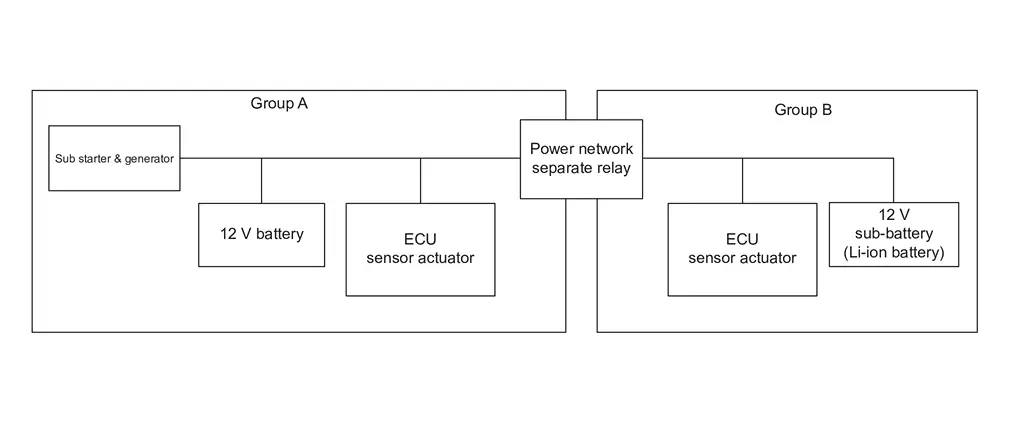
-
Under normal conditions, ADAS control unit 2 (Group A) controls ProPILOT Assist 2.1 in cooperation with each ECU, each sensor, and each actuator of the whole (Group A and Group B).
-
In case of power supply system error, power network separate relay cuts off connection between group A and group B, and function is maintained by normal power supply group.
NORMAL POWER SUPPLY SYSTEM
When power supply system is normal, ADAS control unit 2 that receives signal from each sensor transmits signals to each ECU and controls ProPILOT Assist 2.1 system.
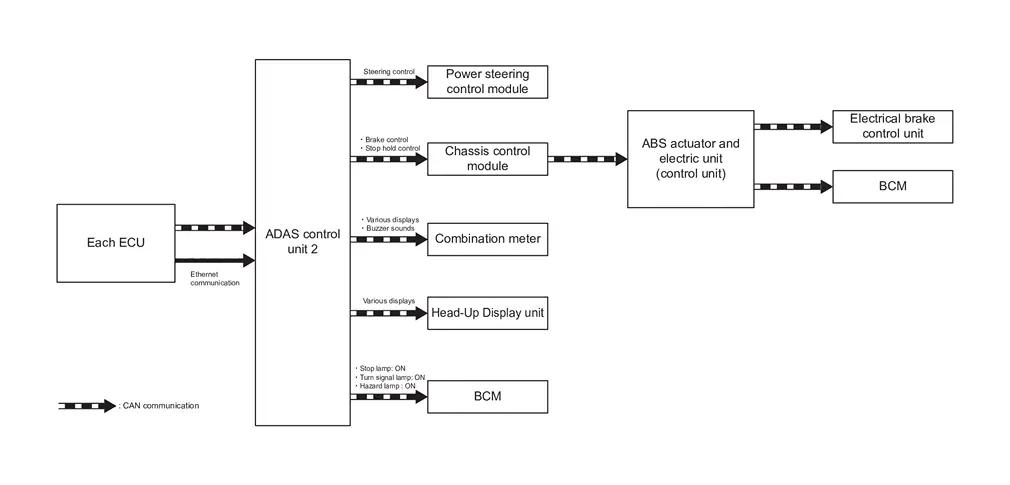
| Control/Operation | Control unit/Component | Description |
|---|---|---|
| Steering control | Power steering control module | Controls steering based on signal from ADAS control unit 2. |
| Brake control | Chassis control module→ABS actuator and control unit (control unit)→ Electric control brake unit | Controls brake based on signal from ADAS control unit 2. |
| Stop lamp ON | Chassis control module→ABS actuator and control unit (control unit)→BCM | Turns ON stop lamp during deceleration based on signal from ABS actuator and control unit (control unit). |
| Stop holding control | Chassis control module→ABS actuator and control unit (control unit) | Operates electric parking brake based on signal from ADAS control unit 2. |
| Displays | Combination meter | Displays ProPILOT Assist 2.1 status based on signals from ADAS control unit 2. |
| Head-up display unit | ||
| Buzzer | Combination meter | Operates buzzer based on signal from ADAS control unit 2. |
| Turn signal lamp & hazard lamp ON | BCM | Operates turn signal lamp & hazard lamp based on signals from ADAS control unit 2. |
-
Power network separate relay cuts off circuit of sub starter & generator side and ProPILOT Assist 2.1 system is controlled by power supply group of the 12 V sub-battery (Li-ion battery) side.
-
When malfunction occurs on sub starter & generator side, around view monitor control unit controls ProPILOT Assist 2.1 system.
-
When around view monitor control unit judges that driver operates steering wheel, it cancels backup function.
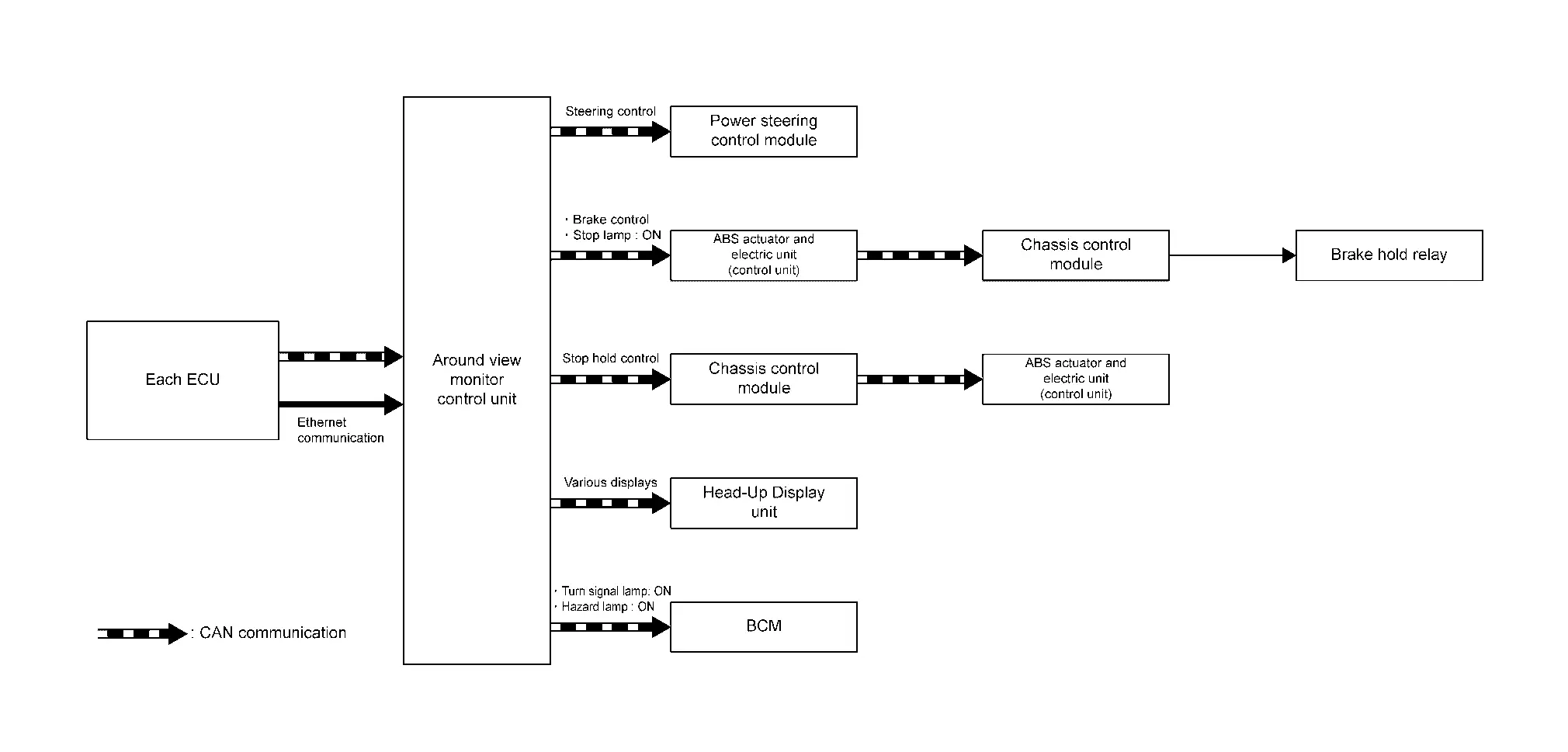
| Control/Operation | Control unit/Component | Description |
|---|---|---|
| Steering control | Power steering control module | Controls steering based on signal from around view monitor. |
| Brake control | ABS actuator and control unit (control unit) | Controls brake based on signal from around view monitor. |
| Stop lamp ON | ABS actuator and control unit (control unit)→Chassis control module→Brake holding relay | Turns ON stop lamp during deceleration based on signal from around view monitor. |
| Stop holding control | Chassis control module→ABS actuator and control unit (control unit) | Operates electric parking brake based on signal from around view monitor. |
| Displays | Head-up display unit | Displays ProPILOT Assist 2.1 status based on signals from around view monitor. |
| Turn signal lamp & hazard lamp ON | BCM | Operates turn signal lamp & hazard lamp based on signals from around view monitor. |
12 V SUB-BATTERY (LI-ION BATTERY) SIDE MALFUNCTION
-
Power network separate relay cuts off circuit of 12 V sub-battery (Li-ion battery) side and ProPILOT Assist 2.1 system is controlled by power supply group of sub starter & generator side.
-
When ADAS control unit 2 judges that driver operates steering wheel, it cancels backup function.
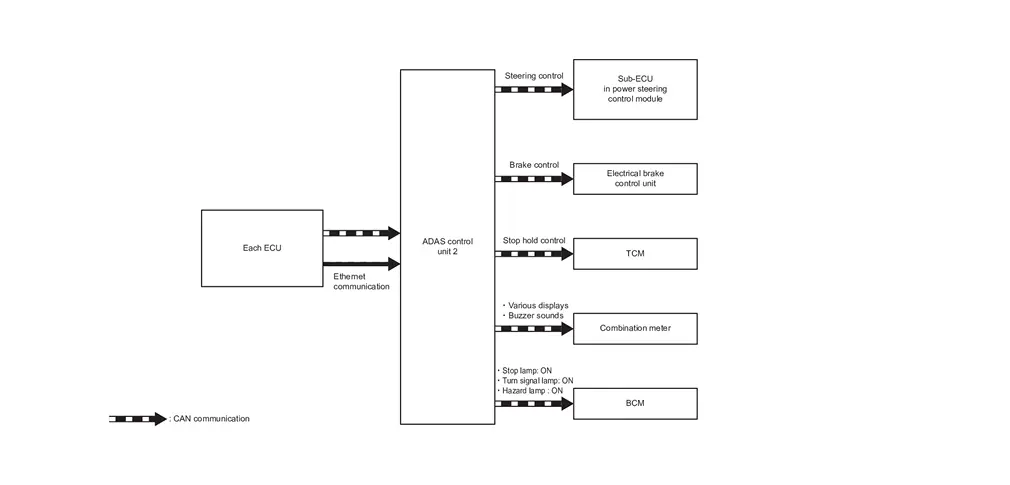
| Control/Operation | Control unit/Component | Description |
|---|---|---|
| Steering control | Sub-ECU in power steering control module | Controls steering based on signal from ADAS control unit 2. |
| Brake control | Electric control brake unit | Controls brake based on signal from ADAS control unit 2. |
| Stop lamp ON | BCM | Turns ON stop lamp based on signal from ADAS control unit 2. |
| Stop holding control | TCM | Shift position is "P" based on signal from ADAS control unit 2. |
| Displays | Combination meter | Displays ProPILOT Assist 2.1 status based on signals from ADAS control unit 2. |
| Buzzer | Combination meter | Operates buzzer based on signal from ADAS control unit 2. |
| Turn signal lamp & hazard lamp ON | BCM | Operates turn signal lamp & hazard lamp based on signals from ADAS control unit 2. |
ADAS CONTROL UNIT 2 BACKUP FUNCTION MALFUNCTION
ADAS CONTROL UNIT 2 NORMAL
When ADAS control unit 2 is normal, ADAS control unit 2 that receives signals from each sensor transmits signals to each ECU and controls ProPILOT Assist 2.1 system.
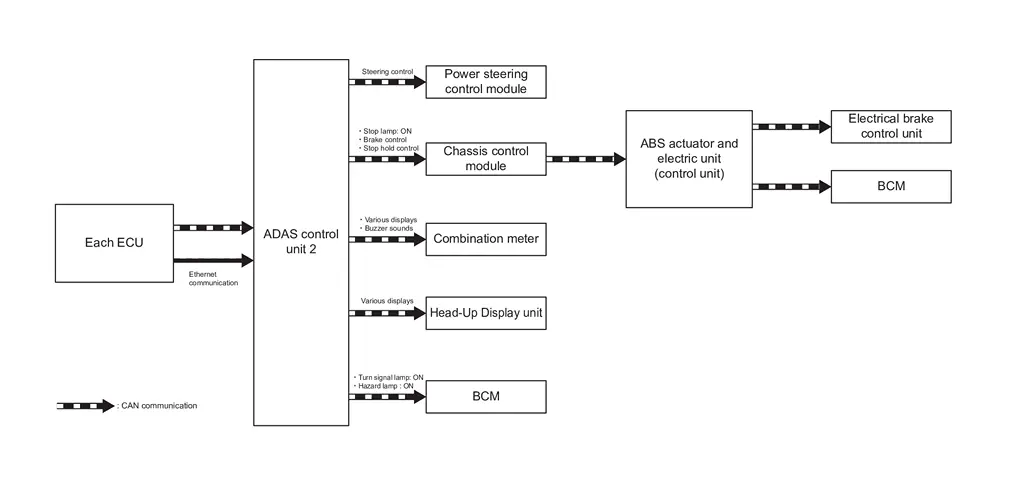
| Control/Operation | Control unit/Component | Description |
|---|---|---|
| Steering control | Power steering control module | Controls steering based on signal from ADAS control unit 2. |
| Brake control | Chassis control module→ABS actuator and control unit (control unit)→ Electric control brake unit | Controls brake based on signal from ADAS control unit 2. |
| Stop lamp ON | VDC→BCM | Turns ON stop lamp based on signal from ADAS control unit 2. |
| Stop holding control | Chassis control module→ABS actuator and control unit (control unit) | Operates electric parking brake based on signal from around view monitor. |
| Displays | Combination meter | Displays ProPILOT Assist 2.1 status based on signals from ADAS control unit 2. |
| Head-up display unit | ||
| Buzzer | Combination meter | Operates buzzer based on signal from ADAS control unit 2. |
| Turn signal lamp & hazard lamp ON | BCM | Operates turn signal lamp & hazard lamp based on signals from ADAS control unit 2. |
ADAS CONTROL UNIT 2 MALFUNCTION
-
Around view monitor control unit performs brake control and steering control for a few seconds, and controls Nissan Ariya vehicle until emergency stop.
-
When around view monitor control unit judges that driver operates steering wheel, it cancels backup function.
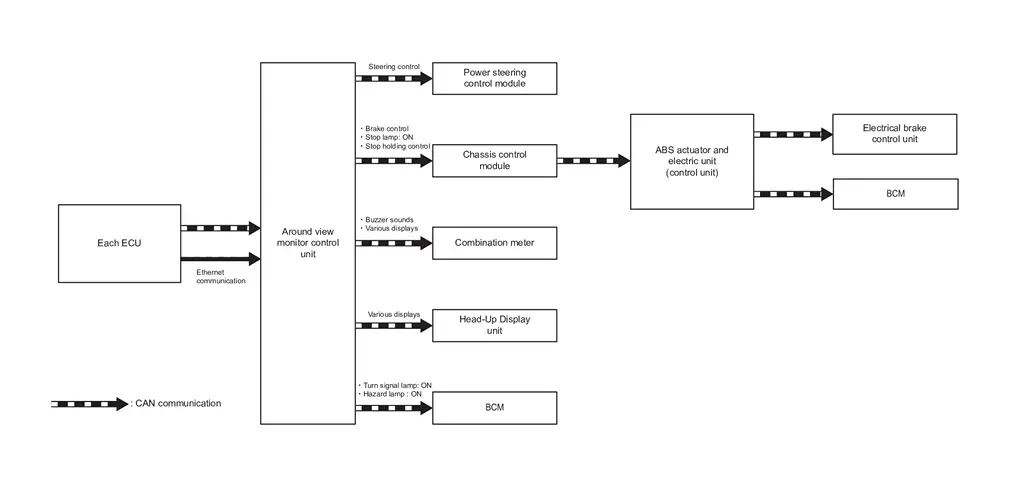
| Control/Operation | Control unit/Component | Description |
|---|---|---|
| Steering control | Power steering control module | Controls steering based on signal from around view monitor. |
| Brake control | Chassis control module→ABS actuator and control unit (control unit)→ Electric control brake unit | Controls brake based on signal from around view monitor. |
| Stop lamp ON | Chassis control module→ABS actuator and control unit (control unit)→BCM | Turns ON stop lamp during deceleration based on signal from around view monitor. |
| Stop holding control | Chassis control module→ABS actuator and control unit (control unit) | Operates electric parking brake based on signal from around view monitor. |
| Displays | Combination meter | Displays ProPILOT Assist 2.1 status based on signals from around view monitor. |
| Head-up display unit | ||
| Turn signal lamp & hazard lamp ON | BCM | Operates turn signal lamp & hazard lamp based on signals from around view monitor. |
| Buzzer sounds | Combination meter | Operates buzzer based on signals from around view monitor. |
BUZZER (COMBINATION METER) SYSTEM MALFUNCTION BACKUP FUNCTION
BUZZER (COMBINATION METER) SYSTEM NORMAL
When buzzer (combination meter) system is normal, ADAS control unit 2 transmits buzzer sound request signal to combination meter and buzzer sounds the operation sound and warning sound required for ProPILOT Assist 2.1.
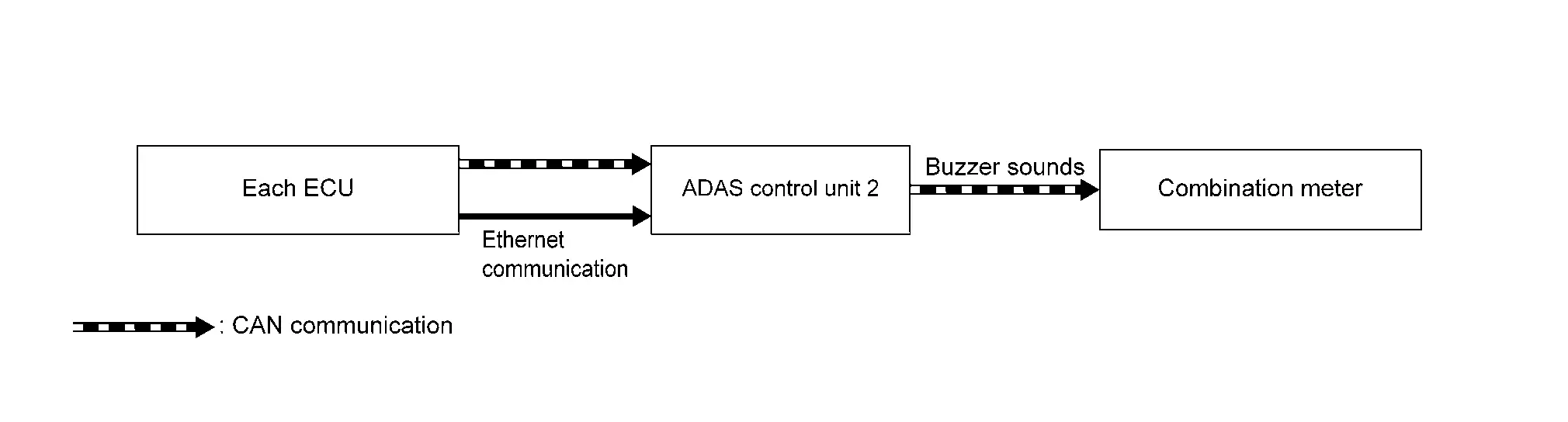
| Control/Operation | Control unit/Component | Description |
|---|---|---|
| Buzzer | Combination meter | Operates buzzer based on signal from ADAS control unit 2. |
STEERING CONTROL SYSTEM MALFUNCTION BACKUP FUNCTION
STEERING CONTROL SYSTEM NORMAL
When steering control system is normal, ADAS control unit 2 transmits steering control signal to power steering control module to control steering.
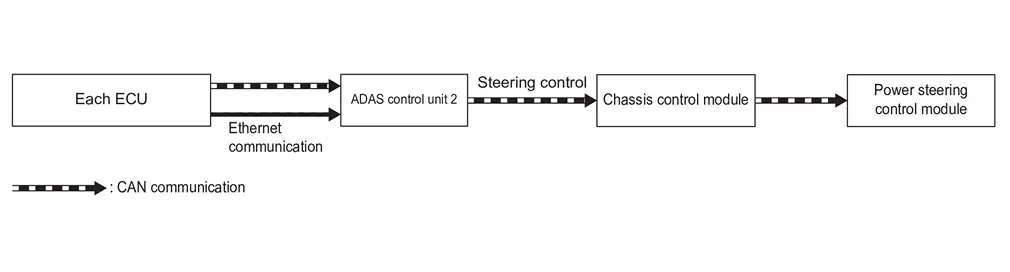
| Control/Operation | Control unit/Component | Description |
|---|---|---|
| Steering control | Chassis control module→Power steering control module | Controls steering based on signal from ADAS control unit 2. |
STEERING CONTROL SYSTEM ERROR
-
ADAS control unit 2 transmits steering control signal to SUB-ECU in the power steering control module to control steering.
-
When ADAS control unit 2 judges that driver operates steering wheel. It cancels backup function.
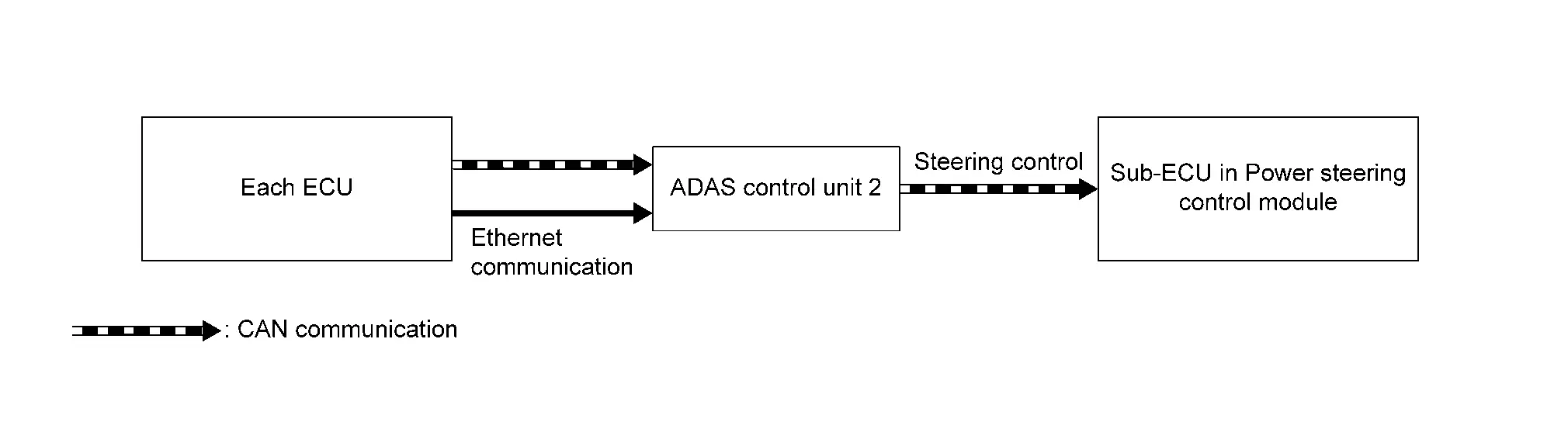
Control/Operation Control unit/Component Description Steering control SUB-ECU in power steering control module Controls steering based on signal from ADAS control unit 2.
BACKUP FUNCTION FOR BRAKE SYSTEM MALFUNCTION
BRAKE SYSTEM NORMAL
When brake system is normal, ADAS control unit 2 transmits brake control signal to electric control brake system via chassis control module.
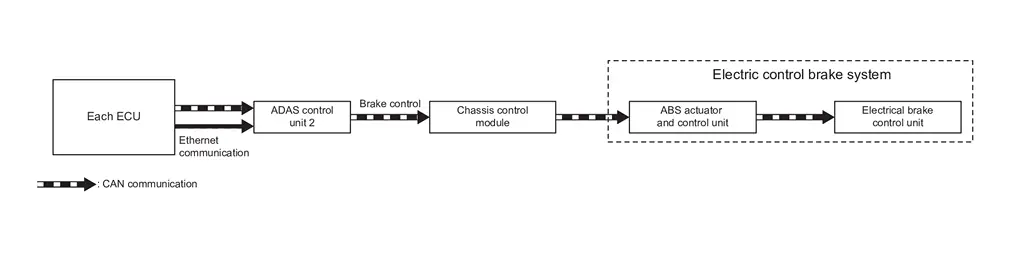
| Control/Operation | Control unit/Component | Description |
|---|---|---|
| Brake control | Chassis control module→ABS actuator and control unit (control unit)→ Electric control brake unit | Controls brake based on signal from ADAS control unit 2. |
BRAKE CONTROL [CHASSIS CONTROL MODULE AND ABS ACTUATOR AND ELECTRIC UNIT (CONTROL UNIT)] SYSTEM ERROR
-
ADAS control unit 2 transmits brake control signal to electric control brake unit and controls brake.
-
When ADAS control unit 2 judged that driver operates steering wheel, it cancels backup function.
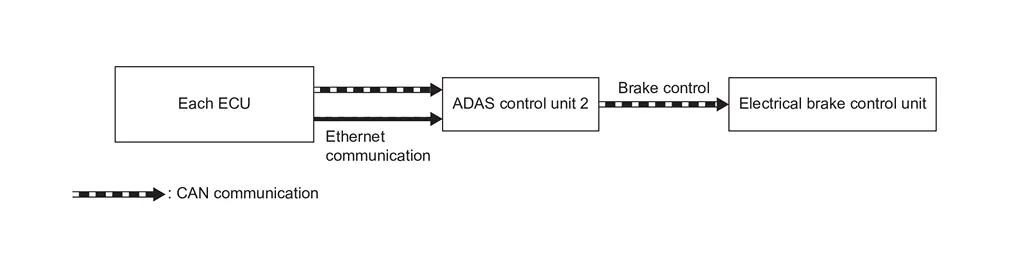
Control/Operation Control unit/Component Description Brake control Electric control brake unit Controls brake based on signal from ADAS control unit 2.
BRAKE CONTROL UNIT (ELECTRIC CONTROL BRAKE UNIT) SYSTEM ERROR
-
ADAS control unit 2 transmits brake control signal to ABS actuator and control unit (control unit) via chassis control module, and controls brake.
-
When ADAS control unit 2 judges that driver operates steering wheel. It cancels backup function.
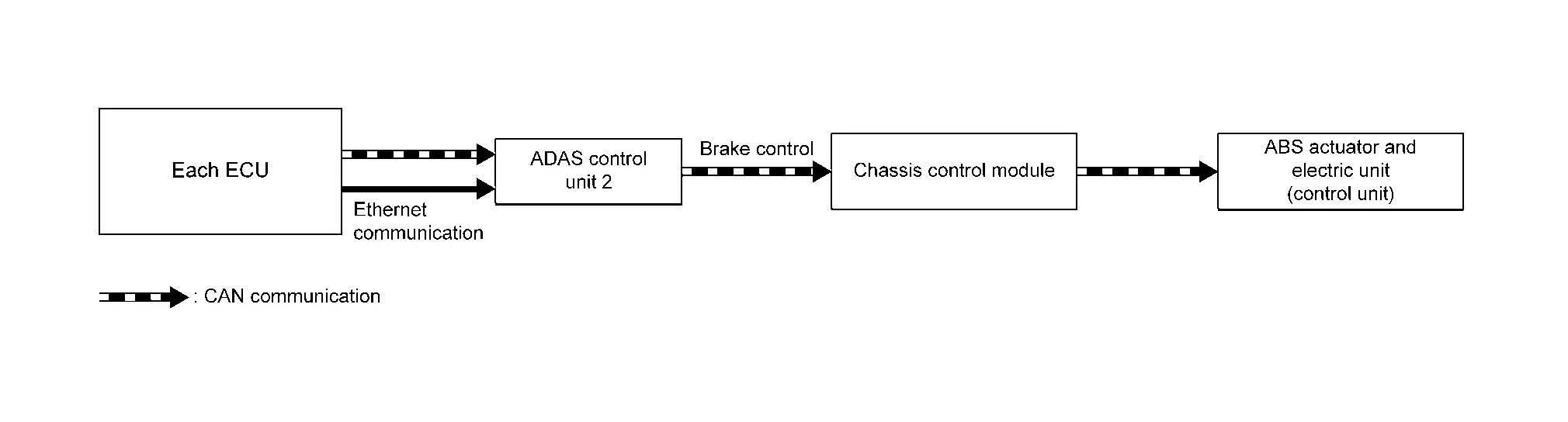
Control/Operation Control unit/Component Description Brake control Chassis control module→ABS actuator and control unit (control unit) Controls brake based on signal from ADAS control unit 2.
BACKUP FOR STOP LAMP OPERATION SYSTEM ERROR
STOP LAMP OPERATION SYSTEM NORMAL
When stop lamp operation system is normal, ADAS control unit 2 transmits stop lamp request signal to BCM via ABS actuator and control unit (control unit) and turns on stop lamps.
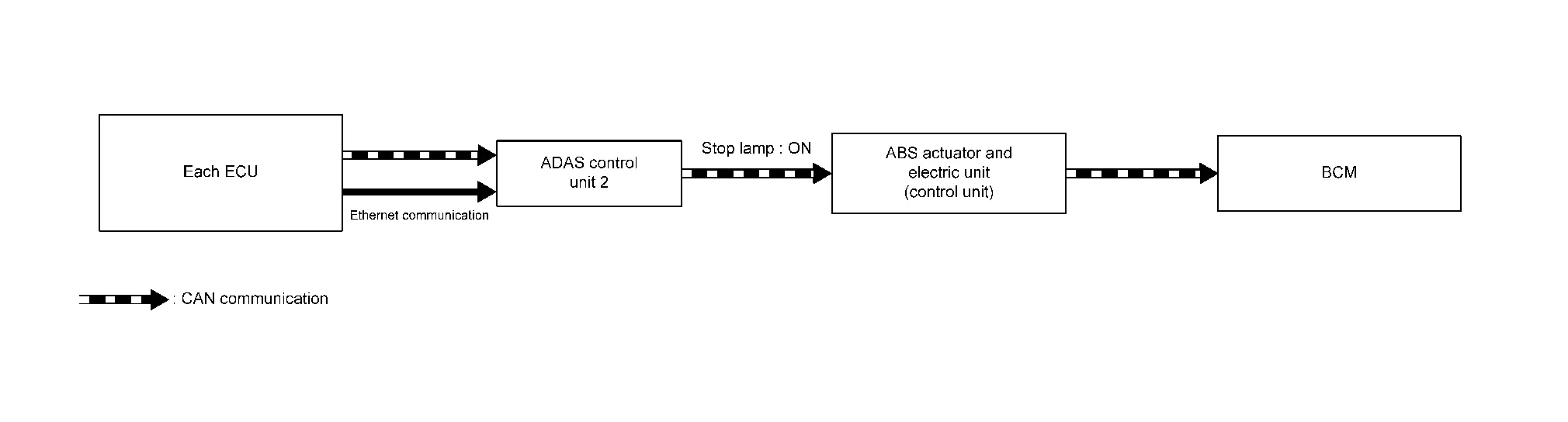
| Control/Operation | Control unit/Component | Description |
|---|---|---|
| Stop lamp ON | ABS actuator and control unit (control unit)→BCM | Turns on stop lamps based on signal from ADAS control unit 2. |
STOP LAMP OPERATION [ABS ACTUATOR AND ELECTRIC UNIT (CONTROL UNIT)] SYSTEM ERROR
-
ADAS control unit 2 transmits stop lamp request signal to BCM and turns on stop lamps.
-
When ADAS control unit 2 judged that driver operates steering wheel, it cancels backup function.
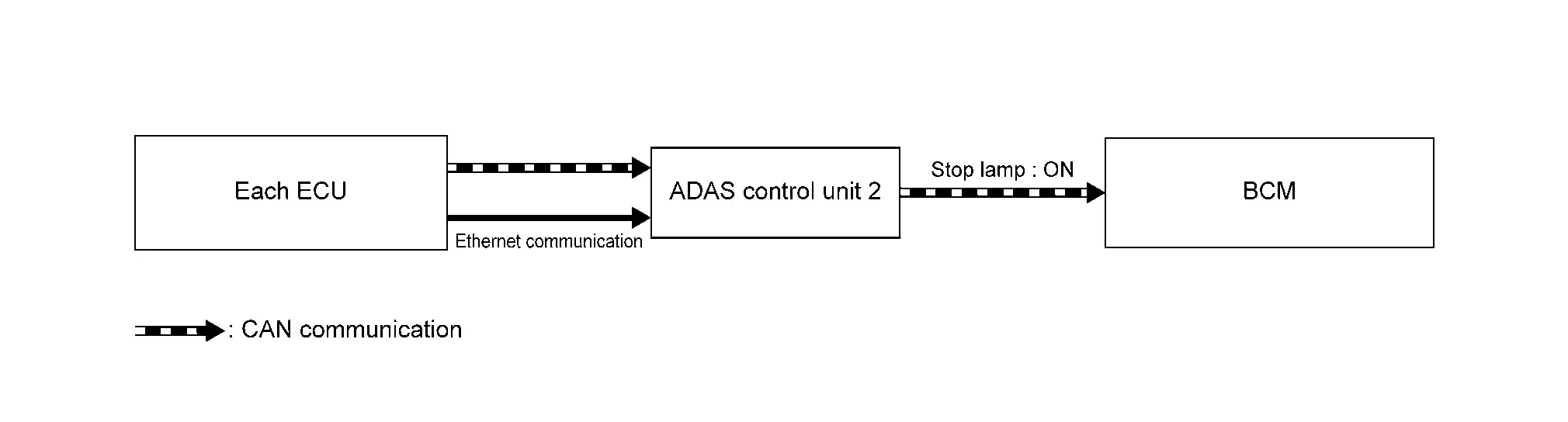
Control/Operation Control unit/Component Description Stop lamp ON BCM Turns on stop lamps based on signal from ADAS control unit 2.
STOP LAMP OPERATION (BCM) SYSTEM ERROR
-
ADAS control unit 2 transmits stop lamp request signal to chassis control module.
-
Chassis control module operates brake holding relay and turns on stop lamps.
-
When ADAS control unit 2 judged that driver operates steering wheel, it cancels backup function.
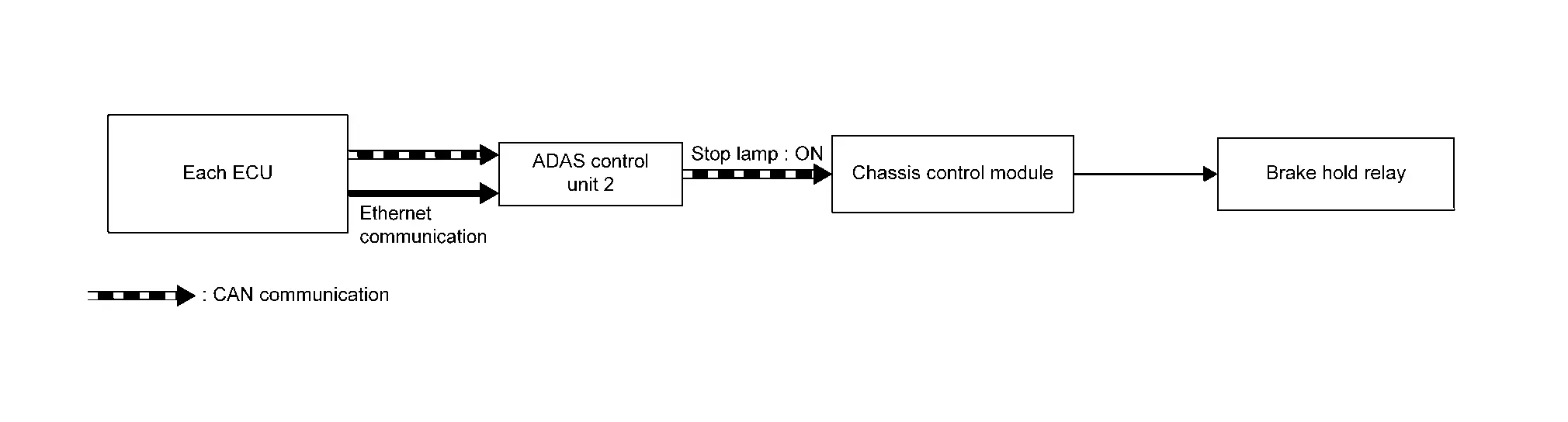
Control/Operation Control unit/Component Description Stop lamp ON Chassis control module→Brake holding relay Turns on stop lamps based on signal from ADAS control unit 2.
BACKUP FOR STOP HOLDING CONTROL SYSTEM ERROR
STOP HOLDING CONTROL SYSTEM NORMAL
When stop holding control system is normal, ADAS control unit 2 transmits stop holding control signal to ABS actuator and electric unit (control unit) via chassis control module, and controls stop holding.
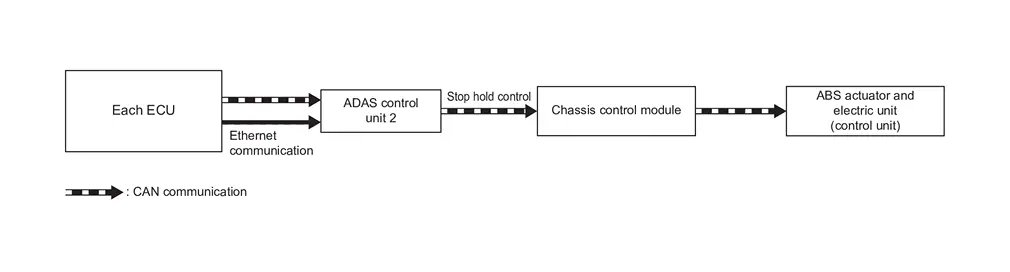
| Control/Operation | Control unit/Component | Description |
|---|---|---|
| Stop holding control | Chassis control module→ABS actuator and control unit (control unit) | Operates electric parking brake based on signal from ADAS control unit 2. |
STOP HOLDING CONTROL (CHASSIS CONTROL MODULE) SYSTEM ERROR
-
ADAS control unit 2 transmits stop holding control signal to ABS actuator and electric unit (control unit) and controls stop holding.
-
When ADAS control unit 2 judged that driver operates steering wheel, it cancels backup function.
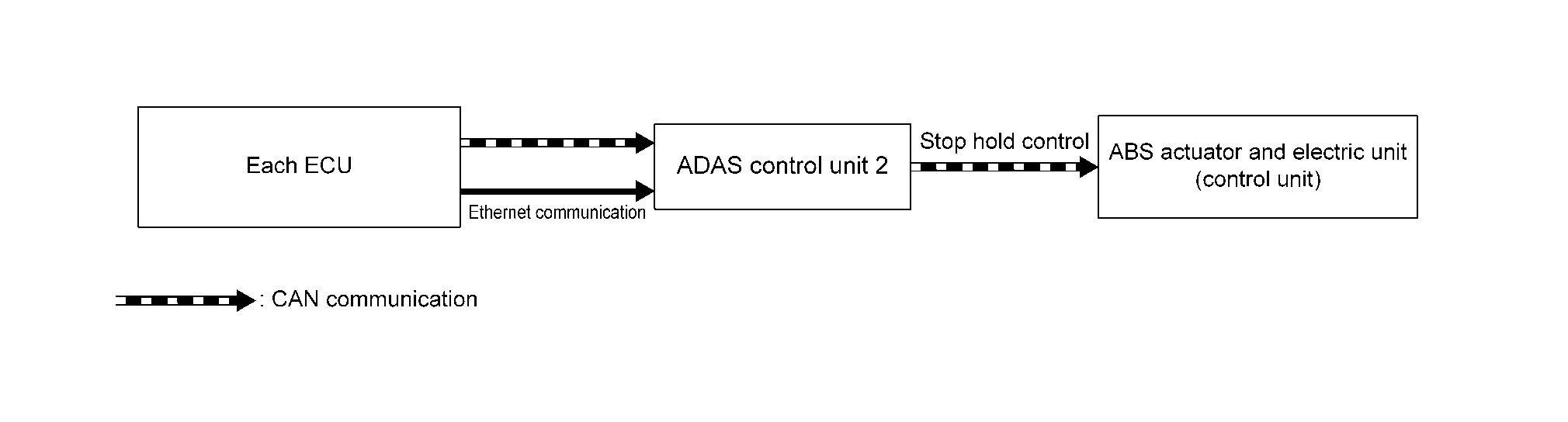
Control/Operation Control unit/Component Description Stop holding control ABS actuator and electric unit (control unit) Operates electric parking brake based on signal from ADAS control unit 2.
STOP HOLDING CONTROL [ABS ACTUATOR AND ELECTRIC UNIT (CONTROL UNIT)] SYSTEM ERROR
-
ADAS control unit 2 transmits target shift position signal to TCM and sets shift position to "P".
-
When ADAS control unit 2 judged that driver operates steering wheel, it cancels backup function.
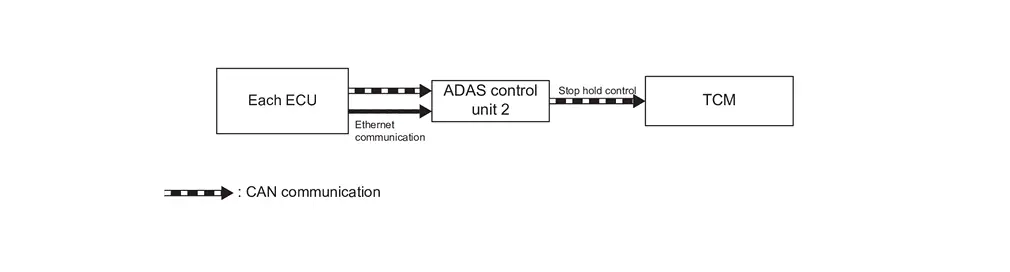
Control/Operation Control unit/Component Description Stop holding control TCM Sets shift position to "P" based on signal from ADAS control unit 2.
BACKUP FUNCTION FOR DISTANCE SENSOR MALFUNCTION
DISTANCE SENSOR NORMAL
When distance sensor is normal, ADAS control unit 2 measures distance to vehicle ahead with distance sensor.
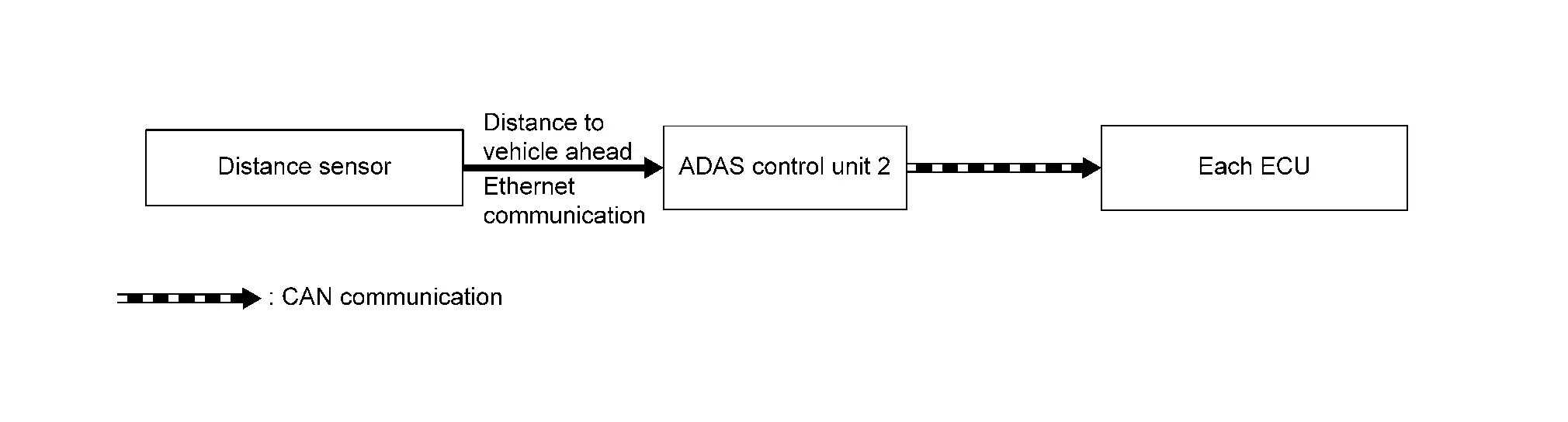
| Control/Operation | Control unit/Component | Description |
|---|---|---|
| Nissan Ariya Vehicle ahead distance calculation | Distance sensor | ADAS control unit 2 recognizes distance to Nissan Ariya vehicle ahead based on signal from distance sensor. |
DISTANCE SENSOR MALFUNCTION
-
ADAS control unit 2 recognizes distance to vehicle ahead based on signal from front camera unit.
-
When ADAS control unit 2 judged that driver operates steering wheel, it cancels backup function.
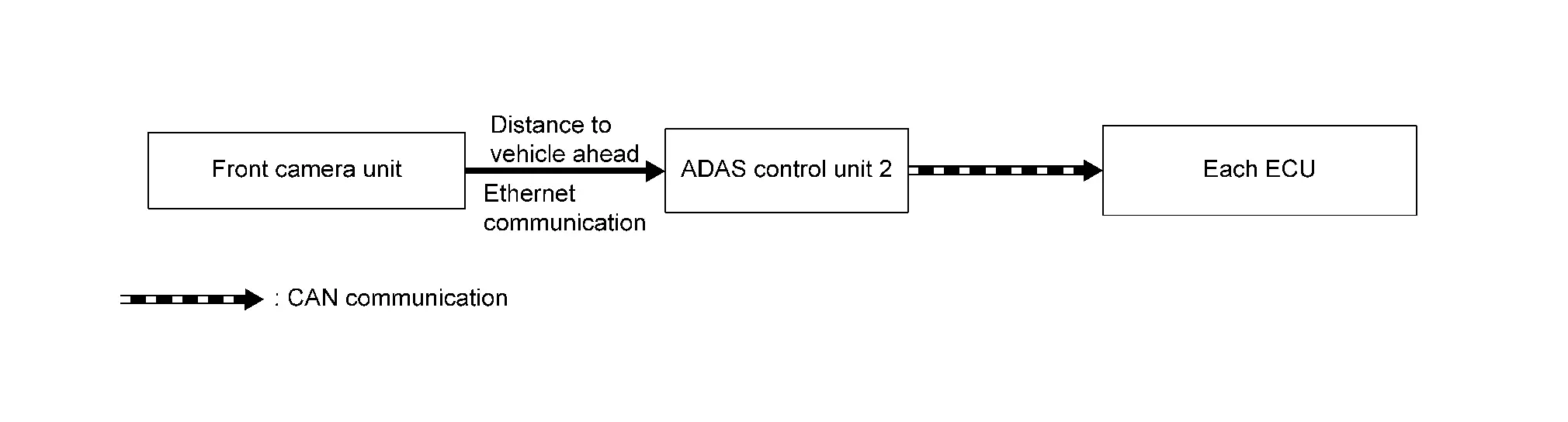
Control/Operation Control unit/Component Description Nissan Ariya Vehicle ahead distance calculation Front camera unit ADAS control unit 2 recognizes distance to Nissan Ariya vehicle ahead based on signal from front camera unit via HD map module.
BACKUP FUNCTION FOR FRONT CAMERA UNIT MALFUNCTION
FRONT CAMERA UNIT NORMAL
When front camera is normal, ADAS control unit 2 receives image signal from front camera unit, controls ProPILOT Assist 2.1 system.
| Control/Operation | Control unit/Component | Description |
|---|---|---|
| Image detection | Front camera unit | ADAS control unit 2 recognizes distance to Nissan Ariya vehicle ahead based on signal from front camera unit via HD map module. |
FRONT CAMERA MALFUNCTION
-
ADAS control unit 2 controls ProPILOT Assist 2.1 system with HD map data in ADAS control unit 2.
-
When ADAS control unit 2 judged that driver operates steering wheel, it cancels backup function.
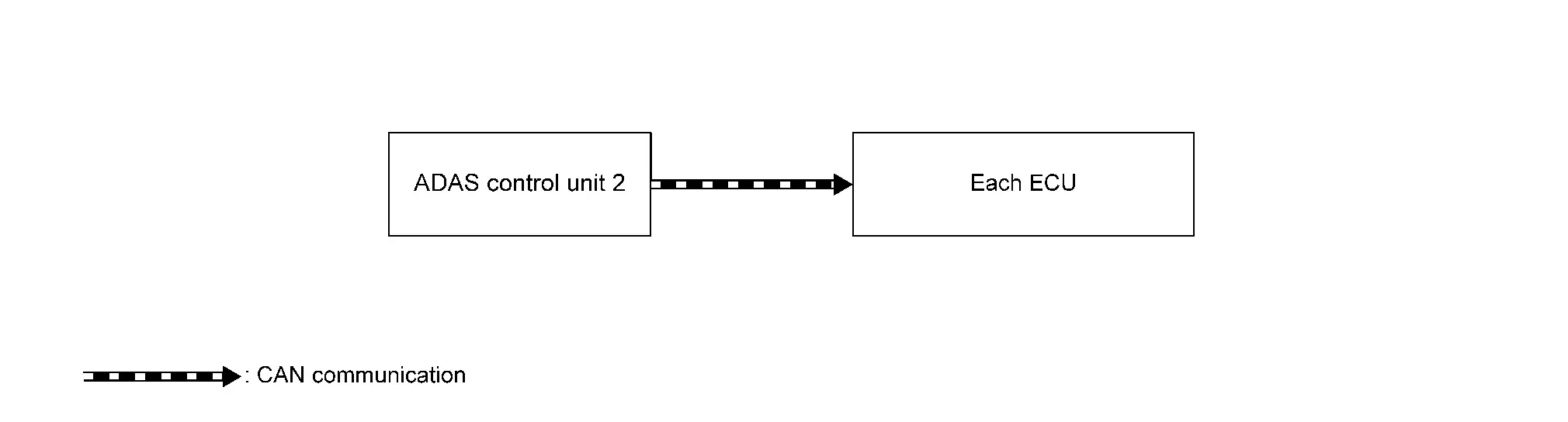
Control/Operation Control unit/Component Description HD map data ADAS control unit 2 ADAS control unit 2 uses HD map data in ADAS control unit 2.
Other materials:
Remplacement de la pile de clé intelligente
AVERTISSEMENT
Risque en cas d’ingestion : l’ingestion d’une pile bouton peut entraîner des blessures graves, voire mortelles.
Une pile avalée peut provoquer des brûlures chimiques internes en seulement deux heures.
Conservez toujours les piles neuves et usagées hors de portée des ...
Ecu Diagnosis Information. Electrically-Driven Intelligent Brake Unit
DTC Index
DTC Display item Brake warning lamp Brake system warning lamp Refer to
B14E0-02
Wheel sensor
OFF
ON
DTC Description
B14E0-09
Wheel sensor
OFF
ON
DTC Description
B14E0-11
Wheel sensor
OFF
ON
DTC Description
B14E0-12
Wheel sensor ...
Removal and Installation. Mood Lamp (center Console)
Exploded View
Mood lamp (center console) assembly (Bulb type)
Center console assembly
Mood lamp (center console tray) assembly (LED type)
: Pawl
: Nissan Ariya Vehicle front
Removal & Installation
REMOVALCAUTION:
Disconnect the battery negative terminal or rem ...