
Nissan Rogue (T33) 2021-Present Service Manual: System
Intelligent Around View Monitor
With 8" Color Display
System Description
SYSTEM DIAGRAM
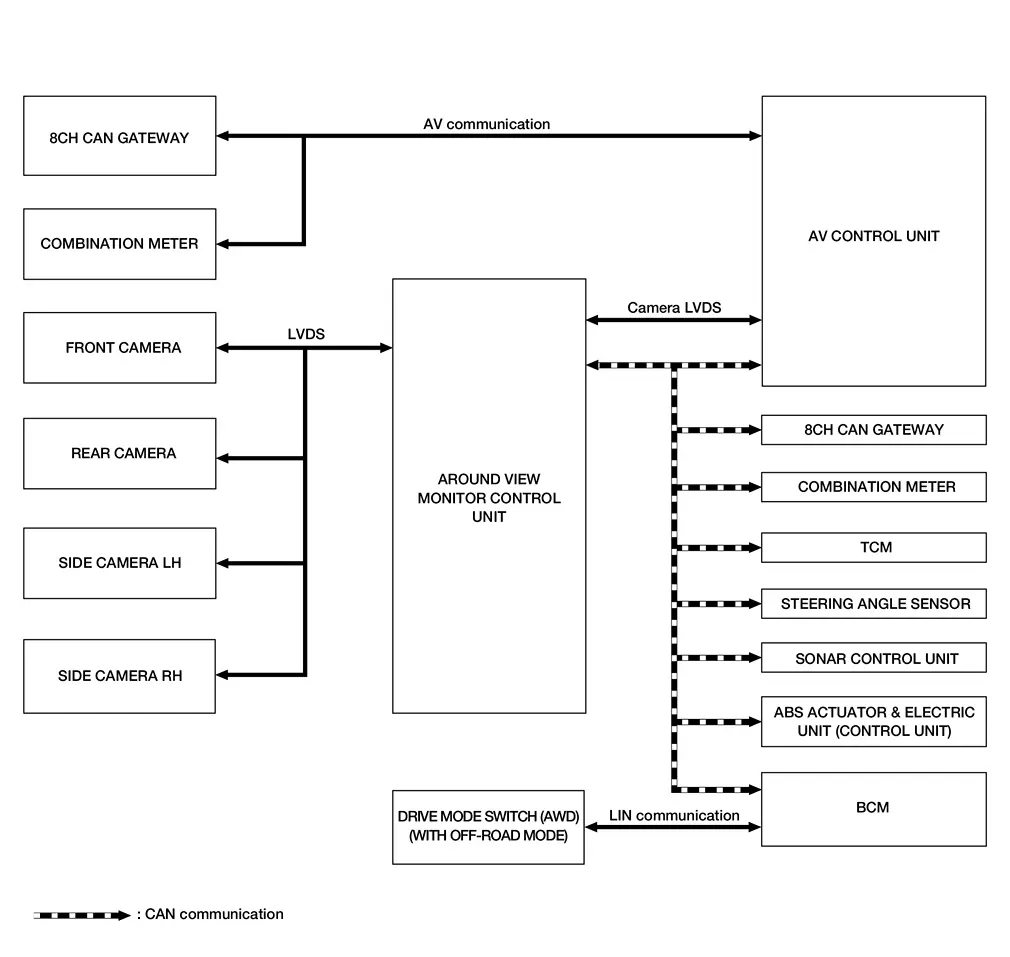
Around View Monitor Control Unit Input Signal (CAN Communication)
| Transmit unit | Signal name |
|---|---|
| AV control unit | Camera switch signal |
| Language setting signal | |
| Combination meter | MOD setting signal |
| ABS actuator and electric unit (control unit) | Nissan Ariya Vehicle speed signal |
| Front LH wheel speed signal | |
| Front RH wheel speed signal | |
| Rear LH wheel speed signal | |
| Rear RH wheel speed signal | |
| Steering angle sensor signal | |
| BCM | Door switch signal |
| Back door switch signal | |
| High beam request signal | |
| Low beam request signal | |
| Position light request signal | |
| Front fog light request signal | |
| Turn indicator signal | |
| TCM | Shift position signal |
| Sonar control unit | Sonar indicator signal |
Around View Monitor Control Unit Output Signal (CAN Communication)
| Transmit unit | Signal name |
|---|---|
| AV control unit | View change signal |
| Combination meter | Buzzer output signal |
| MOD setting status signal |
DESCRIPTION
-
The images from front view, front wide view, rear view, rear wide view, front-side view, rear-side view (with OFF-ROAD mode) and birds-eye view are displayed to monitor the Nissan Ariya vehicle surroundings.
-
Around view monitor control unit cuts out and expands the image received from each camera to create each view.
-
The sonar indicator is displayed (superimposed on the camera image) in combination with the sonar system to warn of the approach of an obstacle.
-
Camera image is displayed when an obstacle is detected by sonar system.
-
In front view and rear view, the Nissan Ariya vehicle width, distance lines and predictive course lines are superimposed and displayed.
-
In front wide view and rear wide view, the view shows a wider area on the entire screen and visibility for the left and right invisible area is improved.
-
In front-side view, the Nissan Ariya vehicle distance guiding line and vehicle width guiding line are displayed.
-
In rear-side view (with OFF-ROAD mode), the Nissan Ariya vehicle distance guiding line and vehicle width guiding line are displayed.
-
The Birds-Eye view converts the images from the cameras into an overhead view. The Nissan Ariya vehicle icon and sonar indicator that are displayed in the Birds-Eye view are rendered by the around view monitor control unit.
-
Moving Object Detection (MOD) detects moving objects according to the camera image and notifies the driver.
SYSTEM DISPLAY
-
The around view monitor control unit combines and displays travel direction view (front or rear), front-side view, rear-side view (with OFF-ROAD mode) and birds-eye view.
-
Around view monitor displays the sonar indicator on the front view, front wide view, rear view, rear wide view, front-side view and birds-eye view.
-
Around view monitor control unit displays the view icon and warning message on the display.
Screen Configuration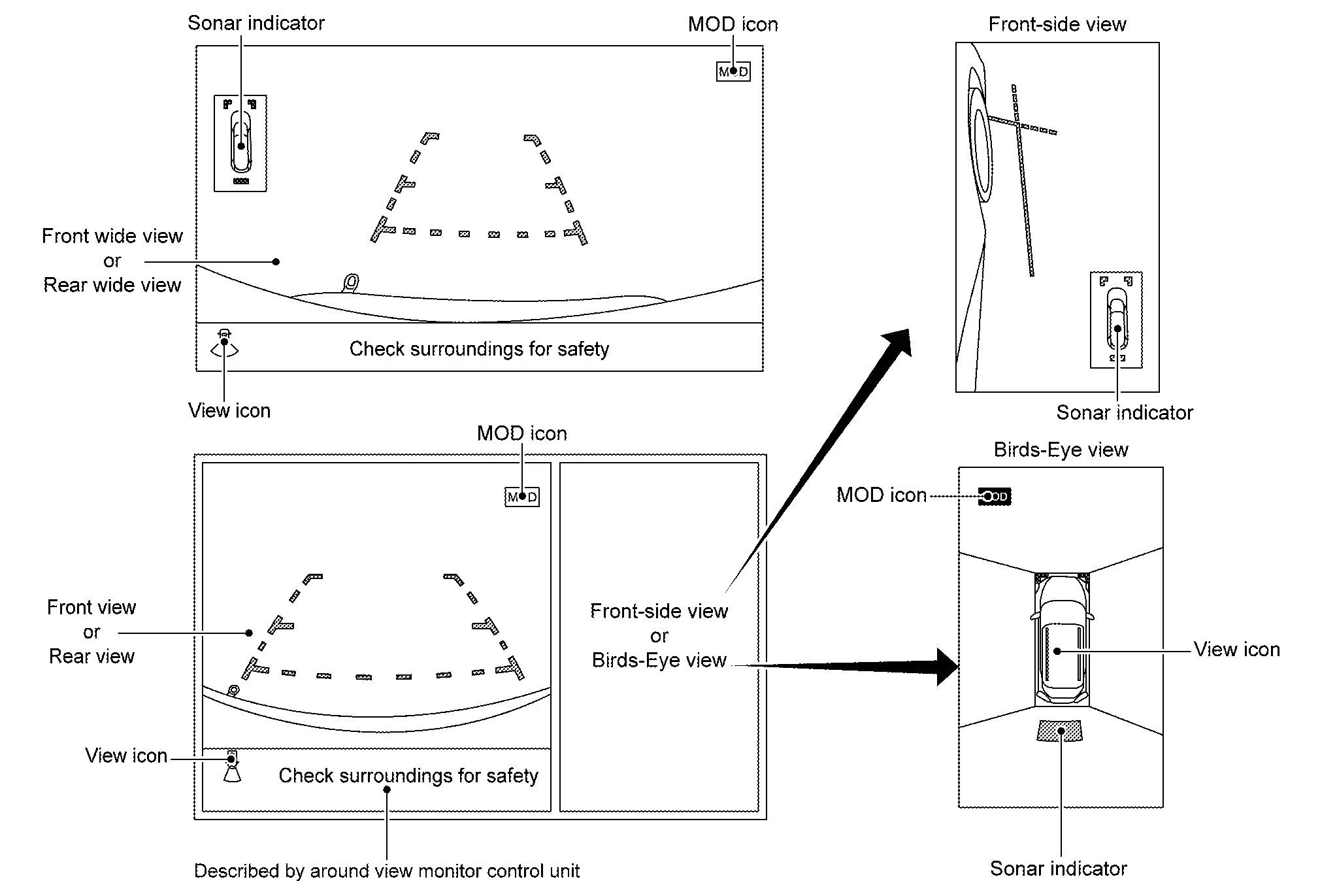
OPERATION DESCRIPTION
Around view monitor screen transition
-
Around view monitor is displayed when “CAMERA” switch is pressed, shift position is reverse, or when an obstacle is detected by the sonar system.
-
Birds-Eye view, Front-side view, and front/rear wide view can be switched using the “CAMERA” switch.
-
When the shift position is in any position other than reverse, around view monitor is cancelled:
-
approximately 3 minutes after “CAMERA” switch has been pressed.
-
when Nissan Ariya vehicle speed is approximately 6 MPH (10 km/h) or more (without OFF-ROAD mode or with OFF-ROAD mode, OFF-ROAD mode not selected).
-
when Nissan Ariya vehicle speed is approximately 12 MPH (20 km/h) or more (with OFF-ROAD mode, OFF-ROAD mode selected).
-
-
Setting of Moving Object Detection (MOD) and sonar can be switched ON/OFF using the combination meter.
-
In Birds-Eye view, an enhanced boundary is displayed on the image indicating the invisible area and clearly indicating the boundary of the 4 cameras. The invisible area is displayed in yellow when Birds-Eye view is displayed.
Front View
-
When the selector lever is in any position other than reverse position, the front view is displayed by pressing the “CAMERA” switch. The front wide view function allows the display of an image with an approximately 180° horizontal angle.
-
Nissan Ariya Vehicle width guiding line and vehicle distance guiding line in front view displays the predictive course line according to the steering angle.
-
If the steering angle is within approximately 90 degrees, the predictive course lines on the left/right side are displayed. If the steering angle exceeds approximately 90 degrees, only the predictive course line on the outside (in the opposite side of steering direction) is displayed.
-
Around view monitor control unit receives the steering angle signal from ABS actuator and electric unit (control unit) via CAN communication.
-
Around view monitor control unit controls the direction of the predictive course line according to the steering sensor angle signal.
Front view guide lines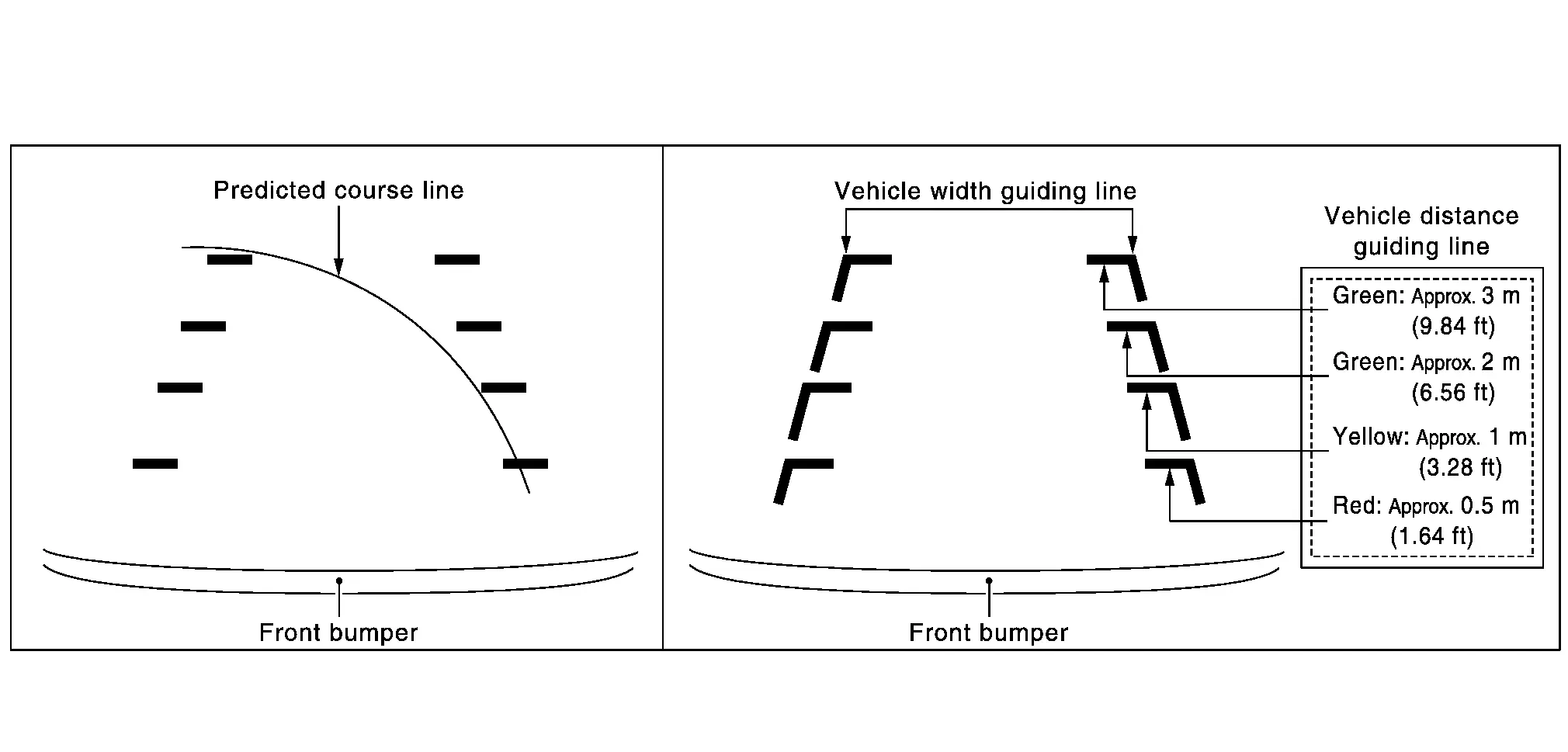
Rear View
-
When the selector lever is in reverse position, the rear view is displayed. The rear wide view function allows the display of an image with an approximately 180° horizontal angle.
-
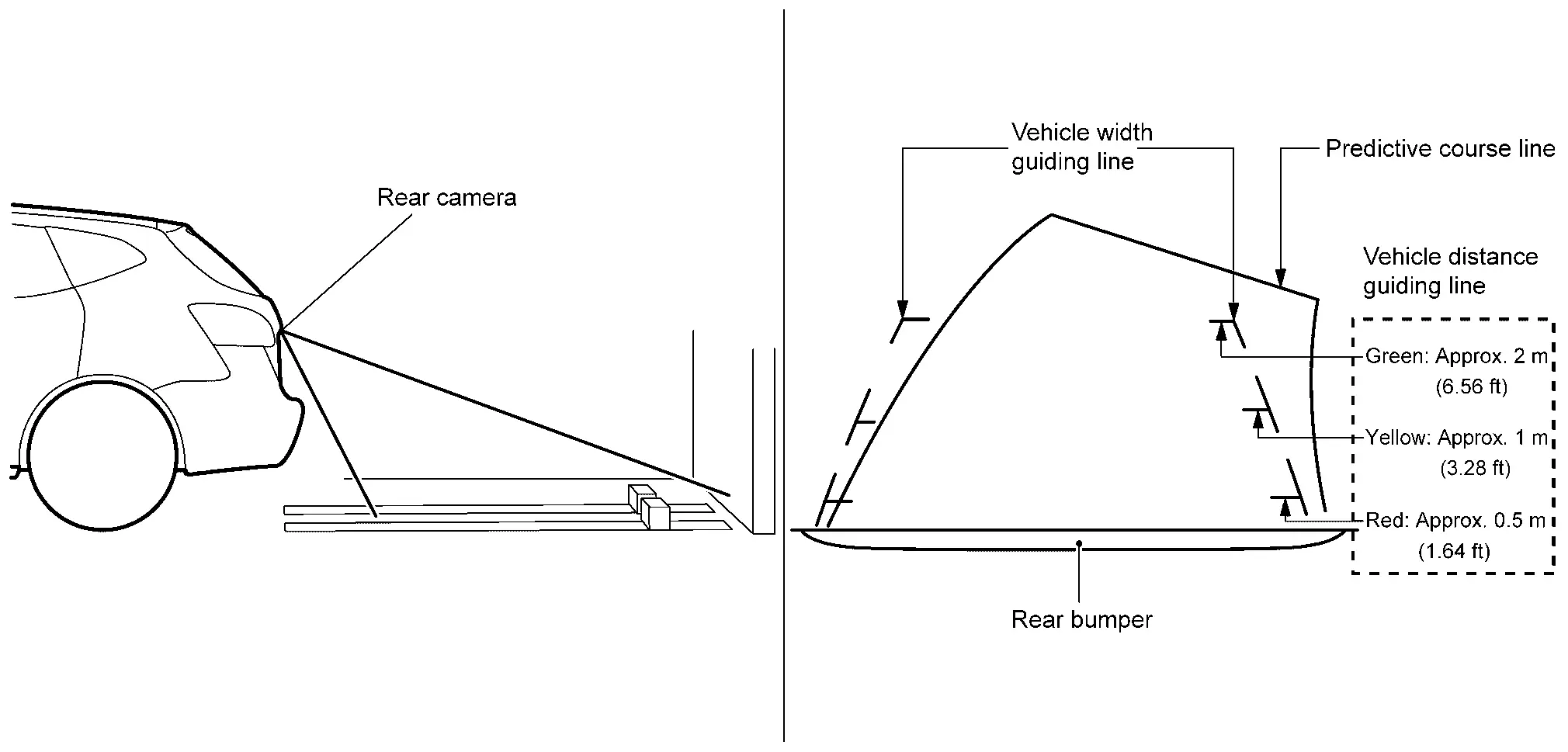
Nissan Ariya Vehicle width guiding line and vehicle distance guiding line in rear view displays the predictive course line according to the steering angle.
-
The predictive course line is not displayed at the steering neutral position.
-
Around view monitor control unit receives the steering angle signal from ABS actuator and electric unit (control unit) via CAN communication.
-
Around view monitor control unit controls the direction and distance of predictive course line according to the steering angle sensor signal.
Rear view guide lines
Front-side View
-
The front-side view image is from the side camera RH.
-
In front-side view, the Nissan Ariya vehicle distance guiding line and vehicle width guiding line are displayed.
Front-side view area and guide lines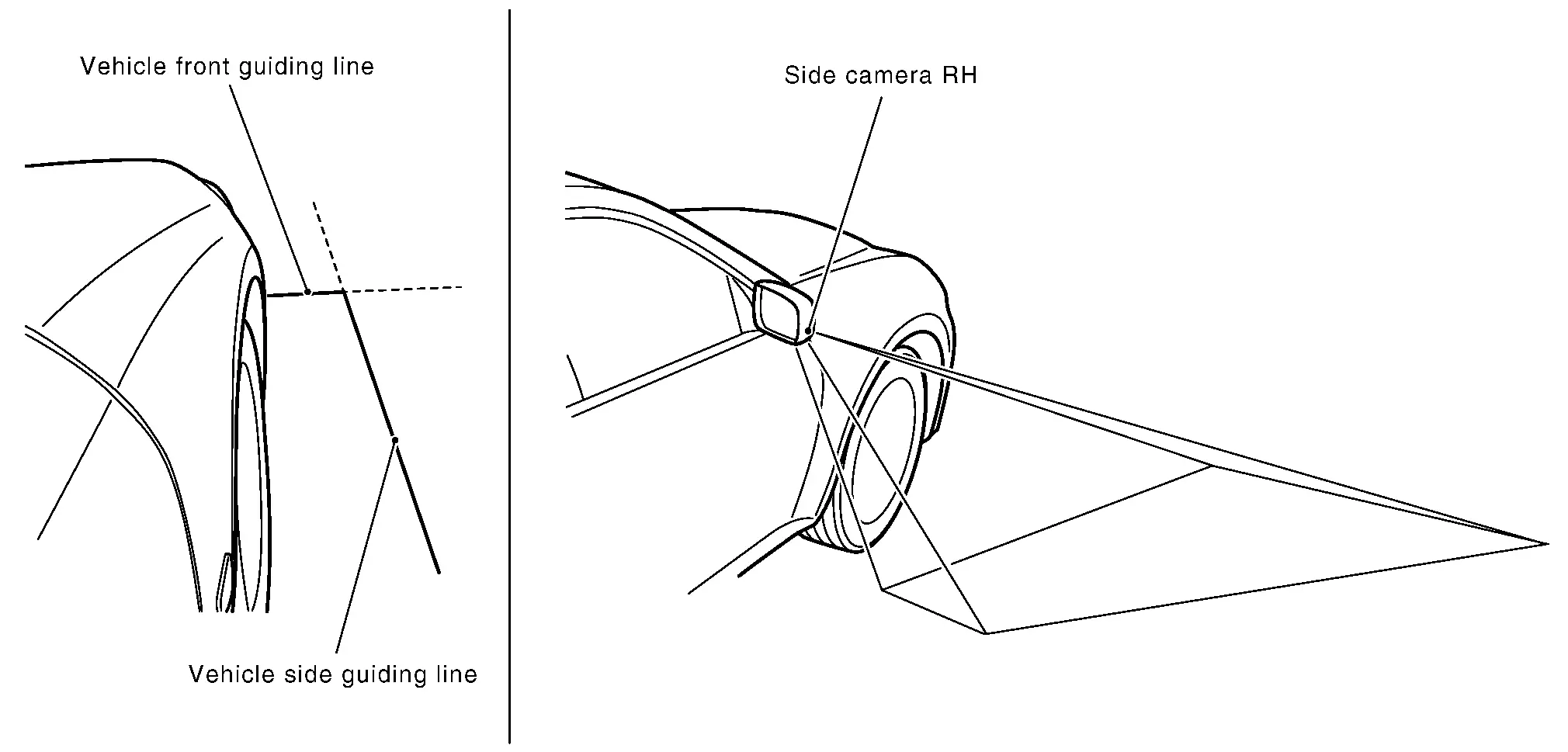
Rear-side View (With OFF-ROAD Mode)
-
Guiding lines that indicate the approximate width and the rear end of the vehicle are displayed on the monitor.
-
The rear of Nissan Ariya vehicle line shows the rear part of the vehicle. The side of vehicle line shows the vehicle width including the outside mirror.
-
This view is only available when the OFF-ROAD mode is selected using the drive mode switch (AWD).
Birds-eye View
-
The image from the 4 cameras is converted into the overhead view and the surroundings of the Nissan Ariya vehicle are displayed.
-
In Birds-Eye view, the invisible area is displayed on the image to specify the boundary of the 4 cameras.
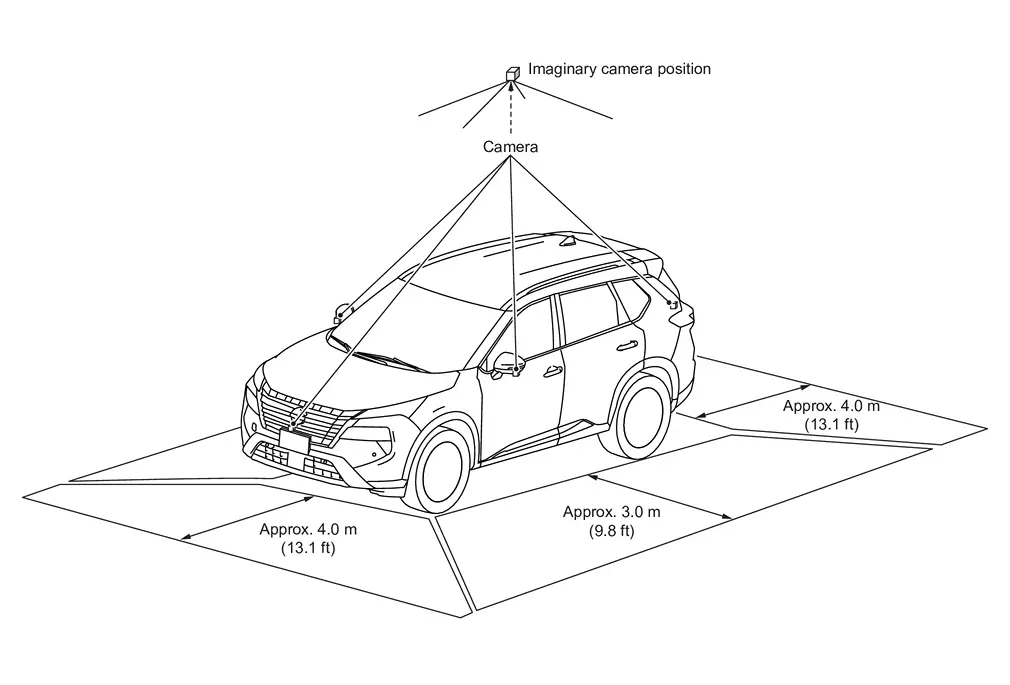
Birds-Eye view display area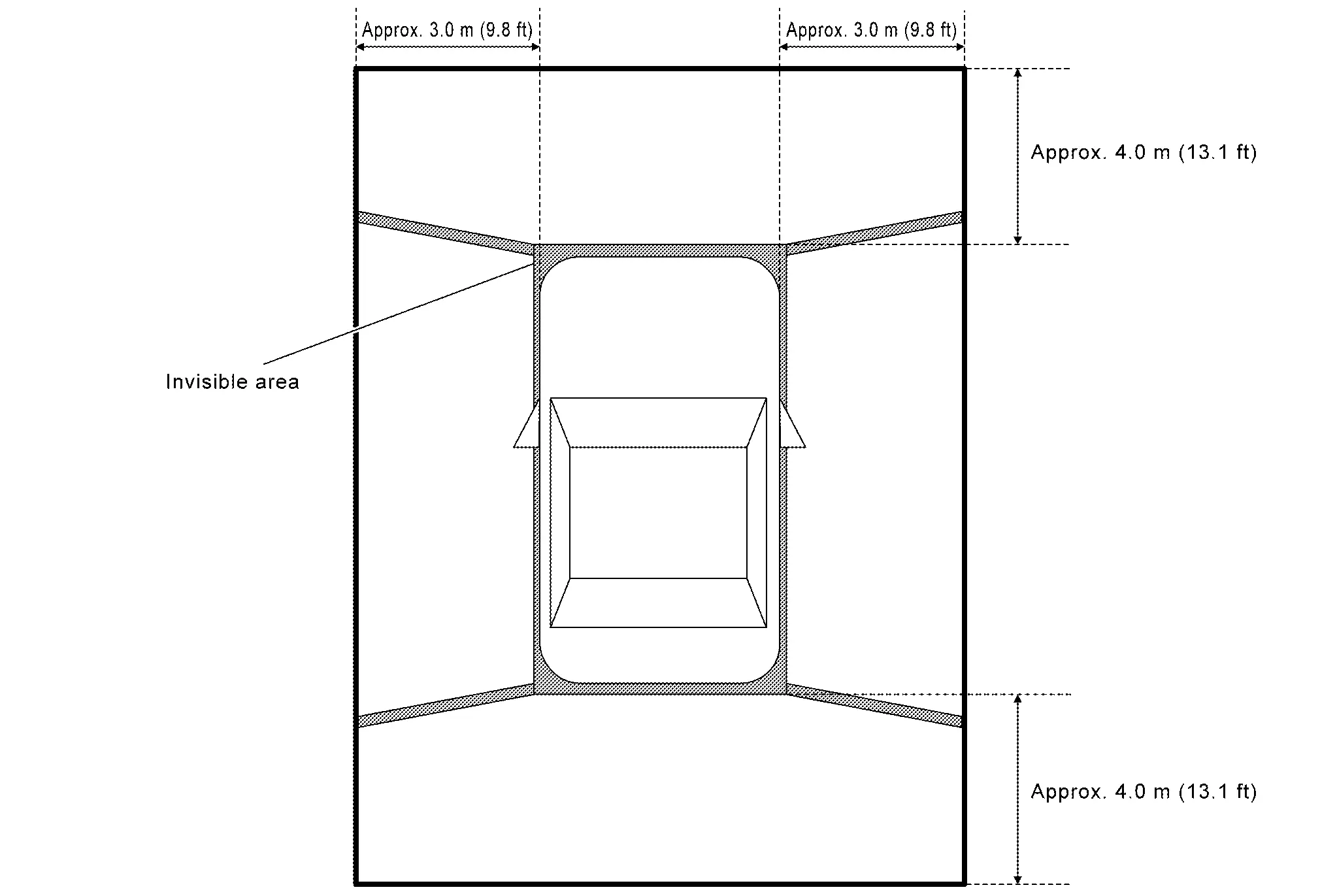
Moving Object Detection (MOD)
-
Moving Object Detection (MOD) is a function that notifies the driver of the presence of moving objects in the area around the Nissan Ariya vehicle. MOD detects moving objects using the camera image, illuminates the frame of view in yellow whenever the “MOD” icon is displayed in green, and sounds a buzzer.
-
MOD detects moving objects while camera image is displayed on AV control unit.
-
Around view monitor control unit performs the following process when moving objects are detected.
-
Superimposes yellow frame line on camera image signal and outputs them to AV control unit by LVDS.
-
Transmits MOD beep sound output request signal to combination meter via CAN communication.
-
-
Around view monitor control unit detects moving objects from camera image according to an image recognition method called optical flow.
-
MOD does not detect a background as a moving object when the Nissan Ariya vehicle moves (when whole screen moves), but detects a moving object when an actual moving object is displayed on screen.
-
MOD can be set to permanent OFF using the Settings mode on the information display of the combination meter.
-
Color of “MOD” icon indicates whether or not MOD is operative. “MOD” icon is displayed as shown in the following table. when MOD is operative, “MOD” icon is displayed in green. when MOD is not operative, “MOD” icon is displayed in gray. MOD icon is not displayed when MOD is OFF in “Settings”.
View Shift position P or N position D position R position “MOD” icon display Birds-Eye view and rear view Birds-Eye view — — Gray Rear view Green Birds-Eye view and front view Birds-Eye view Green Gray — Front view Gray Green Side view and rear view Side view — — × Rear view Green Side view and front view Side view × × — Front view Gray Green Rear wide view — — Green Front wide view Gray Green — ×: Icon is not displayed.
—: View is not displayed in each shift position (P or N position, D position and R position).
-
MOD illuminates frame of view in yellow and sounds buzzer, when any of the conditions in the following table are satisfied.
Operation Condition View where MOD is operative Shift position Nissan Ariya Vehicle speed P or N position 0 km/h (0 MPH) Birds-Eye view D position 0 km/h (0 MPH) or more - less than 8 km/h (5 MPH) -
Front view
-
Front wide view
R position 0 km/h (0 MPH) or more - less than 8 km/h (5 MPH) -
Rear view
-
Rear wide view
-
-
MOD does not operate or stops operation when any of the conditions in the following table are satisfied.
Operation stop condition Note Door open -
MOD does not stop operation for front view and front wide view.
-
Operation stops for rear view and rear wide view while back door is open.
-
Operation stops for Birds-Eye view when any door is open.
Door mirror expanding/retracting Expanding/retracting status of door mirror is judged according to operation signal of door mirror motor transmitted from door mirror (driver side) to around view monitor control unit. -
MAC (Message Authentication Code)
MAC (Message Authentication Code) is a function that prevents unauthorized communication from other than the ECU with MAC function by secure authentication communication. Around view monitor control unit can write a MAC key required for communication between the ECUs and perform MAC diagnosis.
With 12.3" Color Display
System Description
SYSTEM DIAGRAM
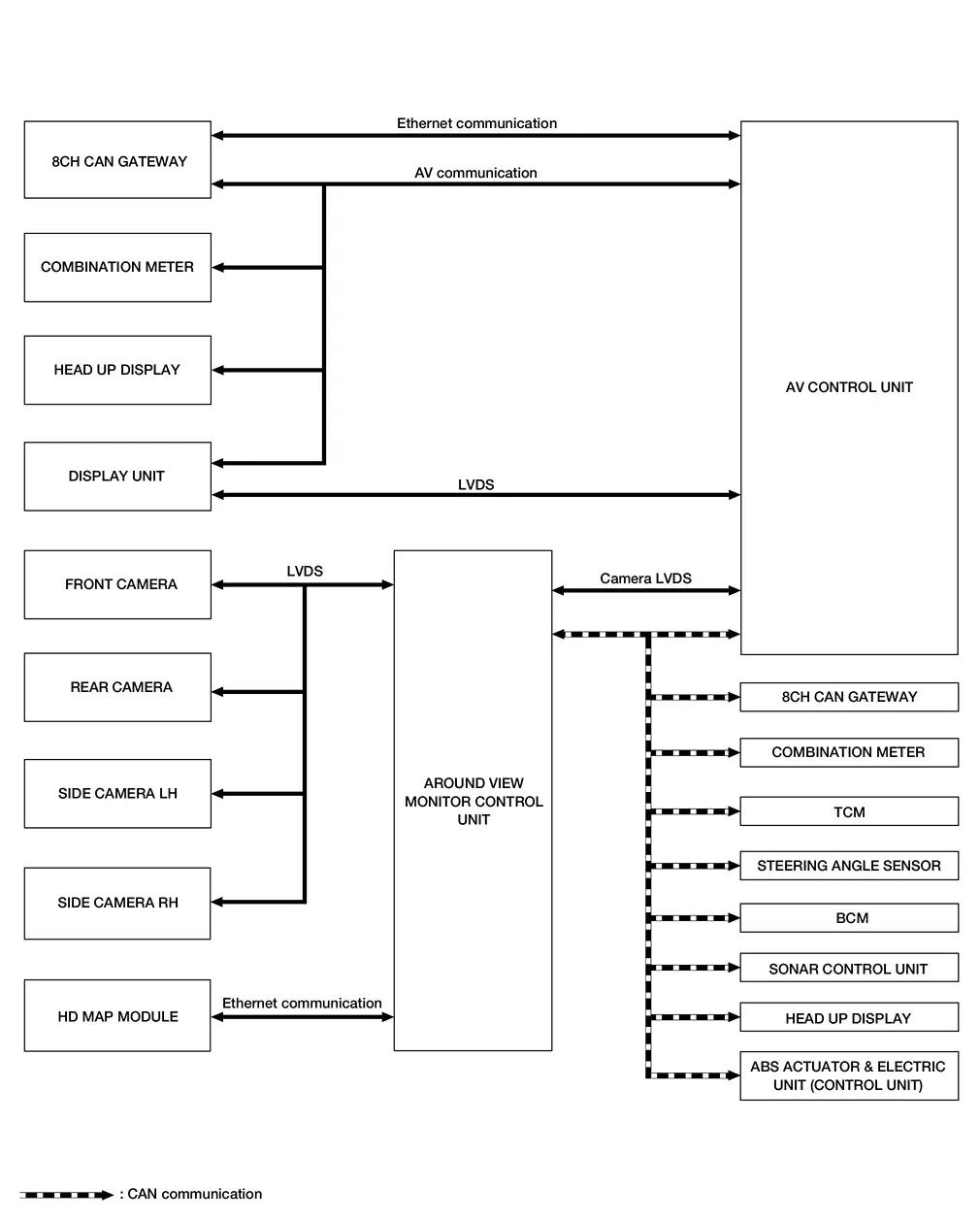
Around View Monitor Control Unit Input Signal (CAN Communication)
| Transmit unit | Signal name |
|---|---|
| AV control unit | Camera switch signal |
| Language setting signal | |
| Combination meter | MOD setting signal |
| ABS actuator and electric unit (control unit) | Nissan Ariya Vehicle speed signal |
| Front LH wheel speed signal | |
| Front RH wheel speed signal | |
| Rear LH wheel speed signal | |
| Rear RH wheel speed signal | |
| Steering angle sensor signal | |
| BCM | Door switch signal |
| Back door switch signal | |
| High beam request signal | |
| Low beam request signal | |
| Position light request signal | |
| Front fog light request signal | |
| Turn indicator signal | |
| TCM | Shift position signal |
| Sonar control unit | Sonar indicator signal |
Around View Monitor Control Unit Output Signal (CAN Communication)
| Transmit unit | Signal name |
|---|---|
| AV control unit | View change signal |
| Combination meter | Buzzer output signal |
| MOD setting status signal |
DESCRIPTION
-
The images from front view, front wide view, rear view, rear wide view, front-side view, birds-eye view, invisible hood view, rear zoom view, and 3D view are displayed to monitor the Nissan Ariya vehicle surroundings.
-
Around view monitor control unit cuts out and expands the image received from each camera to create each view.
-
The sonar indicator is displayed on display (superimposed on the camera image) in combination with the sonar system to warm of the approach of an obstacle.
-
Camera image is displayed on the display when an obstacle is detected by sonar system.
-
In front view, the Nissan Ariya vehicle width, distance lines, and predictive course lines are superimposed and displayed. In rear view, the Nissan Ariya vehicle width, distance lines, predictive course lines, tire predictive course lines, and center guiding line, are superimposed and displayed. In front-side view, the Nissan Ariya vehicle front guiding line and vehicle side guiding line are displayed. In invisible hood view, the vehicle width, distance lines, predictive course lines, bumper line, and tire icon are displayed. In rear zoom view, the center guiding line is superimposed and displayed.
-
The Birds-Eye view converts the images from 4 cameras into the overhead view and displays the status of the Nissan Ariya vehicle on display. The vehicle icon and sonar indicator that are displayed on the Birds-Eye view display are rendered by around view monitor control unit.
-
Moving Object Detection (MOD) is adopted that detects moving objects according to camera image and notifies the detection result to the driver.
-
Front/rear wide view function is adopted. Visibility for the left and right that contains invisible area is improved.
SYSTEM DISPLAY
-
Around view monitor combines and displays the travel direction view and “Birds-Eye view”, “Front-Side view” and then it displays the sonar indicator on the “Birds-Eye view”, “Front-Side view”, "Front wide view", “Rear wide view”, “Invisible hood view” and “Rear wide view”.
-
Around view monitor control unit renders the view icon, warning message on display.
Screen Constitution
OPERATION DESCRIPTION
Screen icon
 NOTE:
NOTE:
3D view is not available in the R (Reverse) position.
-
Around view monitor is displayed on the display when “CAMERA” switch is pressed, when shifting position is reverse, or when an obstacle is detected by sonar system.
-
View can be switched by “CAMERA” switch or touch the screen icon , while around view monitor is displayed
-
While shift position is other than reverse, around view monitor is cancelled when approximately 3 minutes are passed after “CAMERA” switch is pressed, or when Nissan Ariya vehicle speed is approximately 20 km/h(12 MPH) or more. The screen returns to the screen before displaying around view monitor.
-
Setting of Moving Object Detection (MOD) and sonar can be switched ON/OFF by combination meter.
-
In the Birds-eye view, the invisible area of the 4 cameras are blended and displayed.
-
In D position, front sonar can detect an obstacle while camera image is not displayed on AV control unit. Screen is switched to camera image when an obstacle is detected.
-
When “CAMERA” switch is pressed, it receives camera switch signal from AV control unit via CAN communication.
-
When around view monitor control unit receives camera switch signal, around view monitor control unit reads the image signal from each camera.
-
When around view monitor control unit receives reverse signal, while shift position is R position, around view monitor control unit reads image signal from each camera by LVDS.
-
When around view monitor control unit reads image signal from each camera, it cuts out the required screen for each view, superimposes camera image, Nissan Ariya vehicle icon, guiding lines, predicted course line, “MOD” icon, and sonar indicator, and then outputs them to AV control unit by LVDS.
Front View
-
When the selector lever is in any position other than reverse position, the front view is displayed by pressing the “CAMERA” switch.
-
Nissan Ariya Vehicle width guiding line and vehicle distance guiding line in front view displays the predictive course line according to the steering angle.
-
If the steering angle is within approximately 90 degrees, the predictive course lines on the left/right side are displayed. If the steering angle exceeds approximately 90 degrees, only the predictive course line on the outside (in the opposite side of steering direction) is displayed.
-
Around view monitor control unit receives the steering angle signal from ABS actuator and electric unit (control unit) via CAN communication.
-
Around view monitor control unit controls the direction of the predictive course line according to the steering sensor angle signal.
Front view guide lines
Rear View
-
When the selector lever is in reverse position, the rear view is displayed.
-
Nissan Ariya Vehicle width guiding line and vehicle distance guiding line in rear view displays the predictive course line according to the steering angle.
-
The predictive course line is not displayed at the steering neutral position.
-
Around view monitor control unit receives the steering angle signal from ABS actuator and electric unit (control unit) via CAN communication.
-
Around view monitor control unit controls the direction and distance of predictive course line according to the steering angle sensor signal.
Rear view guide lines
Front-side View
-
The front-side view image is from the side camera RH.
-
In front-side view, the Nissan Ariya vehicle distance guiding line and vehicle width guiding line are displayed.
Front-side view area and guide lines
Birds-eye View
-
The image from the 4 cameras is converted into the overhead view and the surroundings of the Nissan Ariya vehicle are displayed.
-
In Birds-Eye view, the invisible area is displayed on the image to specify the boundary of the 4 cameras.
Birds-Eye view display area
Invisible Hood View
The Invisible Hood View allows user to see the road surface underneath the virtually transparent vehicle body.
Invisible Hood View guiding lines
Rear zoom view
The rear zoom view shows an enlarged portion of the rear ground area.
Rear zoom view guiding lines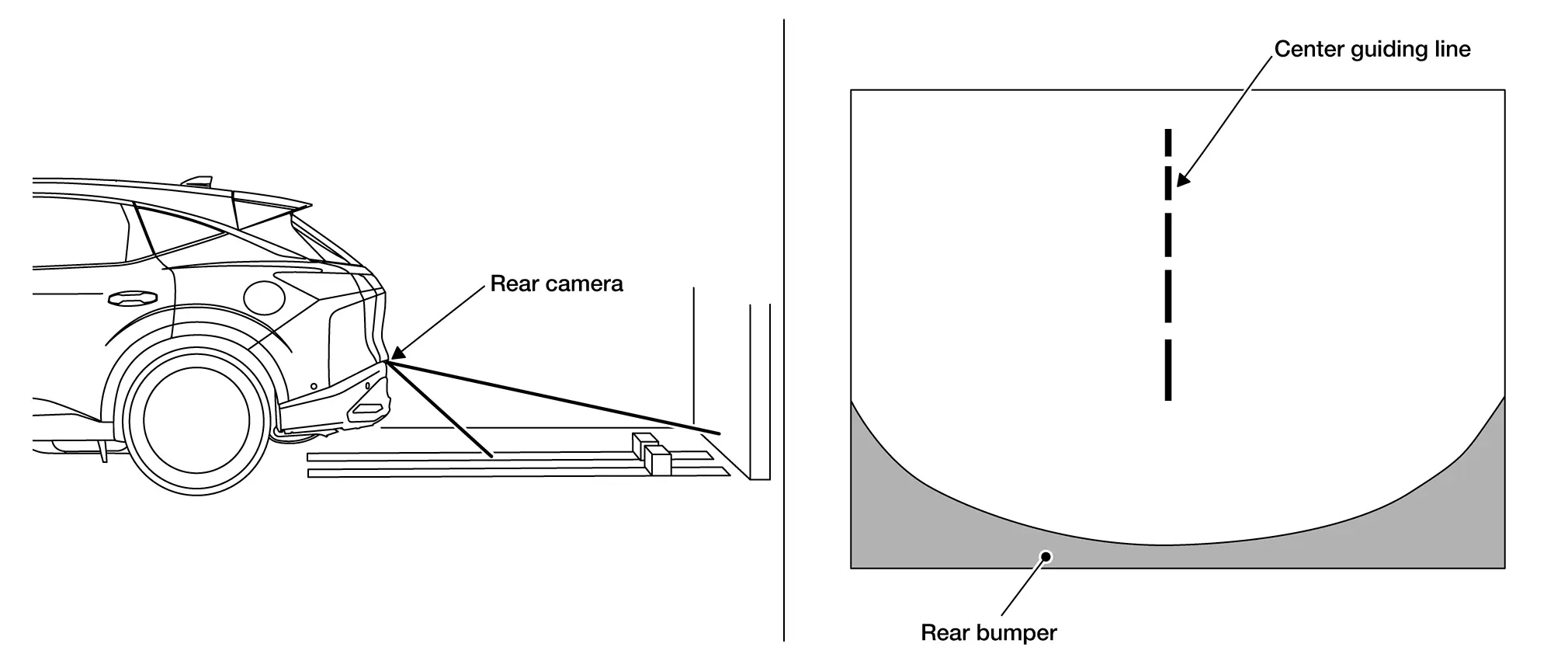
Ultra Wide View
The Ultra Wide view provides the driver with a huge field of vision across both the vehicle information display and the touch screen display.
The Ultra Wide view can be used for the front-wide view and the Invisible Hood View.
3D view
-
The 3D view shows the 360-degree view around the vehicle.
-
When touching the rotation icon , the Nissan Ariya vehicle image and the surrounding area image will pop up and turn 360° to check the vehicle surroundings.
-
The Nissan Ariya vehicle image can also be rotated by swiping the vehicle image itself.
-
8 different camera directions can be selected by touching the camera position icon.
Moving Object Detection (MOD)
-
Moving Object Detection (MOD) is a function that notifies the driver of the presence of moving objects in the area around the Nissan Ariya vehicle. MOD detects moving objects using the camera image, illuminates the frame of view in yellow whenever the “MOD” icon is displayed in green, and sounds a buzzer.
-
MOD detects moving objects while camera image is displayed on AV control unit.
-
Around view monitor control unit performs the following process when moving objects are detected.
-
Superimposes yellow frame line on camera image signal and outputs them to AV control unit by LVDS.
-
Transmits MOD beep sound output request signal to combination meter via CAN communication.
-
-
Around view monitor control unit detects moving objects from camera image according to an image recognition method called optical flow.
-
MOD does not detect a background as a moving object when the Nissan Ariya vehicle moves (when whole screen moves), but detects a moving object when an actual moving object is displayed on screen.
-
MOD can be set to permanent OFF using the Settings mode on the information display of the combination meter.
-
Color of “MOD” icon indicates whether or not MOD is operative. “MOD” icon is displayed as shown in the following table. when MOD is operative, “MOD” icon is displayed in green. when MOD is not operative, “MOD” icon is displayed in gray. MOD icon is not displayed when MOD is OFF in “Settings”.
View Shift position P or N position D position R position “MOD” icon display Birds-Eye view and rear view Birds-Eye view — — Gray Rear view Green Birds-Eye view and front view Birds-Eye view Green Gray — Front view Gray Green Side view and rear view Side view — — × Rear view Green Side view and front view Side view × × — Front view Gray Green Rear wide view — — Green Front wide view Gray Green — ×: Icon is not displayed.
—: View is not displayed in each shift position (P or N position, D position and R position).
-
MOD illuminates frame of view in yellow and sounds buzzer, when any of the conditions in the following table are satisfied.
Operation Condition View where MOD is operative Shift position Nissan Ariya Vehicle speed P or N position 0 km/h (0 MPH) Birds-Eye view D position 0 km/h (0 MPH) or more - less than 8 km/h (5 MPH) -
Front view
-
Front wide view
R position 0 km/h (0 MPH) or more - less than 8 km/h (5 MPH) -
Rear view
-
Rear wide view
-
-
MOD does not operate or stops operation when any of the conditions in the following table are satisfied.
Operation stop condition Note Door open -
MOD does not stop operation for front view and front wide view.
-
Operation stops for rear view and rear wide view while back door is open.
-
Operation stops for Birds-Eye view when any door is open.
Door mirror expanding/retracting Expanding/retracting status of door mirror is judged according to operation signal of door mirror motor transmitted from door mirror (driver side) to around view monitor control unit. -
MAC (Message Authentication Code)
MAC (Message Authentication Code) is a function that prevents unauthorized communication from other than the ECU with MAC function by secure authentication communication. Around view monitor control unit can write a MAC key required for communication between the ECUs and perform MAC diagnosis.
Other materials:
Extérieur arrière
Cette section récapitule les équipements situés à l’arrière du Nissan Rogue : visibilité, éclairage, accès au coffre et capteurs. Vérifiez régulièrement la propreté des caméras et capteurs pour des performances optimales.
Dégivrage de lunette arrière : améliore la visibilit ...
Cvt: Ge0f14a. Basic Inspection
Diagnosis and Repair Work Flow
Work Flow
NOTE:
“DTC” includes DTC at the 1st trip.
OBTAIN INFORMATION ABOUT SYMPTOM
Refer to Diagnostic Work Sheet and interview the customer to obtain
the malfunction information (conditions and environment when the
malfunction occurred) as much as possi ...
U2141 Can Comm Circuit
DTC Description
DTC DETECTION LOGIC DTC
CONSULT screen terms
(Trouble diagnosis content)
DTC detection condition
U2141
57
CAN comm err (TCM)
[CAN comm err (TCM)]
Diagnosis condition
Ignition switch ON
Signal (terminal)
CAN communication signal
Threshold
MA ...