
Nissan Rogue (T33) 2021-Present Service Manual: Removal and Installation :: Terminal Plate
Exploded View
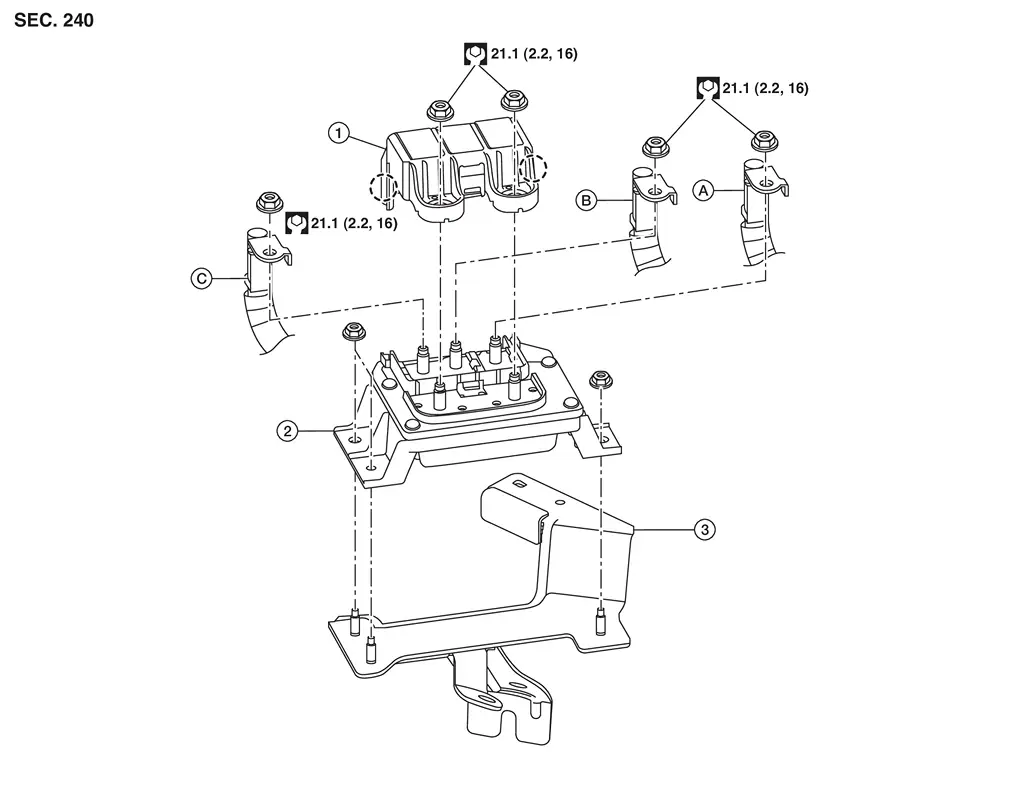
| 1. | Terminal plate cover | 2. | Terminal plate | 3. | Terminal plate bracket |
| A. | Harness (rear) | B. | Harness (center) | C. | Harness (front) |
 |
: Pawl |
Removal and Installation
REMOVAL
Disconnect the 12V battery negative and positive terminals. Refer to Exploded View.
CAUTION:
To prevent damage to the parts, disconnect the 12V battery cable from the negative terminal first.
Release the pawls and remove terminal plate cover.
Remove nuts and remove harness (front), harness (center) and harness (rear).
Remove nuts and remove the terminal plate.
Remove the terminal plate bracket (if necesssary).
INSTALLATION
Installation is in the reverse order of removal.
CAUTION:
When installing 12V battery, carefully read the following instructions:
-
To prevent damage to the parts, connect the 12V battery cable to the positive terminal first.
-
After connecting 12V battery cables, to securely supply 12V battery voltage, ensure that they are tightly clamped to 12V battery terminals for good contact.
-
To securely supply 12V battery voltage, check 12V battery terminal for poor connection caused by corrosion.
Perform Required Procedure After Battery Disconnection.
Other materials:
Dtc/circuit Diagnosis. Power Window Motor
Front (passenger Side)
Component Function Check
CHECK FUNCTION
Check front power window motor (passenger side) operation with power
window main switch (passenger side switch) or front power window switch
(passenger side).
Is the inspection result normal?
YES>>
Inspection End.
NO> ...
P0531 A/c Refrigerant Pressure Sensor
DTC Description
DTC DETECTION LOGIC DTC
CONSULT screen terms
(Trouble diagnosis content)
DTC detection condition
P0531
00
REFRIGERANT PRESS SENSOR A
(A/C refrigerant pressure sensor A circuit range/performance
Diagnosis condition
Engine running at idle
Signal (termin ...
Dtc/circuit Diagnosis. U0073-00 Control Module Comm Bus a Off
DTC Description
DESCRIPTIONCAN (Controller Area Network) is a serial
communication line for real time applications. It is an on-Nissan Ariya
vehicle multiplex communication line with high data communication speed
and excellent error detection ability. Modern Nissan Ariya vehicle is
equipped ...