
Nissan Rogue (T33) 2021-Present Service Manual: Precaution :: Precautions
Precautions for Removing Battery Terminal
-
With the adoption of Auto ACC function, ACC power is automatically supplied by operating the Intelligent Key or remote keyless entry or by opening/closing the driver side door. In addition, ACC power is supplied even after the ignition switch is in the OFF position, i.e. ACC power is supplied for a certain fixed time.
-
When disconnecting the 12V battery terminal, place the ignition switch in the OFF position power before disconnecting the 12V battery terminal, observing “How to disconnect 12V battery terminal� described below.
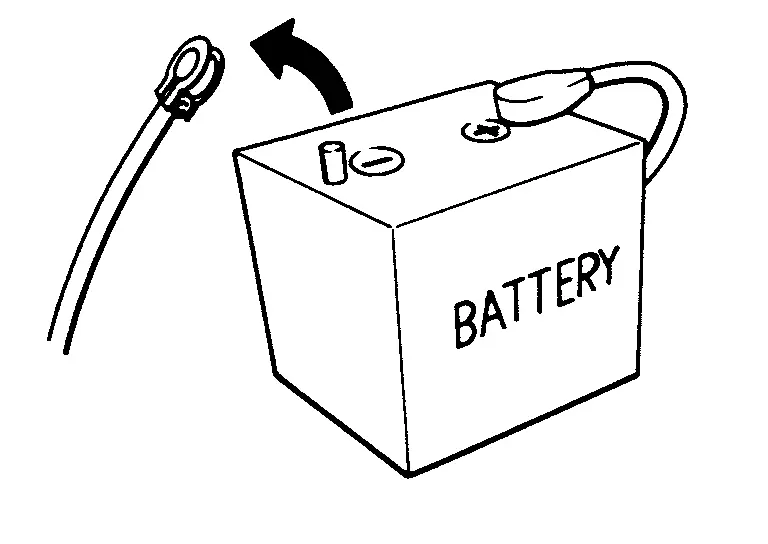
 NOTE:
NOTE:
Some ECUs operate for a certain fixed time even after ignition switch is in the OFF position and ignition power supply is stopped. If the battery terminal is disconnected before ECU stops, accidental DTC detection or ECU data damage may occur.
-
For Nissan Ariya vehicles with the 2-batteries, be sure to connect the main battery and the sub battery before placing the ignition switch in the ON position.
NOTE:
If the ignition switch is in the ON position with any one of the terminals of main battery and sub battery disconnected, then DTC may be detected.
-
After installing the 12V battery, always check "Self Diagnosis Result" of all ECUs and erase DTC.
NOTE:
The removal of 12V battery may cause a DTC detection error.
HOW TO DISCONNECT 12V BATTERY TERMINAL
Disconnect 12V battery terminal according to instruction described below.
-
Open the hood.
-
Place the ignition switch in the ON position.
-
Place the ignition switch in the OFF position with the driver side door opened.
-
Get out of the Nissan Ariya vehicle and close the driver side door.
-
Wait at least 3 minutes.
CAUTION:
While waiting, never operate the Nissan Ariya vehicle such as locking, opening, and closing doors. Violation of this caution results in the activation of ACC power supply according to the Auto ACC function.
-
Remove 12V battery terminal.
CAUTION:
After installing 12V battery, always check self-diagnosis results of all ECUs and erase DTC.
Precaution for Supplemental Restraint System (SRS) "AIR BAG" and "SEAT BELT PRE-TENSIONER"
The Supplemental Restraint System such as “AIR BAG� and “SEAT BELT PRE-TENSIONER�, used along with a front seat belt, helps to reduce the risk or severity of injury to the driver and front passenger for certain types of collisions.
Information necessary to service the system safely is included in the “SRS AIR BAG� and “SEAT BELT� sections of this Service Manual.
WARNING:
Always observe the following items for preventing accidental activation:
-
To avoid rendering the SRS inoperative, which could increase the risk of personal injury or death in the event of a collision that would result in air bag inflation, it is recommended that all maintenance and repair be performed by an authorized NISSAN/INFINITI dealer.
-
Improper repair, including incorrect removal and installation of the SRS, can lead to personal injury caused by unintentional activation of the system. For removal of Spiral Cable and Air Bag Module, see “SRS AIR BAG�.
-
Never use electrical test equipment on any circuit related to the SRS unless instructed to in this Service Manual. SRS wiring harnesses can be identified by yellow and/or orange harnesses or harness connectors.
PRECAUTIONS WHEN USING POWER TOOLS (AIR OR ELECTRIC) AND HAMMERS
WARNING:
Always observe the following items for preventing accidental activation:
-
When working near the Air Bag Diagnosis Sensor Unit or other Air Bag System sensors with the ignition/power switch ON or engine running, never use air or electric power tools or strike near the sensor(s) with a hammer. Heavy vibration could activate the sensor(s) and deploy the air bag(s), possibly causing serious injury.
-
When using air or electric power tools or hammers, always switch the ignition/power switch OFF, disconnect the 12V battery or batteries, and wait at least 3 minutes before performing any service.
Service Notice or Precautions for Steering System
-
Check the following item when performing the trouble diagnosis.
-
Check any possible causes by interviewing the symptom and it′s condition from the customer if any malfunction, such as power steering warning lamp is turned ON, occurs.
-
Check if air pressure and size of tires are proper, the specified part is used for the steering wheel, and control unit is genuine part.
-
Check if the connection of steering column assembly and steering gear assembly is proper (there is not looseness of mounting bolts, damage of rods, boots or sealants, and leakage of grease, etc).
-
Check if the wheel alignment is adjusted properly.
-
Check if there is any damage or modification to suspension or body resulting in increased weight or altered ground clearance.
-
Check if installation conditions of each link and suspension are proper.
-
Check if the 12V battery voltage is proper.
-
Check connection conditions of each connector are proper.
-
Before connecting or disconnecting the power steering control module harness connector, ignition switch “OFF� and disconnect 12V battery ground cable. Because 12V battery voltage is applied to power steering control module even if ignition switch is “OFF�.
-
When connecting or disconnecting pin connectors into or from power steering control module, take care not to damage terminals (bend or break).
-
-
During quick steering, rasping noise may be heard from under the Nissan Ariya vehicle. This is not a malfunction. The noise is an operating noise of the EPS system under normal conditions. If the rasping noise occurs during slow steering, this may not be an operating noise of the system. In this case, it is necessary to find out the location of the noise and repair, if necessary.
Other materials:
Système de freinage
Précautions relatives au freinage
Informations de base
Le système de freinage du Nissan Rogue est constitué de deux circuits hydrauliques distincts. En cas de dysfonctionnement affectant l’un de ces circuits, la capacité de freinage reste assurée sur les deux autres roues, ce qui permet de ...
Dtc/circuit Diagnosis. Touch Sensor
Component Inspection
CHECK TOUCH SENSOR
Ignition switch OFF.
Disconnect touch sensor connector.
Check resistance between touch sensor terminals.
Touch sensor Condition Resistance
Terminal
1
4
Touch sensor
Detect obstruction
400 - 100 Ω
Other than abov ...
P11b0 Vcr Target Angle (cold Start)
DTC Description
DTC DETECTION LOGIC DTC
CONSULT screen terms
(Trouble diagnosis content)
DTC detection condition
P11B0
00
VCR target angle (cold start)
[Variable compression ratio target angle (cold start)]
Diagnosis condition
Engine cold start
Signal (terminal)
â ...