
Nissan Rogue (T33) 2021-Present Service Manual: Removal and Installation :: Bcm
Removal and Installation
CAUTION:
-
When replacing the BCM, always replace it with a new one. The functions controlled by the BCM does not operate properly in case of reuse of the BCM from another Nissan Ariya vehicle.
-
Be sure to perform the following items must be performed when replacing BCM.
-
Writing Nissan Ariya vehicle specification (Refer to Description.)
-
Pairing of BCM and Intelligent Key unit
-
Register of Nissan Ariya vehicle identification number
-
Writing MAC key
-
Tire pressure sensor ID registration (if equipped)
-
REMOVAL
Disconnect the battery cable from the negative terminal. Refer to Precautions for Removing Battery Terminal.
Remove the instrument lower panel LH. Refer to Removal and Installation.
Remove the BCM mounting nuts  , then pull out the BCM
  .
.
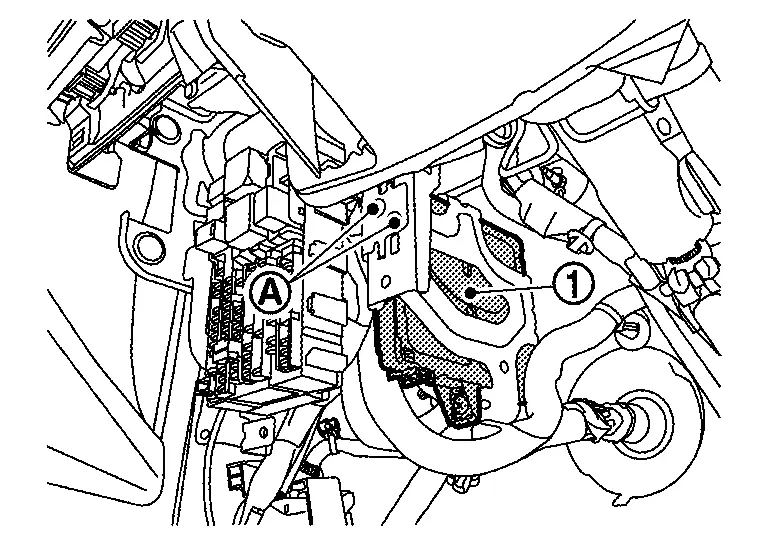
Disconnect the harness connectors from the BCM and remove.
INSTALLATION
Install in the reverse order of removal.
CAUTION:
Be sure to perform ADDITIONAL SERVICE WHEN REPLACING BCM when replacing BCM. Or not doing so, BCM control function does not operate normally. Refer to Description.
Other materials:
P1148 Closed Loop Control
DTC Description
DTC DETECTION LOGICNOTE:
DTC P1148 is displayed with DTC for A/F sensor 1.
When the DTC is detected, perform the trouble diagnosis of DTC corresponding to A/F sensor 1.
DTC
CONSULT screen terms
(Trouble diagnosis content)
DTC detection condition
P1148
00
CLOS ...
Automatic Brake Hold. Basic Inspection. Diagnosis and Repair Work Flow
Diagnosis and Repair Work Flow
Work Flow
DETAILED FLOWINTERVIEW FROM THE CUSTOMER
Clarify customer complaints before inspection. First of all, perform
an interview utilizing Diagnostic Work Sheet and reproduce the symptom
as well as fully understand it. Ask customer about his/her complaints
...
Ecu Diagnosis Information. Electrically-Driven Intelligent Brake Unit
DTC Index
DTC Display item Brake warning lamp Brake system warning lamp Refer to
B14E0-02
Wheel sensor
OFF
ON
DTC Description
B14E0-09
Wheel sensor
OFF
ON
DTC Description
B14E0-11
Wheel sensor
OFF
ON
DTC Description
B14E0-12
Wheel sensor ...