
Nissan Rogue (T33) 2021-Present Owner’s Manual & User Guide: Parking/parking on hills
WARNING
- Do not park the vehicle over flammable
materials such as dry grass, paper
or rags.
Such materials may ignite and cause a fire.
- Never leave the engine running while the Nissan Rogue is unattended.
- Do not leave children unattended in the vehicle. They may accidentally operate controls and cause serious accidents.
- Never leave children, individuals
requiring supervision, or pets inside
the vehicle. Temperatures inside the
Nissan Rogue can rise rapidly, causing
severe injury or death.
Unintended vehicle operation may also occur if someone inside activates controls.
- Safe parking requires applying the parking brake and shifting into P (Park). Failure to do so may cause the vehicle to roll and lead to an accident.
- Always ensure the shift lever cannot be moved without pressing the brake pedal.
1. Apply the parking brake.
2. Push the park button to shift into P (Park).
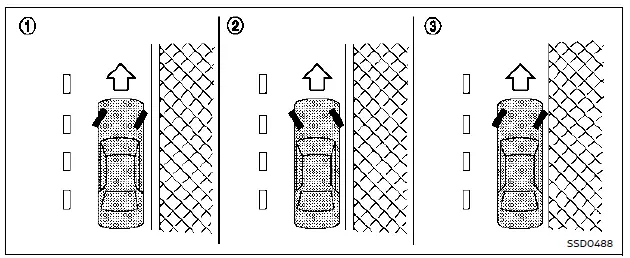
3. When parking on a slope, turn the wheels as illustrated to help prevent the vehicle from rolling:
- HEADED DOWNHILL WITH CURB: 1
Turn wheels toward the curb and move the Nissan Rogue forward until the wheel touches the curb. - HEADED UPHILL WITH CURB: 2
Turn wheels away from the curb and move the vehicle back until the curbside wheel gently touches the curb. - HEADED UPHILL OR DOWNHILL, NO
CURB: 3
Turn wheels toward the roadside so the Nissan Rogue will roll away from traffic if it moves.
4. Place the ignition switch in OFF.
NOTE:
Use the Idling Stop System when stopped for extended periods (e.g., at stoplights). Turn the engine off fully when parking for long durations.
Other materials:
Ecu Diagnosis Information. Bcm, Power Window Main Switch, Passenger Door Mirror Control Module
List of ECU Reference
ECU Reference
BCM
Values on the Diagnosis Tool
Reference Value (With Type A Meter)
Reference Value (With Type B Meter)
Fail-safe
DTC Inspection Priority Chart
DTC Index
Power window main switch
Reference Value
Passenger door mirror ...
Pns Relay (power Network Separate Relay)
B23c0-04 Power Network Separate Relay
DTC Description
DTC DETECTION LOGIC DTC CONSULT screen terms DTC detection condition
B23C0
04
Power network separate relay
Diagnosis condition
When engine is running
Signal (terminal)
—
Threshold
Power network separate rela ...
Shortcut Menu
When the button is pressed, the "Shortcut Menu" appears on the Nissan Rogue vehicle information display. Turn the scroll dial to highlight an item, then press to select.
The following shortcut options are available:
Change Meter View (if equipped)
Allows the driver to select ...