
Nissan Rogue (T33) 2021-Present Owner’s Manual & User Guide: Intelligent 4x4
If any malfunction occurs in the Intelligent 4x4 system while the engine is running, warning messages will appear in the Nissan Rogue vehicle information display.
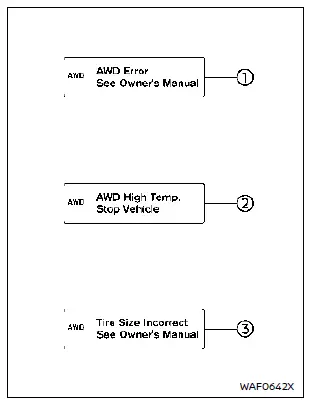
If the "AWD Error" warning 1 appears, there may be a malfunction in the Intelligent 4x4 system. Reduce vehicle speed and have your Nissan Rogue inspected by a NISSAN dealer as soon as possible.
The "AWD High Temp. Stop vehicle" (high temperature) warning 2 is displayed when the oil temperature in the powertrain rises due to a large difference in wheel rotation (slipping), such as when driving on rough roads, sand, mud, or when attempting to free a stuck vehicle. If this warning appears, stop the vehicle safely and allow the engine to idle. In these cases, the AWD system switches to 2WD to protect powertrain components.
Once the warning turns off, AWD driving can be resumed.
The "Tire Size Incorrect" warning 3 may appear if the front and rear tires differ significantly in size or wear. Stop in a safe area, allow the Nissan Rogue to idle, and check that all tires match in brand, size, construction, and tread pattern. Ensure proper tire pressure and verify that tires are not excessively worn. Adjust or replace tires if needed. Avoid using SNOW or OFF-ROAD modes and do not drive at high speed.
If any warning continues to appear, have your Nissan Rogue inspected by a NISSAN dealer as soon as possible.
WARNING
- For AWD-equipped vehicles, never
raise two wheels off the ground and
shift the transmission into drive or
reverse with the engine running.
This could cause drivetrain damage or unexpected vehicle movement, leading to serious damage or injury.
- Do not test an AWD-equipped vehicle on a 2-wheel dynamometer (such as those used for emissions testing), even if the other wheels are raised. Always inform testing personnel that your Nissan Rogue is equipped with AWD. Incorrect test equipment may cause drivetrain damage or unexpected vehicle movement.
CAUTION
- Do not operate the engine on a free roller with any wheels raised.
- The powertrain may be damaged if you continue driving with the "AWD Error" warning active.
- If the warning remains on after performing the recommended steps, have the Nissan Rogue inspected as soon as possible. A NISSAN dealer is recommended.
- If the "AWD Error" warning appears
while driving, the AWD system may be
malfunctioning.
Reduce speed and have the vehicle checked as soon as possible by a NISSAN dealer.
When the Nissan Rogue is in the P (Park) position, operational noises may be heard from the lower part of the vehicle. This is normal and not a malfunction.
Other materials:
Diagnosis System (adas Control Unit 2)
Without Propilot Assist 2.1
Diagnosis Description
APPLICATION ITEMSCONSULT performs the following functions via CAN communication using ADAS control unit 2. Diagnosis mode CGW Status Description
Restricted Mode Diag Test Mode Open Mode
Self Diagnostic Result
Display
Display
Di ...
Wireless Charger. Basic Inspection. Diagnosis and Repair Work Flow
Diagnosis and Repair Work Flow
Work Flow
OVERALL SEQUENCEDETAILED FLOWINTERVIEW FOR MALFUNCTION
It is also important to clarify the customer concerns before starting
the inspection. Interview the customer about the concerns carefully and
understand the symptoms fully.
NOTE:
The customers ar ...
Ecu Diagnosis Information. Bcm, Power Window Main Switch, Passenger Door Mirror Control Module
List of ECU Reference
ECU Reference
BCM
Values on the Diagnosis Tool
Reference Value (With Type A Meter)
Reference Value (With Type B Meter)
Fail-safe
DTC Inspection Priority Chart
DTC Index
Power window main switch
Reference Value
Passenger door mirror ...