
Nissan Rogue (T33) 2021-Present Service Manual: Operation
Switch Name and Function
OPERATION AND DISPLAY OF AUTOMATIC AIR CONDITIONING SYSTEM
Display: Display in A/C switch assembly
-
Air conditioning operation status is indicated on display in A/C switch assembly.
-
Air conditioning status display screen is indicated when MODE switch is pressed while air conditioning is OFF.
Operation: A/C switch assembly
With rear air control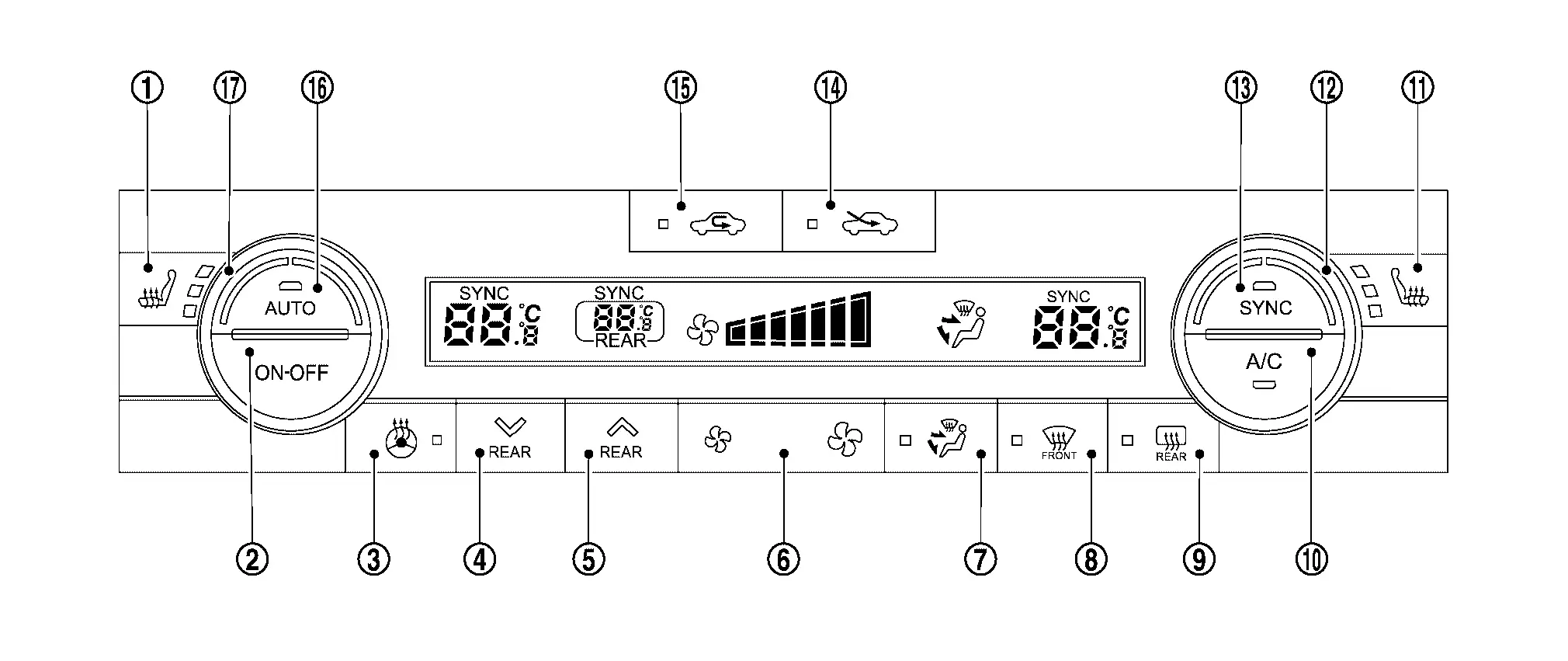
| 1. | Front seat heater switch LH | 2. | ON·OFF switch | 3. | Heated steering wheel switch |
| 4. | Temperature control switch [(rear side) down] | 5. | Temperature control switch [(rear side) up] | 6. | Fan switch |
| 7. | MODE switch | 8. | DEF switch | 9. | Rear window defogger switch |
| 10. | A/C switch | 11. | Front seat heater switch RH | 12. | Temperature control dial (passenger side) |
| 13. | SYNC switch | 14. | FRE switch | 15. | REC switch |
| 16. | AUTO switch | 17. | Temperature control dial (driver side) |
Without rear air control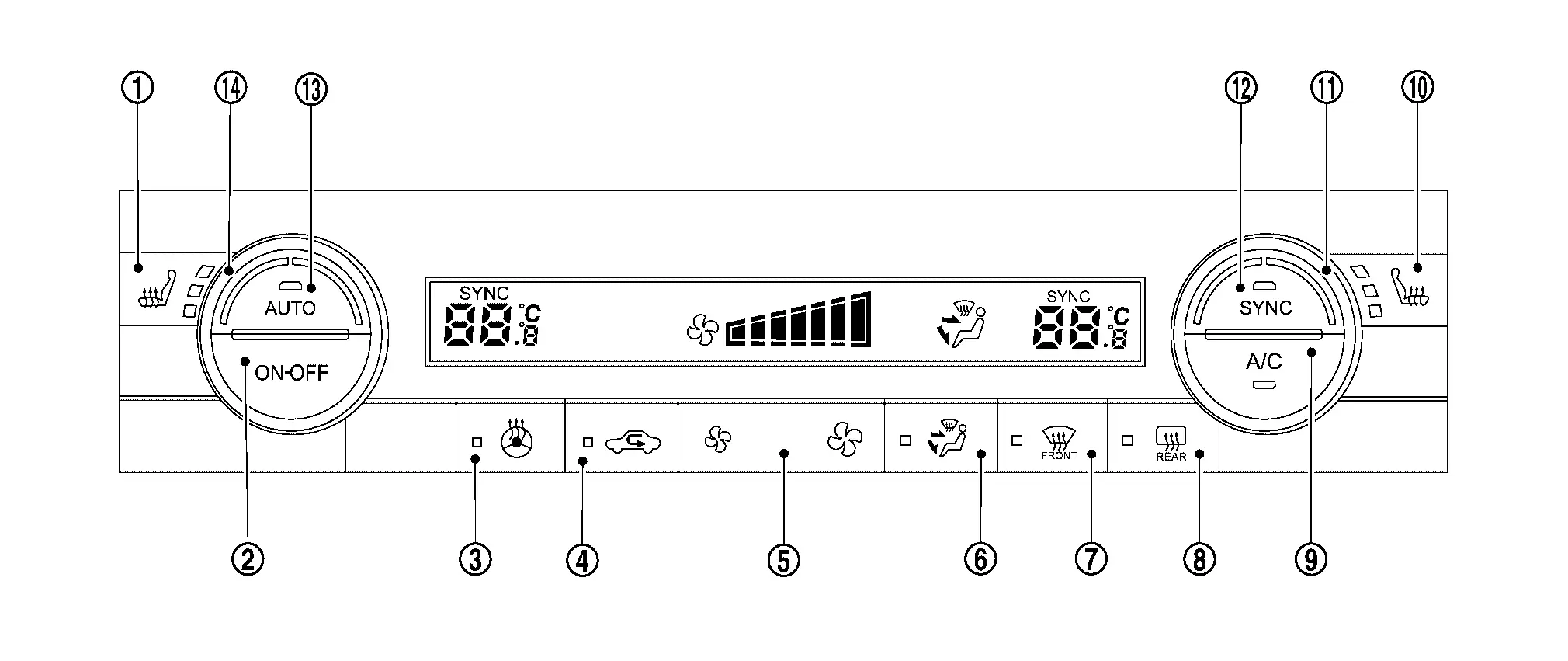
| 1. | Front seat heater switch LH *1 | 2. | ON·OFF switch | 3. | Heated steering wheel switch*2 |
| 4. | Intake switch | 5. | Fan switch | 6. | MODE switch |
| 7. | DEF switch | 8. | Rear window defogger switch | 9. | A/C switch |
| 10. | Front seat heater switch RH*1 | 11. | Temperature control dial (passenger side) | 12. | SYNC switch |
| 13. | AUTO switch | 14. | Temperature control dial (driver side) |
*1: With heated seat system
*2: With heated steering wheel system
| Switch name | Function |
|---|---|
| Front seat heater switch LH*3 | Front seat heater LH changes from OFF⇒ HI ⇒ MID ⇒ LO ⇒ OFF each time this switch is pressed. For details, refer to System Description. |
| ON·OFF switch | Air conditioning turns ON ⇔ OFF each time this switch is pressed. |
| Heated steering wheel switch*4 | Heated steering wheel changes between ON ⇔ OFF each time this switch is pressed. For details, refer to System Description (Heated Steering Wheel). |
| Temperature control switch [(rear side) up / down] |
When full cold, "Lo" is displayed, and when full hot, "Hi" is displayed. |
| Fan switch |
Air flow can be set within a range between 1st – 7th speed according to switch operation.
|
| MODE switch | Air outlet changes from VENT⇒ B/L ⇒ FOOT ⇒ D/F ⇒ VENT each time this switch is pressed. |
| DEF switch |
When this switch is pressed while air conditioning is OFF, air flow setting is automatic control. |
| Rear window defogger switch | Rear window defogger changes between ON ⇔ OFF each time this switch is pressed. For details, refer to System Description. |
| A/C switch | A/C compressor control changes between ON ⇔ OFF each time this switch is pressed. |
| Front seat heater switch RH*3 | Front seat heater RH changes from OFF⇒ HI ⇒ MID ⇒ LO ⇒ OFF each time this switch is pressed. For details, refer to System Description. |
| Temperature control dial (passenger side) |
When full cold, "Lo" is displayed, and when full hot, "Hi" is displayed. |
| SYNC switch | When SYNC switch is pressed, driver side and passenger side air temperature settings become synchronized and the SYNC switch indicator turns ON. |
| FRE switch*1 |
|
| REC switch*1 |
|
| Intake switch*2 |
|
| AUTO switch |
When this switch is pressed, switch indicator lamp turns ON, and then air conditioning system starts automatic control.
When air inlet is not selected manually, air inlet changes to automatic control. |
| Temperature control dial (driver side) |
Setting temperature can be set according to dial operation within a range between 18.0°C (61°F) and 32.0°C (89°F) at a rate of 0.5°C (1°F) per adjustment.
When full cold, "Lo" is displayed, and when full hot, "Hi" is displayed. The air conditioning is automatic controlled by full cold and full hot. |
 Press: Setting temperature increases
 Press: Setting temperature decreases
 NOTE:
NOTE:
 (large): Air flow increases
*1: With rear air control
*2: Without rear air control
*3: With heated seat system
*4: With heated steering wheel system
Display: Display in rear air control
Rear air conditioning set temperature status is indicated on display in rear air control.
Operation: Rear air control
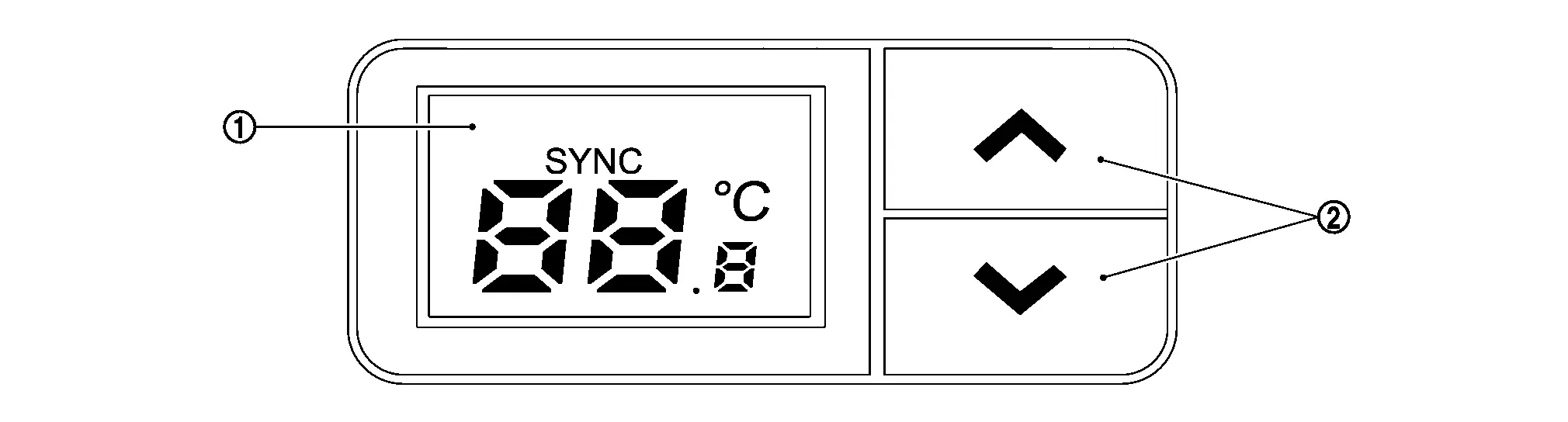
 |
Display |  |
Temperature control switch |
| Switch name | Function |
|---|---|
| Temperature control switch |
Setting temperature is selected using this switch within a range between 18.0°C (61°F) and 32.0°C (89°F) at a rate of 0.5°C (1°F) per adjustment.
When full cold, "Lo" is displayed, and when full hot, "Hi" is displayed. |
Other materials:
P1148 Closed Loop Control
DTC Description
DTC DETECTION LOGICNOTE:
DTC P1148 is displayed with DTC for A/F sensor 1.
When the DTC is detected, perform the trouble diagnosis of DTC corresponding to A/F sensor 1.
DTC
CONSULT screen terms
(Trouble diagnosis content)
DTC detection condition
P1148
00
CLOS ...
Fuel Pump
Component Inspection
CHECK FUEL PUMP
Turn ignition switch OFF.
Disconnect “fuel level sensor unit and fuel pump� harness connector.
Check the resistance between “fuel level sensor unit and fuel pump� terminals as follows.
Fuel level sensor unit and fuel pump Condition Res ...
C1f00-1c Control Unit
DTC Description
DTC DETECTION LOGIC DTC
CONSULT screen terms
(Trouble diagnosis content) DTC detection condition
C1F00
1C
CONTROL UNIT
(Control unit)
Diagnosis condition
When engine is running
Signal (terminal)
—
Threshold
ADAS control unit 2 internal malfunct ...