
Nissan Rogue (T33) 2021-Present Owner’s Manual & User Guide: Motion-activated liftgate
Basic information
The Nissan Rogue liftgate can be opened using a quick forward kicking motion beneath the center area of the rear bumper.
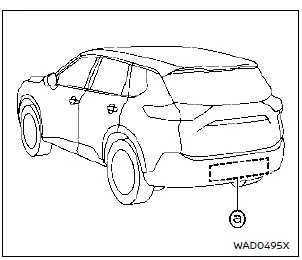
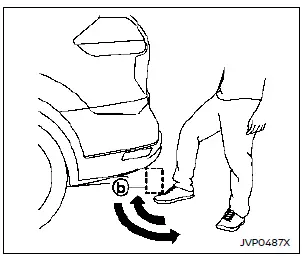
The kick motion sensor a is located behind the bumper. When your foot moves under and away from the detection area b while carrying the Intelligent Key, the liftgate opens or closes automatically.
Proper operation technique
- Stand behind the vehicle and perform a quick forward kicking motion.
- Raise your foot straight under the center of the bumper, then return it immediately to the ground.
- Avoid holding the foot under the bumper or moving it sideways.
- Use a smooth, consistent movement for best recognition.
- After the kick, step back and allow the Nissan Rogue liftgate to open or close.
- Three beeps sound, and within about 2 seconds, liftgate movement begins.
WARNING
To prevent unintentional liftgate operation, keep the Intelligent Key more than 7 ft (2 m) away from the rear of the Nissan Rogue, especially during washing or working behind the vehicle.
NOTE:
- The kick sensor may not function near areas with strong radio waves, such as TV towers or power stations.
- The liftgate may not open if your foot remains in detection area b.
CAUTION
- If the Intelligent Key is near the rear of the Nissan Rogue, even someone who does not carry the key may unintentionally open the liftgate with a kick motion.
- Avoid performing a kick motion near hot exhaust components.
- Do not use the kick motion on unstable ground such as slopes or mud.
Power open or close function
The liftgate will fully open automatically when the kick motion is performed correctly.
1. Carry the Intelligent Key.
2. Move your foot under and away from the rear bumper similarly to a kicking motion within the operation range of the kick motion sensor. This feature helps Nissan Rogue owners open or close the liftgate hands-free.
3. The liftgate will automatically open or close, allowing convenient access to the Nissan Rogue cargo area.
Stop and reverse function
The power liftgate will stop immediately if a kick motion is performed during power open or close. The liftgate can be stopped even if you do not carry the Intelligent Key.
And then the power liftgate will move in the reverse direction if a kick motion is performed again. The power liftgate can be reversed when you carry the Intelligent Key, providing additional convenience for Nissan Rogue operation.
Other materials:
Exhaust Gas Temperature Sensor
Component Inspection
CHECK EXHAUST GAS TEMPERATURE SENSOR
Turn ignition switch OFF.
Disconnect exhaust gas temperature sensor harness connector.
Check resistance between exhaust gas temperature sensor connector terminals.
Exhaust gas temperature sensor Resistance (kΩ)
Connecto ...
Dtc/circuit Diagnosis. B2c95-64 Combination Switch
DTC Description
DTC DETECTION LOGIC DTC No.
CONSULT screen items
(Trouble diagnosis content) DTC Detection Condition
B2C95-64
Combination switch
(Combination switch)
Diagnosis condition
Ignition switch OFF (auto ACC status)
Signal (terminal)
Combination switch signal
...
P054a Camshaft Position Bank 1
DTC Description
DTC DETECTION LOGIC DTC
CONSULT screen terms
(Trouble diagnosis content)
DTC detection condition
P054A
00
Cold start B camshaft position bank 1
(Cold start B camshaft position timing over-advanced bank 1)
Diagnosis condition
Cold condition
Signal (ter ...