
Nissan Rogue (T33) 2021-Present Owner’s Manual & User Guide: Operating manual liftgate
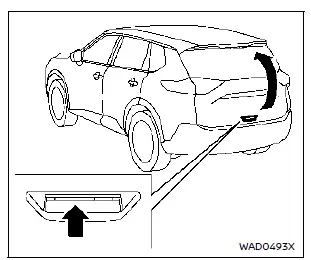
To open the liftgate of your Nissan Rogue, unlock it and pull upward to raise the door.
The liftgate can be unlocked by:
- pushing the UNLOCK
 button on the Intelligent Key twice.
 - pushing the liftgate request switch (if equipped).
- pushing the door handle request switch (if equipped).
To close the liftgate, pull it down firmly until it securely locks.
Operating power liftgate
To operate the power liftgate, the Nissan Rogue must be in the P (Park) position.
The power liftgate will not function if the vehicle battery voltage is low.
If the liftgate is open within 5.9 in (150 mm) of the closed position, power liftgate operation cannot be activated. Close the liftgate manually first.
The power liftgate settings can be activated or disabled through the vehicle information display.
NOTE:
- For models with motion-activated liftgate: During washing, waxing, or maintenance of your Nissan Rogue, turn off the motion sensor to avoid accidental activation.
- If power open/close is used repeatedly, the system may enter safety mode. Wait briefly and try again.
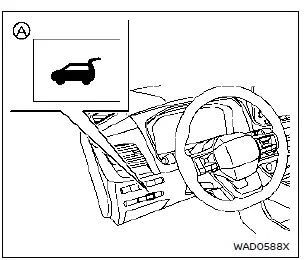
Power liftgate switch - Instrument panel
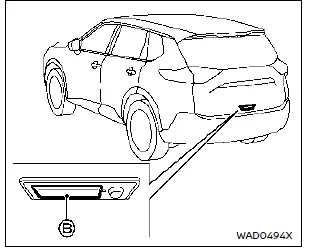
Liftgate opener switch
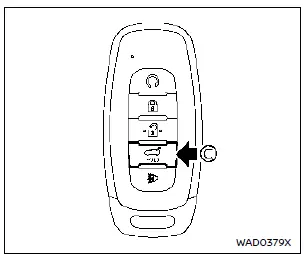
Power liftgate button - Key (example)
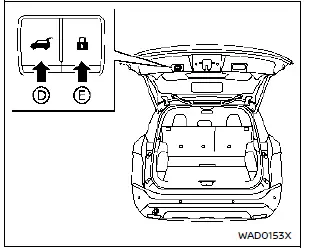
Power liftgate close and lock switches - Liftgate
Power open (using switches)
When the liftgate is fully closed, it will automatically open by:
- pushing the power liftgate switch A on the instrument panel for more than 1 second
- pushing the liftgate opener switch B
- pushing the power liftgate button C on the key for more than 1 second
The outside chime sounds as the Nissan Rogue liftgate begins to open.
NOTE:
- The liftgate can open using switch A or button
 C even if locked. It will unlock and open independently when the Intelligent Key is within range.
 - A warning chime sounds if the shift position leaves P (Park) while the liftgate is open.
Power close (using switches)
When the liftgate is fully open, it will automatically close by:
- pushing the power liftgate switch A on the instrument panel for more than 1 second
- pushing the power liftgate button C on the key for more than 1 second
- pushing the power liftgate close switch D on the lower liftgate for 1 second
The outside chime sounds when the Nissan Rogue liftgate begins closing.
Power close and lock
When the liftgate is fully open and the Intelligent Key is near the rear of the Nissan Rogue, the liftgate will fully close and lock by pressing the power liftgate lock switch E.
The outside chime sounds when closing begins.
Stop and reverse function (if equipped)
The power liftgate will stop immediately if any of the following actions are performed:
- pushing the power liftgate switch A
- pushing the liftgate opener switch B
- pushing the liftgate close switch D
- pushing the power liftgate button C on the key
Performing any of the above actions again will cause the liftgate to reverse direction.
The outside chime sounds when the Nissan Rogue liftgate starts to reverse.
Auto reverse function
Type A
The auto-reverse function allows the Nissan Rogue liftgate to automatically reverse direction when an obstacle is detected during opening or closing. Once the control unit senses resistance, the liftgate will reverse and return to the full open or full closed position.
If a second obstacle is detected, the liftgate movement will stop and enter manual mode.
A pinch sensor installed on each side of the liftgate improves safety. If the pinch sensor detects an obstacle during a power-close cycle, the liftgate will immediately reverse to the fully open position.
Type B
The auto-reverse function works similarly, reversing the liftgate when an obstacle is detected during opening or closing. In this version, the liftgate reverses and stops rather than returning fully to the open position.
If a second obstacle is detected, the liftgate will stop.
A pinch sensor is installed on both sides; if triggered during closing, the liftgate reverses and stops.
NOTE:
If the pinch sensor is damaged or removed, the power-close function will be disabled.
WARNING
There is a small distance near the fully closed position that cannot be detected. Always ensure hands and objects are clear of the Nissan Rogue liftgate before closing.
Manual mode
Type A
If power operation is unavailable, the liftgate can be operated manually. This may occur if multiple obstacles were detected in one cycle, if the battery voltage is low, or if the liftgate is open less than 5.9 in (150 mm) from fully closed. When power liftgate mode is off, the liftgate can be opened manually by pushing the opener switch. If the opener switch is pressed during a power cycle, operation cancels and manual mode becomes active.
Type B
If power liftgate operation is unavailable, manual operation is possible. This may occur due to low battery voltage or when the liftgate is open less than 5.9 in (150 mm) from fully closed. When the Nissan Rogue power liftgate is turned off, opening by the liftgate opener switch becomes manual. Pressing the opener switch during power operation cancels the cycle and allows manual control.
Other materials:
Lane Departure Warning (LDW)
Basic information
WARNING
Incorrect use of the LDW system may lead to serious injury. This feature only warns the driver of unintended lane departure; it does not steer the Nissan Rogue or prevent loss of control. The driver must always remain attentive.
The LDW system activates when driving a ...
Removal and Installation. Brake Pedal
Without Propilot Assist 2.1
Exploded View
Brake pedal assembly
Snap pin
Brake pedal pad
Stop lamp switch
Clevis pin
: N·m (kg-m, ft-lb)
: Apply multi-purpose grease.
: Always replace after every disassem ...
Symptom Diagnosis. Front Passenger Side Power Window Does Not Operate
When Both Power Window Main Switch and Front Power Window Switch (passenger Side) Are Operated
Diagnosis Procedure
CHECK FRONT POWER WINDOW SWITCH (PASSENGER SIDE) POWER SUPPLY AND GROUND CIRCUIT
Check front power window switch (passenger side) power supply and ground circuit.
Refer to Diagnosis ...